Desert Online General Trading LLC
Dubai, United Arab Emirates
Desert Online General Trading LLC
Dubai, United Arab Emirates


T**Y
Don't try to change the battery....just buy a new one.
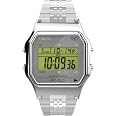
My father-in-law has had this watch for about 10 years. About every two, I have to change the battery (he is 96 years old and changing the battery is really painful surgery). For him, this is a great watch. It comes with a flexible metal band that holds up great and fits his thin wrist. It has a large digital screen with a back light so he can easily see the time. It has plenty of features (which he simply ignores), and I only have to reset it for the semi-yearly time change (it doesn't auto change).Changing the battery is a real challenge. Now that I am 70 with shaking hands and failing eyesight, it is proving to be more than I am willing to expend. The last two times (2 and 4 years ago) it took me about 3 hours each time. One year he snuck off and paid a jeweler...it was over 20 bucks, so I buckled down and did it myself the last two times.This time when the battery died, he passed it to me asking me to change it out. Still had a replacement battery and took off the back and then took off the watch cover retainer. Never could get the screws to go back into their holes...and I knew I still had to short the two terminals once the new battery was installed to get it working again....I simply gave up and ordered a new one (SAME MODEL) from Amazon. It arrived it two days, and my father-in-law was pleasantly surprised at how good the watch looked -- he said it looked new! If only he knew. I dutifully accepted the $3 for the cost of the new battery cost, and handed over the watch. He's happy, and so am I. It is nice that Timex keeps selling this model, without visible changes. Worth every penny.
H**4
Nice watch at 36mm
Nice watchWrite up indicates the case is 34mm in one area and 36mm in another. Per my measurements, this is a 36mm case. Lugs are 18mm. My wrist is 6.5” and this band is just loose. It does not have an adjustable strap so I will return. Overall look and price are fantastic.
D**3
Classic eighties nice watch
Came today, value for money. You can't say much you got it today, but you can't be a time x product. It seems reliable so far. The timer seems good and the color is it's good. I just wish the buttons were a little bit bigger, but it's a nice watch. I can't really say much because I just got it today. But i'm so far happy with it
V**R
Retro Timex
Great watch but extended length band was way too small. I had to have it sized at a jewelry store.Very comfortable and smart looking. Good price. 5 stars except for the short bracelet.
B**E
This is a well crafted product for this price point ...
This is a well crafted product for this price point. Nothing too fancy, but it works well. And, no big hit to the wallet if you lose it. The instructions aren't shipped with the watch, so you do have to Google around to find those. That said, the instructions are simple once you find them. Shoot fire - here they are to save you some time. You're welcome.Set time:1. Press MODE until Time display appears. 2. Press SET. Seconds will flash. Press START/STOP to set to 00. 3. Press MODE. Second digit of minutes will flash. Press START/STOP to advance. 4. Press MODE. First digit of minutes will flash. Press START/STOP to advance. 5. Press MODE. Hour (with A/P) will flash. Press START/STOP to advance. Press SPLIT/RESET to switch between 12- and 24-hour format. 6. Press MODE to continue setting month, date, day of week. 7. Press SET to exit at any time. In Time display, press START/STOP to turn hourly chime on/off. Colon will flash when on.Set alarm:1. Press MODE until “ALARM”appears in upper left of display.Alarm time appears at top of display. 2. Press SET. Hour will flash. Press START/STOP to advance. 3. Press MODE. First digit of minutes will flash. Press START/STOP to advance. 4. Press MODE. Second digit of minutes will flash. Press START/STOP to advance. 5. Press SET to exit at any time.Alarm is automatically armed. When alarm is armed, appears here and in Time display. In Alarm mode, press START/STOP to arm/disarm alarm. When alarm sounds, press any button to silence.Alarm remains armed and will continue to occur daily.Chronograph:1. Press MODE until “CHR” appears. 2. Press START/STOP to start chrono. 3. Press START/STOP to stop. Press again to continue. 4.When chrono is stopped, press SPLIT/RESET to reset chrono to zero. Taking Splits While the chrono is running, you may freeze the display, to see your time at a particular point. This is called “taking a split.”To take a split, press SPLIT/RESET while the chrono is running. “SPLIT” appears and the display will freeze for ten seconds before showing the running chrono again.You may skip the ten-second freeze by pressing MODE. If you exit Chrono mode with the chrono running, it will continue to run. In the Time display, “CHR” will flash.Indiglo:Press INDIGLO (SPLIT/RESET) when time of day or alarm time is displayed (but not while setting) to activate night-light. Electroluminescent technology used in INDIGLO® night-light illuminates entire watch face at night and in low-light conditions. Release INDIGLO to turn light off.
J**N
Easy to set the time and date.
Great watch!
Trustpilot
1 week ago
2 weeks ago
1 day ago
1 month ago