

Desert Online General Trading LLC
Dubai, United Arab Emirates
Desert Online General Trading LLC
Dubai, United Arab Emirates


📸 Scan Smart, Live Free!
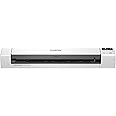
The Brother DS-940DW is a compact mobile document scanner designed for professionals on the go. Weighing just 1.5 pounds and measuring slightly larger than a box of spaghetti, it offers duplex scanning at speeds of up to 16 pages per minute. With wireless connectivity and a built-in battery, this scanner allows for true mobility, enabling users to scan documents directly to mobile devices or save them on a micro SD card without needing a driver. Its advanced image optimization features ensure high-quality scans, making it an essential tool for any modern professional.


| Item Weight | 1.5 Pounds |
| Item Dimensions D x W x H | 2.5"D x 12.6"W x 1.8"H |
| Minimum System Requirements | Windows 7 |
| Color Depth | 48, 24 |
| Standard Sheet Capacity | 1 |
| Paper Size | 8.50 x 71.97, 3.37 x 2.13, 8.27 x 11.69, 2.91 x 3.13 Inches |
| Optical Sensor Technology | CIS |
| Light Source Type | LED |
| Connection Type | Wi-Fi, USB |
| Resolution | 300 dpi |
| Wattage | 2 watts |
| Supported Media Type | USB |
| Scanner Type | Document, Business Card |
W**M
if you know how to set up infrastructure wifi connection (not ad-hoc wifi), It is a great product.
This scanner does not just act as an ad-hoc wifi (Wireless Direct) connection. It can truly connect to your wifi router (Infrastructure mode) and let every device in the same wifi network control it (if you know how to set it up). Most people gave this product one star because they couldn't figure out how to set up the Infrastructure mode wife connection. You can't blame them because it is very complicated to do so and it's a shame that Brother makes this great product but does not give a clear instruction. Here's how you do it. First, connect this scanner to a laptop/desktop with the included USB cable to charge it until the battery signal turn from orange to stable green (not just flashing green, ~2 hour). Second, remove the scanner from the USB connection. Install Brother's iPrint&Scan in Windows PC or iOS and connect the scanner using the Wireless Direct through Brother's wifi network using Brother's Direct Wifi network (Direct-xxxx-xxxxx_BRxxxx and the second password printed on the bottom (Pass:xxxxxxxx)). Once it is connected in iPrint&Scan through Wifi Direct, tap Machine setting in the App and it will bring you to a webpage-based interface in a standard web browser (Microsoft Edge or iOS Safari) that allows you to set up the scanner as an infrastructure mode. You can also do Machine setting in another app/software called Brother Utilities instead of using the iPrint&Scan. In the webpage interface, you need to login (using either the default password "initpass" or the first password printed on the bottom of the scanner (Pwd:xxxxxxxx). Once you login, you can change the password or leave as it is. After you login, go to "Network". Under "Network", select "Wireless". On the left side, you should see "Wireless (Setup Wizard)". Click "Wireless (Setup Wizard)" and start Wizard and follow a step-by-step installation wizard to connect the scanner to your home or office wifi network (your home or office wifi router). It only supports 2.4G wifi so connect to your home 2.4G but not the 5G wifi and you have to input the password or security key of your home wifi network. Once the scanner is connect to your home wifi network, every laptop or smartphone device in your home wifi network can control the scanner wirelessly. If you laptop has Windows Firewall, you may have to set exception to allow your laptop find the scanner (or you can input the scanner's direct IP address to help the PC laptop find the scanner). I hope this helps everyone who bought this scanner. I almost returned this scanner because I couldn't figure out how to set up the Infrastructure mode wife connection. Once I figured it out, this scanner works like a charm and it is so versatile.
B**O
Take anywhere, use without a computer.
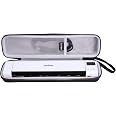
I ordered a different model at first and it did not come with the micro sd card feature. Brother does not advertise well and their instructions are terrible. I look at a lot of websites to see what people who have bought the product are saying. The instruction did not say to fast press the on/off button to turn it on and did not say you have to press and hold the on/off button for 6 seconds and then let go to turn it off. Almost returned it because the lights were flashing and slow to respond when turning on and off. After figuring out that on and off procedure, the scanner worked flawlessly. I like the double sided scan feature and you do not need a computer if you are saving to the SD card. I bought this brand and model because on a government computer, you cannot just hook up any hardware and put in any software without getting approval from the IT department which usually do not allow anything they do not know about.You would think being part of the largest organization in the State that you would have the best of everything. The exact opposite is true. I have antique hardware and am using Microsoft 2013 which was a recent upgrade from Microsoft 2003. The lazerjet printer looks like it belongs in a museum.This scanner solved my problem. It plugs in and becomes an external drive. It scans 14 pages in 40 seconds or less. It can scan in the jpeg or pdf format. It takes up very little space on your desk and is very quiet. You can scan and save through Wi Fi, SD card, or USB cable. The utilities software is alright, not the greatest and like all other brands, they allow you a sample of the PDF software but want you to buy the full version. They make like it comes with the full version of the software but then it begs you to buy it.The only thing is that you cannot scan a page in a book. The page you are scanning has to pass through the scanner, unlike a scanner bed which will allow you to scan an open book. Not unless you rip out the page and pass it through the scanner. I use this scanner everyday at work and it is holding up very well.Legal documents, maps, timesheets, can be scanned and sent through your computer saving you a trip from your remote office to your main office saving you time, money, and gas. Especially with the price of gas today, you will be happy you purchased this scanner. Do not forget to buy the hard case to protect your scanner. I take my scanner where ever I go.
Trustpilot
1 day ago
3 weeks ago
![[Older Version] SanDisk 128GB Ultra microSDXC UHS-I Memory Card with Adapter - 120MB/s, C10, U1, Full HD, A1, Micro SD Card - SDSQUA4-128G-GN6MA](https://images-na.ssl-images-amazon.com/images/I/61EF7HnrWqL._AC_UL116_SR116,116_.jpg)