We remain fully operational. Our teams are working around the clock to ensure your deliveries continue safely.

DOWNLOAD THE APP


Customer Services
Copyright © 2025 Desertcart Holdings Limited
DOWNLOAD THE APP


🚀 Upgrade Your Speed, Own the Game
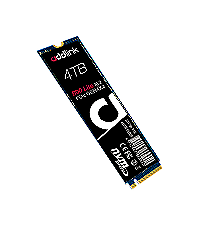
The Addlink S70 Lite 1TB SSD delivers ultra-fast PCIe Gen3x4 NVMe 1.3 performance with sequential read speeds up to 3200 MB/s. Featuring durable 3D TLC NAND flash and a DRAM-less design with HMB, it offers reliable, energy-efficient storage compatible with the latest Intel and AMD platforms. Backed by a 5-year warranty, this M.2 2280 SSD is a cost-effective powerhouse for gamers and professionals seeking maximum speed and capacity.




| ASIN | B07K7LRB2T |
| Additional Features | Compatible Intel/AMD Platforms |
| Best Sellers Rank | #420 in Internal Solid State Drives |
| Brand | Addlink |
| Cache Memory Installed Size | 1 |
| Color | S70 Lite |
| Compatible Devices | Laptop, Desktop, PC, AMD, Intel |
| Connectivity Technology | M.2 PCIe NVME |
| Customer Reviews | 4.6 out of 5 stars 1,351 Reviews |
| Data Transfer Rate | 3400 Megabits Per Second |
| Digital Storage Capacity | 1 TB |
| Enclosure Material | 3D Nand Flash |
| Form Factor | M.2 2280 PCIe 3.0 x4 NVMe SSD |
| Hard Disk Description | Solid State Drive |
| Hard Disk Form Factor | 2280 Inches |
| Hard Disk Interface | Solid State |
| Hard-Drive Size | 1 TB |
| Hardware Connectivity | Solid State Drive |
| Installation Type | Internal Hard Drive |
| Item Dimensions L x W x Thickness | 3.2"L x 0.8"W x 0.4"Th |
| Item Weight | 0.7 Ounces |
| Manufacturer | Addlink |
| Media Speed | 3000 Megabytes Per Second |
| Model Name | S70 |
| Model Number | ad1TBS70M2P |
| Number of Items | 1 |
| Read Speed | 3400 Megabytes Per Second |
| Special Feature | Compatible Intel/AMD Platforms |
| Specific Uses For Product | Gaming, business, laptop |
| Unit Count | 1.0 Count |
| Warranty Description | 5-Year Warranty |
J**G
Update after 1 year - No problems at all for a much lower price
UPDATE after 13 months of continuous use, absolutely no issues whatsoever in my Windows 10 pc. I've installed the drive into a new laptop as well recently and it's perfect as well. I'm amazed at its reliability and speed compared to the Samsung competition. Original Review: I was nervous as I never have heard of this brand before. I also live in another country so an RMA for a DOA drive would be a huge hassle. But the price to capacity ratio was too good to pass up. After reading many positive reviews of it, I decided to pull the trigger. It arrived today and I have already installed it with no issues. I used Macrium Reflect to clone my Samsung 960 EVO 512 NVMe to the 1tb version of this Addlink drive and all went very smoothly. My system rebooted and saw the new drive, automatically booted from it as the C drive (after I removed the old one of course). So there are no issues at all installing this as a boot drive for Windows10. Crystal Disk Mark shows speed is just a tad faster than my 960 EVO on sequential reads, which is most important for me as I'm moving huge files in the 50-100gb range all day long. I must say that it is a relief to see this drive perform as advertised - and installed, cloned, and booted with zero issues. I am now enjoying the extra space available for doing my work and I only wish that my motherboard supported more than two NVMe slots because I'd like to put more of these in my system. If you're on the fence about this drive, I say go ahead and give it a try. My experience was positive and I hope this causes the prices of other brands to drop in response.
M**S
Inexpensive, ridiculously fast, stable... what's not to love?
I'd never heard of this Taiwanese company before, but like other reviewers I gave their product a shot only because of its excellent reviews. I'm glad I did. Since I based my purchase on these reviewers' advice, let me add mine. I purchased the 1TB version and it arrived in a box with the M.2 SSD only. It does NOT come with an M.2 screw, so make sure you have one that came with your motherboard (or purchase one on Amazon). With a screw, the card installed very quickly and easily. As a warning, this SSD does not come with migration or cloning software, and as far as I can tell addlink does not offer this type of software as a free (or even paid) download. So if you're replacing an existing hard drive or SSD, and want to migrate your Windows installation and files to the addlink SSD, you'll need software like Acronis True Image. Other SSD companies like Crucial come with a free downloadable version. If you're doing a fresh OS install, you're good to go. Once installed with my Windows 10 Pro installation cloned, I got far better speeds than my old SATA SSD. addlink states you should expect 3400/3000MB/s read/write speeds, but I got above that, 3453/3229, with an Intel i7-9700K with 16GB of DDR4 3000 RAM. Windows boots in about 5 seconds. Everything is zippy and feels really next-level fast. I can't speak to this SSD's longevity, but it's rated at 1200 Terabytes written, an MTFB (mean/average time between failures) of 1.8 million hours, and comes with a 5 year warranty. If you're looking for a lot of blazing fast storage at a great price, it's hard to see how you could go wrong. Highly recommended.
M**L
Great SSD, would highly recommend
When I first upgraded to SSDs from 7200 RPM spin disks, I thought "woah, this is revolutionary". Now that I've upgraded from SATA SSDs to these PCIe M.2 drives I'm again stunned at how fast these drives are and how affordable they are for the amount of storage you get out of it. I got the 1TB version and I am excited to fill it with many gigabytes of audio files for music production - I remember when I paid $100 for a 60GB SSD and was excited to load just my operating system on it. Works wonders for games, too. Everything loads really quickly, although I will say that my startup times are still around 10 seconds - this could be because my motherboard is on the lower-end, though. If you're wondering if it's as good as the EVO series m.2's, I'd have to say yeah, it is - the smaller price tag does not mean you aren't getting a great device in this product's case.
S**Y
Super Fast Drive
I purchased this 2 TB SSD disk to replace a 500 GB WD Black NVMe SSD disk that was already installed as my main drives (C: and D:). I used an older version of Paragon Free to backup my existing disk. Then I swapped the hardware and restored onto the 2 TB S70. This happened quickly and without any incident. The result is a much larger D: drive. The motivation for this effort was to relocated virtual machines from a SATA SSD to NVMe PCIe SSD. Prior to this effort my virtual machines (WIndows, Red Had Linux and Ubuntu) were all running on my E: drive, which is also an SSD but connected via SATA 6. I wanted these VM's running on NVMe. The 500 GB WD Black was not large enough to handle the VM's, hence the move to a larger NVMe disk. Boot times on the VM's is definitely better on the NVMe attached drives. Albeit, I am not sure the performance gain is significant. The Windows VM boot time has dropped by 25%... which is to say from 20 seconds on SATA to 15 seconds on NVMe. Performance of the running VM's is roughly the same. While the change in boot time may seem significant... I am not sure it changes much about my user experience. For me... the other benefit is that the SATA SSD is now a true "backup disk", only being used for redundancy. Would I recommend someone move from SATA SSD to NVMe PCIe SSD just for performance? Probably not. That said, this drive is super fast and I would recommend this drive if your use case applies. I will update this review in three months with durability feedback.
A**T
Work Well-Native OS Drivers Required
Update 3/9/19. The Addlink 512 consistently out performed my Samsung EVO 256 in write performance and out performed the EVO 256 in two of four read tests. Used Crystal Disk Mark 6 on MSI Gaming Pro 370 Motherboard with Intel i7-8700 CPU and 16GB Corsair Vengeance Pro 3000 C15 memory. See attached tests with M$ WIN 10 bloatware. Update: 1/19/19. Have purchased both the 256 and 512 GB to use exactly as the vendor stated in a 3.0X4 PCI-E configuration-both work as described. Addlink has a support website but they have no manufacturer drivers. Addlink relies on Native Driver support, so for those that want to use as a boot drive to run WIN-7 you need the Hotfixes stated by Addlink on their feature listing, unfortunately, both are no longer available from M$ because Intel and M$ want you to spend big bucks to immigrate to bloat-ware WIN-10 and the Intel 8 or 9 Series processors do not support WIN-7. No problem, using both with Ubuntu so they work just fine.
J**7
Performed better than expected... WOW
Because I never heard of Adlink before, I was also concerned when I bought these two PCIe SSDs but after talking to their customer service rep Anita I took a chance on them. I built up my new I9-9900 Asus Hero XI computer and installed them easily. On first boot I went into the Asus Bios and configured these two in RAID(0). I installed Windows 10 and on first Windows boot I was very surprised that once the Bios gave control to Windows it took less than 2 seconds for the computer to be done with the boot. It is obvious when you compare these two PCIe SSDs to the WD 6T Black HD that this would be so. I have attached the two Crystal Mark results, one is the Adlink SSDs and the other is the 6T SATA WD HD. Looks like 11 times the speed, amazes me. For the price these are the best buy and the only thing I can not vouch for is the reliability since they are brand new. They do look well made though so I am not expecting any reliability issues. So glad that I bought these. Since then I bought a third 1T M2 SSD from Amazon (Addlink) and installed it into my new gaming laptop and am getting great (similar) read and write speeds compared to the 1T SSHD, now the data drive, that came with it. This m2 SSD is the real deal. Installed the pair of them 18 months ago, January 2019, and they are still as fast as ever.
B**B
Great 1TB drives, exactly what I wanted
My first NVMe drives. I did some research, and these 1TB drives offered the best value in my opinion. I installed these in a new MSI MPG Z390 motherboard and use them in a ZFS mirror. Very happy so far--no issues or degradation, although it's only been a couple months. ** Update six years later ** These have been running almost continuously for six years in the same configuration (smartctl says 5.5 years of power-on time). The filesystem is always taking snapshots, and on ZFS this is copy on write, so lots of data being written and deleted and VMs running off them as well. There isn't a single bad block or error on either of them, and they remain some of the best bang for your buck even today! I have some higher end Samsung SATA SSDs with a five year warranty for data on the same computer, and after about two years one of them is already showing errors. These NVMe drives are perfection. Buying two more with PCIe adapters for the same system. They won't run as fast as those on the MB, but they'll still outperform the SATA SSDs. Should have done that in the first place.
R**I
Compared to my factory SATA drive, wow this thing is fast
My son's Dell 8430 always seemed sluggish and never performed as well as I thought it should. When I would work on his PC to perform updates, it always seemed like everything was taking 10x longer than it should. Looking at performance monitor, I noted it was constantly running at 100% utilization on the disk. So when he ran out of space on the factory 1T SATA drive, I started looking at new drives to fix his PC. I replaced the internal 1T SSD with the 1T version of the Addlink s70. Using links from Google, it was easy to clone the current SATA drive to the SSD. I then used diskpart to reinitialize the old drive and we now use it to store his old Steam games. After the upgrade, all I can say is WOW, this is how the PC should have performed from the beginning. Boot times have gone from about 5 minutes to around 30 seconds. The PC no longer feels sluggish and I no longer see 100% disk utilization in perfmon. My son tells me Steam is no longer laggy and feels more real-time. If your machine supports booting from NVDE and you are currently using a SATA drive, this is an incredibly easy upgrade that will give you a huge performance increase.
Trustpilot
2 weeks ago
3 days ago