
🚀 Elevate your simulation game—command the skies like a pro!
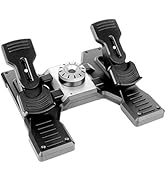
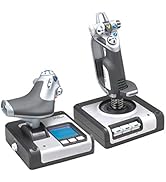
The Logitech G X56 HOTAS is a professional-grade flight simulator controller featuring over 189 programmable controls, 16-bit hall-effect sensors for precise input, and a customizable 4-spring system for adjustable stick resistance. Designed for immersive gameplay, it includes dual USB 2.0 ports, full RGB lighting customization, and mini analog sticks for true 6 degrees of freedom control. Compatible with Windows 7 to 11 and optimized for VR, this robust controller transforms your PC into a high-fidelity flight deck.









| ASIN | B079P6SSHP |
| Batteries | 1 Lithium Ion batteries required. (included) |
| Best Sellers Rank | #2,647 in Video Games ( See Top 100 in Video Games ) #12 in PC Game Flight Controls |
| Customer Reviews | 4.1 4.1 out of 5 stars (2,788) |
| Date First Available | February 20, 2018 |
| Is Discontinued By Manufacturer | No |
| Item Weight | 5.07 pounds |
| Item model number | 945-000058 |
| Language | English |
| Manufacturer | Logitech |
| Product Dimensions | 7.28 x 8.86 x 10.43 inches; 5.07 Pounds |
| Release date | June 20, 2023 |
| Type of item | Personal Computers |
R**S
High end HOTAS
I was a little hesitant after the documented issues with X52 and reviews of the X56, but decided to go for it instead of spending the multiple hundreds into thousands that is the next step up from here. Wow! I have used it for Elite Dangerous, Star Citizen, and MSFS, and am impressed! Have also used it to replace dual joysticks for logging in farm Sim, but it really shines in the games with lots of controls to bind. Despite being primarily plastic, the controls feel premium and construction feels solid. The movement of the main joystick is fluid and smooth, and there are more buttons and hat switches than I could possibly need! The single complaint is with the split throttle needing to be very stiff in order to maintain position, or it will lower itself and easily moves if bumped - and that part never got better over time. I use clamp on brackets, so I can deal with a very tight throttle, but it does get irritating at times, to be honest. Warning #1, check the dimensions, these things are huge compared to some other HOTAS options! Warning #2, despite that size, they are not too heavy, so some kind of mounting is necessary if you "play with passion." lol Have over a couple hundred hours use and no problems except the throttle not holding position unless super tight. Easily recommend unless a person can afford the big jump in cost to go the next step up.
S**T
If you are looking at this HOTAS read my review it is made for those of you wondering.
I normally don't write reviews but I thought it was important to write this one because like me I am sure many other people are looking at this HOTAS and wondering if this is the one for you. You are also probably looking at the x52 and x52 professional. I opted for this HOTAS (playing Elite Dangerous & X4 and various others). This one while being the most expensive option was also the most available at the time and looked the most sturdy as well. THIS IS A SAITEK PRODUCT that Logitech acquired and then branded their own. That's ok, it still works with the proper software driver download (we will get to that later in review). First off this HOTAS is rather large, but keep in mind there are also a LOT OF BUTTONS which require it to be so. Some people with smaller hands might find this to be to big for them. My hands are fairly large and this is at just about the maximum size I can comfortably control. Some reviews complain of poor button placement, well you have a million buttons they all have to go somewhere so nothing is going to be perfect. You just have to adapt to the layout of the HOTAS. The Stick: Solid feeling with the look and feel of a fighter stick, (this is not a Cessna stick here this is a space ship/fighter jet stick). You can still fly a Cessna with this but you also can fly a Boeing 747 or a space shuttle, its up to you. There are multiple HAT controls just on the stick including a smooth move all direction hat that is in fact like a miniature joystick on your joystick. What would you use something like that for? Well for example in Elite dangerous I use the smooth move hat (black to the left of the stick half way down) for which direction I want to "look". This way I can control the direction of the ship with the Stick itself while using the little HAT control to look around which has replaced the mouse for looking around. Very handy, You can effectively remove all keyboard and mouse input with these types of controls and setups. The Stick and Throttle are both coated in that nice feeling smooth PTFE feeling rubber. This makes for a comfy grip not so much of a plastic like feeling like my old Logitech Extreme 3d Pro which I upgraded from. (Had the 3d pro for 15 years excellent entry level joystick and you can still buy it!) The Throttle: This took some getting used to but in the end I am learning to really like the throttle. First off yes you are looking at a split control throttle. Either side can move independently of one another like a real plane. There is a locking mechanism to lock them both together which is how mine will always stay because none of the games I play require independent thrust input to one side of the engine or the other. You will feel that seam in the middle when moving the throttle BUT you will get used to it. Like other reviews the throttle is in fact STIFF, why? because a real throttle is also stiff. If it wasn't than when a stewardess brings the pilots their coffee and sneezes the plane would crash. You have a knob to turn to affect the tension of the throttle, even turned all the way to lowest setting the throttle will feel stiff to push but it is mimicking real life. If you are buying this thinking you are going to be able to just SLAM THE THROTTLE open, you will break this thing like a few review pictures will show. In the games I play you aren't accelerating faster then you can push the throttle so this is a non issue. In fact once again this makes it feel far more real and less chincy than other throttle designs. (for reference I wield chainsaws and buck hay all day my hand strength is above average). YES YOU HAVE A BOATLOAD OF BUTTONS ON THE THROTTLE. Once again you have to ask yourself, if you are getting this many button monster are you gonna be upset at the button placement? Or are you going to adapt (this is the correct answer ADAPTING). The metal toggle switches I would like to point out are not ON/OFF switches. They return to center after you push them up or down. So basically you have 2 buttons for every metal toggle but they still feel ultra satisfying to push and flick. .....So many buttons, if you aren't playing an actual flight sim you will be hard pressed to utilize all your button options. That's ok, better to have more options than less but then again that's why you are going to buy this monster you want them buttons don't ya? The Important: Ok I would like to address a few issues here related to some minor details and specifics I had to figure out for myself when installing this monster. PAY ATTENTION TO THIS I HOPE TO SAVE YOU TIME and maybe even help others who have bought this thing but couldn't get it to work properly. For reference I am running Windows 10 on a computer that is NOT A POTATO. OK here we go...... YOU WILL NEED TO GET THE DRIVER TO MAKE THIS THING WORK PROPERLY AND UTILIZE YOUR PRETTY COLOR FUNCTIONS. This HOTAS is not really plug and play and it is not recognized in GHUB. Listen carefully because you also get ZERO instructions with this thing but I am going to tell you right now what to do. 1. Open box and marvel at the beast you just purchased. (DO NOT PLUG IT IN YET) 2. Go to Logitechs website and go to downloads and look up this product for drivers. 3. You will have a list of about 7 or 8 drivers, go to the one on the BOTTOM not the top. (bottom newest driver circa 2018 lol) 4. If you are running 32 bit choose the driver immediately above (I am 64 bit so I believe my driver was the last one in list) 5. (DO NOT PLUG IT IN YET!) Run the driver you just downloaded. 6. You will see a screen come up that has a picture of joystick then a small picture of a USB WITH A RED X over it and then a picture of a computer. (The red X is telling you NOT TO PLUG IT IN YET there are no instructions past this I had to learn all this by rote and trial and error) 7. Click "Next" the driver will start installing ( DO NOT PLUG THINGS IN YOU BETTER NOT HAVE EM PLUGGED IN!) 8. When the first half of the install is done you will see now the image you first saw except the USB icon at center no longer has a red X over it. This is the 2018 program telling you to PLUG IN THE JOYSTICK AND THROTTLE. 9. NOW you PLUG IN THE JOYSTICK AND THROTTLE. (be advised I am very certain this requires USB 2.0 or higher not basic USB). 10. After you have plugged them both in you may now click next on the install window. 11. After the install is finished the button will now say restart. CLICK RESTART. 12. Upon desktop load you will now have a new Icon for X56 HOTAS, this is your joysticks program this is where you change the color of the lighting and also to do programming button binding etc (this is advanced button binding outside of game controls). If you are playing a game like Elite dangerous or X4 do all your binding IN GAME. Yes I had to learn all this on my own but I have shared it with you and now you know how to set this up dear god I hope this helps at least one soul. Changing the spring on the Stick: Go to Youtube, search "how to change X56 Hotas Springs" WATCH THE VIDEO! I changed to the highest spring, it was tricky but it worked I was a little spooked about breaking something make sure you watch a video on this so you understand what exactly you are doing. Once again let me remind you there is no instruction booklet on this thing in the box, you are either using the internet or reading this review or hopefully BOTH. OVERALL: I am very satisfied with the quality of construction and feel of this $250 sink of my hard earned American currency. Plays Elite Dangerous like you were IN THE SHIP ITSELF and I can't wait to try it on other games like X4 or maybe a real flight sim. Buy this product. Take the time to set it up right. Put on a pot of coffee and spend all night binding 486 gorillion buttons. Have Lots Of Fun After. I truly hope this helps clarify some things for wondering folks and helps for you to make a more informed decision on whether this is the right HOTAS for you. ::This review may be updated in the future, First draft 1/25/2025
N**K
Flawed quality control, but a great HOTAS for the price point.
I was looking for a HOTAS that would provide the functionality I wanted in Elite Dangerous and Star Citizen, among others, but I'm not ready to drop $500+ on a Warthog system, which seems to be aimed at more flight sim enthusiasts than just someone who likes to play space games sometimes. The build quality is simultaniously better and worse than I expected. Both the stick and the throttle are almost entirely plastic, but it's a very high quality plastic. It feels good in my hand, though I wish the stick had a little more weight to it. Both peices could do with more weight in the base as well, for those of us who don't want to permanently (or semi-permanently) attach the unit to our desk or chair. The first set I got, the stick died within a couple hours of usage. (As in, I had *just* finished setting up controls in Elite Dangerous). The axes got permanently stuck in the software, and the ministick went nuts. So I sent it in for replacement (after confirming with Logitech support, who were a little slow. Took more than a week to finally get the "yeah it's busted please return to amazon" message.) The second set seems to be okay. Works well in both Elite Dangerous and Star Citizen. Ultimately a great HOTAS, and pretty much unmatched in its price class, just wish their QC department was a little better at identifying duds.
G**F
Unmitigated Garbage
I bought two of these after reading reviews and I regret it. Needless to say, I'll be passing these along in the second-hand market for cheap. The story: The material quality and engineering is the worst I've ever seen in a joystick and HOTAS combo. I've had a few from decades past that did the job fine, but after having not played simulators since the early 00's, I went with Logitech because the sticks I had long ago were from a company they acquired, Saitek, and I remembered them being alright. That's a mistaken assumption. Apparently, Saitek / Logitech just can't make a good or even half-way decent joystick anymore. Before these, I had a simple Thrustmaster throttle that I thought had pretty bad build quality, with a squeaky plastic throttle lever and rudder flaps that refused to center due to worn down plastic after light use for a week, but it at least functioned properly. This Logitech set is trash by comparison to even that. The problems: Two new sets straight from Amazon arrived at the same time, one for me the other for a friend. I opened mine, and found the analog thumb sticks on both the throttle unit and joystick wouldn't center properly and one axis on the throttle's would physically stick and required manual re-centering. Off to a good start right out of the box. The joystick wouldn't center properly either, and the deadzone was insane in the software testing suite. I've used old N64 analog sticks after years of Mario Party abuse back in the day, and they weren't this bad. All buttons except the primary fire trigger on the joystick were spongy, inconsistent, and would randomly trigger while you're using any axis. For example, I was sitting in my ship in Elite:Dangerous, testing the new control setup, and I decided to try the throttle. I pushed it forward to accelerate and when I reached the mid-point, all the buttons and hats sent random inputs simultaneously. Since I bound those already, my camera was rapidly switching between UI panels and I went into supercruise with flight assist off and jettisoned all my limpets into local station space while throwing chaff and heatsink confetti everywhere. Besides things like that, the throttle axes don't properly report values to Elite:Dangerous, so setting it to max gets you a notch or two below top speed, while setting it to minimum will set your throttle to reverse by about one notch. I haven't tried it in other simulators, but that wasn't a problem with the Thrustmaster (and the random inputs from before already assured me what quality I was dealing with), so experiments with that set stopped there. This was all just unforgivable already, but I considered the possibility that it's merely a defective set. So I opened the one I bought for my friend, and the same random input issues persisted with a whole slew of other problems relating to mushy buttons and stuck analog sticks. Besides the analog thumb stick on the throttle giving only one axis of input, one of the hats on the joystick was stuck straight up, it wouldn't budge. I emailed Logitech customer support about it and they sent me a replacement pro bono with very little hassle. I feel I have to mention here that their customer service is second-to-none in the computer peripheral market, and that's not sarcasm (I still use their mice and keyboards, which are divine). The replacement arrived and upon opening the box, I could tell I had another winner - one of the joystick's hats was installed slightly twisted, so instead of making a '+', it made an 'x'. Regardless of the quirk, I had the same problems, some to a lesser degree. The analog thumb sticks actually felt alright and would physically function as expected, but had unusable deadzones. 3 out of 3 bad sets, all new. Stay FAR away from any Saitek or Logitech joystick. They're worse than MadCatz.
T**Y
Build Quality
Throttle is stiff, but nothing I wouldn’t expect from a throttle controller. Good build quality. Highly recommend.
A**R
High quality and satisfying
This is a great product. I was a little worried when I read some other reviews but that must have been a user error. I have been using them for star citizen and Microsoft Flight Sim. The throttle is really high quality and all the buttons are really satisfying, and the RGB is really nice and useful. The joystick or yolk or whatever it is, is really nice as well, they both have a nice mat finish. The stick can actually unscrew from the base. The buttons on the top feel really good and the whole thing is really ergonomic. The buttons on top also have back lighting RGB. The whole kit is really heavy and does well in MSFS. I am 11 and bought these with the 300$ I saved up for them, and it was worth it.
E**R
Poor ergonomics and build quality is low for price
Number one impression out the box is wow this thing feels cheap for 250 msrp. Every single switch, hat and dial has at least some play except the mode dial which I don't even use. Not bad enough to make a huge difference during flight but not exactly what I would want for the price point. And the stick has a massive physical deadzone built in. Can be tuned around in sim or the control software and I get they had to find a way around accidentally inputting pitch/roll while using HOTAS controls but it would probably feel a lot better if it sat properly at the center and had a stiff spring (I put the stiffest spring on it and it only helps so much.) Number two impression is how uncomfortable it can be sometimes. I often find myself unconsciously avoiding trimming my plane properly because the trim hat is all the way up top and it can get uncomfortable after time. Also, your finger is always on the trigger, it's flush against the stick so you can't tuck it behind it and there's no way to comfortable adjust your grip for trigger discipline (if you care.) Probably the only people who should buy this are folks who want to completely ignore their keyboard while flying cause yes it has a lot of buttons and they all work more or less as expected (you can turn either or both of the analog sticks into 4way hats using the bands option in the control software too which is nice.) But personally I don't think it's really worth this much, I think a T16000M + TWCS throttle is perfectly sufficient for most folks and you can get both PLUS the associated pedals for the price I paid for this HOTAS alone so that's the rub. Of course if you're dedicated you can also get into specialty brands like Virpil or CH but I digress. Long story short the middle price bracket in flight sims continues to disappoint. (Also worth noting, some folks report older models of this set can draw too much power off a single USB header and run into issues but others report the issue is fixed post-Logitech-buyout, I have them on separate headers anyways so I can't comment, YMMV.)
A**R
Premium HOTAS
SHIPPING: The flight stick and throttle were well packaged, each secured from other items in the Logitech box by cardboard. Assembly was required of the joystick, as the stick was not attached to the base (which is a good thing, don't want shipping to somehow knock the axis around). INSTALLATION: There is no install disk included for the software, you have to download drivers off Logitech's website (which was easy). DO NOT PLUG IN PRODUCT TO PC BEFORE STARTING TO INSTALL SOFTWARE!! It will tell you when to plug in the sticks to your USB ports. I'm guessing this is so that Windows doesn't auto-install default joystick software. **** It would be nice if the USB cords were braided, and a little longer. For the price of the product, it would really put it above other, pricier HOTAS systems. SOFTWARE / USAGE: The software takes a bit of getting used to and fiddling with. If you aren't used to setting up joysticks, DOWNLOAD the installation .pdf from Logitech's website for this product. At first, I thought I got a bad stick, because the right side of the X-axis wasn't responding. Turns out I just needed to FOLLOW THE .pdf MANUAL to re-calibrate the stick. It only took me about 10 minutes of fooling with the software to become familiar, so don't let your unfamiliarity with HOTAS systems deter you from purchase :) Summary: Feels great, premium plastics and doesn't feel cheap at all. There's a good weight to both the stick and throttle. There's a little squeak when YAW'ing right or left, but other than that everything is well lubricated in the chassis. All the RGB lights work out of the box. ***Side note**** Be sure to plug in to USB 2.0, so that you're feeding the correct voltage to your stick/throttle. Under-voltage (such as caused by being plugged into USB 1.0) WILL cause ghosting on the stick, and intermittent failures -such as random inputs while in flight).
Trustpilot
1 week ago
3 weeks ago



