

🚀 Elevate your workspace with power, precision, and 4K clarity!
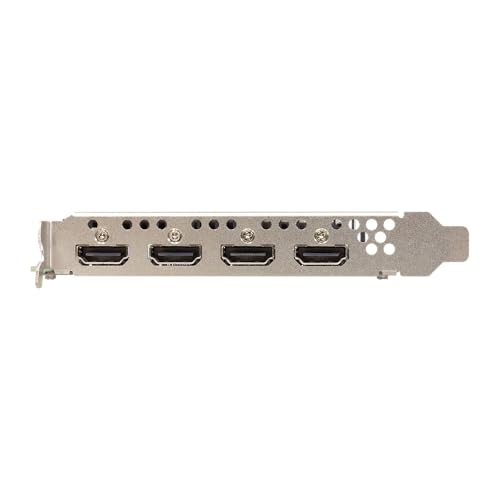
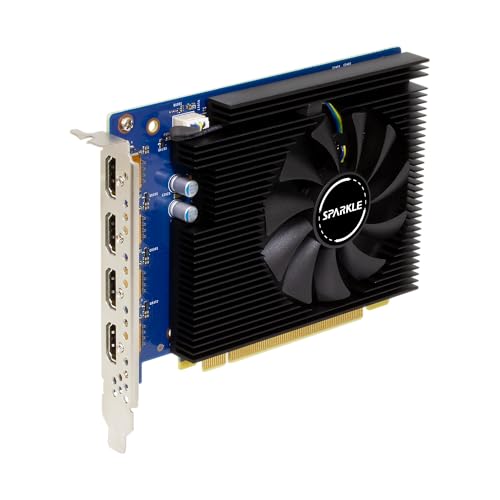
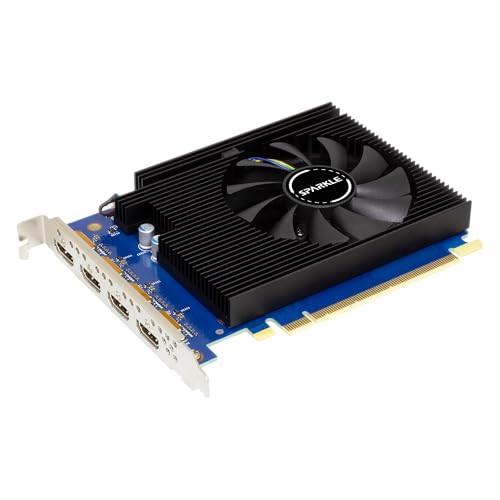
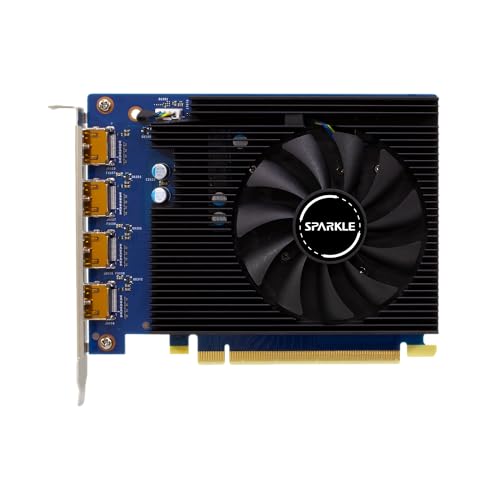
The Sparkle Intel ARC A310 4GB Omni View Graphics Card combines efficient 50W power consumption with 4 HDMI 4K outputs and advanced ray tracing technology. Designed for professionals and gamers seeking multi-display setups and modern API support, it delivers crisp visuals and smooth performance in a compact, single-slot form factor.


| Brand | Sparkle Computer |
| Manufacturer | Sparkle |
| Model | SA310F-4G |
| Model Name | 1A1-S00424000G |
| Product Dimensions | 14.48 x 10.69 x 0.25 cm; 495 g |
| Item model number | SA310F-4G |
| Hardware Interface | PCI Express x8 |
| Graphics Card Description | Intel ARC A310 with 4GB GDDR6, 1000 MHz graphics clock, and 6 Ray Tracing Units |
| Graphics Card Ram Size | 4 GB |
| Graphics RAM Type | GDDR4 |
| Graphics Card Interface | PCI-Express x8 |
| Graphics Coprocessor | Sparkle GPU |
| Compatible Devices | Desktop |
| Mounting Hardware | Item |
| Number of items | 1 |
| Resolution | 4096 x 2160 |
| Video output interface | HDMI |
| Batteries Included | No |
| Batteries Required | No |
| Manufacturer | Sparkle |
| Item Weight | 495 g |
S**N
Single slot, low power, quiet. Does AV1 encoding in JellyFin. Exactly what I needed.
A**I
fantastic! only modern gpu that has 4 x HDMI outputs!
A**W
(Review written in late 2025) If you’re new to PC building and trying to find a good graphics card, this is not for you. If you are looking for a good entry-level gaming GPU, you should check out the Arc B580 instead. So why did I buy an Arc A310? The Arc A310 is about the cheapest modern dedicated graphics card you can buy. AMD and Nvidia don’t offer new GPUs in the $100 range, so your only option is to buy used GPUs which are almost at their end of support. By comparison, Intel Arc graphics drivers offer much better long-term support than similarly priced competitors. The Arc A310 makes sense for my use case, as I was rebuilding a used PC without integrated graphics on the CPU. Purchasing this was cheaper than buying a new CPU, and results in greater performance than using integrated graphics. I can playback 4K media without issue. Another niche use case where this product may be practical is a secondary GPU dedicated to encoding live streams in a system with a high-end GPU for gaming. But don’t be fooled, the performance is not good enough for gaming. You can maybe play some lower end games like Minecraft and Counter Strike 2 at 1080p, but this GPU will struggle to run games with modern high-end graphics. If you want cheap gaming performance, the Arc B580 is the far better choice. This product is relatively easy to install. Its low power consumption means it can be powered directly through the PCIe slot on your motherboard without need for external power connectors from the PSU. It’s as close to plug-and-play as it gets. The 4 full-size HDMI ports on the back also offer convenience for multi-display configurations, and was my primary reason for buying the A310 Omni over the A310 Eco. Overall, I am happy with this product and I hope Intel continues to invest in their dedicated Arc graphics. The A310 is not the GPU for everyone, but it occupies its niche market quite well.
T**N
I bought this video card for the sole purpose of media transcoding in my TrueNAS server (which is Linux based). Unlike NVidia cards that need a separate driver install, this card was supported by my Linux version out of the box. Please note that this is (as of late 2025) not the current generation of Intel ARC GPUs, but the previous one. However the current generation is not yet supported by the TrueNAS version that I am using and my understanding is that for the purpose of transcoding there is little to no benefit in picking the newer generation. One thing I like about this card is that it only uses 50W, so it can pull all its power through the PCIe slot and doesn't need an extra power connector. If you need many parallel 4k to 1080p transcoding sessions, then this card might be a bit on the weak side, but for me it has proven perfectly suitable. Please note that that cards with older firmware have the annoying tendency to frequently ramp the fan up and down, a problem that has been since somewhat mitigated (though not completely eliminated) by newer firmware. So when I received this card, I put it in my Windows desktop PC and updated its firmware to the latest version, before installing it in my TrueNAS server. After booting up the server again, the card was immediately detected and I configured my Plex Media Player to use hardware transcoding, so it would use the new GPU. (Please note that Plex hardware transcoding is a feature that requires a Plex Pass, that is a paid subscription.) All in all I have been very pleased with this purchase.
P**R
I had read about needing ReBAR with Intel Arc cards, and the motherboard I was going to use this in did not support that. I then read that you do not explicitly require it with A Series Arc cards, at least if you're just using it for transcoding. It works fine in my case. The fan does not ramp up and down and is generally unnoticeable to me. I'm not sure how many 4K streams you could do. I am using it with Jellyfin and Tdarr, as well as Frigate. Four AV1 transcoding jobs at once with Tdarr, fan stays around 1650RPM. No fan ramping up and down and it's just quiet. Honestly, this card is just insane for what i'm using it for.
Trustpilot
1 month ago
3 weeks ago



