


🎯 Master your multi-device setup with sleek 4K control and lightning-fast USB sharing!
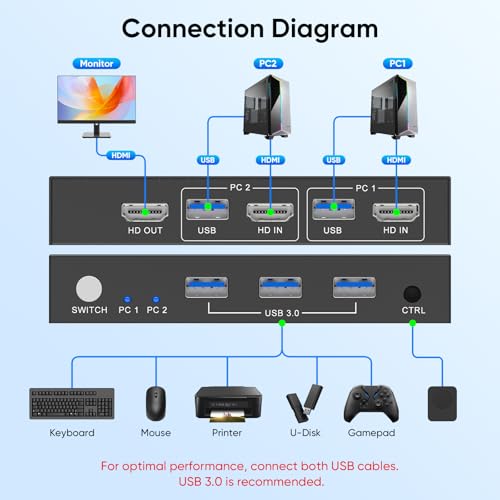
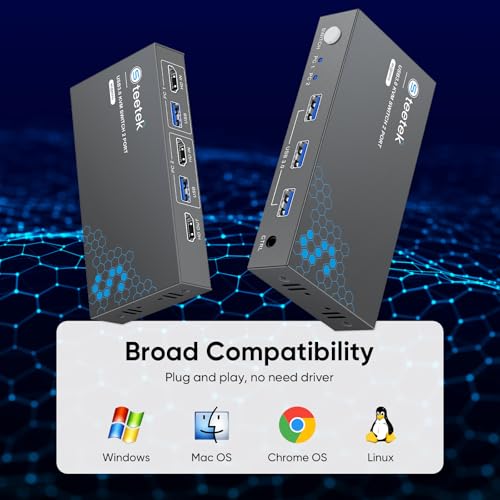
The Steetek USB 3.0 HDMI KVM Switch STK-S7232H empowers professionals to control two computers using a single 4K@60Hz monitor, keyboard, and mouse. Featuring three USB 3.0 ports for 5Gbps peripheral sharing, HDCP 2.2 compliance for protected content, and dual switching options including a wired remote, it offers a clutter-free, efficient workspace. Plug-and-play design with adaptive EDID ensures smooth, stable visuals across Windows, Mac, Linux, and more, backed by a lifetime warranty for long-term peace of mind.


| ASIN | B0D5D4FK1H |
| Item model number | STK-S7232H |
| Manufacturer | Steetek |
| Product Dimensions | 16.26 x 14.99 x 2.03 cm; 272 g |
A**X
I had pretty low expectations for a dual monitor kvm, given comments I've seen online. This has worked excellently. First off, it was smaller than I had a realized, and it fits neatly on my desk. In terms of ports, all of them work without issue. It might be nice to have another USB slot but 3 is sufficient for my wired keyboard, mouse, and webcam. There's no audio output plug which I would have liked, though I'm not sure if that's something I could realistically ask this kind of device to do. Anyway, your computers can send audio to the monitors over HDMI. The button on the device to switch computers is physically robust. It takes a few seconds for my whole setup to switch, which I think is mostly on the end of the computer suddenly seeing new devices. Usually works without issue. There are some limitations to refresh rate and resolution. Both my monitors are 1440p, so I can run them both at a maximum of 100Hz, which is lower than what they're capable of. Overall, it's a worthwhile tradeoff for convenience, and I can run a secondary displayPort cable if I want, to switch to for gaming.
S**R
Change over between the laptops is very slow.Most of the times it does not work.
A**P
I’ve been using the Steetek USB 3.0 HDMI KVM Switch (1 Monitor / 2 Computers, 4K@60Hz) for several weeks now, and it has consistently delivered on the “reliable” promise. Here’s why: 1. Stable switching between machines: Switching from my desktop to my laptop has been rock-solid. The device doesn’t drop input, stutter, or glitch when using the button or the wired remote. just works. That consistency is exactly what I was missing in other products. 2. Strong video performance without flicker or dropouts I run a 4K@60Hz monitor, and this KVM maintains the display signal without flickering or momentary black screens, even when switching back and forth. The “Adaptive EDID” feature appears to help it negotiate and retain stable video resolution. 3. Reliable USB peripheral handling The three USB 3.0 ports are a nice bonus. I have multiple devices (keyboard, mouse, external SSD) plugged in, and switching rarely interrupts or confuses the devices. I haven’t encountered “missing device” or recognition issues. 4. No external power, yet consistent performance Despite being bus-powered only, the unit maintains consistent performance under normal loads. That’s one less cable and one less point of failure. The “plug and play” nature saves hassle and reduces one potential weakness. 5. Build quality and support confidence The unit feels solid and well-built. The inclusion of a “lifetime Protection Plan” seems to support that. Also, the brand has placed it high in the KVM rankings (ranked #3 in KVM Switches on Amazon) which suggests broad adoption.
C**R
I can finally write a review for this. If you were planning on using this exactly as intended it would be a super easy install. My setup is a little different on how I am wiring things and it is still working for what I need. It's and easy switch over between the 2 options and seems to switch rather quickly. Its pretty discrete so it can be hidden if needed, especially with the button that comes with it. If you have a WFH and gaming setup this is clutch for making everything connect smoothly.
T**K
I picked this up to switch between my TV-connected computer and my phone running DeX, and I’m genuinely impressed. As someone who installs KVMs professionally and works in IT, I’ve used everything from basic manual switches to enterprise-grade setups — and this little unit just works. Setup was plug-and-play easy (though I’ll admit, I’ve probably got an unfair advantage there). I had it up and running in under five minutes, no fuss. It handles both HDMI and USB switching flawlessly, which is crucial for my setup. The star of the show? The remote input switch button. I didn’t think I’d care about it, but now I can’t imagine going back. Instead of fumbling behind the TV or tapping an awkward button on the device, I just hit the remote and bam — instant switch. It’s a small thing that makes a huge difference in daily use. It also plays really nicely with DeX — no "display disconnected" issues when switching inputs, which is vital. Some switches drop the signal entirely when switching, and DeX freaks out. This one doesn’t. The inactive device still thinks it’s connected, so when I switch back, everything is right where I left it. Pros: Remote button is incredibly convenient Flawless switching between systems No signal drop or disconnect issues — perfect for DeX USB and HDMI both switch cleanly Setup was fast and painless Cons: None so far — this thing just works If you’re toggling between a phone (especially with DeX) and a PC or second system, this is a fantastic KVM solution.
Trustpilot
2 weeks ago
2 days ago



