We remain fully operational. Our teams are working around the clock to ensure your deliveries continue safely.

DOWNLOAD THE APP


Customer Services
Copyright © 2025 Desertcart Holdings Limited
DOWNLOAD THE APP
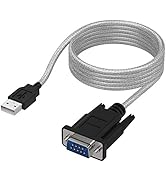
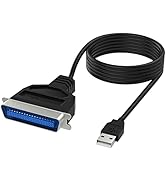
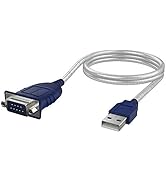
![SABRENT USB 2.0 to DB25 IEEE-1284 Parallel Printer Cable Adapter [THUMBSCREWS Connectors] (CB-DB25) (Pack of 2)](https://m.media-amazon.com/images/I/612luGJHakL.jpg)
🔗 Bridge the gap between classic and modern printing with SABRENT’s seamless USB adapter!
The SABRENT USB 2.0 to DB25 IEEE-1284 Parallel Printer Cable Adapter (Pack of 2) offers a hassle-free, driverless solution to connect legacy parallel printers to modern USB ports. Featuring a fast 480 Mbps data transfer rate and secure thumbscrew connectors, it ensures reliable, high-speed printing compatible with most parallel printers. Perfect for professionals maintaining vintage hardware without sacrificing convenience.



| ASIN | B0CR78KJ86 |
| Best Sellers Rank | #1 in Parallel Cables |
| Brand | SABRENT |
| Cable Type | USB |
| Color | Black |
| Compatible Devices | Personal Computer |
| Connector Gender | Male-to-Male |
| Connector Type | Usb 2.0 |
| Customer Package Type | Standard Packaging |
| Customer Reviews | 4.2 4.2 out of 5 stars (4,571) |
| Data Transfer Rate | 480 Megabits Per Second |
| Date First Available | January 23, 2026 |
| Indoor/Outdoor Usage | Indoor |
| Is Discontinued By Manufacturer | No |
| Item Dimensions LxWxH | 10 x 7.2 x 2.2 inches |
| Item Weight | 7 ounces |
| Item model number | CB-DB25 |
| Manufacturer | SABRENT |
| Maximum Voltage | 5 Volts |
| Number of Items | 2 |
| Product Dimensions | 10 x 7.2 x 2.2 inches |
| Recommended Uses For Product | printers |
| Shape | Round |
| Unit Count | 2.0 Count |
J**E
Works well with HP LaserJet 4050
A pre-20th Century IEEE parallel port connector to more recent USB variant is what you need if you have an old but built to last and still working well machine that needs one. In my case, a 1999, HP LaserJet 4050, high speed workhorse. After scrounging through HP’s Legacy driver pages, I found two that supposedly worked: postscript and native HP talk. Installed them both and the native driver worked no issues.
M**T
Works just like a cable should
Used this to connect a very old HP LaserJet 4M. The old cable just stopped working, probably got damaged by my movers, but it appeared to be fine. The print job would act like it was working, but the printer would just flash and then nothing would happen. This cable solved the problem. Works just like it should. No more print issues. Quality is good.
P**D
Quality product, good service!
Quality cable, works well!
G**T
Cable Works Fine, But Macs Aren't Automatic
I would give the cable itself 5 stars but the overall experience only 4. I wanted to use it between my iMac and an old Okidata OL400e laser printer. The Mac OS recognized the cable immediately and named it " USB2.0-Print" (initial space intended) even with no printer on the other end. Even when I did hook up the printer the System Preferences said it was offline, and I couldn't get it to detect otherwise. BTW my iMac is dual-boot, and the Windows XP side drove the printer just fine - so I knew it was some sort of OS problem. Sabrent Support was no help at all; their entire written response was "You must install the drivers for the printer you are attaching." Anyway I got extremely lucky and saw some web talk about something called USBTB, whose purposes is to help Macs through this. I cleared all my printer settings, then installed the USBTB, which insisted I pick from some HP front-end drivers even though my printer wasn't HP. Again I got lucky and picked one which satisfied the software, to the point at which I could redefine the printer settings (in System Preferences) to the Gutenprint OL400e driver in my system. It was trial-and-error and it mostly didn't work, until it did. Even now the system tells me my Oki is "idle" when in fact it is turned off - but it works when I sent a print job its way, which was what I wanted. Anyway the cable does its job, but I wish it had been easier to get set up!
A**R
Inspect package closely first!
Bad cable, out of the box. Box appeared to be a re-packaged item. Ordered another one anyway, the 2nd one worked just fine. Will NOT be sending the bad one back, this will save someone future problems. Cost of doing business in an on-line market, in today's world I guess....
J**R
Cable works fine, but many old printers are not supported in Win 10
This cable may or may not work for you, but it's not the cable's fault. My old HP LaserJet 4, looks and works like brand new, but I haven't used it for a while since newer computers have no printer port. I needed a printer for shipping labels in a separate location in my home and when I saw this cable I thought my problem was solved, but my computer, an HP laptop, with Windows 10 Pro, didn't even recognize anything had been plugged in when I connected it. Before troubleshooting, I ordered another cable like this from another company and the same thing happened so I decided to look further. I have several computers so I connected another laptop with a dual boot installation, Windows 7 home and Ubuntu Linux 16.04 LTS and it works with both. I had to use the manual setup because it isn't recognized like USB printers usually are. Connect the printer to the laptop and click add printer. Windows 7 wants to scan for a printer which it won't find, but click on the line saying yours isn't in the list. Choose local printer, then choose the port. Scroll down the list provided and you'll see a USB virtual printer port, select that. Then choose your make and model, in my case, the HP LaserJet 4. It will load the driver, ask if you want a test page, which you can print to confirm, and you're done. Works great. Linux is also easy. Click add printer, select the USB port, select the make and model of the printer, print a test page. Works great. You're done. Windows 10 is another story. In my case, there are no current drivers for the LaserJet 4. You can go through the same procedure, click add local printer, there's a USB port option, but if you have an old HP printer like, mine, when you select HP, the long list of models presented does not include a lot of very popular, but old models, like my LaserJet 4. Looking around on the web, lots of sites say they have a driver, but they look a little sketchy to me, you can try those at your own risk. So, bottom line, cable does what it's supposed to do as long as your operating system has a driver. If it's the latest update of Windows 10, there are a lot of old printers that are no longer supported. Since I have one computer where it does work, I stopped investigating. There might be a way to get Windows 10 on board, but it's not plug and play.
N**.
LONG AND STRONG CABLE
Very good and the cable is really long, perfect for my business analog printers
B**S
usei o produto para ativar uma roland cx24 antiga e funcionou maravilhosamente bem
E**A
Excelente. Funciona de maravilla mejor que el mismo producto en el mercado.
F**R
Fonctionne super bien plug and play !
E**N
A permis d'utiliser une ancienne imprimante Brother à port parallèle via un port USB d'un PC sous Windows 7.
J**G
EL producto llegó correctamente. La longitud del cable es aceptable. Además, venía con un alargador USB que no he necesitado usar. Funciona a la perfección. Probada con una impresora de tickets de EPSON.
Trustpilot
3 weeks ago
2 months ago