We remain fully operational. Our teams are working around the clock to ensure your deliveries continue safely.

DOWNLOAD THE APP


Customer Services
Copyright © 2025 Desertcart Holdings Limited
DOWNLOAD THE APP

🔄 Elevate your workspace: Switch smarter, work faster, and never miss a beat!
The Cable Matters 20Gbps USB C Switch enables seamless sharing of a USB-C or Thunderbolt 4 monitor or dock between two computers. Supporting ultra-high resolutions up to 8K@30Hz on Windows and 4K@60Hz on macOS, it delivers blazing 20Gbps data transfer speeds and robust 140W power delivery pass-through. Designed for professionals seeking efficient multitasking, it includes an RF remote for effortless switching without software, ensuring a clean, productive workspace.


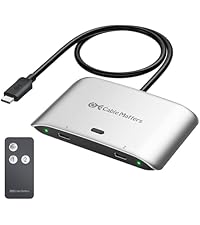


| ASIN | B0CLZ7WP1N |
| Best Sellers Rank | #10 in KVM Switches |
| Customer Reviews | 4.0 4.0 out of 5 stars (604) |
| Date First Available | October 28, 2023 |
| Item Weight | 8.4 ounces |
| Item model number | 201352 |
| Manufacturer | Cable Matters |
| Package Dimensions | 6.73 x 5.63 x 1.57 inches |
T**I
Works with a single Dock for two computers
i have an HP work laptop and thunderbolt 5 Mac mini connected to an older (discontinued) thunderbolt 3 Mokin dock with Pebble usb speakers, mouse, keyboard, webcam, scanner and output to dual 2k monitors via displayport... and this switch works PERFECT. this is the WFH dream setup, and allows me to flip from laptop to the Mini for $60. the trade off is that i had to provide separate power to the laptop so that it keeps getting power from somewhere after i have switched away. I already had an Anker 240w charger for that. if you have a dock that works with two computers and you just need to change the ubc-c cord... this switch "should" work to make that dock switch to either computer with just a button push. then you just need to solve for constant power to each machine, because the power would switch too. i spent two months trying and returning 5 different KVM docks priced up to $500 and not a single one worked right, and this little beauty works for a fraction of that price!! im so impressed. piece of advice-- i tried a different (longer) thunderbolt 4 cord from the switch to the Mini and it did not work... it was a Silkland cord, perhaps those cords are not up to spec? but the shorter cords that came with this switch do work, so i had to rearrange my setup to make the short cable matters cord work (not a deal breaker for a mac mini, which is small enough to be moved around) i cant say this enough-- forget the KVM options out there. i spent probably 100 hours researching and never found one that worked for me, despite using chatGPT for tips and reading thousands of reviews from actual users and "Vine" reviews. KVM seems like such a simple idea... but they just dont work 100% for some reason. The mouse or keyboard drops out, flickering monitors, dropped handshake protocols... and issues came arise months after purchase. for that kind of money they need to work better. fortunately, this little switch did exactly what i need, for a dream price. Thank you Cable Matters!
V**R
The quality is excellent.
This USB-C switch has been an absolute game-changer for my setup! I've been using it for about a year now, and it seamlessly connects my multiple computers to my external monitor rig. Switching between devices is incredibly smooth and hassle-free, saving me so much time and frustration. The performance has been consistently reliable, and I haven't encountered any issues at all. Honestly, if you're juggling several machines and need to connect to a shared display, you absolutely need one of these.
J**Y
Functional USB-C KVM, Cables Could Use Some Work
As other reviewers have noted the provided cables from switch to computer need to be in the correct orientation to work. Additionally the cables are quite stiff which can make cable harnessing a little messy. They also have a low quality casing where you can feel the sticky residue every time you touch them. All that said you can easy buy some much better thunderbolt cables which solves all your issues. The switch itself works well and the remote is RF so it doesn't require direct line-of-sight which is necessary because the chord from the switch to the monitor is pretty short. The port on my monitor is so high the switch can't reach the desk so it is hanging behind. It's a little pricy for the quality but functionally it's exactly what I needed
R**.
Works Perfectly for Dual-Computer USB-C Display Setups — Great Value
The Cable Matters 20Gbps USB-C Switch turned out to be exactly what I needed for my dual-computer setup. I use both a Mac and a Windows work laptop, each with USB-C display output. I’ve got my keyboard, mouse, and desk light all plugged into a USB hub on the back of my monitor, and I simply velcroed this switch to the back. When I want to swap between my Mac and work laptop, I just reach over and press the button — it switches over in about three seconds, which is totally fine for me. The remote control works too, but since I’m sitting right in front of the monitor, I rarely use it (it might be perfect for other setups though). I originally bought this on a whim just to test my idea, and it turned out absolutely perfect. For the price, it beats a lot of expensive KVM switches. The good Seamless switching between Mac and Windows laptops Only a brief 3-second delay when switching Compact and easy to mount behind the monitor Works great with existing USB hubs and accessories Excellent value compared to full KVM switches Would be nice if it came with a small combo USB-C/USB-A hub included Overall If you have two computers with USB-C display output, this is an awesome little device. Clean, affordable, and works exactly as expected. Perfect for dual-computer with usb-c display output productivity setups.
M**Y
Disappointed within 12 hours :(
The product so far has been working great... BUT... After 12 hours out of the box the remote battery is already dead. So disappointing to finally get things setup to only have to undo some of it while you wait for new batteries. Update: New batteries didn't work so I requested a replacement. Replacement arrived this week...AND...the remote failed after 1 use. Contacted the manufacturer and they identified that the model I was shipped had a known design flaw with the remote. They said I should replace the 2025 button cell with a 2032 button cell to resolve the issue. Who the hell keeps piles of button cell batteries around!?!? Well .. fortunately for them...I do. The 2032 seems to be working flawlessly. Updated the review to 1 star because shipping a product with a known design flaw is BS
P**O
A switch in time... The two mac - one monitor problem is solved !
I got this the other day, trying to multiplex a macbook pro and a mini to the same hub. Set up was a breeze. The unit just works flawlessly, drawing power from the hub (the upstream single cable) and supplying power to the downstream (two macs) - one at a time, only to the one selected. The connection to the 4k monitor was 100% same as with a direct cable. Couldn't tell it was going through a switch. The remote is a nice add on, and I will be using it at some point. The supplied cables are quite long and should address any work desk situation... I would recommend it!
ボ**ボ
I am currently using 1 external display for both Macbook Pro (M1 Pro) and Mac Mini (M2). Even though I can switch all devices such as monitor, hifi system keyboard and mouse by just connecting 1 thunderbolt cable, but it is still a hassle. However, it took me a long time to look for a KVM switch that can support faster than 10gbps as most of the KVM switch in the market only support up to 10gbps. Until one day I came across this CableMatter 20gbps switch, it solved all the problems that I had by manually unplugging and plugging in the thunderbolt cable to different devices and it has been work flawlessly for after a year of usage.
S**.
I had to change my review. Initially, it did refuse to start then after two days it stopped working. It turned up that the cable supplied are or became very directional. Yet, there is no indication of that on the cables themselves, the manula, the web page, the Amazon page, unless I missed it. The main thing is that now it works flawlessly! It is now connected to an old (but absolutely wonderful) Apple Cinema display ca. 2011 by two extra adapters (The Apple display crazily has a non remomovable mini DP only (told you that is an old display). At the other end is connected to a Macbook Pro M4, and the other system is an old MacBook Pro 2016 running WIndows 11 through Bootcamp (or sometimes booted to Monterey). It has been working now for two months, switching seamlessly for two months (of course now I marked the ends odf the cables!). My apologies to Cable Matters, and a plea to mark the seemingly directional cables so that they can be correctly connected and explain that in your instructions. I was tempted to give less than 5 stars, because of that, but it does exactly what I need, hence 5 stars.
A**N
RESUMEN: Funciona perfecto, ideal si quieres cambiar rápido entre dos portátiles. Funciona con vídeo y carga. Tengo un monitor que conectaba con un cable USB para cagar y tener video a la vez en mi portátil personal. Quería poder intercambiar fácil entre mi portátil y el del trabajo sin tener que cambiar el cable. Ahora tengo ambos portátiles conectados al aparato, y éste conectado al monitor, con un click en el botón físico (o los botones del mando) me cambio rápidamente de uno a otro. Tarda alrededor de unos 5 segundos cambiar de uno a otro, nada dramático ni para bien ni para mal. Creo que solamente carga el portátil activo, pero no he hecho pruebas para corroborarlo.
C**1
Der Switch wird genutzt, um das Studio Display vom Laptop (Arbeit) auf den Mac (privat) umzuschalten. Der Switch erfüllt zuverlässig seinen Dienst. Per Fernbedienung ist der Bildschirm einfach umzustellen. Die Installation ist ebenso unkompliziert.
C**T
Fonctionne bien mais sur mon Dell inspiron 7640 il indique souvent charge lentement alors qu'il est sur secteur. Mais sinon c'est exactement ce que je recherchais
Trustpilot
1 week ago
2 months ago