Desert Online General Trading LLC
Dubai, United Arab Emirates
Desert Online General Trading LLC
Dubai, United Arab Emirates


Unleash Your Inner Gamer! 🎯
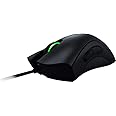
The Razer DeathAdder Chroma is the world's most popular gaming mouse, featuring a 10,000 DPI optical sensor, customizable Chroma lighting with 16.8 million colors, and an ergonomic design tailored for comfort and performance. Perfect for both casual and competitive gamers, it offers on-the-fly sensitivity adjustments and a durable gold-plated USB connector.


| Standing screen display size | 5 Inches |
| Wireless Type | 802.11abg |
| Brand | Razer |
| Series | RZ0101210100R3U1 |
| Item model number | RZ01-01210100-R3U1 |
| Hardware Platform | PC |
| Operating System | PC; Mac |
| Item Weight | 3.68 ounces |
| Product Dimensions | 5.04 x 2.88 x 1.69 inches |
| Item Dimensions LxWxH | 5.04 x 2.88 x 1.69 inches |
| Color | Black |
| Power Source | Corded Electric |
| Batteries | 1 AAA batteries required. |
| Manufacturer | Razer Inc. |
| ASIN | B00MYTSDU4 |
| Is Discontinued By Manufacturer | No |
| Date First Available | September 20, 2014 |
M**R
My basic PC setup is as good as it gets
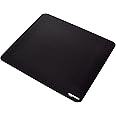
Don't wait to buy this mouse.I'm an avid Battlefield 3/4, DoTA2 and Starcraft 2 player.... if you know what those games are, you know that means I play competitively. Having a competitive edge, even a small one, makes a big difference. I'm ecstatic to say that I feel the DeathAdder has given me a big one.My basic PC setup is as good as it gets, but I've been using a default basic mouse and mousepad for the longest time. I heard talk in the gaming community about Razer devices, so I decided to look into it. Seeing the 2,000+ high ratings on the DeathAdder sealed the deal for me, so I gave it a go.After the mouse arrived, it took my hand a while to adjust. The mouse is very long and I'm a "claw" gripper, but after getting used to it, I can say this mouse is very comfortable and relaxing to use and I feel has helped me go beyond my limitations. I would say I have a normal sized hand. If you're not already aware, this mouse is used greatly be strategy gamers (DoTA2 and Starcraft 2 players), but I haven't heard much about it in the FPS realm. Well, this mouse is just as excellent in FPS games as it is in strategy games.To get extra-nerdy on you, I'm a rushing, bolt-action sniper in Battlefield, so making shots connect is important. I have a great deal of control when taking shots and I feel more accurate now. Controlling "weapon recoil" with fully-automatic weapons feels easier and more precise now too. I use 2400 DPI with 1 point of acceleration and very low sensitivity in-game (DPI is adjustable in the Razer Software). The general consensus among the FPS community is to use a low DPI (400) to be more accurate and turn on "raw input", in other words, turning mouse acceleration off. I can tell you this was a bust for me. Without trying to go too deep into it, lower DPI means (less points on the screen), and depending on your field-of-view and screen resolution, that can cause problems with a low DPI. I used acceleration before my Razer, and I use acceleration now, and I'm fine with it. This all depends on how you play. I'm a high sensitivity gamer, and I don't like moving my hand, arm and whatever else to my mouse around. I use gentle strokes and that's all I need. This might not make sense to someone who has never changed DPI settings before, but once you buy the mouse and tweak it, this review might come in handy. I'm sharing this for you.To sum up, I can't believe I didn't order this mouse ages ago. It really has been like a missing piece to my gaming puzzle and has made me better than I was before, albeit, doing it "comfortably". I have had no issues with drivers or the software, and the mouse feels of good quality. Highly recommend.Oh and btw, I bought this mouse in conjunction with a "Razer Goliathus Control" mousepad. And it works perfectly with the mouse. As a matter of fact, in the Razer Software you can calibrate your mouse to your mousepad, and if you have Razer mousepad, you can choose from a menu which one you are using. Turning the calibration on and off makes a noticeable difference. The calibration gives you more control.EDIT: A little over 1 year later, I've burned through one of these in about 6 months. The mouse truly is a delight to use AND has made me better, but the shelf-life is pretty low. I had a problem with "double clicking" when I would do a single click (something other reviews are keen to point out). The only choice was to either A) contact Razer and replace the mouse and return the old-one free of charge or B) fix it myself. After looking up videos online, I decided I didn't want to void the warranty by doing my own repair and making things worse, so I got a new one. Getting a new mouse was a relatively easy process since I RMA'ed through Amazon and used Amazon Prime to get a new one with free 2 day shipping.Would I continue using this mouse after my issue, even with it being a repeat issue for others? Yes. When it does work it is excellent to use and is very comfortable, and because Razer is willing to replace it when it malfunctions, it is a hassle I'm willing to deal with. 4.5/5 stars
H**.
Sleek design with ergonomic considerations, and superb gaming performance
Overall a fantastic mouse, period. I purchased this mouse to use as a daily driver, as well as for occasional FPS gaming (Battlefield 3 & 4, Battlefront, etc).Pros:-Ergonomics: The contour of the mouse has a slight angle toward the right side that allows you to grip the mouse at an angle (~25°, palm side facing left - for a righty orientation), for a more neutral hand position. The angled grip is more comfortable for a longer session. The grooves on the left/right buttons make for comfortable resting positions for your index and middle fingers. The side rubber grips are placed at the correct positions for control and comfort.-Crisp button feedback: buttons are solid, provide satisfying click, the scroll wheel is precise and super grippy for ease of useCons:-At this price level I don't think it's too much to ask for tilt buttons on the scroll wheel, but this is not a hindrance to gaming, would have been a nice option to have for everyday use-The cloud software leaves something to be desired and how Razer manages the programmable buttons - e.g. I programmed by thumb buttons to home and end keys, and under this default profile when I went in to Battlefield 4 to override these functions it wouldn't allow it. I had to create a profile for each game (BF4, BF3, Battlefront, etc) that had default Razer factory settings, then it allowed me in game to customize keybindings on the thumb buttons. It would be nice to link multiple games to a single profile.The cons are minor nitpicks compared to all the pros this product offers. Overall this is a solid mouse with a beautiful AND functionally ergonomic design.UPDATE: about a month in of using, the left mouse button was firing twice at each click. I tried the basic solutions to this I found online, but the problem persisted. I contacted Razer about it, and they sent me a brand new replacement mouse. They even upgraded it to the Elite version (which has two extra buttons just below the center wheel). Great service.
Trustpilot
2 weeks ago
3 weeks ago
3 days ago
1 week ago