
🖨️ Elevate your home office game with smart, speedy, and sustainable printing!
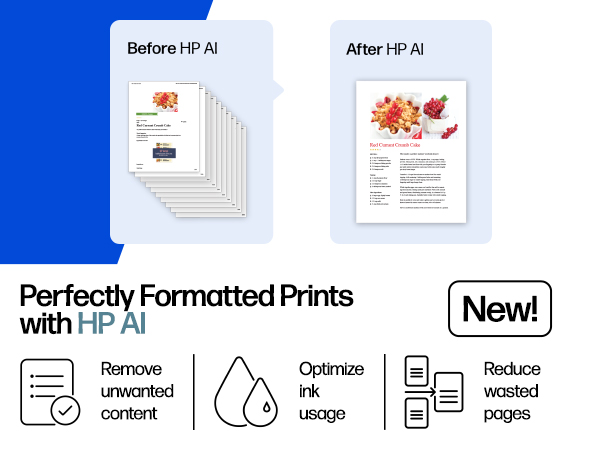
The HP OfficeJet Pro 8135e is a versatile all-in-one inkjet printer designed for home offices, delivering fast print speeds of up to 20 ppm black and 10 ppm color. Featuring AI-enabled printing for perfectly formatted documents, wireless dual-band connectivity, and a user-friendly 2.7-inch touchscreen, it supports seamless mobile printing via the HP Smart app. With a 225-sheet input tray, automatic duplex printing, and an automatic document feeder, it maximizes productivity while embracing sustainability with 45% recycled plastic construction and FSC-certified packaging. Includes a 3-month Instant Ink trial for hassle-free ink delivery.




| ASIN | B0CFM7BTW8 |
| Additional Printer Functions | All In One |
| B&W Pages per Minute | 20 ppm |
| Best Sellers Rank | #5,035 in Office Products ( See Top 100 in Office Products ) #29 in Inkjet Computer Printers |
| Brand | HP |
| Built-In Media | HP 923 Setup Black Ink Cartridge; HP 923 Setup Cyan Ink Cartridge; HP 923 Setup Magenta Ink Cartridge; HP 923 Setup Yellow Ink Cartridge; Power Cord; Regulatory Flyer; Ink Caution Flyer; Setup Poster; Reference Guide |
| Color | Light Cement |
| Color Pages per Minute | 10 ppm |
| Compatible Devices | Laptops, PC, Smartphones |
| Connectivity Technology | Ethernet, USB, Wireless |
| Control Method | App |
| Controller Type | Android |
| Customer Reviews | 3.8 out of 5 stars 3,360 Reviews |
| Display Type | touchscreen |
| Dual-sided printing | Yes |
| Duplex | Automatic (standard) |
| Hardware Interface | Ethernet, USB |
| Initial Page Print Time | 18 Seconds |
| Ink Color | Black, cyan, magenta, yellow |
| Item Dimensions D x W x H | 13.29"D x 18.12"W x 9.17"H |
| Item Height | 9.17 inches |
| Item Type Name | Inkjet printers |
| Item Weight | 17.6 Pounds |
| Manufacturer | HP |
| Maximum Copies Per Run | Up to 99 copies |
| Maximum Copy Resolution Black and White | 1200 x 1200 dpi |
| Maximum Copy Resolution Color | Up to 600 dpi |
| Maximum Copy Speed Black and White | 12 ppm |
| Maximum Print Resolution Black and White | 1200 x 1200 rendered dpi Dots Per Inch |
| Maximum Sheet Capacity | 225 |
| Maximum print Resolution Color | Up to 4800 x 1200 optimized dpi on HP Advance Photo Paper 1200 x 1200 dpi input Dots Per Inch |
| Media Size Maximum | 8.5 x 11.7 in |
| Model Name | New Version |
| Model Number | 40Q35A#B1H |
| Model Series | 8130 |
| Number of Ethernet Ports | 1 |
| Number of Trays | 2 |
| Other Special Features of the Product | Forest First product with HP+; FSC Certified Packaging; Contains ocean-bound recycled plastic; 45% post-consumer recycled plastic; Recyclable through HP Planet Partners, HP Instant Ink eligible; Automatic document feeder; Touchscreen; Quiet mode; Print over VPN with HP+ |
| Output sheet capacity | 60.0 |
| Paper Size | 8.5 x 11;8.27 x 11.7;8.5 x 14;7.16 x 10.12; Inches |
| Power Consumption | 4.45 Watts |
| Print media | Paper (plain) |
| Printer Connectivity Type | Ethernet, USB, Wireless |
| Printer Output Type | Color |
| Printer Type | Inkjet |
| Printing Technology | Inkjet |
| Processor Count | 1 |
| Resolution | 4800 x 1200 |
| Scanner Type | Flatbed, 1-sided ADF |
| Series Number | 8130 |
| Special Feature | Forest First product with HP+; FSC Certified Packaging; Contains ocean-bound recycled plastic; 45% post-consumer recycled plastic; Recyclable through HP Planet Partners, HP Instant Ink eligible; Automatic document feeder; Touchscreen; Quiet mode; Print over VPN with HP+ Special Feature Forest First product with HP+; FSC Certified Packaging; Contains ocean-bound recycled plastic; 45% post-consumer recycled plastic; Recyclable through HP Planet Partners, HP Instant Ink eligible; Automatic document feeder; Touchscreen; Quiet mode; Print over VPN with HP+ See more |
| Specific Uses For Product | Home |
| Total USB 2.0 Ports | 2 |
| Total Usb Ports | 2 |
| UPC | 196337163942 |
| Unit Count | 1.0 Count |
| Warranty Description | One-year limited hardware warranty with option to extend to two-years with acceptance of HP+ Offer. For more info please visit us at support.hp.com . |
| Warranty Type | One-year limited hardware warranty with option to extend to two-years with acceptance of HP+ Offer. For more info please visit us at support.hp.com . |
| Wattage | 100 watts |
E**R
Cannot be happier
⭐️⭐️⭐️⭐️⭐️ The HP OfficeJet Pro 8130e has exceeded my expectations! Setup was quick and simple, and I had it connected to Wi-Fi and printing from my laptop and phone in minutes. The HP Smart app is very user-friendly and makes mobile printing and scanning effortless. Print quality is outstanding—text looks crisp and professional, and color prints are vibrant and clear. I especially appreciate the automatic duplex printing, which saves both time and paper, and the automatic document feeder makes scanning and copying multi-page documents fast and easy. The printer runs at a great speed for home office use, and the paper tray holds plenty of sheets so I’m not constantly refilling it. It’s also well-built, with a clean design that doesn’t take up too much space. I signed up for HP’s Instant Ink program, and it’s been very convenient knowing ink will arrive before I run out. The included promotional months were a nice bonus too. Overall, this printer delivers on all fronts—quality, speed, ease of use, and features. If you’re looking for a reliable all-in-one for your home or office, I highly recommend the
G**E
Make sure the WINDOW 10 0r 11 works with it!!!
I WOULD NOT EVEN GIVE ONE STAR IF I DIDN'T HAVE TO GIVE ONE TO BE ABLE TO POST THIS !!! Notice to anyone looking at this printer, if you have windows 10 or 11 this printer will not work. But they tell you this. I tried probably 45-40 hours to try and connect the printer to my computer. Finally last night I found in HP instructions that this is not capable to use the windows! They don't tell you when you order it or that it does not work with windows they tell you to get an app to use "HP UNIVERSAL SCAN SOFTWARE". But when you do that it comes up on the screen with a green light to tell you it is on, but when you click on it, it says it is not found, make sure it on, but it never dose say its is even on. It just says make sure it is turned on! Now it is too late to return it so I guess I have to buy another printer I have to have a printer like now, so I am scared to buy another one since it does not work. Gook luke if you have one don't even take it out of the box and take it back !!!
B**Z
Great multi-function printer
I was given the opportunity to use and evaluate the HP OfficeJet Pro 8135e printer, and I am impressed with the functionality of this printer. Here’s a detailed review based on my experience so far: Setup and Usability - The design is sleek and professional, fitting well in any home office setting. It has a compact footprint considering its features. The printer was very easy to setup and add to my wireless network. After following the instructions and setting up the printer, I was printing from my phone within minutes. With many devices in the house, it is critical that anyone can printer whenever they need. Whether it be for school, work, or just a fun, this capability is critical. Performance - The printer delivers high-quality prints with great color and sharp text, making it ideal for all my needs. This thing prints fast, around 20 pages per minute for black and white and only slightly slower for color. Even though I would never need to print that much so fast, it is great to know it can if the need arises. Features - The OfficeJet Pro 8135e comes equipped with a variety of features that enhance its usability. The automatic document feeder and double-sided printing save time and reduce paper, which is a big plus. The touchscreen interface is intuitive and responsive, allowing for quick navigation through settings and print options. Connectivity options are robust, with support for Wi-Fi, Ethernet, and USB connections. With the HP Smart app you can print remotely from smartphones and tablets. The integration with various cloud services using the Smart app makes accessing any file a breeze. Overall value - The HP OfficeJet Pro 8135e is an excellent multifunction printer that balances performance and functionality. With its competitive pricing in the all-in-one printer market, it offers great value for small to medium-sized businesses or home offices. Whether you need it for casual printing or more demanding workloads, the 8135e is a reliable choice. This HP OfficeJet Pro is both a versatile and efficient printer. If you are in the market for a new multi-function printer, this one is a solid investment. I would highly recommend the HP OfficeJet Pro 8135e to anyone seeking a new printer.
S**S
Great Printer for Home Office Use: Excellent Print Quality, but Some Features Need Improvement
The connection was straightforward; I used the Quick Start Guide on my phone, scanning the QR code and following all the instructions. It was easy and understandable. However, when I was installing the ink cartridges, the instructions were not very clear. I had to refer to the Reference Guide to understand a bit more. But it didn’t take more than a minute or two to get it done. The connection to my home Wi-Fi was very simple, and the alignment was also easy. The online guide asked me to print the “WiFi Quick Start Guide,” which I did, and I just followed all the instructions. It took me about 10 minutes or less to set it up and have it ready to print. I like that it has the option to send a fax via mobile. I haven't tried it because faxes are not commonly sent nowadays, but it could be useful if needed. I tested scanning a document and found the configuration for scanning very difficult. I followed the steps indicated by the QR code until it started asking for information about my email passwords, email security settings, and other things that I don’t understand because I’m not an IT expert. So, I tried using my email and adding it. The final result was that I couldn’t send myself an email with the scanned document. I found it very difficult and didn’t want to try again because I can easily scan a document using my mobile and send it to any email in an instant. I set up the printer on my computer to start printing the documents I need for my work, and the result was as expected after purchasing a printer. The setup was super easy and fast. I sent the document to print, and the print quality was very good and quick. For now, and according to what I need, which is to print my documents, the printer works very well. There’s also the possibility to set up a “Smart Ink” application and configure free ink purchases for 3 months. After this, you need a payment plan for the ink. Honestly, I’m not interested in doing this because I want the freedom to buy ink when I need it, and I don’t want to be sent and charged according to a predetermined schedule. In conclusion, I like the printer; it prints very well, and the printer and Wi-Fi setup (not the scanner or fax) have been easy and quick. It prints with good quality and does exactly what I need at home.
T**J
A good reliable printer
This printer has been a good piece of office equipment. After using it for some time, the quality of the prints has been excellent. It connects easily to either wi-fi or ethernet. I have mine hooked up both ways. The only issue that I have is that once a while the printer's connection is lost. At this point, I'll just run the troubleshooter as part of HP Smart, and the issue is usually taken care of. Coupled with Instant Ink, and this printer is dependable.
T**L
Perfect for a home office printer!
I recently purchased the HP OfficeJet Pro 8135e, and I believe this would be the perfect choice for anyone who needs a new printer for their home office. This has been my experience: Print Quality: Every document and photo comes out clear and vibrant. The range of printing quality for professional documents and for personal printing jobs such as photos has me impressed. Speed: Even larger print jobs were completed quickly, which is a huge time-saver. This printer boosts up to 20 pages per minute in black ink and up to 10 pages per minute in color. Another aspect that impressed me was how silent this printer was while printing multiple documents. Set-up: This was a breeze. I followed directions straight from my phone and it was set up within about 10 minutes of my time. The step by step walk through was very easy to follow, even for the non tech savvy. Reliability: This printer has handled every printing job I've thrown at it with consistent performance - no jams, no errors. While I have only used this printer briefly, my last printer was hp, and these printers have proved to be reliable long term for me. Color Accuracy: The color accuracy is true to life, and the details are sharp which making photo printing a delight. I am able to avoid the hassle to avoid taking extra trips to a print shop for similar quality documents. Features: The duplex printing feature stands out, allowing for easy and efficient double sided printing. Additionally, the wireless printing capabilities have made it incredibly convenient to print from any device, even your phone, and ability to print from separate rooms. I also noticed a USB connection option which makes printing more accessible when using spotty wifi. This printer offers scan copy print, and fax options. Overall Satisfaction: I am extremely satisfied with the HP OfficeJet Pro 8135e. It has made my work and personal printing tasks much more manageable and enjoyable. I recommend this printer to anyone looking for a reliable and high-quality printing solution. Something to be aware of is there are other options if you want a smaller printer. I've posted pictures for comparison. However with all the features you would want or need in a home office printer, I was expecting a much larger device.
J**S
Nope! Wouldn't Buy Again
I don't love it. It's been hard to pair to my computer and phone for printing. It seems poor quality compared to my last HP printer. The ink goes sooooo fast!! I just do not like how it operates. The size is perfect. Not too big to have on the counter. The quality is great when the ink is full enough to print but like I said the ink goes so fast I rarely get a good quality print. Steer clear of this printer.
C**S
You get what you pay for.
My wife had an older model which worked great but suddenly had 'Printer Failure' without any explanation what was wrong. I contacted HP support to see if it could be fixed. After about an hour on the phone with someone having a thick Indian accent and hearing his kids screaming in the background he told me HP no longer supported the printer and there was nothing left for me to do but consider it junk. I was done with HP and found another replacement from a different vendor. But my wife wanted a printer with scanning and fax. HP was the only printer at a reasonable price so reluctantly I ordered the latest Office Jet Pro which arrived today. Setup went relatively smooth and got the printer working on one of our MAC Book Pros. But to allow the another MacBook Pro access to the printer required installation of a suitable device driver. HP is horrible for setting up the printer on another laptop. They send you to a 3rd party site to download and PAY for the driver. I didn't want to spend my time in searching device driver hell to get it working on the other laptop. So I called HP support for help. Bad idea, I got another Indian with kids screaming in the background. He really didn't know what he was doing and wanted to take over my laptop to run maintenance because the download of the driver failed. He didn't have any options to solve the issue so the conversation was ended abruptly. You buy a HP printer and it doesn't come with a manual. They give you a site so you can PAY for a manual. I finally got printer working by installing the HP Smart application. It had the option to add a printer to the laptop. It was confusing at first until I figured out the setup has to Bluetooth directly to the printer and do the setup. Documentation to that end was non-existent. So I have the printer working on all my devices (except our iPhones, aggravation for another day). But it is sloooowwww printing. For the meantime I'll use this printer until it breaks and I have no intention in dealing with the putrid HP support. Shame on you HP for you ridiculous and terrible support. At least you can provide a manual.
Trustpilot
1 month ago
4 days ago



