
🚀 Power through your print workload with speed, capacity, and security.
The Brother HL-L6210DWT is a high-performance monochrome laser printer designed for busy offices and workgroups. It features dual 520-sheet paper trays expandable to 1,660 sheets, ultra-fast printing speeds up to 50 pages per minute, and flexible connectivity options including dual-band wireless and Gigabit Ethernet. Equipped with advanced Triple Layer Security and cost-efficient ultra high-yield toner cartridges, it delivers professional-quality prints while minimizing downtime and operating costs.


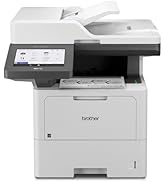
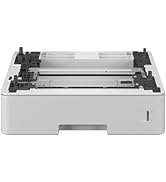

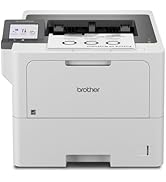


| ASIN | B0CGCBZD8B |
| Additional Printer functions | Print Only |
| Best Sellers Rank | #5,506 in Office Products ( See Top 100 in Office Products ) #44 in Laser Computer Printers |
| Compatible Devices | Laptops, PC, Smartphones |
| Control Method | App |
| Controller Type | Android |
| Customer Reviews | 4.3 4.3 out of 5 stars (299) |
| Date First Available | August 23, 2023 |
| Dual-sided printing | Yes |
| Duplex | Automatic |
| Hardware Interface | Ethernet, USB 2.0 |
| Included Components | Brother HL-L6210dw, LT-6505 520-Sheet Capacity Paper Tray, TN920 Toner Cartridge (3,000 pages)11, DR920 Drum Unit (45,000 pages)12, AC Power Cord, Quick Setup Guide, Toner Cartridges |
| Ink Color | Black |
| Item Weight | 35.4 pounds |
| Item model number | HLL6210DWT |
| Manufacturer | Brother |
| Max Input Sheet Capacity | 1040 |
| Max copy resolution black-white | 1200 dpi |
| Maximum Black and White Print Resolution | Up to 1200 x 1200 dpi Dots Per Inch |
| Maximum Media Size | 8.5 x 14 inch |
| Maximum copies per run | 150 |
| Memory Storage Capacity | 256 MB |
| Model Series | 6210 |
| Number of Trays | 3 |
| Number of USB 2 Ports | 1 |
| Print media | Envelopes, Labels, Paper (plain) |
| Printer Ink Type | Toner |
| Processor Count | 1 |
| Product Dimensions | 15.3 x 14.7 x 16.6 inches |
| Series Number | 6210 |
| Sheet Size | 8.5" x 14" |
| Total Ethernet Ports | 1 |
| Total USB Ports | 1 |
| UPC | 012502670667 |
| Warranty Type | 1 Year Limited |
S**H
Great printer!! it exceeded my expectations
The printer was easy to set up. It prints, both legal and ladder. You just have to go into the menu to select which tray you want to deliver which size. And it’s very fast. I’m very happy with this purchase. It’s a mono, print, laser printer the print quality is as would be expected. The quality of the unit is solid. I haven’t had any paper jams yet and it’s not particularly noisy.
C**H
Fast printer !
I puchased a new 'returned' version of the HL-6210DW and I made a very good decision. It was brand new, with toner already installed, packed very well and turned out to be a very awesome printer. It's very fast, quiet and creates perfect print. This machine is 'the' machine you're looking for, as long as black/white only --- suits your needs. Don't buy a color lazer printer if you can get by with black print only. It's just way easier to manage. The only downside to this machine is that it has a tiny display window, where you'll need to enter you email address and password. But it works OK, just take your time, spend a couple of minutes and get it done. Always enter your login credentials into the printer FIRST. As long as you do that, your computer will take care of everything else, including drivers and software, almost immediately. If you try to get your computer to find the printer without first entering you're wifi information, it will not go smoothly because it won't ever find it. Other than the tiny window, to enter your wifi, I'd give this computer 5 stars. I can't imagine a better or faster printer.
D**.
It works great!
Great printer once I downloaded the drivers and connected with the specific wire needed (not included- that is something they SHOULD INCLUDE!) to my laptop. Brother customer service is great when you find someone actually interested in helping you. The first time when the gal realized I did not already have the necessary cord she practically hung up on me. Told me to come back once I got it (ordered on Amazon for a small price and got the next day). The em second time the guy was extremely helpful and stayed on till all my questions were answered and then he also had me try other things to be certain it worked the. Way I wanted before he hung up. Polar opposites!
A**R
Affordable, an easy setup and simple to use !!
I'm extremely happy with the printer. Setup, including the registration process and various updated, was not difficult and the online guidance made that much easier than it could have been. In terms of printing the results are fantastic. This was a great value for the cost and the wireless connection went off without a hitch. My only issue is with the digital selection panel for choosing language and other attributes...that could have been better, but this is not at all a deal-breaker. Overall, a 4.8 out of a 5.0 in my opinion.
L**V
If the password stops working good luck to you
I loved this printer right up until it locked me out of it. I went to update the firmware the other day. It asks for a password. The password is located on the back of the machine. I give it the password. It doesn't work. I give it the password again. It doesn't work. I attempt to reset the password. I have to make an account with brother. I reset the network. It cannot find the printer now. I click "connect printer" from its app. It asks me to register. I attempt to register. It says "Authenticate your machine". I go into the other room with the printer. It times out saying "Cannot connect". - WELL I'M SORRY THE WALK TAKES A MOMENT! I try again. Repeat, repeat. First of all, why do I need a password to update the firmware? Why can't I opt out? Second, if I do have to have a password why isn't the Reset's password Default the one on the back of the printer? If this doesn't work why can't I provide it my serial number? That's also on the back of the printer. Basically, it's secure, but you secured it so well it locks out the user. Fantastic. Anyway, giant pain... this... If I might give you a friendly suggestion... A person wants to use their printer. I know, this is such a novel concept that it might be alien to you, but it's true. Have you ever gone to a college building's office where you have to talk to the minion staffer? That idiot at the desk who's only answer is, "On our website...," after repeatedly telling her, "I do not have internet?" That's this. Update: After reinstalling the iPrint&Scan app the iPrint&Scan app also stopped working. THIS IS GOING REALLY WELL, Brother! Update: Apparently there is a "Sleep" mode the printer goes into. This also can cause a "Deep Sleep" mode?? Well, the printer is currently "sleep". That's what the computer says. Whatever that means. Disabling "sleep" doesn't work. You can go to Ecology in the Settings and turn it to 0 Minutes. It still goes to sleep. There's apparently a hidden menu to turn off Deep Sleep where you perform pressing Back and - sign at the same time. I've yet to get this to show up, but I'm trying. Again, Brother, amazing job here! I think you made this as successfully asinine as a Canon printer trying to make an image without lines in it. De-moting this to 1 star. Update: This is my final update. I'm not sure what is wrong with this. It will print just fine. It connects to the computer just fine. However, it will not update. Nor will it accept its own password. It tells me it is asleep or offline, but in reality it prints when told to print. I'm guessing that is a "for now" situation since it wants to update the firmware. Unfortunately, that's not possible since it thinks the thing is offline. It does appear to be in sleep mode both from the PC and from the Printer. Again, it will print despite this, but not update. Nor accept its password, which appears to be the primary hurtle. Reinstalling the software for it a second time and resetting the computer lead to the software working. Neither the printer nor computer affirms it is working, but it prints. So, that's something. Anyway, I'm done trying. I've spent all day trying to understand what the issue is. It doesn't make sense. If the issue is that I have to turn off Deep Sleep I have a suggestion for the manufacturer. ... Don't put deep sleep behind some double press key combination. Let us just be able to turn it off and on. If that's the issue you made yourself and your users a pointless headache. I sort of understand the password concern, but I'd also like it to work if reset. That'd kind of go without saying, but apparently it doesn't work after reset. I also tried to give it a new password. This too doesn't work. Which somewhat suggests the issue is that the computer is not communicating with it completely perhaps? I don't know. Conclusion... works until whatever firmware update it wants to have and can't get kills it.
D**K
Quality printing.
We use this in the office to print invoices. We run a bank box of paper through it ever month. It's been working for 18 months! That's a record for us.
C**E
Good Printer But Fuser Unit Fails & Is Expensive to Replace
Bought this HLL6210DW to replace the HLL6200DW for my home office. Like the printer. Only gave it 4 stars because the problem with these printers is they last 1.5 to 2 years; then the fuser unit rollers start wrinking the paper; then you find out that to replace the fuser uint costs almost as much as a new printer; so you buy a new printer and junk the old one. Not particularly efficient or environmentally friendly.l
L**.
Me encanta esta impresora la mejor que he tenido en mucho tiempo la recomiendo ampliamente, rápida, eficiente y se conecta rápido a las computadoras.
A**L
Excelente equipo. Cumplió con mis expectativas. Además una atención muy rápida del vendedor. El producto llegó antes de la fecha indicada.
D**.
Have been using the product consistently for under one month and so far it is working very well. Setup was simple and there have not been any operational issues. Print quality is crisp. Great Amazon pricing and very quick delivery.
J**D
Easy to setup Works well Accessible locally or via apps
S**N
a printer that works well. Nothing special ... a good price and works.
Trustpilot
3 weeks ago
2 months ago



