Desert Online General Trading LLC
Dubai, United Arab Emirates
Desert Online General Trading LLC
Dubai, United Arab Emirates


🎉 Elevate Your Art Game with Wacom One!
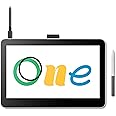
The Wacom One 13 Touch drawing tablet features a 13.3" Full-HD multitouch screen with 99% sRGB color accuracy, designed for creative beginners. It includes a battery-free EMR pen with advanced pressure sensitivity and tilt recognition, ensuring a natural drawing experience. Compatible with multiple operating systems, this tablet also provides access to the Wacom Adventure Program for additional learning resources.


| Brand | Wacom |
| Product Dimensions | 33.6 x 22.2 x 0.1 cm; 900 g |
| Item model number | DTH134W0B |
| Manufacturer | Wacom |
| Series | Wacom One 13 touch |
| Colour | Black |
| Standing screen display size | 13.3 Inches |
| Screen Resolution | 1920x1080 |
| Computer Memory Type | DIMM |
| Operating System | ChromeOS |
| Are Batteries Included | No |
| Item Weight | 900 g |
| Guaranteed software updates until | unknown |
D**D
the best entry-level compact pen display tablet out there for every beginner graphic designer/artist
I've been using this pen display tablet for 2 months already. It works flawlessly as intended. Has a very simplistic design - a pen with one button on it and screen you can draw on - and that's with no doubts all you're gonna need when starting your exciting journey with digital art and computer graphics. Works very well out of the box - almost plug & play (plug this device to your PC, instal Wacom's software and you're good to go). The features, materials used in this product and functionality are ok. The build quality is solid. After 2 months of my regular use there are no visible marks or any scratches on the surface of my screen. Tablet is very portable and light, about the size of an Ipad Pro (you can carry it with you everywhere in 14" laptop case). I find this device very useful and compiled together with a keyboard it's very convenient tool for graphics editing, digital drawing or 3D sculpting. I'm absolutely satisfied with the screen resolution, colours and brightness that comes with this product size and price. Screen parallax isn't really noticeable that much for a beginner, obviously there are high-end pro pen display tablets from Wacom with virtually zero parallax, but for entry-level product like this the parallax is very low and doesn't disrupt my flow while using. Device screen tracks the nib of the pen very accurately at any given angle - with high precision very well known and expected from Wacom's products. There is no jittering and drawn lines come out very straight and smooth. Installation process is very simple and device is very intuitive to use providing very good overall user experience. My personal and subjective review and opinions, but I thought it might help some of you make your decision :) (also if you think that touch screen feature missing in this tablet is going to be very important for you, there is a Wacom Cintiq Pro 13 for nearly twice price of this model which I think is still a good deal for a compact pen display tablet)
V**_
Used for drawing in Photoshop.
Absolutely Love it. Good for the price.This is my first screen display. I previously used a Wacom Tablet to begin with and decided to venture on, once I was able to put a little more money towards a drawing tablet with a screen.I spent so many hours looking at reviews from all sorts of brands , XP-PEN, Huion, Wacom, and many more. I know many people prefer XP-PEN and purely for the fact it's a lower price, however, as I never had purchased an item from XP-PEN before, I was very hesitant, and decided to stick to the brand I knew that was known for good quality. So I took a leap of faith and purchased the Wacom One Creative Pen Display for my first screen display.The quality of the tablet is good. It was very simple and easy to set up. The screen size is decent, especially for those who don't have the biggest amount of space on their desk. I tested the pens a few times before I started drawing and saw virtually no lag at all.I am so happy I chose this Tablet. I'm already using it to draw in Photoshop and believe it's already improved my drawings, in the sense that, because I can now draw straight onto the screen, on a bigger tablet, and am not having to constantly stare at my laptop, whilst drawing on a separate device, it's like I'm drawing straight on paper again. I can't speak for everyone when I say this, but my detail and blending and overall quality of drawing is, in my option, better, and I believe it's due to the fact I'm drawing straight onto the screen. Not everyone may think this, but each to their own.The only thing I would change, is the stand attached at the back. It's a perfectly good stand for those who like to draw with the paper or tablet more flat but I prefer it at more of an angle. So I just used my laptop stand to do so, works fine! For me, no need to buy a particular stand for this tablet. Also, the lightbulbs ever so slightly reflect on the screen, but it's easily fixed.... Just reposition the screen! 🤷🏻♀️ It's not that bad.I can't wait to complete my latest drawing using this tablet. Maybe in the future I'll venture out again for an even bigger screen, but for now I am more than happy!l with this one. I wish I could have purchased it sooner.
N**M
Fantastic, way better than expected.
Excellent product, works well with Android phones and tablets and with Windows, either plugged in or over Bluetooth. Surprised how good it is as I've been searching for a way to take & convert handwritten notes and this works better than a Kindle Scribe which is 10x the price.
C**A
Great tablet display - just awkward setup
Bought this during Black Friday sale. Wanted to upgrade from my basic wacom and try a display tablet for the first time. This was definately a great investment for the price!Complaints:1. the tablet size is pretty big for what I had in mind (not small enough to just hold comfortably in your hands which was my original intent)2. the cables are long and awkward. One end splits into a HDMI and USB heads, which have to be plugged into the laptop, and the other end is the power adapter and the plug in connector to the tablet. While all this surprisingly can be stored away easily and can can look neat when in use, ultimately it just ends up a bunch of cables that is unnecessary. Wacom just needs to make it more simple.3. This all purely depends on the resolution on your laptop - the display on the tablet doesn't show up sharp.
Trustpilot
2 days ago
2 weeks ago