
🔥 Level up your game with MSI RX 580 – where power meets precision! 🎯
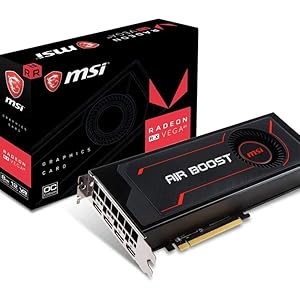
The MSI Gaming Radeon RX 580 8GB GDDR5 graphics card delivers robust 256-bit memory bandwidth and a 1340 MHz core clock, engineered on AMD's Polaris architecture. VR-ready and optimized for DirectX 12, it supports ultra-high resolutions up to 8K and multi-display setups, ensuring smooth, artifact-free gameplay with enhanced color and contrast. Dual fans provide efficient cooling for sustained performance, making it a top choice for serious gamers and content creators alike.
| ASIN | B078Q78L93 |
| Best Sellers Rank | #1,978 in Computer Graphics Cards |
| Brand | msi |
| Card Description | AMD Radeon RX 580 8GB Graphics Card |
| Chipset Brand | AMD |
| Customer Reviews | 4.4 4.4 out of 5 stars (3,107) |
| Date First Available | December 30, 2017 |
| Graphics Card Ram Size | 8 GB |
| Graphics Coprocessor | AMD Radeon RX 480 |
| Is Discontinued By Manufacturer | No |
| Item Dimensions LxWxH | 7.79 x 1.57 x 4.41 inches |
| Item Weight | 1.21 pounds |
| Item model number | Radeon RX 580 8G V1 |
| Manufacturer | MSI Computer |
| Max Screen Resolution | 7680x4320 |
| Memory Speed | 1340 MHz |
| Product Dimensions | 7.79 x 1.57 x 4.41 inches |
| Series | Radeon RX 580 8G V1 |
B**5
If you cannot get gtx 1050 due to system configuration, then consider this card. I did and like it alot.
This my opinion of this msi Rx 550 Lp card. i have a dell 780 desktop with 255W PSU. You will only need one slot, but have room for the dual fan.That is why its like a 2 slot card. Thankfully it fits,and work i my system. my previous card was a GT 1030,and it was fast,and a great card,but it let me down at times with the games freezing,and stuttering at times with my system,and lack features like ansel,or anything to make it a GTX. I also realized that i will never be able to get a GTX 1050 in my system which has 112 GBs cause of its design has to have two pci slots,and i got no pci slots left. This Rx 550 also has 112 gbs,and not as fast, but it performs superb,and smooth and fluid. i run it without chill or the frtc so it can be its fastest. i tried a comparsion on my system with its rival GT 1030. To me even though it has a slower boost clock it runs smooth,and and faster on most games including aaa games on high or max settings then the gt 1030.besides you do not really notice anything but smoother running games.Its already factory overclocked,and if i overclock it i get only a few more fps. so i do not use it. It also has better visuals,and brighter colors,and the crimson relive software is great cause you have control of everything on the card,and even overclock with amd wattman. I play action,fps,simulations,flight,and others and its performance is amazing during game play,and also esports play them too. i am not knocking the gt 1030 cause its a great card too, but i think this rx 550 is better. But brought it for performance in all games with high,max and ultra settings at 1080p,and my media experience is all hd. which is crystal clear,and sharp. the crimson relive software give you everything to make a true RX card. One thing I know if struggles gaming during play I have not seen it yet. Train sim 2017,and fsx run smooth with ultra settings.i mention this games cause they are graphically demanding,and they use to freeze for a brief moment,and now they do not. I also love the dual fans keeps my card cool even with a heavy load during are gameplay,and they quiet too. the main thing about the dual fans is a better cooling overall. 112 gbs is better then 48 gbs,,and that equals better game play,and overall performance which is what i was looking for. i am happy with this card,and recommend it.
C**G
msi RX 570 Armor mk2 8g OC video card
2 day shipping took , 2 days and 3 hours . That's 5star shipping . msi RX 570 Armor 8g OC ( generation 2 ) newer boards have 2 HDMI , 2 DP , 1 DVI-D ( BIOS March 2018 ) One 8 pin power connector . board length 10.6 inches . about 2 pounds ( 892 grams ) 2048 Stream precesses ( half that of the new RX 5700 ) 224 Gig Bytes of memory bandwidth RX 570 . 448 Gig Bytes of memory bandwidth RX 5700 . RX 570 170 RX 5700 350 RX 570 half price for half the performance , at about the same power . Below details setup and game use : quiet fans , 5 watts when on desk top . runs at a max temperature of about 74 C under full load . Temperature can be less when making custom wattman profiles . room temperture plays a factor with GPU temperature . Max power is about 106 watts under full load using default voltage values . When under-Volting , max power is about 96 watts under full load . How to keep it cool : Back Plate radiates a lot of heat . to keep the case inside cool , a fan ( 3 inches or so ) can be set on top of the GPU Back Plate , with the Fan blowing\venting straight out to room environment . Cass temperature is now normal . Mother board and video card have temperatures as expected . The card has massive ( 2 fans and heatsink ) but no venting to outside of case ( You must find a way to Fan Vent the case ) Stays cool best when the Fans have direct access to ambient air intake , while Fan venting the case to ambient room . ( Shrouds might help , not using shrouds here ) Back Plate can get warm . Keep ALL cables OFF the back plate . Heat will eventually soften the rubber sheething and ruin the cables. custom wattman profiles : GPU 1165 Mhz at 900 mV , Memory 1750 Mhz at 900 mV ( Under-clocked and under-volted , 60 watts at 60 C , ( this is my main use game profile ) or GPU 1400 Mhz at 1100 mV , Memory 1400 Mhz at 765 mV ( overclocked , 85 watts at 71 C ) or GPU 1400 Mhz at 1100 mV , Memory 2100 Mhz at 1000 mV ( overclocked , 96 watts at 74 C ) or GPU 300 Mhz at 750 mV , Memory 300 Mhz at 750 mV ( desktop use , 5 watts fans OFF , at 30 C to 39 C ) or use their "Default" : auto ramps GPU from 300 Mhz to 1286 Mhz . Note : all of my custom profiles set GPU "State 1" min = max all of my custom profiles set Memory "State 2" min = max Thus ALL frequencies operate at "Fixed Frequency" No ramp up\down . ( CPU has very little impact on GPU fps performance ) Fan curve : 25 C at 31 % 50 C at 31 % 60 C at 60 % 70 C at 70 % 85 C at 90 % ReLive recordings : 4k at 30 fps 2k at 60 fps press Ctrl-Shift-R anytime to start\stop recording . only have a 1080p monitor\TV ? you can still record in 4k . use SVR ( Super Virtual Resolution ) ( if you have a 4k monitor\TV , SVR has No purpose ) When using SVR with your 1080p monitor\TV , turn SVR On in Radeon "Display" Tab Settings . ( i recommend a reboot after SVR is turned ON\OFF ) when in game menu , you now have 3840 x 2160 resolution choice . all GPU processing occurs at 3840 x 2160 , then the output to the Frame Buffer is down scaled to 1080p for your 1080p monitor\TV . When pressing Ctrl-Shift-R , the game will now record using the GPU internal 4k processing . you can game at 4k and record at 4k , while using a 1080p monitor . or you can choose to stay at 1920 x 1080 game resolution and record at 1080p . processing still occurs at 4k inside GPU . Something of a hardware Super-Sampling mode . or keep SVR OFF , and ( play and record ) at 1080p , on your 1080p monitor\TV . Recordings are ( h.264 or h.265 ) to .mp4 your choice . Audio has perfect sync . bit rate slider max at 100 Mbps . Recommend using AMD HDMI audio sound device when recording . .mp4 imports into Vegas 14 or newer for HEVC h.265 . Want to record the desk top at 4k , on your 1080p monitor\TV ? yes you can . With SVR ON , now go into window' Settings and and set Display properites to 3840 x 2160 . All desk top processing now occurs at 4k inside the GPU , while the desk top is scaled down to 1080p . Screen captures and recordings are Full Quality 4k . The desk top fonts may take on a slight fuzz because of the down sampling to 1080p however , the desktop 4k recordings come from the GPU at Full quality 4k . Whenever windows display resolution is set to 4k\2k , i recommend a reboot . Radeon Overlay : Radeon Settings , click "Preferences" Tab at bottom of Home Screen , click "Show Overlay" . Overlay is now available but NOT yet visible . Now press ALT-R to show the full overlay Menu . or press Ctrl_Shift-o , to view GPU stats . Dying Light does NOT like the showing GPU stats( overlay ) when in SVR using 4k in game menu . the AMD driver will crash . ( for normal gaming , keep ALL overlays OFF , "Show Overlay" OFF ) passive Speed boost performance smoothness increase . "Shadow Map" in game setting : do NOT use AA . Blur is ok to have ON . Moti0n Blur is the Continious Bluring as you move ( i keep this OFF ) Dying Light , reduce Shadow Map from "Very High" to "High" All remaining settings can be ON to the max , including Nvidia post processing . runs nice at 1080p . "Witcher 3" , reduce Shadow Map from "Ultra" to "High" panning is now smooth at 1080p . DOOM 2016 with Vulkan API , does NOT seem to have Shadow Map size issues . thus Shadow Map "Nightmare" works just fine at 1080p . 8 gig VRAM is plenty to access max Shadow Map size , but , causes too much pixel processing on the GPU to determine which pixels are found to be "in shadow" and than to paint each pixel that were found to be "in shadow" to black\gray value .
J**Y
I love the Vega 56 Air Boost 8gb OC from MSI.
I had upgraded from an XFX 570 XXX 8gb Edition to the MSI Vega 56 Air Boost 8gb OC, believe me when I say that you should get an adequate PSU, specifically one in the 650w range, but if you want to future proof it for future graphic cards then get a 1200w PSU or the biggest best brand PSU that you can buy. I say this because I have a 600w power supply from EVGA. Apparently, it isn't powerful enough to run the AMD 2nd Zen 2200g CPU, along with an ASUS TUF X470-Plus Gaming motherboard and 2 16gb Kingston's HyperX fury black 2666MHz DDR4 memory cards and the Vega 56. The graphic card just kept getting too hot, at temps of 79c to 85c and it would just die suddenly, sending my screen into the black abyss of death. The solution was to use the Afterburner software, where you can download from the MSI's website, to under volt the card. Now it works like a charm with temperature spikes only around 71c, but mostly it stays down around 59c to 62c when in a game. The fan is quiet. it only goes at only 49% of its total speed. all-in-all, get a big enough PSU and it should run cool and smooth for you, but if not you can use the Afterburner software to under volt the card. I have mine set on -100, you can also adjust the fan manually, but that could cause the fan to stay running, at least it did with me. So, I had to set everything back to default, and just settled for under volting the card. I would definitely buy this card again if I had the money. But my next purchase may be a 2nd or 3rd rDNA 7nm Radeon Graphic's card that can possibly do ray tracing. But with everything that I said, I only had this card for a little under a week, and MSI' Vega 56 seems to be of the best quality for this specific card. plus, it just looks cool.
竜**三
Mac Pro 2012にMojaveをインストールするために購入しました。既存のグラフィックボードと差し替えるだけで問題なく認識しました。Mojaveのインストールにはファームフェアのアップデートを要求されますが、これも問題なくインストールできました。 ただAmazonの表示では予定日を過ぎても荷物の追跡番号が表示されず、日本郵便が届ける表示になっていましたが、実際に届けてくれたのは佐川急便でした。その分だけ星をひとつ差し引きました。
R**Z
I chose this GPU card as I was on a very tight budget. Installed on my system comprising the Ryzen 5 2400G, 8GB Corsair 3000MHz XMP 2.0 RAM and Asus Prime A320 mobo, the GPU is a beast! I play Doom, PUBG (PC), Dirt Rally, Battlefield 1, Wolfenstein: New Order, Quake Champions at my screen's (Samsung CF24 curved with FreeSync) native 72fps very comfortably! Outstanding performance in Illustrator and Premier Pro. The Adrenalin config app is easy to use. Relive lets me stream games to my phone! Similar to Steam streaming. Relive also lets me monitor system performance with fps, temps, clock and mem speeds, fb usage etc. remotely and wirelessly to an android device. NEAT! MSI Afterburner allows overclocking and I've managed to reach shader clock speeds of 3000MHz and mem clocks to 1850MHz. Though overclocking is a bit limited, its certainly enough, just make sure there's enough power available from the PSU and is provided gracious cooling. I have a 450W Corsair PSU but I suggest you get at least a 500W one. I believe this has the best value for money in all of my purchases ever!
A**.
It works perfectly on my new PC that I just assembled from scratch.
M**A
Easy to install and auto detect by motherboard
A**E
Ein Produkt das meine Erwartungen endspricht. Installation Problemlos und der Betrieb von 4 Monitore läuft sehr gut. Die Grafikarte ist Geräuscharm und akzeptabel. Denke das es kein schlechter Kauf war!
Trustpilot
1 month ago
2 weeks ago



