🎶 Own the beat. Own the moment.
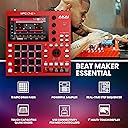
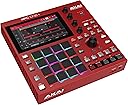
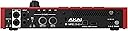
The Akai Professional MPC One+ is a standalone drum machine and MIDI controller designed for professional beat makers and producers. Featuring 16 velocity-sensitive RGB pads, a 7-inch multi-gesture touchscreen, and wireless WiFi/Bluetooth MIDI connectivity, it empowers music creation without a computer. With 16GB internal storage, expandable via SD card, and deep integration with Native Instruments and MPC3 software, it offers a powerful, portable production hub. Despite a noted volume knob hardware flaw, its workflow and feature set make it a top-tier choice for modern music creators.


| ASIN | B0C3RN1RTS |
| Battery Type | Lithium Metal |
| Best Sellers Rank | 5,350 in Musical Instruments & DJ ( See Top 100 in Musical Instruments & DJ ) 43 in MIDI Controller |
| Colour | MPC One + red |
| Compatible Devices | Audio interface, Drum machine, Laptop, Mixer, Monitors, PC, Synthesizer |
| Connector | USB |
| Customer Reviews | 4.6 4.6 out of 5 stars (430) |
| Date First Available | 30 May 2023 |
| Hardware Interface | USB 2.0 Type B |
| Hardware Platform | Mac, Windows |
| Instrument Key | Any |
| Item Weight | 2.2 kg |
| Item model number | MPCONE+ |
| Material Type | Metal, Plastic |
| Mixer Channel Quantity | 2 |
| Musical Style | electronic |
| Number of Keyboard Keys | 16 |
| Product Dimensions | 28.3 x 27.5 x 6 cm; 2.2 kg |
| Size | misura individuale |
| Supported Software | Any Digital Audio Workstation compatible with Windows / Mac OS |
J**6
The MPC One+ Review: Great Workflow, Systemic Hardware Flaw – READ BEFORE BUYING
The MPC One+ is a great piece of kit that significantly expands on the original MPC One by upgrading the internal storage (16GB) and adding essential Wi-Fi/Bluetooth capabilities. It’s a powerful standalone workstation that offers solid value, but as I learned, buyers must be aware of a critical component quality control issue that significantly devalues it. The Good: Why the MPC Workflow Works (5/5) Standalone Power & Portability: The freedom from the computer is the main draw. The core performance is solid, and you can sequence and arrange entire tracks right on the sofa. For true portability, you can use a portable battery (I successfully used a myVolts Ripcord - USB to 12V DC power cable connected to an INIU 20000mah mini power bank with 65W). Tactile Feel: The pads are responsive, the touchscreen is good, and the Q-Link knobs are fantastic for real-time parameter modulation. Connectivity & Storage: Built-in Wi-Fi and Bluetooth are game-changers, making it much easier to integrate MIDI controllers wirelessly and download plugins without constant tethering. The jump to 16GB of internal storage is a huge quality-of-life improvement for plugins and expansions (I use a 128GB SD card for projects and samples). The Reality Check: Critical Component Quality Control (1/5) The Master Volume Knob Defect: I discovered this systematic flaw on numerous replacements that I tested—they all exhibited the same issue. When setting monitoring levels at low volumes, the right audio channel starts rising significantly before the left channel engages. This poor channel tracking makes it impossible to set a perfectly balanced stereo output at the lower end of the volume range—a fundamental flaw for critical mixing and monitoring. Manufacturer Response: Akai's parent company (InMusic) suggested this severe imbalance was "normal behavior," which is unacceptable and dishonest for a professional audio device. This highlights a clear lack of quality control for low-tolerance stereo components. (Note: You can bypass this flaw by routing audio through a USB audio interface and controlling the overall volume there, leaving the MPC knob dormant.) Verdict The Akai MPC One+ is a fantastic choice for standalone production. It’s a 9/10 for workflow and features. However, based on the component quality issue and the manufacturer's unwillingness to address a clear functional defect, I am rating this 5 stars for visibility only. The true score is closer to 3/4 stars. Advice for New Buyers: I strongly advise any new buyer to immediately test the main volume knob with a consistent stereo signal playing upon arrival. Turn the knob slowly from zero to ensure both the left and right channels track simultaneously and maintain a stable stereo image across the entire volume range.
D**S
Solid as a rock
Quite pleased with the quality of both hardware and software. Steep learning curve but totally worth it.
S**E
Excellent piece of kit
Excellent piece of kit, over the moon at being able to grab one at a decent price. If you want to work DAWless then I highly recommend the MPC one+ - it can be a steep learning curve to begin with but I wouldn't want to work any other way. Solid piece of equipment that you can do just about everything on and you don't even need to look at a computer screen.
J**N
Love it, and so will you.
For years I've flirted with the idea of trying an mpc, and in a moment of spontaneous must have it, I decided I was finally going to order one, in fact a one+. After opening the Akai One+ box, I was pleasantly surprised to see a nice colour high quality card with an image of the One+ and all it's function buttons explained on it, nice touch Akai. The One+ is a very nice looking piece of equipment, the red livery isn't a bright red, but a deep sumptuous red like a plum tomato, and everything is laid out very logically, with a lovely clear touch sensitive screen that is pretty responsive and very legible. The pads themselves I found a bit hit or miss, and I couldn't get them to trigger very accurately, but after a small tweak in the sensitivity settings, they were absolutely amazing. Then there's the WiFi for downloading your purchased plugins, and Bluetooth too. Booting up the One+ for the first time, I had that sinking feeling that I would be lost, and wouldn't have a clue how to use it, but that idea was quickly diminished and in literally no time I was knocking out beats. Over the last few days since it arrived I've delved further into what it can do, and I'm finding new tricks and workflow techniques that just seem to emphasise just how good this little red box is, I find myself spending hours in my living room, headphones on, just getting lost in music, and that's where I'm happiest, my wife describes my look as perma grin when I'm playing around on the One+. The mpc One+ plus can run 8 instances of Akai plugins, which are very good I may add, and multiple expansions including one hits, samples, and drum kits, and initially I thought this was quite limiting, but oh, how wrong I was. Not only can the One+ run it's internal goodies well, but it can also control external midi gear very very well, I've had an Access Virus Ti and a Roland JD-XI connected to it, and the world of what the One+ can do suddenly becomes a universe. And then there's the sampling, where you can record in audio and manipulate it to your hearts content, pitching and stretching and chopping, it's just fantastic. I'm kinda mind blown with the One+ can do, and this is the baby of the mpc family from Akai, so I can't even begin to image what it's bigger siblings can do, but for me, I'm a happy chappy right now, enjoying making beats and tunes. I'm an Ableton guy, and I know the One+ can use the link feature, but I've not even got that far yet, Are there downsides to the One+? Well yeah, but more gripes than real flaws, the headphone jack input is a bit lackluster, it's a bit wobbly and causes sound drop outs, and I'd much have much preferred it to be for 1/4 inch jacks, but really in the few days I've had it, that's all I've found so far. I love the One+, and I'm sorry Akai, I should have bought an mpc years ago, my bad. So my final closing statement can only be...... Wow, I love it, it makes music and it makes me smile, and that's really all that matters.
P**L
Ease of use
Ordered the Akai MPC One + as i always wanted a MPC. Took me a little while to get around at 1st then i got in to it. Nice screen is the best feature which is touch screen with the ability to use VST plugins & 3rd party. I highly recommend the purchase of a SD card too. SDHC or SDXC card will work just fine when downloading & installing VST plugins, projects & Samples. I purchased a SDXC SanDisk 128GB Extreme. The internal storage is 16gb where half is used for the system & everything else. Overall great standalone groove box that does it all. Hope this helps.
N**S
Reçu rapidement... Livré devant ma porte avec le code demandé par le livreur.( Livraison sérieuse). Le colis est en bonne état,pas de signe de mauvaise manipulation. Et l'article fonctionne a merveille.
A**O
Me encanta !!! más fiable que un ordenador para llevartela en los directos, aunque para componer sigo utilizando el Logic Pro para llevarte tus secuencias con la banda es una maravilla, 100% recomendado, ahh!! los instrumentos virtuales y efectos de muy buena calidad,
T**M
I know drum machines and DAWs pretty well, but I am songwriter, guitarist, bassist, and singer, not so much into pure electronic dance music (techno, house,...). But I love Kraftwerk, New Order, ..., Depeche Mode, which was the reason to buy this instead of a standalone drum machine (to sprinkle in sequencer and keyboard support). This is an excellent and very powerful standalone version of a DAW/Midi controller/Sequencer/sampler, and goes far beyond a drum machine (while covering it more than sufficiently). The sound quality and number of features is impressive, and one realizes quickly that Akai really understands what musicians need and could use (even more exotic functions). I was positively shocked that one for instance can add to each drum sound or sample up to four independent effects (from a great selection). Once knowing how to find your way around, it is so much faster than working on a computer. The ease of use becomes greater and greater thanks to the multitude of ways/combinations of using the touch screens, buttons, and dials. But only if one is familiar with terminologies and the tasks involved, which takes a while - since there are so many ways to accomplish a task. A few terms are unique and unusual when comparing to the usual DAW industry terms, but it's not a big deal. If you buy this as a beginner, this technology requires in general some intense learning, so do not expect that much can be done 'plug-n-play' unless one is a quick learner and understands the used terms quickly. Tutorials on Akai and Youtube are plentiful, and many are very good. Unfortunately, the user interface on many videos is different from mine, maybe since I am using an updated version of the software, so this complicated things a bit for me until I played with the menu and features. Here two little concerns: 1) Sampler and sound editors are included that can sample up to 20 min. So, in theory, one could write an entire song with bass, guitar, vocals as samples/tracks, and then arrange a song, but I frankly haven't seen any tutorials on this. Probably since mixing/mastering is still best done with a DAW using plugins and VSTs that are specialized and more powerful. I assume it is possible to actually do an entire song, and the memory/processor powers should in theory be sufficient to do so. But also see my 2nd point. 2) The preloaded samples, instruments, and sounds are mostly for modern and 100% electronic music. There are only a few complete (acoustic) drum kits preloaded (or classics like TR808, TR909). But pages over pages dance/house/hip hop/... kits with 6-7 drum sounds (1-2 kicks, 1-2 snares, 1 handclap, open/closed hihat, maybe 1-2 toms or a cymbal) and 8+ samples of some synthesizer sounds, vocal bits as heard on rave parties, etc. So, Akai targeted a certain clientele in my opinion, and somehow tried to 'lure' people who like to copy/make some dance music with a few clicks of a button. This is not meant to be critical, but the machine can do so much more. It for instance could easily double as a live recording device out of the mixer, or for rehearsal recordings. I definitely plan to use it for songwriting and publishing. I know that I will have to import a few more drum kits, and find a few more instruments to cover my style of music, which is alternative e-rock/e-pop based on early 80ies sounds.
T**A
Perfeito para quem busca produção musical.
A**ー
I bought an MPC ONE+ after years of dabbling around with an NI Maschine MK2 and a Roland TR-8S. Both have good and bad points, but I'm not here to review them. Prior to buying the MPC ONE, I also tried moving forward with a Novation Circuit Rhythm and that was a total disaster. I packaged it up after 2 days and filed a return with no regret. They have no idea what they're doing, but again, I'm not here to review that (haha, I actually did review it elsewhere on Amazon, feel free to search for that review). I'll start by saying this: the MPC ONE is an absolute BEAST. It is everything I've ever dreamed of when it comes to a standalone "DAWless" do everything machine. Of course the machine itself is essentially a DAW, but since I don't need my aging laptop then I'm happy. I'll begin by saying the bad points, then I'll mention a few of to the good ones (there's way too many to list). First, I was not impressed that a nearly 100,000yen machine doesn't even come with an instruction manual. It did include a "quick start" guide, which was MUCH MORE than what the Circuit Rhythm came with (a postcard with a QR code), but that's not typical for Japanese products. Now I know the PDF manual is 532 pages, but scrolling through it is so terrible when you're just starting with this device. The printed manual should have been an option - I would have gladly paid extra for it. Or at least they could provide an abridged printed manual similar to what Roland does (although the Roland manuals are terrible so I don't think that's a good example). Next, the power supply - or rather, the power brick - is huge and so totally un-necessary in 2024. The voltage input on the ONE+ is DC 12V barrel center-positive, it should have been USB-C 12V. Well in my case I ended up buying a 12V USB-C PD to 5.5x2.1mm barrel PD trigger cable. It costs about 1000yen here on Amazon and works perfectly with a USB 3.0 PD compliant charger (12V/3A). Now I can use the MPC ONE+ with a portable battery or any AC/DC USB-C power adapter. After a few weeks it still works fine. I guess that's a big advantage over the MPC ONE (not plus) which requires a wacky 19V. The next issue that bothers me is the tiny pads (they are much smaller than other MPCs), and the crappy plastic knobs. The stock knobs have grooves and are flanged at the bottom so they are somewhat easy to operate, but they just don't look or feel good. If you have big hands (I don't), you probably won't enjoy turning them because they're so small. I quickly replaced them with some knobs I found at Marutsu, and they look and feel soooo much better. The final issue I have with this MPC ONE+ is the sound of the buttons, like the REC, PLAY, UNDO, etc.. they are so loud! What is this, 1988? I really wish they weren't so clicky and clacky, I just can't use it while the kids are sleeping. I know other MPCs have nice smooth/silent buttons, and they really should have done that with this instead of trying to keep a retro feel. As you can see, pretty much all my complaints are aesthetic. From my experience with other machines in this category, the MPC ONE+ is just so incredibly amazing. If you forget the nitpicking I made early, there's just no other reason someone wouldn't like this. The interface is extremely simple to use, so even if you have no idea what you're doing, you can start using it right away and do really cool things. You don't "need" to read a manual (although I highly recommend it, along with the "MPC B*ble" by Andy Avgousti). I love that I can sample directly into it (unlike the TR-8S), I love that I can timestretch and pitch adjust and do a whole bunch of things to my samples and get actual visual feedback (unlike on the Circuit Rhythm which is a joke in that department). I love that I can basically create an entire song on that one machine without "needing" to worry about it crashing, or an update popping up on my screen, or any other issues that computers carry with them. I can use it while idling in car and hook it up to my Korg Volca with ease. It has WiFi which is extremely useful for updating the firmware and downloading plugins. Did I mention I was given a choice of a free plugin and I chose Jura, which costs like 18,000yen or something! I also purchased the Stems plugin for like 1000yen but that's a flop on the standalone version - although I heard it works really well in controller mode (with a computer, sigh). Hopefully they'll fix that in the future, it's not super necessary anyways and didn't cost much. Earlier I mentioned the MPC ONE+ is a beast, and I'm not even joking. The amount of features and options and included sounds and samples etc is just insane. I personally still love creating drum beats on the TR-8S, but now I can sync it perfectly with the MPC ONE and just sample or record my tracks onto the MPC ONE and continue without the TR-8S, at least until I need another drum beat. Even better, the TR-8S works perfectly as a MIDI controller when plugged into the MPC ONE, so I can use its faders and knobs to control the mixer - which makes mixing sooo much easier as well. I love that I can hook up my audio interface to the MPC ONE and just use those inputs and outputs instead of the builtin ones (note: when doing that, the inputs/outputs, even the master volume and record volume are disabled, but not the CV/MIDI IN/OUT thankfully). I do wish it had more I/O but I guess I could have gotten an MPC X or something for more, but then it's not really portable so.. yeah this is great. Honestly if you're considering between this, a Maschine+, or some other standalone "DAWless" all-in-one machine, you really can't go wrong with an AKAI MPC ONE+. The Maschine+ is much more expensive and I absolutely hate all of NI's software, so that's something to consider. I was also burned badly by the "just pay us to upgrade Maschine 1.8 to Maschine 2.0" fiasco so I gave up on them. The Novation Circuit Rhythm is kind of like a kids toy except to use it you need to MEMORIZE a bunch of color combinations and codes and/or do everything blindly (by ear) because the device is just so poorly designed (by designers, not musicians). If you're just getting started with music, or a seasoned vet, I can pretty much guarantee this thing will blow your mind. I think it's priced just right, and despite the minor annoyances I listed above (things which I wish they would improve), I still think it was absolutely worth every penny. If you're still undecided between the plus or non-wifi version, just remember the ONE+ runs on 12V instead of 19V, and it's red. Just those two things make it so much better. As a final note, don't ask me about removing the plastic screen protector (in my photo). I'm still waiting for my glass film protector and carrying case to arrive haha.
Trustpilot
3 days ago
3 weeks ago