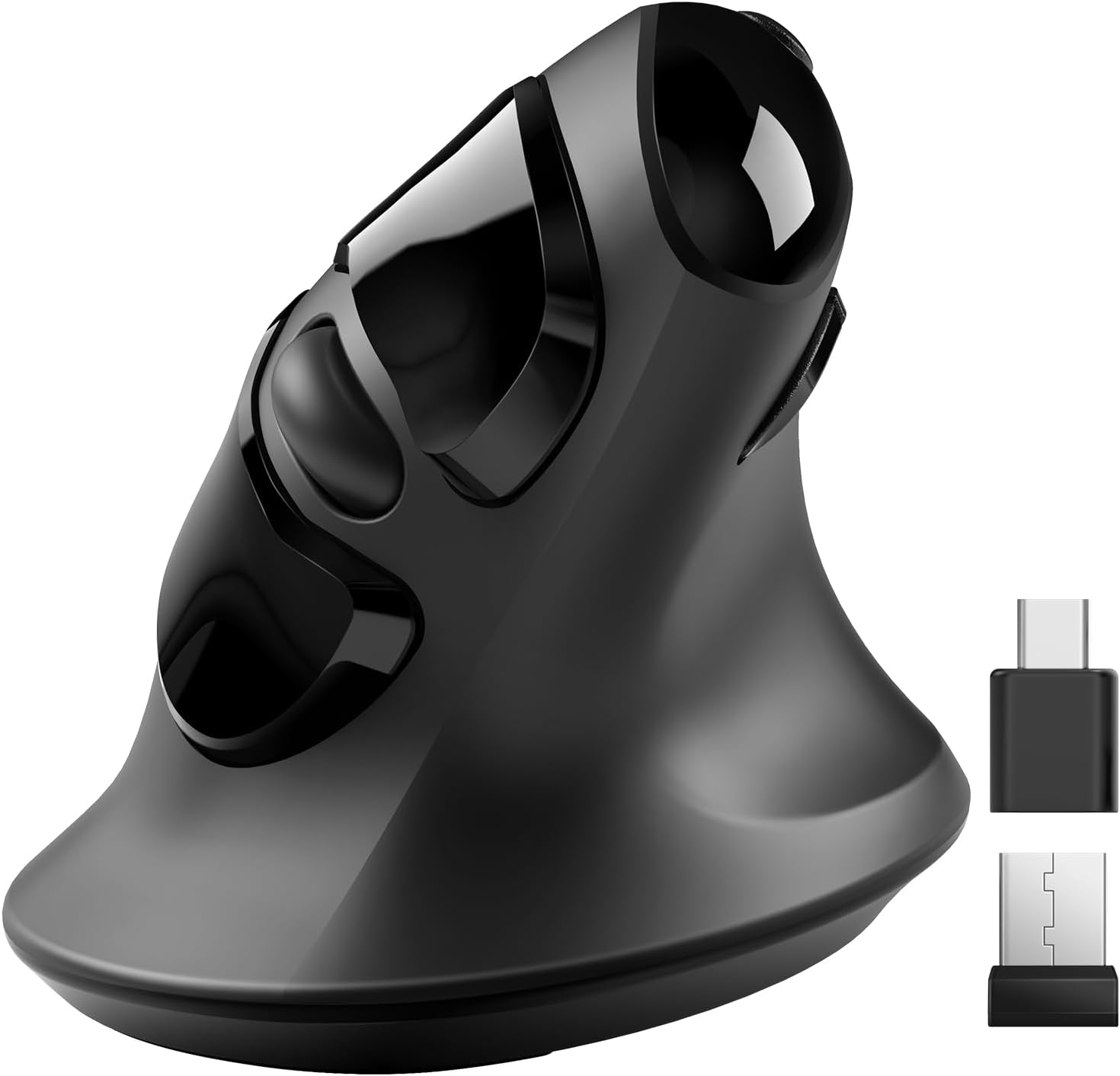
🖱️ Elevate your workflow with ergonomic precision and wireless freedom!
The MicroPack Ergonomic Mouse features a unique 60º vertical handshake design that minimizes muscle strain, making it ideal for professionals seeking comfort during long hours. It offers adjustable DPI settings (800/1200/1600) for precise cursor control, compatible across Windows, Mac, Linux, and more. Equipped with silent buttons and dual USB-A & Type-C receivers, it ensures quiet, versatile connectivity. Powered by a single AA battery with an 8-month lifespan thanks to auto-sleep mode, this wireless mouse blends durability, portability, and ergonomic innovation for a healthier, more productive computing experience.


| ASIN | B0BWJ5759Y |
| Additional Features | Ergonomic Design, Lightweight, Portable, Soundless, Wireless |
| Antenna Location | Laptop |
| Are Batteries Included | No |
| Are Batteries Required | Yes |
| Battery Average Life | 8 months |
| Best Sellers Rank | #536 in Computer Mice |
| Brand | MICROPACK Digitally Yours |
| Built-In Media | USB A & Type-C Receiver, 1 AA battery |
| Button Quantity | 3 |
| Color | Black & Type-C Receiver |
| Compatible Devices | Laptop, Notebook, Personal Computer |
| Connectivity Technology | USB, Wireless |
| Customer Reviews | 3.9 out of 5 stars 750 Reviews |
| Enclosure Material | Plastic |
| Hand Orientation | Ambidextrous |
| Hardware Platform | Laptop, PC |
| Item Dimensions L x W | 4.28"L x 3"W |
| Manufacturer | MicroPack |
| Model Number | V03W |
| Mouse Maximum Sensitivity | 1600 Dots per Inch |
| Movement Detection | Optical |
| Movement Detection Technology | Optical |
| Number of Batteries | 1 AA batteries required. |
| Number of Buttons | 3 |
| Operating System | Chrome OS, DOS, Linux, Mac OS, Windows |
| Power Source | Battery Powered |
| Range | 33 |
| Special Feature | Ergonomic Design, Lightweight, Portable, Soundless, Wireless |
| Style Name | Modern |
| Unit Count | 1.0 Count |
| Warranty Description | 1 year manufacturer |
W**N
Would be perfect if I could run 2 or 3 devices on it.
BUT the ball moves if it's not level. I don't yet have a level surface for my input devices, but since I like this one I'll make it happen. If you let it tilt to the left a little bit the cursor will move when you take your thumb off the ball because the ball will move slightly. This can lead to mis-clicks. All of you using a proper desk or table should never have this issue. I compute from my couch with a big rounded armrest--and is why I had to quit using mice. I did have trouble getting it up to speed on one system to I swapped it to the other one where it works fine. If it weren't for this I'd buy a second one for the other system, but a new release of Mint should fix that, and it's up. I just haven't done the upgrade.
G**Y
For Carpal Tunnel Relief
I've used trackballs for years. For me they allow easier and more precise control. I suffer from right wrist carpal tunnel and after a half hour or so of computer use my right hand goes to sleep. My doctor suggested a handshake type mouse is a more natural position and might offer some relief. Following a fairly exhaustive Amazon search I purchased both of the MicroPack Ergonomic Wireless Mouse's or more correctly Mice on offer. I was looking for a wired model but could not find one meeting my requirements . The Micropack Wireless Models were the ony ones I could find that could address the carpal tunnel. I'm keeping both but I like the other one best. It gives you the option of rolling on top or on the side which is good because when my carpal tunnel kicks in, the thumb does not cooperate. However, I like both of them.
C**R
Pick another mouse to hate
Ah, the ergonomic mouse that promised comfort but delivered nothing but frustration. If only I could give it negative stars, I would. This piece of "technology" is a masterclass in disappointment. At first glance, it looks like it could be the ergonomic mouse of your dreams. It fits your hand perfectly, and the sleek design gives the impression that it means business. But don't be fooled by appearances, for this mouse is a wolf in sheep's clothing and I'm definitely not on Team Jacob. The first sign that something is terribly amiss is its complete inability to respond. It's as if it takes pleasure in ignoring your every command. You move the cursor, and it just stares back at you, mocking your futile attempts to get work done. Oh, but don't worry, it's not entirely heartless. It occasionally decides to grace you with a response, but only after a series of desperate beatings on your desk that make you question your sanity and the state of your mouse. Yes, you read that correctly – this ergonomic marvel requires physical abuse to function properly. It's like it's in a toxic relationship with your desk and needs a good thrashing to rekindle its love for work. If I could return it after giving it a few rounds of office-spacing with a baseball bat, I'd send it off in a fiery blaze of glory just to make a point to all the other inferior mice out there. It's a sadistic game of cat and mouse, where you're the mouse and the mouse is the cat, reveling in your suffering. You find yourself questioning every life decision that led you to this point. Why did you think an ergonomic mouse would bring you comfort when it only brings frustration? Why did you trust the sleek exterior when the inner workings are a hot mess of dysfunctionality? In conclusion, this ergonomic mouse is the ultimate betrayal of form over function. It's a tantalizing illusion that lures you in with promises of comfort and style, only to slap you in the face with its incompetence. If you have any self-respect, avoid this mouse like the plague and save yourself from the endless cycle of desk beatings and frustration.
J**O
Update
I absolutely hate touchpads and in most of the places where I use my laptop and even on several of my desktops, the real estate is such that using a traditional mouse is very difficult or impossible. I usually rely on trackballs. They all have had some drawbacks. I have a Logitec and a Microsoft in the standard horizontal configuration. First of all, horizontal is not very ergonomic. The natural position of your arm on the table it is to have the hand vertical. In addition, because of the design, your hand tends to push forward on these devices making them slide. On my large desktop computer, I actually have used double-faced tape to stick it to the desk because the sliding became so annoying with the Microsoft unit. This device is extremely ergonomic and natural feeling to use. There is no tendency to slide or move whatsoever. I have never used the "forward/back" buttons on any of my other trackballs so I don't miss their absence on this device. You can switch the sensitivity but the press of a button behind the thumb wheel. Very convenient. One thing that does take a little getting used to is what to do with your thumb when you're pressing the left mouse button. With a traditional horizontal trackball, you're pressing down toward the table so there is no tendency to move the cursor. With this device, when you press on either the left or right button what you're actually doing is "squeezing" the button towards the ball. The result is there can be a tendency for your thumb to move slightly on the ball and move the cursor. This gets a little easier to control with practice however there's also a very convenient ridge right above the trackball to rest your thumb on when you're pressing the buttons which makes it a little bit easier. Dragging and dropping is the only thing that is really kind of tricky. With a traditional mouse or trackball, since you are pressing down on the button, using the ball itself is an independent motion and easy to do. With this device because of the squeezing action, it's a little tricky to keep the left button pressed while you are manipulating the ball to drag something to a new location. Not that it can't be done. With little practice you can learn to press slightly downward on the button as opposed to the left which takes the pressure off the thumb and allows you to do the dragging motion. What would really be nice is a mechanism to turn the left mouse button into a sticky key but I haven't found any way to do that yet. I have seen reviewers downgrade the device because the ball becomes "sticky". As someone who has used various designs of trackballs for well over a decade, I can tell you this almost always results from either the ball itself or the supports inside the ball cavity becoming dirty. If you are using this in an environment where your hands are likely to be dirty or sticky or there is a lot of dust around, frequent cleaning is definitely going to be necessary as with any trackball. And if you have little ones using your computer, figure on cleaning the ball mechanism pretty much every time they get their hands on it. The price is very reasonable and if you are looking for a more ergonomic alternative to a traditional trackball, it's well giving this a try. I will probably be replacing the cursor control devices on all of my computers with this unit. UPDATE I'm afraid I have to downgrade my rating to 3 stars. I have been using these devices on two of muy laptops for 4 and 6 months respectively. To those reviewers who said the ball became "sticky," I know now what you mean. It is not so much sticky as rough. Originally both were smooth as silk but BOTH have now become extremely rough and jumpy, I have removed the balls and thoroughly cleaned the balls and sockets-no help. There is something with the tiny supports that hold the trackball. the ball itself seems fine but it feels like it is resting on sand. Actually hard to get the cursor in the right place because it is so jumpy. Since it happened on both of my samples and I have never had this happen with other brands, I have to assume there is a defect in the design or materials. I can no longer recommend this device.
S**R
OK mouse, longevity not so good
Purchased this mouse July 2023, it is now April 2025. Mouse has worked fine until about 2 months ago. The left-click button has begun double-clicking on its own, which is very frustrating when trying to drag and drop things. Other than that, this mouse has worked fine so far.
R**C
Trackball Performs Well with Comfortable Ergonomic Design
I read many reviews and decided to give the trackball mouse a try despite the negative feedback and frequent return notice on this item. I’m glad I did try it because the trackball and mouse perform great! Once install was complete, the first thing I did was adjust the setting for the cursor speed for trackball. There’s no lag or going all over the screen. Also found out during use that the button in the center of left / right click buttons will control the cursor speed, click 4 times to cycle through different speeds. I use this mouse with the trackball for 8 hours a day. Very happy with the performance! I don’t generally review products. That’s how pleased I am with this one.
K**N
Love them.
I bought the black vertical mouse a couple years back but temporarily lost it during moving so I bought two new ones the same one but in a pretty and light mint green and the scroll ball version as well and than of course I found the one I lost. While I haven't tried the new ones yet and I will update once I have used those for a while, I will however give a update on my old one: it is small which fits my hand perfectly but is too small for my husband's hands (The scroll ball version is slightly bigger almost making it to big for my hand). Easy to use I love that it has a USB and C connection (The scroll ball version only has USB) the battery lasts two weeks to a month for me depending on how much I use it and if I remember to turn it off, I think it does have a sleep mode that helps to save battery as well. Never had issues with lack of connection or lag even when out camping where there is no wifi.
E**F
Great mouse!
Love this mouse easy to use.
Trustpilot
2 weeks ago
1 month ago