
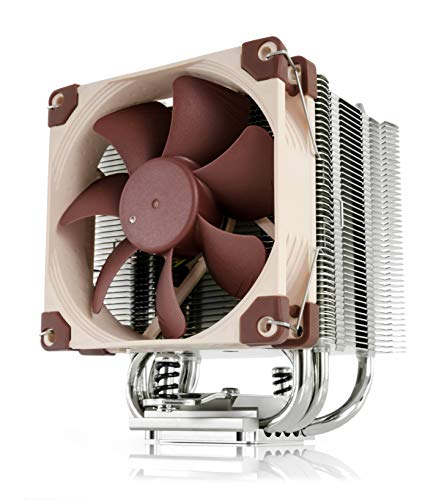


❄️ Stay cool, stay ahead — the silent champion for your compact powerhouse!
The Noctua NH-U9S is a premium, compact single-tower CPU cooler featuring a highly optimized 92mm NF-A9 PWM fan delivering 96.3 m³/h airflow at an ultra-quiet 22.8 dB noise level. Standing just 125mm tall, it’s engineered for small form factor builds, ensuring zero interference with RAM or PCIe slots. Equipped with high-grade NT-H1 thermal paste and the SecuFirm2 mounting system, it supports a wide range of Intel and AMD sockets for easy installation. Renowned for reducing CPU temperatures by up to 15°C compared to stock coolers, it enables higher sustained boost clocks while maintaining whisper-quiet operation, making it the go-to choice for professionals demanding efficient, silent cooling in compact setups.









| ASIN | B00TBHYYFK |
| Air Flow Capacity | 96.3 Cubic Metres Per Hour |
| Batteries Required? | No |
| Batteries included? | No |
| Best Sellers Rank | 16,620 in Computers & Accessories ( See Top 100 in Computers & Accessories ) 234 in Fans & Cooling |
| Colour | Silver |
| Customer Reviews | 4.8 4.8 out of 5 stars (2,591) |
| Date First Available | 12 Nov. 2014 |
| Included components | Thermal paste & mounting system |
| Item Package Quantity | 1 |
| Item Weight | 618 g |
| Item model number | NH-U9S |
| Manufacturer | Noctua |
| Material | Copper (base and heat-pipes), aluminium (cooling fins), soldered joints & nickel plating |
| Noise Level | 22.8 Decibels |
| Part number | NH-U9S |
| Plug profile | Chassis Mount |
| Product Dimensions | 9.5 x 9.5 x 12.5 cm; 618 g |
| Style | Single |
| Voltage | 12 Volts |
| Wattage | 1.5 |
J**K
Way to cool your Ryzen CPU.
First lets talk about quality - its premium. You get what you paid for. Heavy, all metal. Built like a tank to outlive generations of CPU you would put it on. Very good packaging. Delivered fast. Installation - very easy for AM4 Gen2 Ryzen 3600. Was able to swap my AM4 stock cooler without removing motherboard from case. Just asked someone to hold the back plate for me where the holes are. After the SecuFirm is in place - just 2 screws to install the heat-sink is super easy. Provided instructions are very easy to follow. There is also instruction video for AM4 socket mount on their web page. All fits easily. If you mounted the stock one - this one is easier and cleaner to do (stock 4 screw type mount with screechy screws is a pain). Provided thermal paste amount is way more than you need. Its good quality too. Now - was this worth the change from stock? Numbers below do not lie. System Specs below: Ryzen 3600 EVGA RTX 2080 Super FTW3 MSI Gaming Edge Wifi X570 16GB 3600MHz 1TB SSD Evo 960 NVME M2 PCIE 4.0 Corsair RM750x PSU. Case fans: 2 front intake fans. 2 exhaust fans (back and top). Small case: Corsair Carbide SPEC-05 - 140mm CPU Fan clearance - hence need to pick up tower that would fit. CPU Setting: Left all clocks etc. at stock. Adjusted Fan Curves in BIOS to ramp up above 60C and set the timer for ramp up/down to 2s to avoid RPM fluctuations during Idle. Ryzen Power Plan - Balanced. Numbers captured in Ryzen Master. Performance comparison between Stock CPU cooler and Noctua. All below tests were done extensively during the time I built the system. Means I know my temp pretty good. Usually 2-3h gaming various CPU intensive titles to reach thermal equilibrium. 1h stress test to hammer all cores at 100% to also push thermals all in. Gaming usually occupied 40-50% CPU usage to keep up with RTX 2080S. Idle - means average observed. Ryzen 3600 and Gen2 CPU can spike up/down their temps pretty aggressively. This is normal. Still observed that temp spikes are much cooler and last much shorter time on Noctua (fans do not even ramp up for the duration of the spike on Noctua while Stock was whining up and own constantly). Temps below. STOCK RYZEN 3600 COOLER: Idle - 55 C Gaming - 70 C Stress Test - 85 C Noisy NOCTUA: Idle - 35 C Gaming - 55 C (Max I saw). Stress Test - 68 C Cant hear it. Difference is clear - on average usually around 15 C cooler CPU! That is massive difference and I was truly shocked that this small beast can handle it so well. Also noticed much better overall thermodynamic performance - Noctua is able to dissipate heat quicker during spikes or when Stress Tests were completed. It also took CPU a bit longer to reach max temp on Noctua (68C). In most cases Noctua fan doesn't even need to ramp up to 100% only when stress testing. Even then - I cant hear it outside normal PC noises (case fans are way louder). While gaming - CPU Fan is completely silent. It enabled Ryzen 3600 to sustain 4.1 GHz boost on all cores (4.2 in games) if it have to on STOCK BIOS setting. Stock Cooler was only 3.85GHz due to thermal throttling at 85C on stress test (3.9-4.0 in games). So yes - if you have Ryzen 3600 and running on stock cooler - just dont do it. If you also have smaller case (only 140mm CPU Cooler Clearance) this Noctua would outperform any air cooler on the market. Highly recommend to anyone with similar spec and small case. Only water is better than this.
J**K
An extremely well engineered CPU Cooler for use in small PC cases
The Noctua NH-U9S is a superbly made CPU cooler based on a 9cm fan, and is ideal for small PC cases that cannot accommodate a full height tower. The footprint, including the fan, is 95mm x 97mm and fits within the reserved Intel cooler space. It does not cover the memory slots or interfere with the top PCIe slot of a Z97 motherboard. It can be mounted so that the airflow is vertical or horizontal. The cooler is 125mm high. The base of the cooler is made from nickel plated machined copper. The nickel prevents oxidisation of the copper surface, which in turn would reduce the thermal conductivity. The five heat-pipes are also nickel plated copper, and are soldered into the base block for maximum heat transfer. The cooling vanes are aluminium. The machined and polished base is very smooth and the heat pipes are not exposed nor have direct contact with the CPU. For all current Intel CPU’s an X-shaped metal backplate is provided, with threaded studs passing through the motherboard holes. The studs are insulated from the back of the motherboard by thin plastic washers pre-fitted to the studs. It would be wise to check that these insulating washers are present before the backplate is fitted into position. Insulated collars are then placed over the studs from the top side of the motherboard and two cooler retainer bars fitted either horizontally or vertically as required. The whole of this tower mounting system is secured with four knurled nuts. The cooler tower is then simply screwed onto the retainer bars using the captive sprung-loaded retaining screws. The springs ensure that the correct amount of pressure is applied between the tower base and the CPU lid. The assembly is well thought out, very simple to use, and is very effective. A 90mm Noctua NF-A9 PWM very low-noise fan is provided in the kit. The fan is PWM controlled and the sleeved power lead is fitted with a 4-pin connector. The fan clips into place with wire hooks and should be the last item to be assembled. The fluid dynamic bearing has a very long rated life of 150,000 hours. Noise from the fan at full speed is 22.8dB, which when inside a closed case, is normally not audible above the noise from the other case fans, even with the PC sitting on the top of a desk. A second fan can be added, although this will extend outside of the Intel cooler envelope. The cooler is supplied with Noctua NT-H1 thermal paste, which although is a very good TIM it only has a guaranteed service life of 3-years. The life very much depends upon the conditions of use and it will probably last longer. Noctua claim that all pastes of this type have a similar life, and that their specification is very conservative. As a precaution I used Arctic MX-4, which is claimed to have a life of 8-years. In reality they are probably very similar; Noctua are being very conservative, whilst Arctic are optimistic - time will tell! In addition to the Intel mounting kit an AMD AM2 fitting kit is also included. An optional low-noise adapter is supplied, which reduces the maximum fan speed from 2000rpm to 1550rpm and lowers the fan noise by 6.5dB. I found that when the fan is PWM controlled by the motherboard the low-noise adapter is not required because in normal usage the fan is operating at, or near to, its minimum running speed. A nice Noctua case badge is included for those that like to decorate their PC cases. I fitted this cooler, not so much to allow overclocking, but to reduce the noise and vibration from the stock Intel cooler. An Intel i7-4790K based system, using the stock Intel cooler, reached about 78⁰C at full load. Fitting the NH-U9S reduced the maximum temperatures to 63⁰C. At these loads the fan is still not running at maximum speed, which indicates that there is headroom for moderate overclocking. Importantly, the cooler fan cannot be heard above the other case fans at maximum load. In summary the Noctua NH-U9S is a very well engineered, very high quality cooler that will significantly reduce the CPU temperatures, reduce noise levels, and is ideal where space is limited. There are cheaper alternatives but you get what you pay for, and for its intended application it cannot be faulted.
W**W
Brilliant quality and performance.
I bought this cooler as I needed something to effectively cool my intel i7 6700k cpu without compromise, that would fit inside a Fractal Design Nano S case. This is the perfect CPU for me as it barely takes up any room in my case and gives close to full size CPU cooler performance. The instructions were easy to follow and installing it seemed really easy thanks to it top quality feel and no issues fitting the screws. As you can see from the photos I have Corsair vengeance LED ram installed. This is high profile memory at 4.9cm. This is not a problem for this cooler as the fan does not get in the way. I tried to take a photo so that you could see how the ram sits in front of the fan, I don’t think this will effect cooling performance because case clearance and air flow is otherwise very good. Having installed this I can see if I were to fit a second fan it would be blowing directly on my rear outtake fan with about 1cm clearance. With this in mind I think the rear case fan will do a good enough job at removing heat from the cooler so I won't try fitting another fan onto the cpu cooler. My previous CPU cooler kept my processor around 30 degrees at idle, 60+ under load. With the noctua cooler I'm getting 25 degrees idle and mid fifties at load (in the same test). It also seems to cool down the CPU much quicker from heavy load. There are no negatives about this cooler. It's worth the price. Maybe it could have come with 2 fans as standard but I wouldn't have used the extra one because I have a small case, which is what this cooler is designed for.
Trustpilot
3 weeks ago
3 weeks ago



