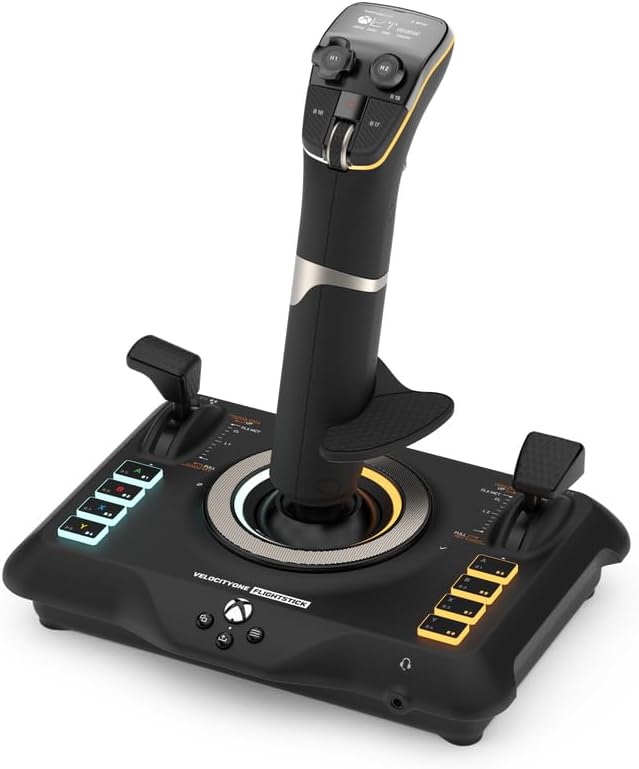
🛫 Elevate your flight game — command the skies with precision and style!
The Turtle Beach VelocityOne Flightstick is a high-precision, ambidextrous joystick designed for Xbox Series X|S, Xbox One, and Windows 10/11 PCs. Featuring 27 programmable buttons, 8 axes with non-contact sensors, dual customizable throttle and flap levers, and an integrated OLED Flight Management Display, it offers unparalleled control and customization for air and space combat simulation. Adjustable RGB lighting and a touchpad navigation sensor enhance immersion, while broad platform compatibility ensures seamless gameplay across top flight sim titles.


| ASIN | B0BHTPP71M |
| Best Sellers Rank | #976 in Video Games ( See Top 100 in Video Games ) #8 in PC Game Flight Controls |
| Customer Reviews | 4.0 4.0 out of 5 stars (2,172) |
| Date First Available | October 20, 2022 |
| Item Weight | 1.81 pounds |
| Item model number | TBS-0722-05 |
| Language | English |
| Manufacturer | Turtle Beach |
| Product Dimensions | 6.46 x 8.54 x 9.07 inches; 1.81 Pounds |
| Release date | November 17, 2022 |
| Type of item | Video Game |
A**X
Amazing HOTAS for the price
(Bought on sale) I have owned this HOTAS for a few weeks at this point with regular use in combat flight simulators (DCS World, War Thunder), and I can confidently say that this is an amazing HOTAS system for the money, Turtlebeach really outdone themselves with this product. The build quality is amazing and all the buttons and switches function perfectly. However, and this was stated quite a lot before me- The three switch covers on the Joystick base feel loose and wobble on the metal switch arm itself- However for me it is not an issue at all. _Stick_ Pros: - Stick grip is very ergonomic and fits most hand sizes with the sliding feature. - A lot of programmable buttons, switches, HAT switches, joysticks and rotary switches. - Build quality is amazing for the price. - Very satisfying buttons and switches. - Very responsive gimbal. Cons: - Pretty useless screen ontop of the stick - "Mouse" feature on the pickle button is very rough and unresponsive, as well as also being useless as it is right now with how choppy it is. _Throttle_ Pros: - Very accurate throttle readings. - Extremely smooth throttle sliding. - "Fire" button extremely satisfying to press (personal opinion) - Many useful buttons, HAT switches, 3 position switches and joysticks all over the throttle grip. - Split throttle feature, can prove useful in certain twin-engine aircraft. - Useful programmable screen (Can make your own switch panel using keyboard bindings in the software) that makes use of digital switches, dials and buttons. - Satisfying knobs and dials near the throttle grip Cons: - Never found a use for the "flap" lever as no game I tried recognizes the lever moving (as an axis), instead recognizing the switch clicks on the bottom and top of the travel - Touch screen is pretty low framerate and can wash out at certain angles. Overall, I really recommend buying this HOTAS system as it is a great product overall and you get an amazing system without breaking the bank like some of the more higher end HOTAS out there by Thrustmaster, Winwing, Etc. And you get a lot for what you pay which is always a big plus!. and I really recommend buying the Turtlebeach Rudder pedals along with this HOTAS system for an immersive flying experience!.
A**R
EXCELLENT. BUY IT.
Amazing. Switched my thrustmaster 16000 and rudimentary throttle quadrant for this to play Warthunder sim in VR and DCS and so far all I’ve played is Warthunder, but it works like a charm. Haven’t had this much fun flying in a long time, you have to map out each button for Warthunder and DCS but anyone who plays will know this already. The only complaint I have is that one of the 6-8 hat buttons doesn’t have a binding for if you click down and only works directionally. Would be an issue if there weren’t FIVE OTHER hat switches that do let you bind clicking it. Buy it you won’t be disappointed.
J**S
Very nice controllers BUT game compatibility is lacking (11 games) - support is awesome
I bought Everspace 1 hoping I could use the Flightdeck with it, and while I like the game to a certain extent, I am thoroughly P!$$3d 0ff that my flight stick and throttle aren't compatible with it. I have played with both the keyboard and mouse, as well as an Xbox contoller; while the game is playable with either (each has definitive pros and cons compared with each other), I would have much preferred using the flightstick (Turtle Beach Velocity One Flightdeck, so shame on them for not supporting their hardware better). Supposedly they are compatible with Everspace 2, but I just wasn't impressed with the first one enough to want to spend money on the second (at least I'll probably buy it when it goes on a good sale). To be fair, while my Flightdeck is nice, really nice, however, the support for multiple games REALLY $uck$. At this time Turtle Beach is only showing they are compatible with only 11 games, WTF??? for as expensive as it is, really? But I suppose that part of that is in the game makers too, having so little compatibility with more "elaborate" controllers, which again is why I'm kind of disappointed in Everspace, so shame on them as well. Truthfully, I don't really like using the Xbox controller for most games other than some platformers, for flight games, even this one which is a more "basic" sim (well okay, not sim, more of a shooter), I just don't like controlling with it (forget using it in an FPS, it feels like you're playing gimpy-games). Regardless, any game that offers any kind of flight mechanic, I'd prefer to use a flightstick, just as any driving game I'd prefer to use a wheel... Anyhow, it would have been REALLY nice if the Flight Hangar software offered better flexibility to allow users to at the very least emulate other controller profiles, such as the mouse for flight stick or having you be able to mimic a game controller input so at the very least be able to play "legacy" games, like the old Star Wars games, No Man's Sky, any number of mech games. Really any game you can ride or fly something, a compatibility mode or legacy mode would be really nice. Right now, I only have 2 games that this system is actually compatible with, Elite Dangerous and Star Wars: Squadrons. The others that are compatible I don't have or have much interest in playing. I should have researched this system more than I did to be honest, but I had faith in Turtle Beach products, at least until now. This was a LOT of money to spend to be only able to use it for two games :s I'm really hoping more game compatibility is to come, and more games. So yes, I really like the Flightdeck system, but I am really disappointed in the games supported and the ability to modify control settings. To be fair, on behalf of Turtle Beach, their support is really top notch. I had a problem with the controllers out of the box, and they immediately sent me a replacement. The support staff was extremely polite and efficient. Kudos to them. PS another future add-on that would be nice is to be able to have more control over the skins the throttle display, stick HUD, and tablet controls (nice feature BTW) can have applied. The stock ones could be nicer (or at least Turtle Beach could add some more).
Q**.
Quality
R**B
Super Deck, macht Spaß und ist einfach zu verstehen. Gute Verarbeitung, macht einen hochwertigen Eindruck, lediglich das Touch Sreen gefällt mir nicht so gut, ist wohl dann Geschmackssache
P**R
Great value for the price, a real bargain. Ease of setting up was really non stressing. Typical Turtle Beach Product, Quality.
M**O
Questi Flight Stick si presenta in una confezione curata e ben strutturata. Al suo interno, oltre al controller, troviamo il cavo USB c. È possibile invertire il poggia polso sul dorso dello Stick per i mancini ed è anche regolabile in altezza con relative tacche di orientamento. Il feedback è buono, forse un po' troppo resistente al suo rientro in posizione centrale. Ha un ottima compatibilità grazie all'ultimo update che consente oltre alla modalità PC e Xbox quella per terze parti, ovvero per tutte quei giochi non ottimizzati dalla casa produttrice. Si dovrà soltanto eseguire una mappatura dei pulsanti. Sostanzialmente verrà letto come un normale controller. Le impostazioni sono davvero molte, relative a trim, sensibilità, inversione assi, colore dei led, luminosità display e led ecc. Il mini touch pad sarebbe davvero utile, peccato che ad oggi soffra di una sensibilità decisamente imprecisa. Il cursore viene mosso correttamente in basso e verso l'alo l'input non è coerente con il movimento del dito. Ha molti tasti fisici personalizzabili, molti inaspettati, che rendono il controller, utilizzato da solo, molto sfruttabile per tutte le shortcut utili a chi lo usa con il simulatore e non. Con Flight simulator 2020 si comporta egregiamente, lo utilizzo prettamente su Xbox series x. Mi è bastato impostare alcuni parametri per mia comodità ed ero già pronto al volo. Unica pecca ancora non risolta è che pigiando il pulsante home dell' Xbox il cursore tenderà ad andare in basso a destra senza fermarsi, il che rende impossibile spostarsi nel menù della dashboard. A livello di feedback non ho apprezzato gli spostamenti dal punto zero, troppo rigidi e accompagnati da un ticchettio un po' fastidioso. In conclusione lo trovo un ottimo prodotto e con un buon qualità prezzo, ha tutte le comodità per chi vuole usare mfs da console e dal punto di vista estetico è veramente piacevole.
J**D
Parfaitement reconnu et intégré à Flight simulator 2020. Facile à programmer. Fonctionne bien. Certaines personnes regrettent sa stabilité sans doute pour des jeux de combat. Mais pour piloter dans l'aviation civile, il n'y a aucun problème.
Trustpilot
5 days ago
2 months ago