Desert Online General Trading LLC
Dubai, United Arab Emirates
Desert Online General Trading LLC
Dubai, United Arab Emirates


🔧 Build Your Signal, Boost Your Connection!
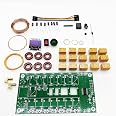
The Malahit ATU-100 Antenna Tuner DIY Kit is an advanced automatic tuner designed for amateur radio enthusiasts. It operates across a frequency range of 1.8-50MHz and features a compact 0.96-inch OLED display. The kit includes high-quality components and is designed for easy assembly, making it perfect for both beginners and seasoned hobbyists. With the latest firmware pre-installed, users can enjoy seamless tuning and reliable performance.

| Color | Multicolor |
| Number of Channels | 1 |
| Impedance | 50 Ohm |
| Maximum Range | 1000 Meters |
J**R
Fun afternoon build
Bought this on a whim since I wanted another kit to work on. The price for this unit was attractive and I always wanted a little auto tuner, so why not!Took a couple hours of casual building. The provided instructions aren't great, so if you've never built anything like this before, you may have a couple difficult points. Specifically, the binocular torroid winding for the primary and secondary. It is not well explained or shown on the provided instruction piece of paper. Most of the soldering is pretty easy with a decent fine tip iron (don't go trying this with a soldering gun or something lol)Fired right up the first time and worked perfectly. Fun and useful kit. Can't believe the price.
B**S
Works great
Fun to build and works great
S**I
Great Kit But Not For First Time Kit Builders
I FINALLY got this ATU-100 Antenna Tuner kit built after watching several YouTube videos done by previous builders. The Tuner works great but I had to re-work some wiring errors I made due to the lack of detailed instructions and the fact that I am not an Electronics Assembly Expert.The difficulty is that there are no detailed Step-By-Step Instructions for this kit. There is adequate information on the document along with the Schematic to enable an experienced kit builder to assemble the kit. However, a relatively new or first-time kit builder probably will not be able to get it assembled.Here are a few things I learned (some the hard way!) -Unless you have SUPER eyesight, use a large magnifying glass/light before you attempt to build this kit.1. For the Malahit ATU-100 Antenna Tuner Box, the image of the wiring on the back of the green Tune Switch is incorrect. The wire connecting half of the Auto, BYP and Tune switches goes to GROUND, NOT the + wire as shown in the picture that comes with the Tuner Box. The OTHER side of the Tune switch gets the + wire.2. The hookup wire necessary to fully assemble the ATU-100 kit does NOT come with the kit! You will have to provide the stranded insulated hookup wire yourself (NOWHERE is this mentioned on Amazon NOR the single Instruction sheet!). A. I used some 18 ga. stranded insulated wire for the initial power connector but the hole in the PCB made it tough to fit that size wire in the (-)hole. The other wire (+) goes to the On/Off Power Switch so there was no issue there. B. I used 22 ga. stranded insulated hookup wire (very flexible!) for the other hookup wire connections that were necessary. C. The Yellow and White wires needed to connect the Auto and BYP switches to the BACK SIDE of the Printed Circuit Board (PCB) must be VERY small to fit into the two tiny PCB holes they must be soldered into. You will need to be very careful soldering these two wires to the back of the PCB because the solder pads are so small and so close together!3. This is a very compact kit. Use a very small pointed Soldering Iron to prevent overheating the PCB or the already installed SMD components.4. As another Amazon customer suggested, I recommend building and installing the Toroids FIRST (and in their numbered order). Trying to install the Toroids AFTER the Relays are soldered onto the PCB will be a nightmare.5. Pay close attention to the size and LENGTH of the wire for each Toroid as stated on the Instruction sheet.6. As suggested in the instruction sheet, I used Allen Wrenches the proper diameter as described to wind the three air core windings.7. Take your time and be sure you understand EXACTLY where each component and wire should be soldered to the PCB. I initially soldered the four light yellow enamelled wires for the Tandem Match Transformer "binocular" toroid in the WRONG 4 holes (underneath it!). They actually go into the four SMALL holes just outside the "binocular" toroid's diagram outline on the PCB.8. The Electrolytic Capacitors have a very distinct mark on one side. Be sure that side of those Capacitors goes into the PCB hole that shows the white mark on the edge of the circle images on the PCB.9. Examine the picture of the vertically installed diode as it is shown on the Instruction sheet. Be sure the white ring mark is at the TOP when you solder it into the PCB (you will have to bend that end of the diode's terminal wire down toward the other wire end to install it vertically).10. If you buy the Tuner Box, BEFORE YOU SOLDER THE SLIP ON TERMINALS ONTO THE OLED, be sure you draw yourself a diagram showing which terminal on the OLED display module is which connection (i.e., Gnd, VAC, SCL and SDA). After you solder the push-on terminals to the OLED display module, you will no longer be able to read those markings on it!11. If you buy the Tuner Box pay close attention to how the four green mounting tabs are oriented in the picture when they are attached to the PCB.12. If you buy the Tuner Box, when pushing the On/Off Power Switch into the end panel, do your best to keep the switch even and press it straight into the rectangle hole (i.e., NOT one side in before the other!).13. If you buy the Tuner Box, I suggest sticking a piece of electrical tape or other insulation material onto the back side of the front end panel. This tape will insulate the inside of the front box end panel. This is BETWEEN where the OLED display's soldered connectors are located and the inside of that box end. This should keep those solder connections from contacting the inside of that metal box end. The Instruction sheet does not mention this. It just didn't make sense to me to risk those solder connection points touching the metallic box end panel and potentially shorting out. I actually used a small file to flatten the sharply pointed solder points to make their thickness narrower and less likely to punch through the tape and contact the metal end panel.As I said, my completed ATU-100 Tuner works great! However, my language during the build process was not fit for human ears! I hope this was helpful to others considering to buy and build this kit and that they have a much better experience building their kit.73!
A**L
Why use a manual tuner when you can have an automatic one at this price!
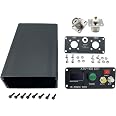
I wanted a tuner to use with my FX-4CR that I had ordered. I ordered it while I was waiting for the radio to arrive.The kit arrived soon after I ordered it and well before the FX-4CR. I went ahead and built it in advance.Disclaimer, I am an experienced kit builder and built many kits of all sizes in the past. That said, this is not a first-time kit. It's not that it's difficult, it's that you have to build it with minimal instructions. About all you have is the toroid winding information and the screening on the board. But other than that, it's a pretty simple kit. Put in all the parts according to the screened locations on the board. Putting in all the relays is the biggest job. Then wind the toroids one at a time and put them on the board where each one goes. There is just enough information supplied to do that!The binocular core is the most confusing one, but following the pictures it's not hard to do.Use the supplied wires to connect the display paying attention to the pin names on both ends.I bought the matching enclosure and the board fit perfectly onto the threaded studs. The enclosure kit came with another display ass well as the coax connectors and some other parts, so I have an extra now. The buttons all mount on a small PC board, and the board is then wired to the connections on the tuner PCB.I only made one mistake wiring it up and it was of my own doing. I reversed the connections on one of the coax connectors so that the center pin went to ground. I spotted it quickly and it was easy to fix and caused no damage. I tried it out with my IC-7300 and it worked perfectly. So I put it away until the new radio arrived.The FX-4CR is a very small radio, but does put out 20 watts, which is why I got this tuner instead of the ATU-10. There doesn't seem to be much of a size penalty anyway. When the radio arrived, I tried them out together. I put a watt meter in line with them and worked with both a dummy load and various antennas. The tuner performed exactly as I expected and was able to match my 80M dipole on any frequency I tried.I am happy with the tuner so far and look forward to using it in the field with the FX-4CR.
K**K
Bought, Built, Used, and I'm happy
Bought this kit for 2 reasons...1. I was bored and wanted to build something2. Was looking for an antenna tuner for POTAFirst and foremost... Great little kit that comes with everything you need to build a functional antenna tuner (Minus the case but thats obvious). I built it in a day and had it functioning in no time. Instead of using the supplied power input i did use Anderson power pole connectors. I went with the power poles for versatility. I can run either a 9v battery to the tuner or connect it to the 12v battery from my power bank. I did need to replace the diodes across the SWR bridge with better schottky diodes... No issues with the diodes on the board but just as a preemptive thing. The tuner tunes decently quick, not as quick as my LDG z100 but pretty close. After building it I 3d Printed a case for it to go into and i have been a happy camper since. Works very well and couldn't ask for anything more. If you're looking for a weekend project or just want the satisfaction of building one of the pieces of equipment you use here it is!WARNING: DO NOT tune with full power... turn your power down to about 10watts or so if your radio is capable of 100watts. I have used as little as 5watts and right around 15w max for tuning. Good luck and have fun!
Trustpilot
3 weeks ago
2 weeks ago
4 days ago
2 weeks ago