We remain fully operational. Our teams are working around the clock to ensure your deliveries continue safely.

DOWNLOAD THE APP


Customer Services
Copyright © 2025 Desertcart Holdings Limited
DOWNLOAD THE APP


🌦️ Own your microclimate with the smartest weather station on the block!
The Ambient Weather WS-5050 is a cutting-edge ultrasonic smart weather station featuring a no-moving-parts sensor array, real-time updates every 5 seconds, and enhanced WiFi connectivity. Designed for seamless smart home integration with Alexa, Google Home, and IFTTT, it empowers users to monitor and automate their environment remotely. Solar-powered and community-connected, it offers professional-grade hyperlocal weather data with effortless setup and maintenance.






| Best Sellers Rank | #24,057 in Patio, Lawn & Garden ( See Top 100 in Patio, Lawn & Garden ) #40 in Weather Stations |
| Brand | Ambient Weather |
| Customer Reviews | 4.2 out of 5 stars 789 Reviews |
| Material | Metal |
| Power Source | Solar Powered |
| Recommended Uses For Product | Garden |
| Special Feature | Barometer, Hygrometer |
| Specific Uses For Product | Temperature |
J**N
Great product!!
Super happy with this weather station. Easy to set up and seems to be very accurate compared with my neighbors. I travel a lot, but I always know what the weather in my back yard is thanks to this weather station.
S**W
After year of use I'm very happy
This unit has been excellent for me. Set up was easy, intuitive. I purchased the Lightning sensor and it works perfectly. I did a little checking and I didn't need to calibrate as it still seemed to be giving me accurate results compared to other trusted sensors near me. The rain gauge lines up perfectly with my analog 24' tube model. I wasn't able to get the Weather Underground system to engage but I give my friends the AWN app and that works. I didn't spend much time trying to get WU going. Indeed, the articles and directions are correct; placement is important for precise readings. I have alot of trees, a tree line and house to deal with. I put it in the most open area but wind readings from the south are reduced by the obstructions. Oh well. The rain gauge stopped after about six months and I cleaning it to trouble shooting standards. It worked in a few minutes. After about a year of use it worked but paused regularly. Another quick look at Troubleshooting and resetting both the sensor and the display (and new batteries) had it going again in a few minutes. Resetting did not require network/Wifi set up again. A year in, I finally sprung for the 65' heater cord. What a terrific enhancement. It was regularly dropping the signal and giving me blank info. Now it seems to be running 100%. That was a win. I love it and use it multiple times daily. My 6 year old grandson got the name "Weatherman" and he engages with it. I'm a happy owner.
B**L
Accurate
Very good weather station. Accuracy seems to be very close to perfect. Able to adjust “gain” to fine tune parameters that may be off. Weather station app is very user friendly. It’s not the “weather channel “ but it’s a very quality station. Neat to be able to compare other weather stations locally that are the same brand.
T**.
Indoor sensor won’t sync
When the system arrived, I set it up and the outdoor sensors began working immediately but the indoor temperature sensor did not sync. Turns out it needed to be calibrate and all is well after a phone call from Matt at ambient weather support
P**N
Could have easily been 5 STARS!
This is a great weather station, perhaps even the best on the market, according to the review videos I've watched. So why one star? PRO'S The equipment has no moving parts, for the most part. The rain gauge has what appears to be cheap plastic inside - a spoon type thing that collects rain and periodically empties what it has collected. Nowhere did I see even the slightest about this, but it is - in my opinion - one of the biggest sales features about this unit. The Ambient Weather online web page displaying this weather station's information is outstanding. The page is mobile responsive - it looks as good, if not better on a phone as it does on a browser page. The display provided with the unit doesn't have to be plugged in to make the browser page work. There is an entire Ambient Weather social media feature that allows you to comment on others weather station data, or to share you, IF you've made your weather data public. CONS This could have been so easy to assemble but easy things are made so blooming difficult. For example, the bolt holes used to secure the aluminum bar to the wind sensor, didn't line up. I ended up having to call Ambient Weather to send me one that did. There is a little heater dongle that is attached with a thin wire to the wind sensor. The dongle is supposedly designed to slide down the inside of the aluminum bar. Problem is, it doesn't easily do this. I tied a little thin ribbon on the dongle and fished it through the bar. This added about 20 min. to the assembly process. Ridiculous. The instructions are so laborious - nobody got time for that – that they are not useful. Ambient Weather would be well served to produce a simple 5 X 7 card that has the "fast start" assembly/set up instructions. Here is what I wish had been included on a card, that I hope will save you a ton of time. – The display device is supposed to come with a power supply. The first unit I ordered (and returned) did not. This display could easily, and I mean easily, be powered by AA batteries. It is only powered by electricity. – There really is not much setup to do on the display device. The sensors automatically connect/sync to the display device. The ALARM page on the display can totally be skipped unless you want to be alerted to extremes outside of the norm for you – such as when a temperature sensor falls below a certain threshold. – START by connecting the display unit to your home router. It detects and displays this fairly quickly. However, it is not intuitive how to make a keypad appear on the screen to click in (arrow up down left right) the numbers/characters you use for a router password. – The magnifying glass icon with the plus sign is the "enter" key by the way. This is not intuitive and instructions that explain that is no where to be found. – On the CALIBRATION page, you can bring the temperature sensor, for example, in line with your indoor thermostat. I asked Alexa what the temperature is in here and then set the Ambient Weather to display that temperature. To change the numbers (calibrate), that's done one number at a time by selecting the number, arrowing over to select the first number, arrowing up and down to change the digit, then arrowing over for each digit. A pain. – The time zone can be set. That is on the first page, under SERVER. There is a list to scroll through for every time zone in the world - dozens of them. A hint: if you use the - (negative) button, you'll get to Eastern, Central, Pacific, and Mountain a little quicker. –There are TWO Ambient Weather apps in the app store. One is just for setup. You really don't need that if you used your computer/browser which is much easier to use that the app, which the inverse should be true. You can find the MAC ADDRESS (not to be confused with an Apple Computer) by arrowing over to the SERVER setting, choosing it (positive arrow magnifying glass) and looking at the bottom of the screen. Enter the MAC address on YOUR Ambient Weather Account Page that you're going to set up. Once you enter the MAC address, your weather data will instantly appear on your browser page. To repeat, the set up app is not necessary to do this. Use your laptop. The SECOND app allows you to look at your weather data on your phone. But so will sharing (copying and pasting) your Ambient Weather data page. – Outside, nowhere quickly does Ambient explain there is a little arrow above the aluminum bar port that is supposed to point north, so the wind detector direction works correctly. In summary, I am enjoying the display and looking at the weather data using.both the supplied display and my computer web browser. Sometimes, I use the Ambient Weather app. I'm sure the Ambient Weather people are good folks, but they have made both the technical setup needlessly difficult, and the physical set up so difficult, aligning bolt holes and manipulating the clunky supplied brackets. – BONUS! Here's my best tip. If you're looking for a pole to mount your station, go to the big box hardware store and look for the crossbar (top bar) for a chain link fence. You can get a 10 ft one (what I did) or one longer, OR combine to if you want your equipment really high. I did not cement the pole so I can pull it out of the ground so I can easily change the batteries when hopefully in a year or so I need to change batteries. I hope this information is very helpful for you.
D**L
First impression compared to AcuRite Atlas
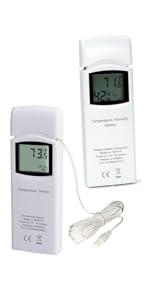
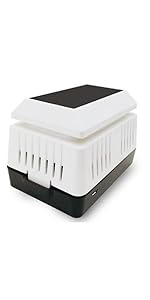
Wow I LOVE this Ambient Weather WS-5000. Don’t waste your time on lousy competitor models! I had an AcuRite Atlas for a couple years, but I got tired of constantly losing the historical weather trends every time we had a brief power outage. The AcuRite has a major design flaw by not having any kind of time sync (no Internet NTP or even radio time sync) the AcuRite Atlas resets the clock back to factory default time, and then all the weather data is messed up. While the AcuRite Atlas takes less time to install (it is all one piece unit, no assembly needed), this WS-5000 blows it away as far as the careful thought that Ambient Weather put into the display and presentation of information. For example, the AcuRite Atlas shows 48 hour rainfall on the display. Why not 24 hour? The WS-5000 has all the info laid out in a way that I can see the useful stats at a glance, very intuitive and in a beautiful presentation. The AcuRite display is also very pretty looking, but I can tell that the Ambient Weather WS-5000 display was designed by weather gurus who probably debated each icon for many weeks before deciding how to show it on the screen. But perhaps what I love the most about the WS-5000 is to be able to show the swimming pool temperature on the display using the optional WH31P waterproof thermometer probe sensor. It’s nice to have the pool temp always shown right next to the weather station stats, because this has the ability to set the extra info display onto a single sensor, in addition to the choice of cycling between sensors. It’s also very cool to be able to use the optional soil moisture and air particulate sensors with this. The Ambient Weather iPhone app features are better than the AcuRite app. The historical data charts are super useful, and I can use this with more home automation features like IFTTT. The WS-5000 can tie in with Wunderground hyper local weather, which is fun to contribute to, and to see other people’s weather station info in the neighborhood and how the microclimate varies. While I am super excited about the WS-5000 so far, this product is not perfect. If the manufacturer is reading this, I hope they can address some things in the next design. The instruction manual is terrible, and so is the user interface for the display buttons. It is not intuitive which buttons to press and what they do to navigate the various display menus. These buttons should be scrapped and go with a touchscreen design next time. It would be better to have a wall mount bracket to make it easier to line up and level to mount on the wall rather than two screw hanger notches on the back (which are always tricky to mark and line up on the wall). Also, I had to to a factory reset before it would recognize the main sensors, and wasted time being puzzled why it wasn’t working straight out of the box. Finally another minor improvement would be to not show the humidity circle on the display if a sensor does not have the humidity feature. I have to look at a blank humidity circle all the time for my pool temp sensor. It’s very minor, but would be more beautiful and less cluttered without this inactive item on the screen. Overall, I highly recommend this weather station! I think this may very well be the best one for residential use on the market at any price (the more expensive pro models from other brands have extremely antiquated info displays).
A**R
Weather Stations - The Best of the Best - WS Ambient Weather Station - WS-5000
What a great Weather Station. *I have owned a few different types of Weather Stations before that I was not happy with. *This WS-5000 meets all my needs! Gives me accurate and precise measurements where all the others failed. You can pay more, but they won't be as good, user friendly or accurate with up to the minute results with your personal weather station! Thinking about getting the WS-5000 Weather Station? This is the ONE that you will be happy with for many years to come. *** Ambient Weather Station WS-5000 is,.......*Simply put,.......*Precise, *Awesome and Fantastic! :)
N**E
Awesome Station
While the Ambient WS-5000 is a bit more expensive than the average weather station for home use, it is totally awesome! Very accurate. I added the pool temperature monitor for my koi pond, and I absolutely love knowing their water temperature. Very easy to install, you can place the different components in different locations, easy to read indoor display with tons of info. AWN's online network is just the icing on the cake. I can drill down and see temps everywhere there is a station online (and there ae thousands across the US). Going to the beach today, I can pull up AWN station and get a live forecast from a station right there where I'm going or very near. This is an excellent buy for anyone who loves to know the weather, store and analyze years of data, whatever you like. Oh, did I mention programmable alarms for low temp, high temp, solar radion warnings, and more? A TOTALLY AWESOME BUY - I COMPLETELY RECOMMEND the WS-5000
Trustpilot
4 days ago
2 weeks ago