
EX6400
Product ID: 28017478
Details
- BrandNETGEAR
- Data Transfer Rate1900
- Frequency Band ClassDual-Band
- Special FeatureSmart Roaming
- Wireless Communication Standard802.11ac
⚡1.9 Gbps dual-band speed
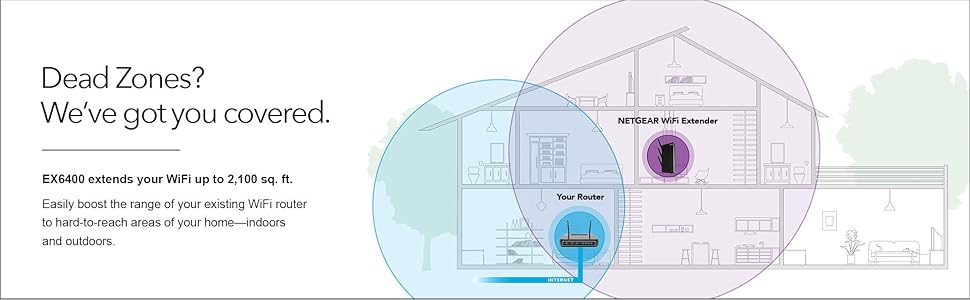
📶2,100 sq ft coverage
🔌Gigabit Ethernet port
Desertcart purchases this item on your behalf and handles shipping, customs, and support to Italy.
🚀 Boost Your WiFi, Boost Your Life — Never Miss a Beat!
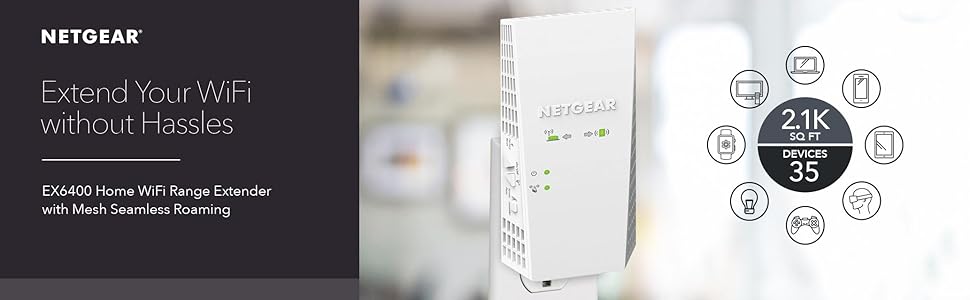
The NETGEAR EX6400 WiFi Extender expands your home network by up to 2,100 sq ft, delivering dual-band WiFi 5 speeds up to 1.9 Gbps. Supporting up to 35 devices simultaneously, it ensures smooth HD streaming and gaming with FastLane technology. Easy setup via the Nighthawk app or WPS, plus a Gigabit Ethernet port for wired connections, makes it a versatile upgrade compatible with any router. Say goodbye to dead zones and hello to seamless connectivity.
| ASIN | B01D6JEMXC |
| Best Sellers Rank | #6 in Repeaters |
| Brand | NETGEAR |
| Built-In Media | AC1900 WiFi Range Extender (EX6400), Quick start guide |
| Color | white |
| Compatible Devices | Router |
| Connector Type | RJ45 |
| Customer Reviews | 4.0 out of 5 stars 2,665 Reviews |
| Data Transfer Rate | 1900 megabits_per_second |
| Frequency | 2.4 GHz |
| Frequency Band Class | Dual-Band |
| Frequency Bands Supported | 2.4 GHz, 5 GHz |
| Global Trade Identification Number | 00606449111897 |
| Item Dimensions D x W x H | 3.82"D x 5.56"W x 6.93"H |
| Item Highlight | Signal Booster for Home, Easy Set Up, 35 devices, Works with any Router, Compact Design, WiFi 5, AC1900 |
| Item Weight | 10.56 ounces |
| Manufacturer | NETGEAR |
| Mfr Part Number | EX6400-100NAS |
| Model Number | EX6400-100NAS |
| Number of Items | 1 |
| Range | 2100 square_feet |
| Special Feature | Smart Roaming, Mesh Smart Roaming, FastLane(TM) technology |
| Special Features | Smart Roaming, Mesh Smart Roaming, FastLane(TM) technology |
| UPC | 606449111897 |
| Unit Count | 1 Count |
| Warranty Description | 1 year warranty |
| Wireless Communication Standard | 802.11ac |
| Wireless Compability | 802.11ac |
M**L
WORKS GREAT! Highly recommend this model
When used to help increase already existing wifi signal strength you will get a better and more stronger connection to your router. I used this to help increase the signal to my Xbox One because my games would download slow and multiplayer games would often times be laggy or more times than not have packet loss in games such as Battlefield 1. Once connected the range of my wifi signal is greatly increased and reaches far across the opposite side of my house where my router is now. My router is only a Netgear N600, nothing special so you don't need a top of the line router for this to work correctly. When setting up it was hard to connect it using the WPS button on my router but I think thanks more of me not knowing how to correctly use it. I found it much more easier to go to the website listed in the manual to set it up manually. The website displays everything for you which made a huge difference because my router has a 2.4 GHZ and 5 GHZ signal so on the website you can click to make an "extension" for both signals. When using the WPS rather than website to connect the extender to your router you have to repeat the steps to connect it because it connects each signal individually. When I tried it that way I wasn't sure if both signals were connected to the extender and when I went on the setup website it clearly showed and gave the option to connect both. For performance on the extender signals, I orginally was getting 78 mbps on my routers wifi in the room I was intending to have the extender in. On the 2.4 GHZ EXT the extender was giving me a signal of 135 mbps , huge difference! I use the 2.4 GHZ EXT for my smart phone which is more than enough signal strength. And on the 5 GHZ EXT I was getting 270 mbps which works great on my Xbox one for downloading/uploading, multiplayer, streaming. When I tested the download speed of my Xbox One on my regular network I would get between 9 - 15 mbps and upload speeds would be around 5 - 8. Now on the extender network I get between 25 - 30 mbps download speeds and 10 - 15 mbps upload speeds. So this device did exactly as it intended to do. Hope this helped anyone on the fence about purchasing this, as I was unsure myself after seeing many reviews saying how these extenders were a "waste if money". I belive those people just bought an extender that was not strong enough to support their full wifi signals or placed them too far from their router and it can't connect to it good enough. When it comes to these, spend a little extra money if you have it so they work as you expect them too, if the price is cheap so is the quality! The last note I'll make on this is I liked how on the extender itself it gives light displays to show if you need to move it closer to the router or if you need what it's extending the signal to, to be closer because the signal is too weak. Both should be green to indicate that you are in a good zone.
T**Y
Easy setup
Very easy to setup, WiFi signal is strong throughout the house
M**1
Degraded quick. NOT a mesh network, does not daisy chain.
I have trusted Netgear for a long time but this piece of equipment falls way short of what I have experienced in the past. The extender runs hot and the speed has actually slowed down what I was receiving with it unconnected, I can run slow without it, slower with it. Yes, I have tweaked it as best as I could but am constantly having to reboot it only to have it come back up slow as molasses. I've tried resetting to factory settings and starting over but it is just wasting my time. I'm not spending days messing with something that should work. The extender is set up in a line of site with the router about thirty feet away, my other computers are another fifteen feet farther away and in a line of site with the extender, and it is not the computer, it is a beast made for 3D modeling and video rendering. It may be a one-off lemon, and I am past the return date, but I won't trust Netgear with another purchase of an extender. One other point, this thing is not a true mesh network point, If you need a mesh network, this item is NOT what you are looking for. Netgear needs to take that out of the description. This is, in my opinion misprepresented, as a mesh network but is "mesh like". In other words, it has seamless roaming, switching from your main router to the extender without dropping connection BUT, it does NOT support daisy chaining.
J**K
Did what I wanted, except...
Tech support not rated, didn't use it. I have a Netgear Nighthawk that does a great job of putting a 2.4 and 5 GHZ around the entire house. It was very dependable, no dropped wifi transmission unless the internet went out, which was very rare. That is except for one specialized video streaming box that is used to access live Japanese channels in Hawaii which doesn't seem to get the signal that an Apple TV unit right next to it does. It just could not sustain a steady streaming flow and was very problematic. After many trial workarounds, I ordered this extender which installed fairly well, though not as easily as advertised...no complaint. It immediately solved the video streaming issue, which felt like success. Except, a few days later, we started having a series of random daily drops on 5G while the 2.4 GHZ channel kept working...it was not a dropped internet signal. The only thing that had changed in the wifi spectrum was the addition of the extender. As I worked through it, the only explanation I came up with was that the Nighthawk and extender might somehow have been cancelling out each other, since the extender is working off the 5G GHZ frequency and the Nighthawk signal was generally supporting the same area where the extender was installed. I started troubleshooting via the Nighthawk app on my iPad, but the problem got worse, the 5G channel went down to less than 50 MBPS when 230 had been its norm. Although I had done a firmware update of the extender upon original installation, the Nighthawk app was showing that a firmware update was needed, so that was done and soon after that, reception went back to what it had been upon first installation, a more reliable wife transmission. I am still experiencing short (2-3 minutes) drops, but not as dramatic as they had been. Knock on wood! It can be argued that the extender is not at fault, and I can't defend that it might have been. But, it is the only thing that changed in our home wifi spectrum literally only a few days before two weeks of daily drops occurred. Bottom line: I am happy with the extender, it does what it should, but I'm not totally convinced I've totally solved the dropped signal issue yet.
C**P
Great once got help
Once we got it set up, it was great. Had to take two different phone calls with tech-support to get it to work correctly. The first tech didn’t help completely. The second tech was very good and thorough, and we had to do a factory reset. Once that was done, it was full speed ahead.
D**0
WiFi performance issues? Try this extender before you get a new router.
I have Verizon FiOS 75/25. For some reason, after working fine for years, my iPhone 5 wifi was not performing as well at home. My ROKU was also having connection issues. I got a new Quantum Gateway router and that helped - some. What I should have done in the first place is get this awesome Netgear range extender. For various reasons, my FiOS router is on my top floor in a sitting room / office. By placing the Netgear extender on the main floor, I found that the wifi signal of the extra SSID was great on the main floor as well as in the basement, where my big HDTV and ROKU are. The streaming on my ROKU is now *flawless*. Setup could not have been easier - especially if your router has a WPS (Wifi Protected Setup) button. 1) Plug in the Netgear extender in the same room as your current wireless router. 2) After about a 2 minute bootup when the light is green, push the WPS button on the extender, then the WPS button on your router 3) The extender "talks" to router and basically learns how to act as it's "surrogate" 4) The extender will create up to two additional SSIDs (one regular one for 2.4 Ghz and one for 5 Ghz frequencies) 5) To use the new SSIDs you can use the *exact same password* as your router's SSID 6) Throughout the house pick / choose which SSID is best based on where you are, then connect It would be nice if my phone (or other wifi enabled device) was smart enough to automatically connect to the closest / best wifi signal (router or extender) but can't complain at all about performance. The lag is imperceptible. Could have saved my self some money if I simply bought this extender first instead of the Quantum Gateway router. In any case, great performance and super easy setup if you have WPS.
C**L
Easy to use
Works amazing! I tried two different brands and did not make difference. One of my Ring camerad was not working for days at a time. Finally got this, just plugged it and ring has not stopped working. It’s a great product
P**J
Not very reliable
Set up was not very easy. Also, range is not very stable as it keeps on disconnecting
G**.
No pude hacerlo extender las redes WIFI
Terrible producto, trate de hacerlo compartir Wifi de un AP Meraki y no se pudo a pesar de que segí todas las indicaciones. Aparentemente se conectaba y las extendía pero ningún dispositivo se pudo conectar.
Trustpilot
1 week ago
4 days ago