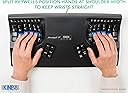
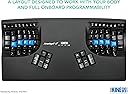
⌨️ Elevate your workflow with silent comfort and custom control
The Kinesis Advantage2 Quiet LF Ergonomic Keyboard (KB600LFQ) features a patented contoured design paired with Cherry MX Red Quiet Linear mechanical switches for maximum comfort and silent typing. It supports easy USB plug-and-play installation with no drivers required and offers powerful key remapping through the SmartSet™ Programming Engine. Compatible with all major operating systems, this keyboard is built for professionals seeking ergonomic excellence and customizable performance.


| ASIN | B07K1SMRGS |
| Are Batteries Included | No |
| Best Sellers Rank | #29,652 in Computers ( See Top 100 in Computers ) #741 in Computer Keyboards |
| Brand | Kinesis |
| Color | Black top case, Cherry MX "Silent" Red Switches, QWERTY keycaps |
| Customer Reviews | 4.4 4.4 out of 5 stars (695) |
| Date First Available | 14 December 2018 |
| Hardware Platform | Laptop, PC |
| Item Weight | 998 g |
| Item model number | KB600LFQ |
| Manufacturer | KINESIS |
| Operating System | Android, Linux, MAC OS, Windows |
| Power Source | Corded Electric |
| Processor Count | 1 |
| Product Dimensions | 41.91 x 20.32 x 7.62 cm; 997.9 g |
| Series | KB600LFQ |
G**G
Uncomplete Product
I received the keyboard after waiting for weeks, and the package is missing the hands rest cushions... Disappointing...
T**R
Un diseño fuera de serie en la búsqueda de un teclado ergonómico que reduzca las dolencias y malestares de quienes pasan muchas horas tecleando textos. Sin embargo, lo devolveré, porque en mi opinión, dado su diseño curvo, las teclas tienen una posición inusual, por no decir extraña, por lo que se tiene que reaprender la posición de las teclas para llegar a dominar este teclado. Tengo 50 años y empezar de nuevo significaría una preocupación, más que un apoyo.
R**S
TL:DR the Kinesis Advantage 2 LF (KB600LFQ) is a phenomenal keyboard for anyone spending significant time typing. It's a solid investment in your work comfort and overall hand health. If you're on the fence about purchasing, I highly recommend giving it a go. As someone sat at a keyboard all day writing and programming I have tried many different keyboards with both standard and ergonomic layouts. The Kinesis Advantage 2 LFQ (Low-Force, Quiet) keyboard is the best so far. The biggest selling point for this keyboard is its ergonomics. The Kinesis Advantage 2 LF features a key well design that comfortably accommodates your hands and fingers in their natural resting position, which drastically reduces the strain typically associated with long periods of typing. The key wells are split and angled for a more natural position for your arms, wrists and hands. Additionally, the keys are highly responsive and don't require much force to activate, leading to reduced hand fatigue and a more enjoyable typing experience. One feature this keyboard has that the newer 360 models lack is a piezo speaker. This speaker creates a key click sound on key actuation so you can hear when the key is activated. It's a small detail but helps to avoid "bottoming out" the keys which is a common cause of pain in your fingers from typing. I bought this keyboard because I suffer from RSI, it's not a cheap keyboard but for me the keyboard enables me to keep working pain free. If you are suffering from RSI do seek expert advice though, RSI is a catch all name for a variety of different symptoms with different causes, what works for some may not work for others. The keycap profiles on the Advantage 2 is fantastic with the home row being a different shape so your fingers can quickly recognise where they are on the keyboard without looking. Sadly these keys are made of ABS plastic, giving them a sticky feel. They are pretty thin and wear out quickly getting a very smooth and shiny texture. You can buy replacement PBT keycaps direct from Kinesis, they aren't quite the same profile as the originals but they do feel nicer to type on and should not wear out. The keyboard sounds very hollow which is a real shame, I feel kinesis could have improved on this and with the Cherry Red silent switches it could have been a very quiet keyboard. There are various discussions online on how best to reduce the sound on these keyboards, I personally haven't tried any of them yet though. The Advantage 2 also has powerful programmability with Kinesis own Smart Set system, offering the ability to customise every key to suit your specific needs. It's possible to program it from the keyboard itself switching key positions and recording macros which is useful if your IT department limit the control you have over your PC, but you can also mount the keyboard as a USB device by using a key combination where you can create more powerful customisations such as "mod tap" keys where if you tap the key it performs one action and if you hold the key it performs another. For example, on my keyboard I have the Caps Lock key mapped to Ctrl when it's held down and Esc when tapped. The keyboard has two layers per layout, but supports many custom layouts which you can activate using a keyboard shortcut. It takes a little while to adjust to having come from using a regular keyboard but I was back up to typing at around 90 wpm within a week. The instruction manual that comes with the keyboard provides some useful guidance. If you buy this keyboard, do make sure you read the instructions. This is by no means a cheap keyboard, but given it's programability, and potential to prevent repetitive strain injuries, I believe it's a worthwhile investment. The Kinesis Advantage 2 LF (KB600LFQ) is a phenomenal keyboard for anyone spending significant time typing. It's a solid investment in your work comfort and overall hand health. If you're on the fence about purchasing, I highly recommend giving it a go.
B**N
This might sound extreme, but I think this keyboard literally changed my life. I say "think" because I'm not sure what could have been. I am a software engineer. Needless to say, I spend a lot of time at a keyboard. Over the years (I'm 39 by the way) my hands and wrists have progressively got worse. I would hear cracking, and constant aching in my hands and wrists. I just assumed that was par for the course with my job. As time went on, it got worse, and I decided to look into keyboards. I've had the split wrist ergonomic keyboards in the past and I liked them, but I thought I would look into something else. After reading tons of reviews, looking at and seriously considering every crazy keyboard style out there. I looked at all the start ups, oldies, etc. I had some criterion: - Nothing but the best ergonimics - mechanical keys - programmable I finally settled on the Kinesis Advantage 2. Setup was as expected. Now that's because I was already aware that there are KVM switches often have compatibility issues for keyboards like the Kinesis. This prevents you from being able to use the keyboard input on the switch. I have a KVM switch (IOGear Miniview DVI 4 port USB KVMP Switch). When reading the reviews from both companies, I knew it wasn't going to work, but I already had a workaround. Basically, because your keyboard has the multimedia controls (like a lot of other of your cool keyboards) and some other advanced features, KVM switches don't recognize them. That doesn't mean that you will have any drivers on your windows PC (or Mac/Linux/etc) or anything like that. It's just a keyboard to everything else in the world... but your KVM switch. This problem was easily solved by using one of the standard USB connections on the switch. I just have to push the button on the switch now. I also hooked up a standard keyboard for the rest of the people on this planet that don't know how to use my keyboard... so I just use that to actually control the KVM so it's really fine in the end. If you are planning to use a KVM switch have a look at the Kinesis web page, they have identified some that do work, sometimes only in a partial manner. As any other review of the Kinesis will tell you, it takes time to get used to. Plan on that. I spent a lot of time on Type Racer practicing in my down time. I completely stayed away from standard keyboards for about 2 months (mostly). I made a lot of mistakes and made a lot of mistypes, hitting double keys, etc. It was obvious from the start how much better the ergonomics were. I was able to easily program some macros into the keyboard. As I mentioned, I'm a software engineer. There are a lot of patterns that I type many times a day, I can do this with a single keystroke now. So far, I haven't found a need for it yet, but the keyboard has different layer settings so if I'm switching between editors that have different auto completion features (i.e. how {} and () brackets are written out and tabbed... developers know what I'm talking about). The Cherry keys are all they are cracked up to be. It's my first mechanical keyboard set so I don't really have much to compare them to, but the keys are wonderful. They are clicky, but not too bad. People I work with have not mentioned much about it so I assume that it is not too bother some. Now, on to the real reason you would buy this keyboard. The ergonomics... As I mentioned, it was obvious immediately how much more comfortable this keyboard is. I'm not sure exactly at what point it was, but my wrist pain went away... and I'm talking about a 2 months... probably less. I didn't have any diagnosed carpal tunnel or anything like that, but the pain was constant. It's also important to note that I have reduced shoulder and neck pain because my arms are in a more natural position as well. I carried my keyboard back and forth to work gladly every day until I got one for my work. At that price my work wanted a doctors note, which I gladly went for. At this point, I have had the keyboard almost a year. I will now switch between "normal" keyboards and the Kinesis pretty easily enough. It literally becomes painfully obvious how much better the Kinesis is after typing at a "normal" keyboard for more than 5 minutes for me now. My wrists will start to hurt almost immediately and I think that I've been doing this all my life. I'm seriously considering switching to Dvorak now that I have one at work and one at home. I was thinking that it might help me separate my brain more from the "normal" keyboard so switching would be easier. I did get the Dvorak version for work to plan for this and will likely buy the keys for my home keyboard. Have a search on Youtube for a review on the Kinesis Advantage 2. There is a very good one that is about about a 15 minute in depth review of the "Human Keyboard". Pros: - Ergonomics - Program-ability - Ergonomics - Build quality - Ergonomics - Actually smaller than it appears in pictures. - Ergonomics Cons: - KVM Switches... but a lot of other high end keyboards will suffer - It's completely different from all other keyboards (but that's why your buying it right?) so switching between "normal" keyboards can be awkward, but it's not as bad as I expected. - Fatter and taller than a "normal" keyboard but slightly shorter. It might not fit well in those desk drawer keyboard trays. - could be considered loud, but nothing louder than any other mechanical keyboard. In the end, this keyboard does exactly what it says, every other review I read is spot on. If you are serious about your ergonomics, are experiencing pain in wrists and shoulders. I'm not saying this is going to cure you... but it might. In conclusion, I "THINK" this keyboard changed my life, because I will hopefully never know, but I was quite certain that I was developing some long term chronic problem with my wrists and hands. As of a year later, I don't worry about this nearly as much.
E**L
I've had several natural keyboards in my time, including a much loved Microsoft Ergo one and the Sculpt. But I started to notice wrist, arm, and neck pain, so I ordered a Logitech version of the natural keyboard and their vertical mouse. It got worse because the keyboard was so much larger and the mouse hurt my hand. So back they went which was a shame as I love Logitech normally (I'm using an MX Master 2 mouse now). Still, I had to do something and I'd heard of Kinesis before. I looked at the Ergodox as well, but that looked even worse. Enter the Advantage 2. I still flub typing the c key as my finger thinks it should be lower down, but I'm almost back to where I was with speed and my body thanks me. Expensive? Yes. Worth it if you're typing a lot? Absolutely! I'd highly recommend this to anyone that wants to feel better about their ergonomics and who wants a premium mechanical experience. And....I can switch to a laptop keyboard with no issue and back again as well.
A**A
I was recently diagnosed with RSI. A general economic keyboard did not help the situation and this is where I decided to try this. First challenge was you have to relearn how to use this keyboard as all the characters are slightly displaced. So I actually tracked my progress on typing test.com. on the first week I was at 13 words per minute and subsequently I progress back to 60 words per minute. the only biggest thing I hate about this keyboard is that it is not wireless, given how long it is really been in the industry.
Trustpilot
2 weeks ago
4 days ago