
DOWNLOAD THE APP



Desert Online General Trading LLC
Warehouse # 7, 4th Street, Umm Ramool, Dubai, 30183, Dubai
DOWNLOAD THE APP
Desert Online General Trading LLC
Warehouse # 7, 4th Street, Umm Ramool, Dubai, 30183, Dubai


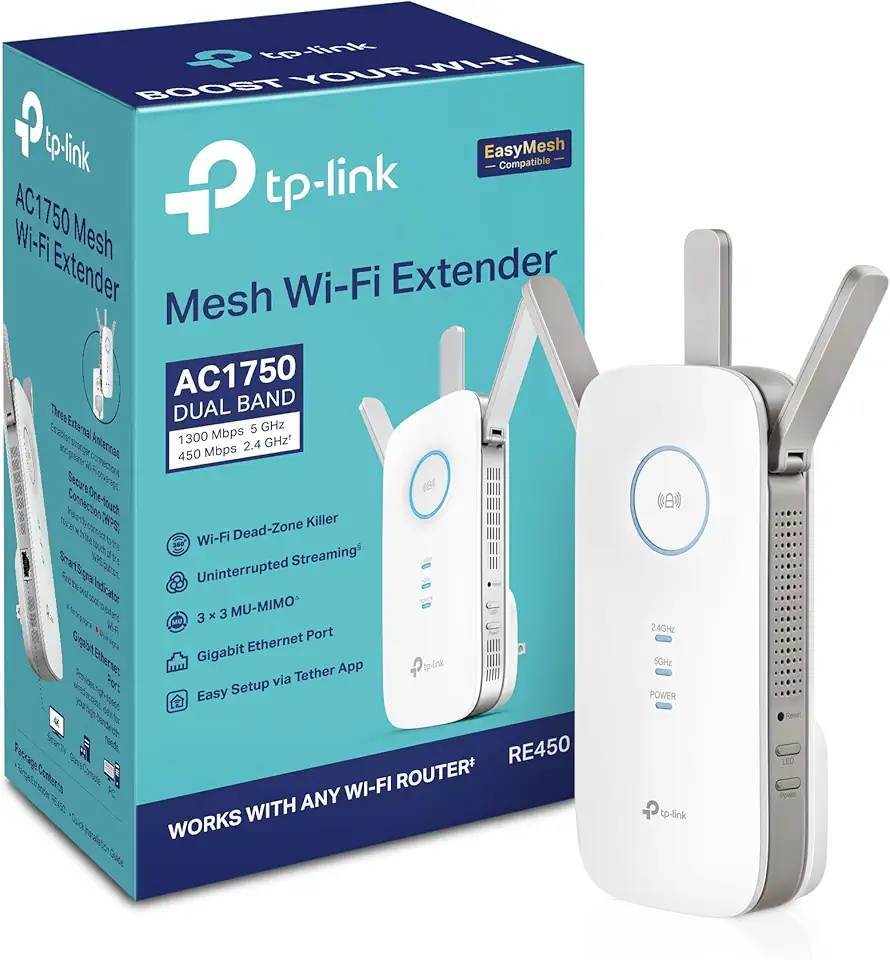
🚀 Boost Your WiFi, Boost Your Life!
The TP-Link AC1750 WiFi Extender (RE450) is a PCMag Editor's Choice device that enhances your internet experience by extending WiFi coverage up to 2000 square feet and supporting speeds up to 1750Mbps. Its dual-band technology ensures fast, lag-free connections for up to 32 devices, while the Gigabit Ethernet port offers wired stability. Compatible with any router, this sleek, easy-to-install extender is perfect for professionals seeking seamless connectivity across multiple devices and smart home systems.



| Brand | TP-Link |
| Product Dimensions | 7.62 x 16.26 x 6.6 cm; 340.19 g |
| Item model number | RE450 |
| Manufacturer | TP-Link |
| Series | Wifi Extender |
| Color | White |
| Connectivity Type | Wi-Fi |
| Wireless Type | 802.11ac |
| Number of USB 2.0 Ports | 1 |
| Voltage | 100240 Volts |
| Wattage | 9 watts |
| Operating System | Microsoft Windows 98SE, NT, 2000, XP, Vista or Windows 7, 8, 10, Mac OS, NetWare, UNIX or Linux |
| Are Batteries Included | No |
| Item Weight | 340 g |
H**N
Very good
Very good product
N**.
It works perfect
It works perfectly. I’m still using it until now. Very good with boosting signal all over the house totally recommendable
S**G
Wifi extender for a home use
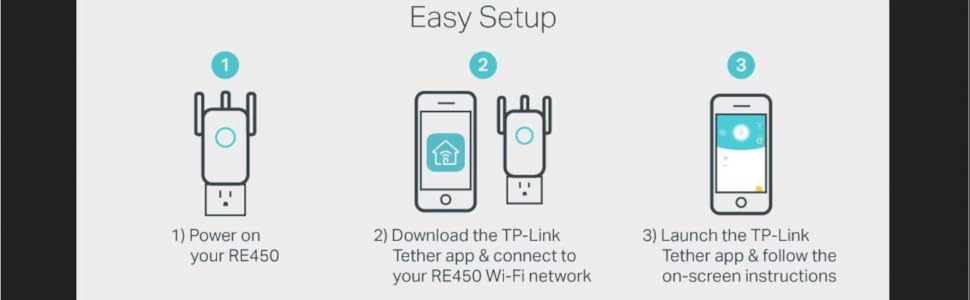
Easy to install, set up is very easy and supports the dual band, you can change the extender name, cannot change the password
O**I
جودة المنتج ممتازة
M**O
great range
the 2.4 is great not that much on the 5g range
D**A
Stopped working after 6 months
Stopped working after 6 months It’s dead , and it’s not even switching on Even the Seller is not helping with replacement even if there is one year warranty on my product
B**I
Great product
Just got the delivery and worked awesome, I'm getting good wifi signals, Easy to setup
H**B
الجهاز كويس بس بيفصل لوحدة كل شوية ومش عارف ايه السبب ؟؟ ودي حاجة مستفزة بصراحة
A**R
منتج رااااائع ويستاهل كل ريال .. القوة ولا غلطة ماشاء الله
G**Y
جهاز ممتاز وبيدعم السرعات العالية جداً والتغطية ممتازة، الأفضل تشوف له ڤيديو مراجعة على اليوتيوب عشان تعرف تشغله ازاي
K**L
You will NOT require a degree in computer science or relevant networking certification in order to set this up, the app for your phone/tablet will do all the hard work for you, and the instructions are very clear as long as you follow each step and do not try to skip the first one (place it within 10ft of the router first time when setting up) As the room I was trying to cover is a bit of a dead zone I was unable to put it where I wanted in the house, as I also wanted to use the Powerline Lan feature for my system whilst extending the wifi for other devices. BUT as it says in the instructions the idea is to place it in a place that extends the wifi between the router and the target area, which using the socket outside the room it has done very well, only had a couple of drop outs but not sure that wasn't the site I was streaming from. The powerline lan works incredibly well, I have several others and have only ever managed to achieve half 5-6Mb/sec this one caps out my top internet speed of 14Mb/sec from a virgin 100mbit line. So VERY impressed with that, I have also had zero network drops since I switched to this powerline lan. Tested on a default virgin media hub v3 and an AC1750 router connected to the hub in modem mode, it had no issues finding and setting up the extender.
T**E
Honestly, I have only had the TP-Link AC2600 WiFi Extender(RE650) for about 2 weeks. But it performs awesome - solid signals on both 2.4 and 5 GHz bands. Extremely easy to setup, just use the WPS or Log Directly into it. I did both methods just to see how it would go, as I generally never use the WPS (EASY METHOD) of adding devices to my router, I had to go ahead and try it. Went so easy, so easy. But being a bit of a computer, networking nut, I still like doing things the direct hands on way, so directly logged in, very easy to navigate, changed that default security password jazz - DO THIS or anyone who sees these devices or any hooked to your system, will straight off try to log in to them and either hack you or just lock you out. Not to scare anyone, just keep that in mind with ANY electronic devices hooked to your network. Save yourself the heartache. That said, it's so easy to do or have a family member help you, but it is really very easy. read and follow the easy directions and you should not have any problem. My LinkSys Router used to (2yrs ago) delivered a 5 BAR signal to everywhere on my property (about 1/2 acre) but my house is only about 1850 sq-ft. Router sits in the farthest room from screened back porch. As I said, 2 yrs ago the signal was 5 BARS everywhere maybe occasionally at the farthest corner of the property I might dip to 3 but then zoom back up to 5 within seconds. That was 2 yrs ago, more homes have been built, more cell towers etc. So for the last 12 - 15 months, that great signal dropped to 5 BARS occasionally with 2 mostly or completely dropping signal altogether. That's some Big League Taboo nowadays, so that leads me to my purchase of the TP-Link AC2600 WiFi Extender(RE650) - Plugged it in at the opposite end of the house - In the Laundry Room. No problems. Solid Signal on both bands - never drops at all, not even a flicker. Fast transfer speeds, I upload / download photos and graphics to and from my place of work. No hick-ups, no more dropouts, just a solid enjoyable signal. Watch HD and some 4k videos over it without a bit of trouble. This device is top shelf in my opinion. You can set timers for when it shuts off and wakes up (when nobody's home) and can even set the led lights to always on, always off, or at a sleep/wake time. Yeah you can get cheaper, but that's generally a gamble with finding a diamond, usually you get what you pay for. Who needs that headache to save 25 or 50 bucks. Not saying saving some money is a bad thing, I like money too, work hard for it, so throwing it away is not something I do either, but if your internet and network traffic is important to you - why skimp. There may be better too, really just depends on how you use it. If you're a real Rockefeller Type, go for whatever fits your need. I just needed my strong signal and network/internet transmission speeds back to STELLAR. And STELLAR is what this 58 yr old kid got with this TP-Link WIFI Extender. Oh, and it comes with an Ethernet port built into it for direct configuring or getting even more speed out of it. I only used it for the direct login to the device and to upload a new update. That was easy peasy too. Oh, and it has 4 swing up antennas on it. Really nice device, just place it and forget it. Sorry for such a long winded review, but it is an honest one. Like I said, I have only had it for maybe 2-3 weeks, more 2 weeks. Will definitely update if anything happens to change it. FOR NOW IT'S AWESOME AND 5 STARS. Hope this was helpful people. Thanks TP-LINK. Very well done.
A**T
Product is awesome, its signal strength is too good. The problem is with the packaging, seller sent ONLY the device in the brown cardbox. I mean no manual, no TP-Link packaging. It felt like I bought a product worth less than 100 rupees. And the product was used, I had to reset the device to use it.
Trustpilot
1 month ago
2 months ago