
🎯 Master your workspace with precision and style.
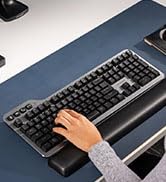
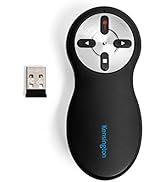
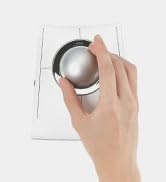
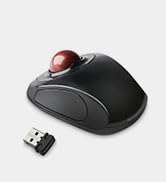
The Kensington Expert Wireless Trackball Mouse (K72359WW) combines a large 55mm optical trackball with patented scroll ring technology for precise, effortless navigation. Designed for ambidextrous comfort with a detachable wrist rest, it offers customizable buttons and speeds through KensingtonKonnect software. Wireless connectivity via Bluetooth LE or USB dongle ensures versatile compatibility across Windows, macOS, and Chrome OS. Auto-sleep power saving extends battery life, backed by 3-year coverage and lifetime support.







| ASIN | B01936N73I |
| Batteries | 1 A batteries required. (included) |
| Best Sellers Rank | #2 in Computer Trackballs |
| Brand | Kensington |
| Color | Black |
| Computer Memory Type | DDR3 SDRAM |
| Customer Reviews | 4.2 4.2 out of 5 stars (9,601) |
| Date First Available | January 12, 2016 |
| Hardware Platform | PC,MAC |
| Is Discontinued By Manufacturer | No |
| Item Dimensions LxWxH | 6.02 x 4.92 x 2.76 inches |
| Item Weight | 1.35 pounds |
| Item model number | K72359WW |
| Manufacturer | Kensington |
| Number of Processors | 1 |
| Operating System | Chrome, Mac, Windows |
| Power Source | Battery Powered |
| Product Dimensions | 6.02 x 4.92 x 2.76 inches |
| Series | Expert Mouse |
| Wireless Type | 2.4 GHz Radio Frequency, 802.11a/b/g/n |
S**Y
High quality, great value
An extremely high quality mouse at a good price. I also own the Kensington Orbit, but the larger, heavier ball on the Expert makes for a much better experience. You can easily flick the cursor across the screen without having the ball move in its housing. The scroll ring is great and maybe a little better than the Orbit's and the additional buttons are a nice quality of life upgrade. Kensington seems to have deprecated the software they used to use for this device, but it works fine natively. I could not get the KensingtonWorks software to run on Windows.
G**O
best of two mice I will always rebuy
absolutely they best mouse for executives, presenters, writers, artists and RTS gamers. I use this side by side with my other trackball for every other gaming and activities. lasts and lasts, is easy to clean. mind cable wear tho. this was the first time I've ever had a mouse catch fire. no fault of design. it got pinched and shorted. however the old one's electronics saved both the PC port and its own board. I had enough parts left over to combine with an old one and make a spare. 10/10 I will always leave a good review when repair-ability and durability meets functionality and class. love the flow of the trackball and how I can swirl it where I want it putting my finger back on it when it reaches its destination. with five screens it is a must.
J**S
24-hour Initial Review – Early Pros & Concerns
February 04, 2024 Update: Track ball works well. Doesn't seem to have but one issue and that issue is probably my problem. The scroll ring sometimes and my fingers don't jive causing me top hit one of the corner buttons. I must further practice, do much more practice. New Thought, 31dec23: Dragging and dropping, for instance, an email in MS Outlook to a folder can be challenging. I have not figured out the best method. Am looking for any ideas... 28dec23: Overall, I like the trackball and am tentatively at about 60/40 thinking to keep the device. Has many interesting functions and possibilities. Will know more as I work to better use the device. I definitely need more practice with the trackball because my long-term use of a regular mouse allows me to be pretty fast with the mouse. Early Pro’s: 1. Bluetooth connecting is really easy. 2. Kensington Works software for the trackball is easily downloaded for the device and pretty easy to use although it is not overly intuitive. 3. Large trackball seems very good particularly located in the mid position. Is good for me with some tremors and a shaky thumb compared with a side trackball. The middle trackball is far superior, for me, to the side mounted track balls. With practice, I am sure that I can rapidly move the cursor via the trackball. 4. Left Click/lower left button works pretty well. I seem to have it pretty well figured. Using my thumb for this button. 5. Right Click/lower right button not so handy as the Left Click button. Learning. May do better with it after more practice. 6. Have not really used upper two buttons, yet. 7. Scroll ring works well. Don’t have clicking noise that other reviewers have reported. 8. Don’t know how the battery life will be; we shall see. 9. Don’t yet know how the wrist rest will be although it seems okay with this short time review. Early Concerns: 1. Will take considerable practice for me which I am willing to do to become proficient with the trackball. 2. Have already learned to be very careful not to simultaneously touch the trackball while trying to scroll. Is easy to do! Result is my inadvertent action takes me some crazy place I did not want to go!
A**S
Good Mouse Especially For Hand/Wrist Problems.
The mouse arrived yesterday. Hooking it up was quite easy; download software, plug in and use. I qualify for senior discounts, if that helps with who will be able to do this easily. I purchased this product because I was getting hand and wrist pain after using my regular mouse all day. I have alleviated those issues, but now I need to build other fine muscles to use this regularly. It's not painful, just different. The buttons are easily customized to your liking. I wanted to speed up the scroll, as well as the sensitivity, and accomplished that quickly with the software. The hand rest is easy to attach, turn the item upside down and match the item to the stand. Do it with the mouse off, that laser is powerful! Also hold the ball when you turn it upside down so it does not drop. My wrist was still in a slightly awkward position when I tried this without the hand rest, so by all means, attach it. A bonus is that this mouse takes up space, but does not require the movement of a standard mouse. If you have little desktop space, it's worth the learning curve. I like to occasionally use my standing position desk with my elevating monitor arms and vented laptop desk with mouse pad, however the mouse pad area does not accommodate all the movement I require, and this trackball is a perfect alternative. The reason for the 4 stars: The mouse occasionally freezes. I use a 2-monitor setup and that may cause some difficulty, but I notice that if I have too many windows open at once, it tends to freeze. Once I close a few, it works fine. Uninstalling, then reinstalling the software and that seems to have helped for the most part, still a few glitches, but I'm working on it. Expect to take a day or maybe for some, a week or more to get used to this one. It's very different from a standard mouse.
A**Z
Desde que lo uso ya no se me cansa la muñeca, a pesar de que lo utilizo unas seis horas al día. He ganado en productividad porque, gracias a su gran bola, puedo situar el cursor exactamente donde quiero a gran velocidad. Los cuatro pulsadores de que dispone son grandes, sensibles y cómodos para usar. Aunque puede configurarse para que la pulsación conjunta de dos botones adyacentes sea equivalente a otro botón, esto no me resulta práctico porque es difícil hacer la pulsación simultánea.
C**.
I just got this trackball, first time using a trackball ever, i was delighted by how well this one works. the included wrist rest is really helpful especially for my hnda when on a hard surface, the ball rolls smoothly and with precision, the only slight thing is the scroll ring has a slight wobble to it, but it is not that bad, i am just very particular. but i do really like the scroll ring, i am able to operate the left click with my thumb and right click with my little finger. very easy to use and the optional kensingtonworks software is great, its not needed to use the trackball, but you can set so many options for the 2 programable buttons, the top 2 buttons are great, but you have to be very very precise about clicking both at once when using shortcuts, overall this was an amazing purchase, and i am impressed by the quality of kensington products
R**K
So good, feels great and I was able to customise the buttons and actions and also add special actions.
M**Y
This product has found its home in almost every professional recording studio in the world. It is extremely dextrous and such a comfort to the wrist. Long hours at the studio don't seem so long anymore! The only issue I have noticed is with the scroll wheel not performing smoothly, but it still works. The trackball is weighted and has sufficient momentum to sen e cursor flying to the other end of the wide screen display. Integrates very well with Pro Tools, and general workflow. I am yet to try out the customisable top keys to instantiate macros. Very satisfied with the product finish and quality.
A**M
Great trackball. Easy to connect; just plug the dongle in, and it's good to go. Really good size of trackball allows me to use three fingers to navigate precisely with my non-dominant hand. Comfortable to use from the couch too. The buttons click nicely and the scroll wheel works well. It's definitely a little bit pricey, but definitely worth it to be able to rest my injured dominant hand but still be able to enjoy good precision when using my home PC. The ball comes out easily to clean, so I wouldn't want to take this loose in my bag into the office, but that isn't really a consideration for me since I've switched this one out for the Orbit Fusion, which I'll take to work instead.
Trustpilot
3 weeks ago
2 weeks ago



