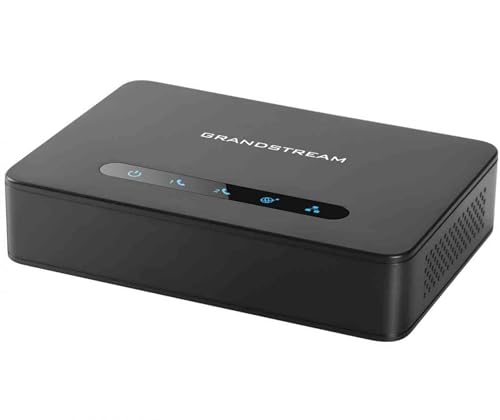
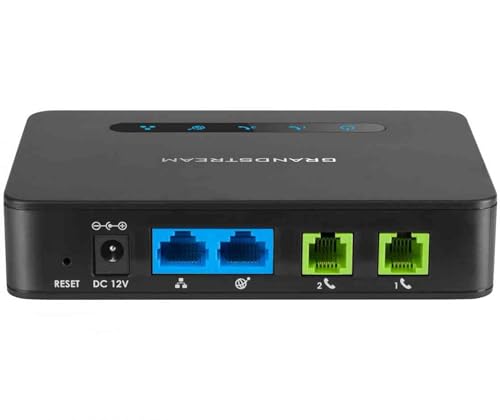


📡 Stay connected, secure, and ahead of the curve with Grandstream HT812!
The Grandstream HT812 is a professional-grade VoIP Analog Telephone Adapter featuring 2 FXS ports and dual Gigabit Ethernet for high-speed NAT routing up to 100 Mbps. It ensures secure communications with TLS and SRTP encryption, supports automated provisioning for easy deployment, and bridges legacy analog phones to modern VoIP networks with exceptional voice clarity.
| ASIN | B01M2ZJQAF |
| Batteries | 1 AAAA batteries required. |
| Batteries Included | No |
| Batteries Required | No |
| Best Sellers Rank | #217,288 in Electronics ( See Top 100 in Electronics ) #2 in VoIP Routers |
| Brand | Grandstream |
| Colour Screen | No |
| Compatible Devices | Laptop, Personal Computer, Smart Television, Smartphone, Tablet |
| Connector Type | Ethernet |
| Country of Origin | China |
| Customer Reviews | 4.3 4.3 out of 5 stars (470) |
| Data Transfer Rate | 100 Megabits Per Second |
| Date First Available | 17 November 2016 |
| Does it contain liquid? | No |
| Has Auto Focus | No |
| Imported By | Pure Life office system |
| Includes Rechargeable Battery | No |
| Includes remote | No |
| Item Dimensions LxWxH | 22.9 x 33 x 7.1 Centimeters |
| Item Weight | 290 g |
| Item model number | HT-812 |
| Manufacturer | Grandstream |
| Model | HT-812 |
| Model Year | 2016 |
| Mounting Hardware | Analog telephone adaptor, network cable, power adaptor and stand |
| Net Quantity | 1.00 Count |
| Number of Ports | 2 |
| Operating System | RouterOS |
| Product Dimensions | 22.86 x 33.02 x 7.11 cm; 290 g |
| Programmable Buttons | No |
| Special Features | Automated provisioning options include TR-069 and XML config files, Failover SIP server automatically switches to secondary server if main server loses connection, Includes a built-in NAT router which can handle routing speeds up to 100MBps, Supports 2 SIP profiles through 2 FXS ports and dual Gigabit ports, Supports 3-way voice conferencing, Supports T.38 Fax for creating Fax-over-IP, Supports a … |
| Standing screen display size | 5 Inches |
| Voltage | 28 Volts |
A**R
Not worthy
After few hours in working, not getting incoming calls
T**E
Bought as I'm a zen.co.uk customer, and have UniFi throughout the house (I don't use the Fritzbox). With the BT/UK "digital voice" switchover in full-swing, I wanted a means to keep our old land line alive. This worked perfectly. Configuration hasn't been utterly straight-forward, but I've finally found the following settings work (for Zen customers): - Ensure your NAT/firewall is forwarding the required ports through to the Grandstream (5060/UDP from 212.23.7.228, and 20000-30000/UDP from 62.3.88.0/28 and 62.3.88.16/28) - Primary SIP server: voip.zen.co.uk - Secondary SIP server: voip2.zen.co.uk - Prefer Primary SIP server: No - Outbound proxy: Blank/None - Allow DHCP Option 120: No - SIP Transport: UDP - NAT traversal: No - DNS Mode: A Record - DNS SRV: No - Fallback Timer: 60 - Use Request Routing ID in SIP INVITE Header: No - Sip Registration: Yes - Outgoing Call without Registration: Yes - Register Expiration: 5 - Enable SIP OPTIONS/NOTIFY keep alive: No - Local SIP port: 5060 - Local RTP port: 5004 - Random SIP port: No - Random RTP port: No - Enable RTCP: Yes - Hold Target Before Refer: Yes - Refer-To Use Target: No - Remove OBP: No - Support SIP Instance ID: Yes - Validate Incoming SIP Message: No - Use Privacy Header: No - Use P-Preferred-Identity Header: Yes - Use P-Access-Network-Info Header: Yes - Use P-Emergency-Info Header: Yes - Use P-Asserted-Identity Header: No - SIP REGISTER Contact Header Uses: LAN - Caller ID Fetch Order: Auto - DTMF: RFC2833 - SLIC: UK - Caller ID Scheme: SIN 227 - Dial Plan: (You may want to customise) ... { 999 | 10[015] | 11[129] | 11[68]xx | 1[45]7[1-2] | <0=44>8001111 | <0=44>845464x | <0=44>[1235789]xxxxxxxxx | <=441638>23456789]xxxxx | 1410[1235789]xxxxxxxxx | x+ }
L**X
We switched from Ooma to a SIP provider (VOIP.ms, but there are lots of others). We got a few more features and are saving a little money. This was a little tricky to setup (it has lots of settings). Most of the settings are fine if left at default, but it's capable of encrypting traffic and a whole bunch of other stuff and there are settings for every possible feature. In fact, there are five or six options to backup/restore the configuration (seems like any of them will work, though).
L**S
Lo probé con Megacable conectando el módem a modo puente con este dispositivo usando la VLAN 559 y funciona de maravilla. Es importante que la cuenta SIP se puede tener activa en un dispositivo a la vez.
M**K
Just been fitted. Very happy. Great idea if you don't want a normal house telephone line. Works great with Starlink.
A**N
Just works. Purchased to replace a PAP2T that wouldn't ring the bell on a rotary phone.
Trustpilot
1 week ago
2 weeks ago



