🤖 Unlock your child’s coding genius with the robot everyone’s talking about!
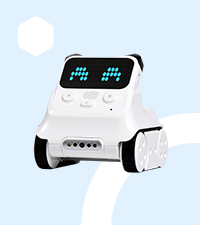
Makeblock Codey Rocky is a compact, programmable robot toy designed for kids 6+ to learn coding and robotics through interactive play. Featuring over 10 sensors, it supports both beginner-friendly Scratch block coding and advanced Python programming. Ready to use right out of the box with no assembly, it encourages creativity, problem-solving, and STEM skills development without any subscription fees.


| ASIN | B07CGH8NZ7 |
| Assembly Required | No |
| Batteries | 1 Lithium Polymer batteries required. (included) |
| Batteries Required? | No |
| Batteries included? | Yes |
| Best Sellers Rank | 204,289 in Toys & Games ( See Top 100 in Toys & Games ) 315 in Toy Robots |
| Colour | Blanc |
| Customer Reviews | 4.5 4.5 out of 5 stars (419) |
| Date First Available | 15 April 2018 |
| Delivery information | We cannot deliver certain products outside mainland UK ( Details ). We will only be able to confirm if this product can be delivered to your chosen address when you enter your delivery address at checkout. |
| Educational Objective(s) | Learn programming, robotics, and related technologies through interactive play coding activities. |
| Item model number | P1030024 |
| Language | German |
| Manufacturer recommended age | 0 - 3 years |
| Material Type(s) | Acrylonitrile Butadiene Styrene (ABS) |
| Number of pieces | 1 |
| Product Dimensions | 4.01 x 3.74 x 4.05 cm; 650 g |
| Radio Control Suitability | education, programming learning, creativity development, problem-solving skill improvement, play-based learning |
| Release date | 1 Mar. 2019 |
| Remote Control Included? | No |
| tech_spec_battery_description_toys | Built-in lithium polymer battery and USB cable for charging. |
M**E
Amazing
My 10 year old son loved this! It comes with a downloadable app and connects with no issues through Bluetooth. Even without any coding knowledge this little guy is pretty impressive - you can draw pictures on the face using the app (simple shade each pixel type drawing) and switch between 'emotions' and control him through a simple remote function in the app. For more advanced users it has another app to download which allows the child to use python to write code and also has drag and drop for basic coding learning. We haven't delved too much into the coding as he's been happy running it round the house displaying emotions but I'm sure he'll play around with that side of it before the years out 😄 You do need to charge him before first use but for any impatient terrors just hook it up to a power bank and walk around on a lead that's what we did until it was charged 😅. Great value for money - no subscription to the coding app it is a.once bought it's yours like kids toys used to be ☺️.
C**Z
Excellent
Excellent toy which helps to child to learn
T**M
1. Kids love to code with it via design mode. 2. Adults also can practice python coding with this product. 3. Product is good in quality. 4. I feel the product can be sold at a lesser price. 12k I feel overprized.
V**A
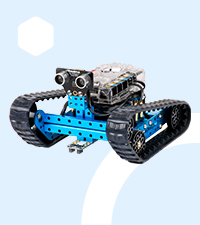
We got it during Prime Days so price was awesome. We had the other mBot1 from this company and it was good, so we were ok to try this one. The mBot is more hackable and modular, while Codey is MUCH cuter. It looks like a little cat, and is SO MUCH more expressive, with its wide dot display. We use it to send messages and make our 6yo son do things he normally is reluctant to (“go brush teeth”, “go pee now” etc.). He loves his catbot and is now learning to program it using their block coding app. Their software situation is a bit confusing but you figure it out (which app to use for what, how to connect) and it’s not bad. Tutorials are well done but limited and not a lot. Bluetooth connects well and stays connected. Battery lasts a long time, charges quickly, and the motors are very powerful. You can drive it manually with a phone or tablet and it is easy and fun. It has preset moves and sounds too, but you can program the buttons. Has a few holes to accept Lego Technic pins (not blocks) and that’s a cool feature. Kiddo built a few costumes or tools on top. Has a color detection cam in the front, so you can program it with that too. Light sensor too. And you can also do simple AI stuff! (Small neural network, image recognition). All in all, a good purchase.
T**D
Acheté pour mon fils de 7 ans. Il adore ! Pour programmer le robot un navigateur web suffit, pas besoin d'installer de logiciel. A 7 ans l'enfant doit être accompagné pour la programmation, mais ça vient assez vite.
J**S
He probado otros robots y éste me parece muy apropiado por su facilidad de uso y simplicidad sin renunciar al gran abanico de posibilidades para aprender a programar.
D**.
Ho acquistato il Codey Rocky per avvicinare mio figlio (8 anni) al mondo del coding e devo dire che è andato ben oltre le aspettative. È un mix perfetto tra un giocattolo adorabile e uno strumento educativo potente. 📦 Cosa c'è nella scatola? Il robot è diviso in due parti: Codey: Il "cervello" rimovibile con un display a LED e alcuni pulsanti. 🧠 Rocky: La base cingolata che permette al robot di muoversi ovunque. 🏎️ ✅ I punti di forza: Facilità d'uso: Si inizia a giocare in 5 minuti. L'app è intuitiva e permette di comandarlo subito come un telecomando. 📲 Imparare davvero: Si programma con mBlock (basato su Scratch), quindi si usano i blocchi colorati. Per i più esperti, si può passare a Python! 🐍💻 Sensori ovunque: Riconosce i colori, segue le linee, evita gli ostacoli e anche altro. È incredibile quanta tecnologia ci sia dentro. 👁️🗨️ Design simpatico: Il display LED permette di creare espressioni facciali. Sembra quasi un animale domestico robotico! 🐱 ⚠️ Cosa considerare: Prezzo: Non è il robot più economico sul mercato, ma la qualità costruttiva e il supporto software giustificano la spesa. 💰 Batteria: La durata è buona, ma assicuratevi di caricarlo completamente prima di sessioni di coding intense. 🔋 📝 Verdetto finale Se cercate un regalo che non finisca nel dimenticatoio dopo due giorni, questo è quello giusto. È perfetto per le scuole o per casa. Trasforma lo schermo del tablet da "tempo perso" a "tempo creativo". 🎓✨ Voto: 9/10 🏆 Consiglio: Scaricate l'app sul tablet, è molto più comoda rispetto allo smartphone per trascinare i blocchi di codice! 💡
Trustpilot
2 days ago
3 weeks ago