Desertcart purchases this item on your behalf and handles shipping, customs, and support to Italy.
๐ Unlock your dataโs full potential with Sybaโs 5-bay RAID powerhouse!
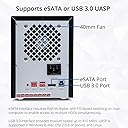
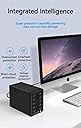
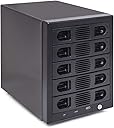
The Syba SY-ENC50118 is a versatile 5-bay external RAID enclosure supporting both 2.5" and 3.5" SATA drives up to 24TB each, with a total capacity of up to 120TB. Featuring tool-less hot-swappable trays, USB 3.0 connectivity at 5 Gb/s, and multiple RAID configurations, it offers professional-grade storage flexibility and speed. Its thermally efficient aluminum design and quiet fans ensure optimal drive longevity and performance, compatible across Windows, MacOS, and Linux platforms.


| ASIN | B07MD2LPNW |
| Best Sellers Rank | #154 in Enclosures |
| Brand | IO CREST |
| Built-In Media | (1) 5 bay USB 3.0 Enclosure, (1) Power Cord, (1) Screw Driver, (1) USB 3.0 Cable, (1) eSATA Cable |
| Color | Black |
| Compatible Devices | Desktop, Personal Computer, Laptop |
| Connectivity Technology | Raid support: RAID 0, RAID 1, RAID 3, RAID 5, RAID 10, span, and JBOD |
| Customer Reviews | 3.9 out of 5 stars 175 Reviews |
| Data Transfer Rate | 5 gigabits_per_second |
| Enclosure Material | Aluminum |
| Global Trade Identification Number | 00857426008208 |
| Hard Disk Form Factor | 2.5 inches |
| Hardware Interface | SATA 6.0 Gb/s |
| Hardware Platform | Mac |
| Item Type Name | Syba 5 Bay Tool Less Tray Hot Swappable 2.5" 3.5" SATA III RAID HDD External USB 3.0 Enclosure Windows MacOS SY-ENC50118 |
| Item Weight | 6 pounds |
| Manufacturer | Syba |
| Material | Aluminum |
| Memory Storage Capacity | 10 TB |
| Mfr Part Number | SY-ENC50118 |
| Model Number | SY-ENC50118 |
| Number of Items | 1 |
| Number of Packs | 1 |
| Supported Devices Quantity | 5 |
| UPC | 857426008208 |
| Warranty Description | 1 Year Warranty |
G**S
Great box with Iffy management software for Macintosh.
This is great value. As per other reviews here, I am astounded at the build quality and inclusions with this product. It comes with a couple of dozen little drive screws, which you would only need if you are installing 2.5 inch drives. And it comes with cables for both eSATA and USB 3.0, and they are not the usual short cables that come with drives - there is a little room to play here. I did not measure them but they are good. The POWER cord is only a couple of feet long, but it is a standard 3-prong IEC power cable! You can get one cheap anyplace you are, if you don't already have a couple of spares lying around. The RAID app is fun! I spent the day changing modes and testing speed. I've had RAID appliances before, but I'd never ever built a RAID, and it was pretty easy with the included software. I have to not that I used the software to set up my drives in it. I had an old Promise 6400 4-Bay enclosure from 2009 I think, and bay 4 was crapping out, so I took a chance on this Syba box to replace the failing Promise. I had the most recent 4x 5TB hard drives from that box, and a fifth 5TB drive I had as a spare, so in they went, and it's running fine on my Mac Mini 2012 running El Capitan. I am going in through eSATA into a Thunderbolt-to-eSATA dongle I had used with the Promise RAID. I'm currently running in RAID5. In every mode I was getting about 200MB/s up and down from this thing. It's a great box so far. If anything changes I will update this here review. Have a great day everyone! Update: a week into running this. The unit is fine, but the HW RAID Manager software for Mac now cannot see the enclosure, although the RAID volume does still mount perfectly on my desktop. I switched from eSATA to the USB connection to see if it helps, but it didn't change anything. I deleted the software management app as well as all of it's prefs and did a clean reinstall, and it still doesn't see the unit. It turned out that if I launch the application from my DOCK it won't see the drives, but if I launch the application from inside the Applications Folder the app operates correctly!! So do it that way, and all will be fine. The RAID Hardware is exceptionally well constructed, accessible, and runs very cool temperature-wise. I'm loving this thing! Update 2025: Still running great 5 years later. I've since bought 2 more of these. Love em so much!
P**D
Very nice Raid tower with Raid 5
I bought two of these units. One replaced five WD Red 3TB drives pulled from a Sans Digital 5 bay hardware raid tower and they all came right up with all data intact. I formatted anyway and copied the data back. Lots of videos. Was around 150Mb/s to 200Mb/s according to Windows 10 file transfer. The other replaced a four bay Sans Digital tower and all of the WD Red 5TB drives' data came right up. So I like it being interchangeable with my Sans Digital towers. Both units are compatible with the Sans Digital software and even have a buzzer silence/unsilence feature that did not show with my Sans Digital towers. I was able to destroy the Raid 5 and add another WD Red 5TB to get all 5TB up in Raid 5. I used the Sans Digital software to destroy and recreate the Raids, so I havent tried the dip switch setup, although they are set for Raid 5. In the Sans Digital, these each ran around 100-130Mb/sec or so when copying to the drive. In these kits, they are 150-200Mb/sec - noticeably faster. I am very pleased with the performance, build quality, and especially the compatibility with the Sans Digital Raid interchangeability in case any of my mix of towers fail and I need to swap out to keep the data. Sans Digital are hard to find and I assume discontinued. Not sure on this one as I only recently discovered them and could only find in stock at Amazon, although they were out of stock and back in and as I write this review, no longer in stock again...
C**G
Great form factor and fairly easy to use, but questions about reliability
I bought two of these and put (4) WD Red 6TB drives in each. I tried to use them with an HP P420 array controller's external SATA (eSata) port, but that did not work. It only saw 1 6TB drive, and weirdly that seems to be the case even when in a RAID 5 configuration. Setup with software is easy. Setup with the switches on the back is difficult. Instructions say to hold the button down for 15 secs or something like that, but they don't say whether to do that with the unit on or off or while starting or connected to a computer or not connected or whatever. It would be nice if the instruction manual were more clear. The array does not appear to offer the option of hot spare, which is a shame. I wanted to do 5 drives with 4 in RAID 5 and one hot spare. No dice. I switched to USB and it works great. Make sure you plug it into a USB 3.x port. It is abysmally slow under USB 2, but quite fast under USB 3. There is a utility on the internet for Windows called USBTreeView that lets you look at your USB ports and verify that the port the array is connected to is 3.x capable. Why not 5 stars? My 1st unit worked great for 4 days, then the top 2 drive bays failed. I emailed Syba support and they responded in less than 10 minutes and gave me an RMA. I do not know how long it will take to receive a replacement. My concern is that these units may not be super reliable. I am thinking about ordering a spare in case it fails a lot.
R**Y
Email of event notifications fails to send alerts
Works as my external RAID but has a major flaw, compounded by lack of support from SYBA. The unit has an option to send alerts via a built-in sendmail feature. I can send and receive emails to/from myself via another NAS box by another vendor using the same sendmail info entered on this sendmail config screen. SYBA's support is only via email and they do not respond.
V**C
Clean solution to working with multiple SSDs and 3 1/2" drives
I recently "downsized" from a full tower to a Geekom A6. The Syba enclosure accommodated my 5 SSDs and they were immediately recognized and accessible. I haven't tried hot swapping yet but am confident that there will be no problems though I'll need to got another tray or two to make things easier. The box comes with a set of 20 mounting screws for the drives and the instructions are good but, to be honest, I went out to their website so I could enlarge the pictures. I do advise that you use gentle pressure when removing and reinserting the tray and, make sure that it "clicks" into place.
C**R
These work really well but with a couple caveats...
I bought two of these and they work well but with a couple caveats... The setup software basically sucks. It works maybe 10% of the time. So you end up having to try the initial setup over and over until you finally get it to pick up your hard drives and let you set up RAID, etc. And once it's setup, it basically just works. And there's no need for the software at that point . But..... The enclosure randomly disconnects and isn't detected by the computer. No rhyme or reason to it. It just randomly disappears out of windows explorer. Normally after a reboot. I've tried hooking these up with eSATA and USB 3.0. Same problem each way. It randomly just doesn't show up in Windows explorer. Without those two issues this would be a five-star review. I'm taking one star off for each issue.
A**N
Perfect Replacement for DYCONN Quartz 5
My Dyconn Quartz 5-bay RAID enclusure died. Probable cause some power outages we've had recently. No complaints, the thing ran day in, day out for around seven years. But when I went to repair/replace, I found that repair options are scarce and expensive. And the device was discontinued some time back. Every vendor I checked was out of stock. So I figured I'd replace with this Syba unit, just formatting and re-using the same drives. When I put the drives in (putting each in the same bay it was in the old unit), set the DIP switches for RAID 5 and plugged it in, the old DYCONN software popped up saying the array was fine and ready for use. To be clear, the EXISTING array was still in existence! So apparently the the Syba uses the same chipset the DYCONN did. Not wanting to mess up, I installed the Syba software and guess what? It's the EXACT same software the DYCONN used. The only difference is that one says DYCONN and the other says SYBA. Well, perhaps not exactly - this the Syba gives me and SSL checkbox on the email notifications setup screen. But otherwise, every screen is identical I ran my (previously failed) backups (I use SyncBackPro), and it picked up where it left off as if nothing had changed! 100% success. So needless to say, I'm a happy camper. I know this won't help many, but if you're in the same fix I was in, this is a great solution. LITERALLY plug-and-play! :-)
M**E
Unstable, risk of data loss
I've tried this unit on 3 different PCs in raid and just straight up jbod mode. It will stay connected for several hours then drop. When drives reconnect they reconnect in a different order and one might not reconnect at all without a power cycle. Drives also power down after 10 seconds of inactivity. Would never recommend this product to anyone. And anyone trying to find out, it does NOT support UASP and has a ancient jmedia chipset that only supports bulk transport. I wish it would have worked, because it's a actually decent design.
J**N
Best Enclosure
This is exactly as advertised, easy to use, and works perfectly. The parts are not cheap junk plastic, they're made quite well. The fan is quiet and moves enough air to keep drives at a proper temperature. I run it without any RAID so I can't comment on that, but I've had zero issues in the few weeks I've been using it. I have it connected to a server running Debian Linux and have put it through its paces, accessing all drives, read/write tests, etc. Real-world use it performs perfectly as well. The Windows utility is easy enough to use as well as straight-forward. The box includes a USB cable as well as an eSATA cable. The directions are clear enough, and simple enough to understand. Definitely happy with this purchase and will buy another when the time comes.
G**Y
Good value, easy setup and good transfer speeds.
Easy install, simple RAID software. I did 2 x 250GB drives in RAID-0 (total 500GB space) as a test and am getting 180MB transfer speed (write and read) between this and an internal SSD of the windows PC. Good value hardware.
B**E
nice HDD enclosure, good price
It recognize my 18TB drives, the speed is pretty good, the real copy speed can reach 200MB/s(I don't use raid) The actual appearance looks better than the picture. very easy to install, no tool required. I like it has individual switch for every drives. it just that the switches are so tiny that you can't use your fingers to operate. The fan is quiet for me, I put it on my desk besides the monitor. overall it is a great buy. very good price. other brands of 5 bay enclosures are more than $200, some of them are $300+. and it is sold by Amazon, no need to worry about customer service.
A**C
instant RAID-5
I am using Ubuntu, I didn't do anything to install RAID5 6TB Enterprise HDDs. It is a hardware RAID over USB 3.0, it just worked. There was no setup. You have DIP switches on the back to enable which drives bays are turned on, and which drives are RAID enables. It is in the manual, as well as online.
N**M
Excellent and inexpensive
I'm very pleased with the unit. It took me about 30 minutes to install and get configured 5x old 1TB drives I had lying around. The 2.5" drives screwed right into the trays without any need for an adapter (25 screws were included as well as the mini Phillips needed for the 2.5" drives). One of the trays didn't align perfectly on insert and needed to be wiggled a bit but no big deal. It comes with a mini-DVD with configuration software that is very simple to use, and you can download it from their site if you don't have a DVD drive anymore. Mine is configured for RAID 5 with the hardware controller and working very nicely. I would definitely buy again!
Trustpilot
1 month ago
3 days ago