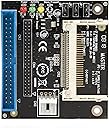
💡 Upgrade your vintage rig with modern SSD speed—because your legacy deserves to run like new!
The StarTech.com IDE2CF adapter converts CompactFlash cards into bootable IDE SSDs, supporting both 40-pin and 44-pin IDE interfaces. It enables fast, silent, and shock-resistant storage upgrades for legacy desktops and notebooks, delivering modern SSD benefits without replacing entire systems.


| ASIN | B0026OYEEQ |
| Brand | StarTech.com |
| Color | Black |
| Compatible Devices | Desktop |
| Connector Type | CompactFlash (50 pin) Slot |
| Customer Reviews | 4.6 out of 5 stars 282 Reviews |
| External Testing Certification | Não aplicável |
| Finish | Black |
| Global Trade Identification Number | 00065030834735 |
| Input Voltage | 12 volts |
| Item Dimensions | 7.01 x 1.61 x 5.71 inches |
| Item Weight | 0.02 kg |
| Item dimensions L x W x H | 7.01 x 1.61 x 5.71 inches |
| Manufacturer | StarTech.com |
| Mfr Part Number | IDE2CF |
| Model Number | IDE2CF |
| Number of Items | 1 |
| Number of Ports | 2 |
| Package Quantity | 1 |
| Power Plug Type | No Plug |
| Specific Uses For Product | personal |
| UPC | 065030834735 |
| Unit Count | 1 Count |
| Warranty Description | 2 year warranty |
| Warranty Type | Limited |
F**P
Life Saver
This adapter has worked wonders in converting my old 386 and 486 computers over to solid state drives. a 4 gig CF card can be formated with maxblast software ddo so that the whole 4 gigs can be recognized. Much better solution than trying to find a 4 gig ide hard drive. I bought several of these to upgrade my old machines with. The down side is that with SOME of the machines the master / slave isn't recognized properly. Sometimes you have to put the ide2cf on a different ide cable from the hard drive or cd-rom. But then you have to remember that machines of this vintage had personalities and even identical hardware would not perform exactly the same. All in all I'm very happy with it. It's allowed me to convert my old machines over to newer technology and keep them going. I highly recommend the ide2cf. One of the advantages this card has over other types is that it does plug into the ribbon cable so that you CAN have two devices on the same cable. That works most of the time. Only 1 out of 5 machines needed to have the ide2cf placed on a different cable from the cd-rom. I have gotten decent speed results with the sandisk 4gb 30mb/s cards. I'm very happy with this product and would recommend it to anyone. One down side is the back of the card has exposed circuitry. I used silicon to glue a small piece of wood to the back, then glued the wood to the top of the floppy drive. This lets me change cf cards without opening the case. works great.
T**D
Works with my Mac Performa 630CD
This was the ONLY IDE-to-whatever device that I could find that worked with my Mac Performa 630CD. In fact, it was kind of a struggle to get it to work - not because of this device, but because I could only find 2 compact flash cards that would work with the Performa. The "Verbatim 4GB CompactFlash Memory Card, 95188 Black" (found here on Amazon) was the only brand new card I could find that worked. I also had a very old 32MB CF card that worked, but 32MB isn't much room. 4GB is much better, and conveniently the partition size limit for the OS on my Performa. I left all three jumpers at their default setting of 1-2 (not 2-3), and plugged in the CF card, connected it to the Performa and it worked. System 7 could see it just fine, as well as System 8. I wish I could find a larger size card that would work with the Performa, but I'm just happy its working.
M**.
Fast and no issues - great adapter
I bought this to replace a hard drive in a PowerMac G4 with a sawtooth motherboard. The machine has been running about 1 week and no issues. The install was easy and so far the software had no issues recognizing the drive. I’m using a Sandisk Extreme CF card and it is fast. I don’t have benchmarking software but booting and launching programs is 2-3x faster than using the hard drive. I took one star from the value because the back of the board is completely exposed. The hard drive tray for the Mac is all metal. I wish a plastic shield would have been stuck to the bottom of this board to provide extra protection from potential shorts. I have not had any issues but if this was not mounted and just laid inside a computer case I believe there is potential for the adapter to short out. I would buy this again in the future.
B**K
CFC >to> IDE adapter = low cost SSD - solid state drive, new life for old computers! :)
I have an old IBM PS/1 Consultant, 486-66 MHz that could use some performance help & I thought the lowest cost option was to add an CFC >to> IDE adapter to act as a SSD - solid state drive. My search for a suitable adapter found this one. The pros: + Reasonably priced at $7.81 with free shipping when I purchased this. + The installation, other then the mounting, is "plug & play". The system sees this as a hard disk drive, so no drivers are required. + CFC activity pass thru - meaning the computer IDE controller card LED will display the CFC activity. + CFC voltage selection for +5.0V or +3.3V. + Advertised - Supports both 40/44-pin IDE interfaces for compatibility. + Advertised - On board jumper configuration for IDE jumper settings for master or slave mode. + Advertised - Supports Ultra DMA mode. + Advertised - Compatible with CompactFlash Type I, Type II & Micro Drives. + Advertised - Supports 40 and 44 pin IDE interfaces. The cons: - Not hot pluggable, meaning the computer has to be powered off to insert or remove the CFC. - No power cable is provided. - No IDE ribbon cable is provided. - No mounting or mounting hardware is provided, you have to fabricate your own mounting system. - The instruction booklet print is very small. - Advertised - LED indicators for easy setup. ◄ The LED on the board are extremely bright, they light up the computer case! - Advertised - Backed by a StarTech.com 2-year warranty and free lifetime technical support. ◄ I'm not impressed with the technical support I received when I contacted them! :( CFC - CompactFlash card information: ▪ CompactFlash cards come configured to two different modes: [1] "Removable Disk Mode" [2] "Fix Disk Mode" ▪ Normally Commercial CF cards are set to "Removable Disk Mode" & Industrial CF cards are set to "Fix Disk Mode". This varies between manufactures, so it best to verify the mode of the CF card you purchase. ▪ CF card with "Fix Disk Mode" is used as a permanent data storage device. Use this card for creating fixed partitions, installing operating systems, or creating a bootable drive. ▪ Note that Windows operating system will not place system files on a removable disk, so it's important to use only CF cards which are set to "Fix Disk Mode". Closing remarks: ▪ Overall, I'm happy with this CFC >to> IDE adapter & it does speed up the old 486 computer I installed it in. ▪ I used Norton Ghost 2001 to clone the old HDD - hard disk drive to 512 MB Compact Flash card. Very easy & I left the old HDD in the computer, not connected, as a backup.
T**D
Works great in my Socket 7 machine with DOS/Win3.1
I've seen some reviews here and elsewhere report that their adapters have caught fire and the solder bridge on pins 41/42 was to blame. I don't think that's the case. I looked up the IDE spec and both of those pins are for +5V, one for the logic board and the other for a HDD motor (obviously not relevant here). It looks like Startech made the solder bridge intentionally to carry the 5V throughout the rest of the circuit board. I traced it out and don't see any reason why it would cause a short. I can't explain why some people have had fire issues with theirs, maybe the pins on the underside shorted on something metal while testing? Given the design of the unit it would be pretty easy, especially since there's really no means for mounting this in a case. But so far the adapter has been working great for me.
S**N
This works darn well. Exceptionally well.
I needed to replace an old CF-to-IDE adapter. I have a really fast rugged CF card holding my OS on it. Everything like /tmp /log etc. is in RAM anyway, so it basically holds an embedded OS. This one keeps up with booting quickly, doesn't flake out, and I like the indicator lights. But what sysadmin doesn't like blinking lights? Difficult to hardware mount it though. I took some of the packaging material, cut it to fit on the underside, and mounted it inside the server it boots where the original HD was. My server has a major SATA raid setup but all I needed was something to boot it instead of a USB stick. It's awesome. Plugging it in and getting it to work with the case open was a snap. Getting it firmly to actually physically mount it was a brief challenge, not for a beginner. Getting it to mount the OS was a snap, no problems, totally transparent to the BIOS.
C**Y
Works perfectly on my 386SX from 1990.
I plugged a 1GB SanDisk CF drive into the device, plugged the IDE cable from my 1990 386SX into the other end... and.. It worked! Okay, I admit, I was skeptical when I purchased this, but it worked perfectly. I'm totally psyched! This old computer is not capable of detecting drive geometry (that functionality came a few years later). So if you have a software tool like OnTrack Disk Manager, it will detect the CHS (Cylinders/Heads/Sectors) of the device attached to the IDE controller. You can then plug those values into the CMOS. Of course you may still need to use an overlay to actually use a disk larger than 500MB, but as far as this CF to IDE bridge goes, wow - worked out of the box. Well done.
F**M
Slave jumper seems to do nothing
Bought this after having issues with the cheap IDE>CF adapters and trying to set CF cards into SLAVE... sadly this adapter seems to suffer the same fate... tried startech support and they just kept asking me essentially the same questions in circles until I gave up... seems like they are all the same junk... works otherwise just fine if you don't have a master in the chain... sadly the motherboard I needed to use this with has a small flash drive set as master soldered onto the motherboard
C**N
servicio veloz
El producto es bueno y llego rapido, me urgia. buen servicio
H**R
Funktioniert am PC, aber nicht am Alesis HD-24
Der eine Stern Abzug eben wegen dem Nichtfunktionieren am Alesis. Dieses hat eine IDE-Schnittstelle, die mit den meisten alten 3.5 Zoll Festplatten kompatibel ist. Da steht "UDMA 66/100" gelabelt, und das war zu der Zeit (2002) Standard. Natürlich ist das HD-24 nicht 1000%iger PC-Standard. Dennoch sollte eine IDE-Platte aus der Zeit vom Interface simuliert werden. Auf meinem PC von damals funktioniert der Konverter problemlos, zumindest als zweite Primärplatte hab ich das mit einer 64er CF Karte von Sandisk, die ich extra dafür gekauft habe, getestet.
A**O
Schede perfettamente funzionanti.
Ne ho usata una per sostituire in un registratore digitale a 8 tracce il sistema di store che era un vecchio zip. Ora posso memorizzare le registrazioni su Compact Flash, con un grandissimo guadagno in termini di tempo di registrazione.
W**A
Works great with my vintage Power Macintosh 6500
I bought this so I could replace the IDE hard drive in my Power Macintosh 6500. I didn't have high hopes at first as this was the third product I'd bought to try and enable me to use a Compact Flash card with my 6500. Well, this was the goldilocks one all right - it worked straight away; my Mac was able to recognise it and format (initialize) it via the OS 8.6 startup CD. Now my Mac is devoid of a spinning hard drive I can breathe a sight of relief! Excellent, excellent product and a great price too for what it does.
H**T
Has a lot of features for a seemingly simple function.
StarTech stuff is amazing, wouldn’t go with anyone else for parts like this. They’re expensive but worth it. There are a lot of cheap CF to IDE adapters out there but this one is almost guaranteed to work because it’s StarTech. Comes with a lot of options other adapters don’t, like whether your CF card is 5V or 3.3V. Two other jumpers, Master/Slave, and finally one for 40 pin or 44 pin (desktop or laptop IDE). There are solder pads to add an extra LED if you want more detailed information on what’s going on (whether it’s in Master or Slave, etc) but by default there’s a drive activity LED. Works great with my Power Mac G4. Only drawback is it requires a floppy power connector instead of Molex (LP4). Non beige Power Macs don’t have those so I needed to buy a separate adapter.
Trustpilot
2 months ago
1 week ago