

🎮 Travel Light, Play Big — Your Switch’s Ultimate Portable Docking Station
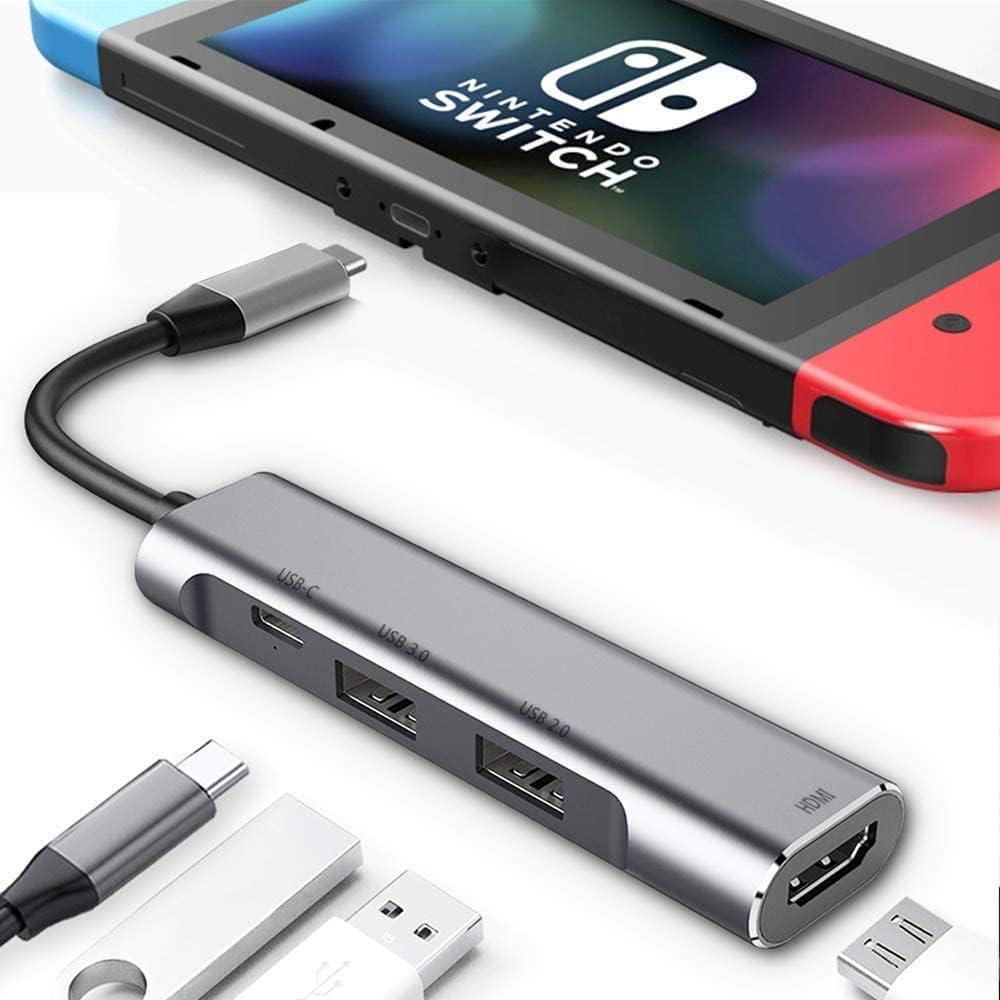
The RREAKA Switch Dock is a sleek, lightweight 4-in-1 adapter designed exclusively for Nintendo Switch 1st Gen and OLED models. Featuring 4K HDMI output, dual USB 3.0 ports, and 100W Type-C fast charging, it offers superior heat dissipation in an aluminum alloy body. Perfect for gamers and professionals on the move, it supports GameCube controllers and a wide range of USB-C devices, making it the ideal compact dock for travel and versatile connectivity.


| ASIN | B07JK9DFKH |
| Additional Features | Fast Charging, Fast Data Transfer, Lightweight, Plug and Play, Portable |
| Best Sellers Rank | #3,399 in Video Games ( See Top 100 in Video Games ) #37 in Nintendo Switch Cables & Adapters |
| Brand | RREAKA |
| Color | Silver |
| Compatible Devices | Macbook M1,M2,M3,Type C Laptops,iPad Air/Pro/Mini,iMac,Steam Deck,Type C Smartphones,Mouse,Keyboard,iPhone 16 Pro Max,iPhone 16 Pro,iPhone 16,iPhone 16 Plus,iPhone 15 Pro Max,iPhone 15 Pro,iPhone 15,iPhone 15 Plus, Nintendo Switch, Nintendo Switch OLED Compatible Devices Macbook M1,M2,M3,Type C Laptops,iPad Air/Pro/Mini,iMac,Steam Deck,Type C Smartphones,Mouse,Keyboard,iPhone 16 Pro Max,iPhone 16 Pro,iPhone 16,iPhone 16 Plus,iPhone 15 Pro Max,iPhone 15 Pro,iPhone 15,iPhone 15 Plus, Nintendo Switch, Nintendo Switch OLED See more |
| Customer Reviews | 4.3 out of 5 stars 5,341 Reviews |
| Data Transfer Rate | 5 Gigabits Per Second |
| Enclosure Material | Aluminum |
| Hardware Interface | HDMI , USB 2.0, USB 3.0, USB Type C |
| Item Dimensions L x W x H | 3.7"L x 0.9"W x 0.5"H |
| Item Weight | 32 Grams |
| Manufacturer | RREAKA |
| Mfr Part Number | RREAKA |
| Model Number | 4351605027 |
| Number of Ports | 4 |
| Operating System | Android, Nintendo Switch, Windows, iOS, iPadOS |
| Special Feature | Fast Charging, Fast Data Transfer, Lightweight, Plug and Play, Portable |
| Total USB Ports | 2 |
| Total Usb Ports | 2 |
| UPC | 793029632955 793029633013 |
| Unit Count | 1.0 Count |
| Warranty Description | 1 |
J**E
Perfect Travel Dock for Nintendo Switch — Compact and Reliable
This dock really makes you wonder why the official Nintendo Switch dock is so massive. I understand the original dock is designed to look nice next to your TV—this one definitely isn’t—but that’s not why I bought it. I use this specifically for travel. It’s perfect for hooking up my Switch to a TV at a hotel or a friend’s house without packing something bulky. I’ve tried several compact docks before, and some of them stopped working after only a few uses. This one, however, has held up really well so far and has been reliable every time I’ve needed it. Pros: Extremely compact and travel-friendly Great alternative to the bulky official dock Reliable performance compared to other small docks I’ve tried Ideal for hotels, travel, and visiting friends Easy way to play on a bigger screen while on the go Cons: Requires proper power via USB-C (power bank or adapter) to function Does not support HDMI auto-switching like some consoles (e.g., PS5) Not designed to look nice as a permanent TV setup Overall Verdict: This isn’t meant to replace your main dock at home—it’s meant for portability, and it excels at that. As long as you power it correctly and understand it won’t auto-switch HDMI inputs, it does exactly what it’s supposed to do. If you travel with your Switch and want a reliable, compact way to play on a bigger screen, this is a great buy.
S**S
Actually works! But you need to plug in an order.
I bought this a few months ago while I wasn’t at home. Needed a Switch dock that wasn’t expensive. It actually works as intended! However, you do have to plug in everything in a specific order or it won’t work. I believe other reviews also said the same thing. I can’t complain about that, it’s extremely portable and works with more than just a Nintendo Switch so it is a good trade off for me. You can easily fit it into a bag for traveling, which is exactly what I ended up doing. I’m also able to use my iPad on the TV, no specific order required. One issue is that if you’re trying to watch media apps on your Switch, it likely will not work. There is no HDCP handshake, so something like YouTube for example will not work at all. We thankfully have a Roku easily available at the TV so that isn’t an issue for us, but if your main purpose is to watch media, I would look into another product. I am not sure if other devices will give an HDCP error, since I haven’t tested it on my iPad.
D**.
The best portable dock for Nintendo
I've been using this dock for over two years while traveling around Europe and America and it's been one of the best thing I've purchased. It works with all kinds of TVs, it's small and light enough to take it with me wherever I go and it's easy to use. Can't recommend it enough if you need to travel and want to take your Nintendo with you, especially if like me, you prefer to play on the TV.
M**E
Works with Switch OLED! (when connected in order)
Plugged it in to test with Switch OLED, and it worked great without too much fiddling. Rated 4 stars due to the specific cable order required to work (see below). The size is extremely portable, especially compared to the OEM dock! This is great for traveling. Connected to a 4K projector + A/V receiver combination that has a tendency to be super finicky with the timing of HDMI handshakes. I have tried a few other adapters which have the same ports but did not work. Something is obviously different between these. Original Nintendo Switch dock displays at 1080p@60Hz. This registered the same through my setup and looked great in my initial tests. (I'll update if there are any issues found later on.) I rated this 4 stars overall due to the cable order which is required otherwise it does not work. I don't mind this much since plugging it in is trivial to undo and redo. But since this is a necessary requirement, I wish they would just screen print or engrave numbers on the back of the ports to follow. Keeping this paper card is pretty annoying. Below is what the paper says (for when I lose the tiny paper): How to Use: 1. Connect power supply to the adapter. 2. Connect HDMI and turn on TV/display screen. 3. Keep Nintendo Switch screen in working state before plugging the HDMI adapter into the Switch. 4. Connect Nintendo Switch.
J**S
Works with Nintendo Switch and external monitor
I bought this dock specifically for connecting a Nintendo Switch to a portable KYY monitor. I had a similar dock from a different brand, but it didn't work with the Switch. I bought this dock and it worked perfectly. I actually like the blue and red color as well. It will make it easy to grab the right dock when wanting to connect my Switch. In case you are trying to connect a Switch to an external monitor, here's what I did. I connected a USB cord from a power adapter in the wall to the KYY monitor USB C input. Then I connected the HDMI output of this dock to a HDMI to mini-HDMI adapter into the KYY monitor. I also hooked up a USB cable to a power adapter plugged into the wall into the USB C connection on this dock. It didn't seem to work at first, but I was able to get it to work several times with no issues. I wasn't able to use my Hori split pads while holding the Switch, because the Hori Split Pads need power from the Switch. I'm assuming normal Joycons would work fine since they have their own power and can connect via bluetooth. I used an external bluetooth controller with the Switch hooked to the monitor with no problems.
S**N
Probably a fluke:edited
Well, i was really hoping this would work for me, and heck... maybe its just a fluke, but after plugging it into my Galaxy s8 and it turning into dex mode, after a few mins it starts to flash on and off (my tv screen) almost like its unplugging and replugging. Im using the original fast charger that came with my S8, and the original cord so that shouldnt be a problem. I followed the directions for this particular product: Plug power in to the hub, plug hdmi into hub and tv, make sure device is on and working, then plug the hub into the device. So thats out of the question. Honestly, i think its just a glitch with the product, and that its just mine that doesnt work... i think this mainly because i see very good reviews about this product (thats why i chose this one over the others). Ill keep fiddling with it, and see if i can get it to work properly (ive also tried multiple different HDMI cables, one being the one that came with my xbox one x, and one i bought thats allegedly "highspeed HDMI 2.0). Maybe its because im hooking it up to a 50 inch 4k smart tv? idk, because it says that it scales to 4k, so that shouldnt be it. Again, i think its probably just the one that i got thats defective.... Update! Ok, so this has gotten worse. I cannot even switch to screen mirroring mode, back to Dex mode without having to unplug my phone and restart it. It CONSTANTLY flickers, and then shows no signal on my T.V screen. So, i was thinking that it was maybe the charger I am using (which i dont think it really is, because i was using the original cable and box that came with my s8) and went out and bought a big powerful blackweb charger, thats rated higher than the fast charger that came with the phone. Still, it does the same thing. So, idk... hopefully its just mine, and i can get a replacement.
P**T
Great portable adapter
I really like this product. It does everything advertised. I use this with a USB wireless mouse, jelly Bluetooth mini keyboard ,and a note 10+ . This allows for it to be a work station(DEX) on your TV via hdmi connection or a streaming device capable of playing high end games via emulation. The build is great as the cabling seems strudy and the case is metal. As far as being a 3rd party portable dock for the switch it is possible granted you have the latest firmware update. I want to address some of the issues people have posted about here. 1st off it will not charge your phone via hdmi cable alone. That's because hdmi cables are not a source of power they simply take a visual/audio signal so you will need an extra USB-c cable connected to a power source to charge it. While it can work as a portable dock for the switch, buyer beware. The switch firmware has been an issues since its launch. This isn't the adapters fault but Nintendo's, should your console brick. Nintendo has been vague on its usb-c compliance protocol simply cause they want you to buy only thier dock at a marked up price to play your switch on. So be aware that there is a possibility that you can brick your switch on this adapter but again its Nintendo who is the problem here.
J**J
Perfect solution for people who lost their dock or want to travel!
This dongle works great! We are borrowing a Nintendo Switch from someone, but they couldn't find their docking station. I found this dongle online and it seemed much more simple than the stand up docking stations with buttons to push for TV mode. I bought a compatible power adapter separately (not the Nintendo branded one) from Amazon. I also had a spare HDMI cable laying around (doesn't everyone?). I plugged in the power cord into the dongle, plugged in the HDMI into my Denon receiver, and plugged the USB C into the Nintendo Switch after the receiver and TV were already powered on and the Nintendo Switch was booted up with Mario Party. The device worked fine! I appreciate the spare USB plug to charge controllers as well. No issues with audio or video. If someone wanted a travel companion for their switch, this would be so easy. Just need power adapter and HDMI cable (and carrying case for Switch).
Trustpilot
3 weeks ago
2 months ago