We remain fully operational. Our teams are working around the clock to ensure your deliveries continue safely.

DOWNLOAD THE APP


Copyright © 2025 Desertcart Holdings Limited
DOWNLOAD THE APP


💼 Work, stream, create — all day, your way.
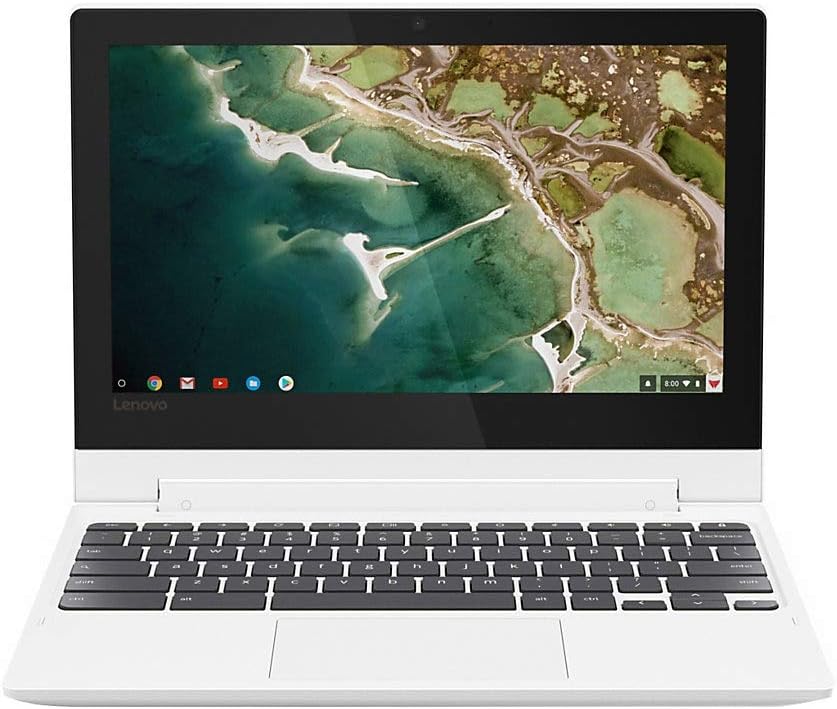
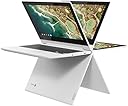
The Lenovo Chromebook C330 is a sleek, lightweight 11.6-inch 2-in-1 convertible laptop powered by a MediaTek MT8173C processor, 4GB RAM, and 64GB SSD storage. Featuring a fast-booting Chrome OS with built-in virus protection, a vibrant 10-point touchscreen, and up to 10 hours of battery life, it’s designed for professionals and students who value portability, seamless Google integration, and versatile use modes in a stylish Blizzard White chassis.



| ASIN | B07GM2J11Q |
| Audio Output Type | Headphones |
| Audio Recording | No |
| Audio features | 2 x 2W speakers, Headphones audio output |
| Automatic Backup Software Included | Google Play |
| Battery Average Life Standby | 10 Hours |
| Battery Cell Type | Lithium Polymer |
| Battery Life | 10 Hours |
| Best Sellers Rank | #44,001 in Computers & Accessories ( See Top 100 in Computers & Accessories ) #6,766 in Traditional Laptop Computers |
| Bluetooth Version | 4.1 |
| Bluetooth support? | Yes |
| Brand | Lenovo |
| Built-In Media | PC, Charger, User Guide |
| CPU Model Number | MT8173C |
| Camera Description | 720p HD webcam |
| Cellular Technology | 4G |
| Chipset Type | MediaTek Helio |
| Color | Blizzard White |
| Compatible Devices | External displays, mice, keyboards, storage devices, printers, and other accessories that can connect via USB, HDMI, Bluetooth, or SD card. |
| Connectivity Technology | wired, wireless |
| Control Method | Touch |
| Customer Reviews | 4.5 4.5 out of 5 stars (10,657) |
| Display Resolution Maximum | 1920x1080 |
| Display Technology | LED |
| Display Type | LED |
| Form Factor | Laptop |
| Front Photo Sensor Resolution | 1 MP |
| Global Trade Identification Number | 00192158257839, 00192940234802 |
| Graphics Coprocessor | PowerVR SGX543 |
| Graphics Description | Integrated |
| Graphics Ram Type | DRAM |
| Hard Disk Description | SSD |
| Hard Disk Interface | Solid State |
| Hard Disk Rotational Speed | 7200 RPM |
| Hard-Drive Size | 64 GB |
| Hardware Interface | USB |
| Has Color Screen | No |
| Human-Interface Input | Touch Pad |
| Is Electric | Yes |
| Item Dimensions L x W x Thickness | 11.5"L x 8.5"W x 0.77"Th |
| Item Type Name | standard-laptop-computers |
| Item Weight | 2.6 Pounds |
| Keyboard Description | qwerty |
| Keyboard Layout | QWERTY |
| Lithium-Battery Energy Content | 45 Watt Hours |
| Manufacturer | Lenovo (United States), Inc. |
| Maximum Display Brightness | 300 Nit |
| Memory Clock Speed | 1600 MHz |
| Memory Speed | 1600 MHz |
| Microphone Form Factor | boundary microphone |
| Model Name | Chromebook C330 |
| Model Number | 81HY0000US |
| Model Year | 2018 |
| Native Resolution | 1366 x 768 pixels |
| Notebook Pointing Device Description | 4 GB LPDDR3 1866 MHz |
| Number of Ports | 6 |
| Operating System | Chrome OS |
| Other Special Features of the Product | 2-in-1 Chromebook with a 10-point touchscreen |
| Power Device | USB Power Delivery |
| Processor Brand | MediaTek |
| Processor Count | 4 |
| Processor Series | Mediatek Mt8173C |
| Processor Speed | 2.1 GHz |
| RAM Memory Installed | 4 GB |
| RAM Memory Technology | LPDDR3 |
| RAM Type | Unknown |
| Ram Memory Maximum Size | 64 GB |
| Resolution | 720p |
| Screen Finish | anti-glare |
| Screen Size | 11.6 Inches |
| Speaker Description | 2 x 2W speakers |
| Specific Uses For Product | Personal |
| Supported Monitor Maximum Quantity | 2 |
| Total Number of HDMI Ports | 1 |
| Total Usb Ports | 2 |
| Touch Screen Type | Capacitive |
| Touchpad Feature | true |
| UPC | 192940234802 782948139058 192158257839 |
| Unit Count | 1.0 Count |
| Video Output | HDMI |
| Video Processor | Intel |
| Virtual Reality Ready | No |
| Voltage | 7.7 Volts |
| Warranty Description | 1 Year Limited Parts and Labor |
| Warranty Type | Limited |
| Webcam Capability | Yes |
| Wi-Fi Generation | IEEE 802.11ac |
| Wireless Compability | 802.11ac |
| Wireless Technology | Bluetooth |
L**H
PERFECT little simple laptop for students
So, disclaimer: I'm not a heavy computer user, meaning, all I mainly use a laptop for is browsing the web, using spotify and discord, and sometimes some Microsoft apps which i'll talk about. Pros: The battery can last a whole day of good usage, the screen quality is great, the keyboard feels nice, and my favorite thing: it's FAST! I was so sick of my slow as a** clunky hp laptop. It takes probably like 10 seconds to start up, and pages are quick to load. The laptop is a perfect size for sitting on your lap or putting in your bag, and it's really light to carry around. Not necessarily "cons", just stuff that takes a little to get used to: Like with any chromebook, most of the "apps" are just in another window of the browser. That being said, I managed to find a good add on to chrome for spotify and discord, but if you use other apps that you're used to on pc or mac, you might find that a problem. With microsoft apps, you could just use the online versions and they work fine for my student purposes. The touchpad feels a little inaccurate, but after some use, I got used to it. The two-finger scrolling and zooming feels nice, though. Also, the speakers are kinda washed out but again, I got used to it. Actual cons: It's crashed on me a handful of times already... normally, it's just a little annoying since it starts back up so quickly, but recently I had it crashed TWICE during an online midterm. Really though, that was just awful timing and otherwise I don't really mind it. Any issues I had at first were gone after time passed. Despite the issues, I'm giving it 5 stars since it's such a high quality laptop for the price. If you're a student that wants something simple, I recommend it.
C**D
So far it's proven to be a nice little machine
Disclaimer: I'm normally a die-hard Mac person. But I'm also a middle school teacher. And if there are two things that do not go together, it's an expensive personal computer and over 100 twelve to fourteen year-old kids. So I decided now was as good a time as any to use some of my saved-up Amex points to get something that I wouldn't be *that* bothered by if the kids accidentally knocked it off a table or dropped something on it. I mean, they're middle-schoolers so they're not exactly known for their agility and grace. It's fairly no-frills. The box is cardboard. The instruction manual is a folded piece of paper. There's really not much to figure out with a Chromebook and I'd rather pay less for the machine than more for a glossy box and an instruction manual that kills paper and serves no purpose. Right out of the box it booted up nicely. I logged into my Google account and was instantly able to access my email, photos, etc. The touchscreen is nice because sometimes I'm just lazy and don't want to deal with using the trackpad. It was also super-easy to download apps from the Google Play store to use on the Chromebook. Plus, it has an HDMI slot on it so I can hook it up to the board in my classroom and project what I'm looking at to the kids. Is it a high-powered computer that suits the needs for graphics-intensive gaming or serious programs? Absolutely not. Is it worth the price for what you get - a cheap, lightweight Chromebook that's great for a teacher to use for lesson planning, grading (in sheets) and composing quick word documents to be emailed to students, parents, and administrators? Absolutely.
K**B
Incredible Chromebook
This is my first Chromebook. I decided to get one because most of what I use a computer for doesn't require anything more heavy duty than what this has to offer. I'll still use my other computer should I require things like Photoshop or those heavier use programs, but since I got my Chromebook a week ago, I haven't even touched my other laptop. The Pros: Battery life - When it estimates that I have 12-13 hours of battery life, it means it. I can stream videos and multitask and it doesn't sacrifice that time. Time to charge is also impressively quick. Speed - I open the lid and it's on. It's that simple. No waiting for everything to load up. I had to do an update and it took maybe 10 seconds, including restart time. I know internet will vary depending on network, but I'm able to easily multitask and it's not dragging. I'm currently casting a video to my TV and have multiple tabs open on chrome, all with no lag to the video (which would often happen with my other laptop). Ease of use - If you're already a chrome/google user, switching over to a chromebook is a piece of cake. I didn't have to transfer anything, and I do have to eventually back a few more things up to my Drive, but again, that's easy. Getting used to more app-based programs than desktop ones is easy enough too. Almost everything that would have required a windows download has an app version or a way to use it on a chromebook as well. Screen/Tablet mode - I haven't toyed too much with the touch screen, but it's a nice perk. I like being able to flip the screen around and turn it to the side and bam, it's a big tablet. So far I've only used it like this once to read some comics, but it was nice. Brightness is great too. I usually have it down halfway or less even. Size - I was worried about it being too small because my other laptop is somewhere between 13-14'' but it's a really great size. This thing is incredibly light too. Much lighter than I'd expected. Love it. The Cons, though extremely minor: Caps Lock - Mostly, it's a "getting used to" factor that I just haven't quite mastered yet. There's no caps lock key, and the search button that replaces it isn't terrible, but I think I'd have preferred to just have the caps key. (You can just press alt+search for caps lock easily enough though) Backlighting - my other computer had backlit keys. Totally an "extra" that's not necessary, but regardless. And that's it. If you're looking for something light and simple for everyday use, this is an incredible choice.
C**C
This lenovo chromebook started up v fast. And the touch screen is v sensitive as well. I think this touch screen function is essential for a chromebook. Been using it after 1st charge. Battery still at 70%, really impressed by it. But don't expect too much that the chromebook can play game and etc. It's for daily use type of laptop. Overall, I'm satisfied with my loot!:)
P**R
A very basic piece of electronics that can be only used for web-related stuff. I am using this laptop for the last couple of month and I am happy. This laptop can be used for day to day stuff over the web and watch movies.
R**R
This laptop is one of the best laptops in this price range AED 695.00 ive had so far, overall build quality is great the performance is also amazing despite its size. The touch display is also very responsive although it will be hard to use outdoor because of its glossy screen its still a very great display compare to windows apps response so fast loading and switching between apps that is the most thing which i like this. I Had a windows laptop which is worth AED 1800.00 But it too lagy and makes me mad this was worth for movies browsing & good security updates
K**C
A bang for the buck for Chromebook beginners!
M**I
unico difetto però forse non ho approfondito io è che la tastiera è americana pertanto ho dovuto acquistare delle mascherine adesive per riportarla all'italiana
Trustpilot
3 weeks ago
2 weeks ago