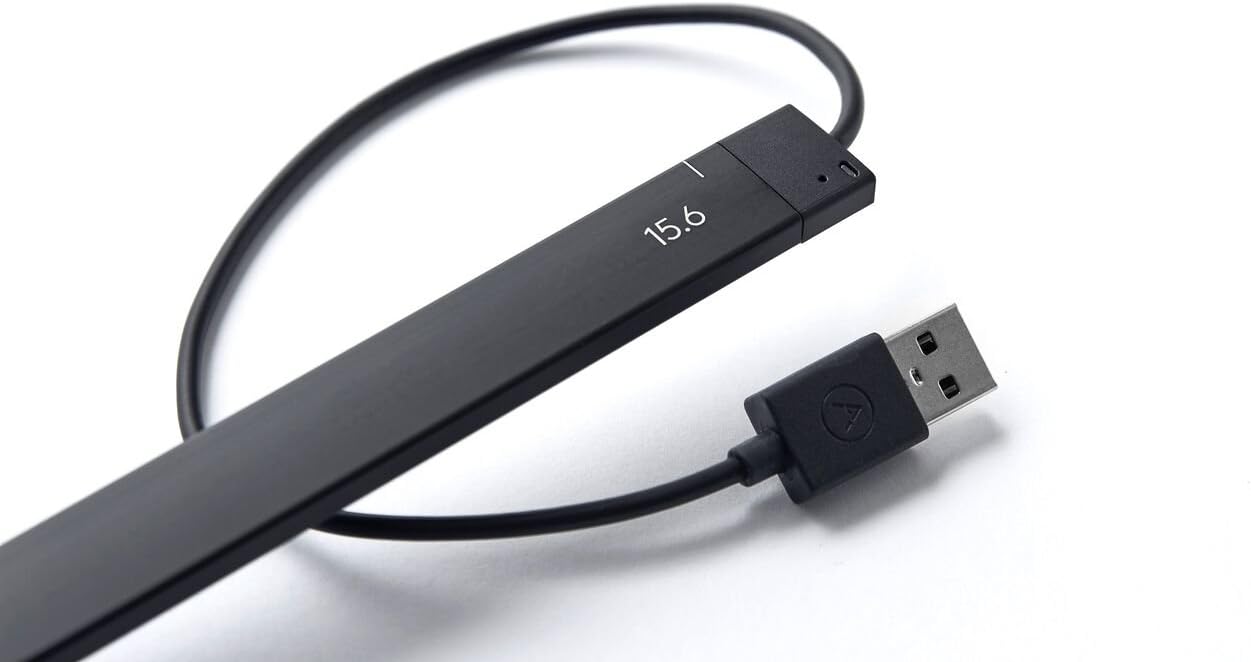




Neonode AirBar 15.6-inch Touchscreen Enabler for Laptops (Matt Black)
Product ID: 82186995
📏Fits 15.6-inch laptop screens
🔌Plug & play USB-A connection
🖐️Multi-object touch input
✨ Elevate your laptop game—touch the future now! 🖱️
The Neonode AirBar 15.6-inch Touchscreen Enabler is a lightweight, magnetically attached USB device that instantly converts compatible Windows 10 laptops into touchscreens. Supporting multi-object input and intuitive gestures, it offers a versatile and elegant upgrade for professionals seeking enhanced interactivity without replacing their existing hardware.


| ASIN | B01N3MHMSF |
| Are Batteries Included | No |
| Brand | Neonode |
| Colour | Matt Black |
| Customer Reviews | 3.7 3.7 out of 5 stars (646) |
| Date First Available | 3 November 2016 |
| Generic Name | Neonode Touchscreen 15.6" Windows 10 Notebooks, Matt Black (NNABC3460XU01) |
| Hardware Platform | Windows 10 |
| Included Components | AirBar sensor, Setup Guide |
| Item Dimensions LxWxH | 9.47 x 0.13 x 0.43 Meters |
| Item Height | 17 Inches |
| Item Weight | 55 g |
| Item Width | 5 Inches |
| Item model number | NNABC3460XU01 |
| Manufacturer | Neonode |
| Operating System | MS Windows 10 |
| Product Dimensions | 947.42 x 12.7 x 43.18 cm; 55 g |
| Series | AirBar for 15.6" Windows 10 Notebooks |
P**A
Awesome in every way!
... complete thumbs for the team who have made this awesome product. I just riddled worth my laptop and ... My complete thumbs for the team who have made this awesome product. I just riddled worth my laptop and all those complaining about accuracy, just caliberate from the window s control panel section. Thats it! It didn't even miss one touch. The other key factor is you have align properly with the screen with it just 3mm below the laptop screen(take the usb wire as reference.). Installation video is on youtube. Enjoy the awesome feature of touch to your non touch laptop
A**R
Good product, works as said.
The product unboxes with the airbar itself attached with a USB A to connect with the laptop. It's a simple way to enable your laptop to become a touchscreen. What it does is emit some rays from the bottom bezel of the laptop towards the top and when you touch the screen it calculates the point where the rays have been blocked by your finger and then processes the touch. Pros : 1. Easy to use and elegant looking. 2. Can be connected to any laptop via USB A. 3. The touch is accurate around the center of the screen and the touch can be recorded by simply hovering your finger over the screen rather than touching it. 4. It beeps when you place your hand over the top of the screen. 5. Can use any surface to record touches. For example, if you connect it to the laptop and place it on a horizontal surface instead of the bottom bezel of the laptop, then that surface is where you'd record your touch and the action would be taken on your laptop screen. Cons : 1. The magnet they use is slightly weak so the bar keeps falling of from the screen. 2. The sticky side of the magnet is also not so grippy but that's nothing that fevicol can't do. 3. Towards the top of the screen the touch reception is poor for obvious reasons. 4. Should be a little cost friendly.
A**N
Nice "party trick", not very practical.
On paper it sounded awesome to get this thing which magically makes any screen feel like touchscreen. I liked this idea a lot, but in reality, that's not the case and it stopped being fun very very quickly. - Accuracy is a problem. You can't draw, write or do much else with this, only use it for touch gestures like zoom and scroll, which you can already do with your laptop's trackpad. - Mounting and alignment is a very annoying problem. Package includes small magnets and the alignment has to be just right, otherwise touch will be strangely off. Making adjustments to the alignment after making magnets stick to the screen is also annoying. If placement is off, the airbar will get physically bent and detect ghost touches at the bottom of the screen. - Laptop displays that aren't made for touch screen, will feel flimsy, wobbly and might even have problems with physical scratches/etc. With a touchscreen, you need that physical feel, trying to precisely tap air while trying not to add scratches to the screen or make it wobble, simply defeats the whole point. This isn't airbar's fault though, but still a big flaw in the whole idea. - USB Cable is only available on the right side of the airbar, and it is very short. Now if your laptop doesn't have a USB port there, that's another problem. Good luck trying to carry USB hubs, which again defeat the whole point of having a portable device if you have to dock it all the time. - Build quality is plastic and weak, carrying it becomes a big hassle. It can easily get bent by the force of magnets it comes with if the alignment is wrong so you need a solid box to carry it around, again taking away from portability. I won't carry this around because I'm afriad it'll break accidentally (and very easily). - Cannot keep the airbar attached all the time because you can't close your screen's lid once this thing is on. Once again taking away from portability and the whole idea behind laptops. - Cannot hand this over to kids or anyone who isn't careful with tech, because anyone would full-force press the screen. That is what touch screen is. Leaving fingerprints, marks, scratches, etc on the physical screen of your laptop. - Windows and most other laptop OS interfaces are simply not made for touch screen anyway. They include a lot of detail and need precision clicks - using a mouse or touchpad is far more practical in almost all use cases, which makes airbar very very impractical. Conclusion: For the cost of an entire IPS monitor that's larger than 15.6" (Rs. 10k - 12k) , I'd say this purchase definitely wasn't worth it. If I had a chance to try this hands-on earlier, I wouldn't buy it myself. Still, definitely cool tech and nice for a party trick, and it does what it says on paper. For that, it is just OK. Giving 3 stars, I would give 2.5 if possible, because the build quality, carrying methods and mounting mechanism could be vastly better than it is in this state and for this price.
P**T
If you're planning to use this product to draw on a screen then you will be disappointed. This is mainly for individuals who might want ...
Incredible product. Touch accuracy has room for improvement but works as advertised. If you're planning to use this product to draw on a screen then you will be disappointed. This is mainly for individuals who might want a touch-based laptop to show off, or for semi-professionals who might use this in conjunction to timeline-scrubbing in video-editing or sound-editing software.
H**I
Useless Product not working as expected
not working properly with my laptop compaq c700 incompatible the width of this product is big as compared to my laptop down width and magnets not fixing properly useless product
A**F
It is value for money.
I loved the product. It work properly. It work same like normal touchscreen laptop. Instead of buying touchscreen laptop with more features is quite expensive, so this product give you the feeling of expensive laptop in cheaper price(depending on seller). I also loved the see through packing of this product. It good for drawing,editing,designing etc.
C**A
Nice and good gadget.
This is nice gadget. It's not working with Corel and photoshop. It's working good with Google Chrome, and other browser, paint brush, and zoom in, zoom out, and windows Explorer. All over good product. And an Amazon.. on time delivery.
A**R
Adds tech but Product Need Improvements
Converting your laptop to touch is a magical achievement but however it seems to be overpriced in India. Months back I pre-ordered it at $49 from the official site but upon it's launch, I was directed to Amazon.in listing here. There are fews which makes me not to use this product regularly. The USB cable is too short and my Lenovo Z51 laptop has USB ports on the other ends. Moreover, the USB cable is on the site where we rest our mouse, so that most of the times it causes discomforts. Airbar is not so thin. Due to its thickness, you can't close the laptop, if you need to do so, you will have to detach the Airbar.
C**N
Increíble producto
Increíble producto, 100% recomendado, funciona perfectamente en computadoras con Windows, excelente respuesta al tacto y fácil instalación, uno de los mejores gadgets
P**.
Airbar écran 15,6"
Très bon matériel et fonctionne super bien sur mon "Gamer Erazer ", l'effet est immédiat et ce sur n'importe quelle prise Usb 2 ou 3 de votre ordi et avec absolument Windows 10 (cindition requise). La sensibilité de l'écran est énorme au touché, vraiment magique et chouette comme matériel. Seul petit bémol, le aimants fournis avec sont trop léger pour le poids de l'airbar, donc pour ma part j'ai mis un ptit morceau de papier collant 3M par dessus et tout est ok depuis. à chacun sa méthode lol... A conseiller... De plus le fournisseur est super sympa, et vous offre son aide en cas de problème avec la commande. Encore un grand merci pour tout. ;-)
A**T
the Air Bar is truly amazing. It is so simple to use
This product, the Air Bar is truly amazing. It is so simple to use , just plug in and it works immediately turning my Acer laptop into a touch screen. For a customer that is not a technically fluent ,it has transformed my laptop into a much more useful computer. As a photographer images are extremely important, and with this Air Bar am able to move, expand with ease. Additionally it really is light as air, and so easy to transport. Excellent piece of kit. I am using Windows 10 and it seems to be completely compatible. I was met with lot of negative views prior to buying,when i enquired in well known retail shops ,who either said it didn't exist and even if it did, could not possibly work. I cannot rate this product highly enough from design, ease of use, quality, converting my current laptop into a much immediate touchscreen.
D**R
...nun günstig ein Laptop mit Touchfunktion...
..ruck zuck hatte ich die schmale Verpackung mit der Airbar bekommen. Angeschlossen an mein 15,6" FullHD Display meines Win10 Laptops und nach 5Sek. hatte ich ein Laptop mit Touchfunktion !!!!! hier könnte ich ja schon aufhören ,weil hiermit eigentlich schon alles gesagt ist ,aber ich will das System kurz beschreibe... ...in der schmalen Packung ist wirklich nicht mehr drin als die schmale Airbar mit dem festverbunden kurzen USB Kabel. Das Kabel ist bei mir perfekt lang. Es reicht exakt bis zur ersten USB Buche auf der rechten Seite des Laptos. Das ist auch wichtig, weil der Anschluss hinten oder Rechts am Gerät sein muss, damit die Kabellänge ohne Verlängerung reicht. Bei mir passt es perfekt ! Ein ASUS n552VX Laptop. Um die Airbar zu befestigen sind 2 Magnete verbaut ,die selbstklebenden und sehr flachen Gegenstücke können am unteren Rand des Displays befestigt werden. Somit ist die Airbar nun sehr leicht zu befestigen und sofort Einsatzbereit. Die bar hält gut, könnte aber etwas stärke Magneten haben. Schön wäre auch ein 2. Satz der Selbstklebenden Eisenplättchen. Nun zur Funktion... Plug und play wie man es sich wünscht. Es sind keine Treiber zur installation nötig (Win10). Ich habe die Airbar angeschlossen und hatte umgehend die Touchfunktion. Wer angst um sein Display hat, kann ich insoweit beruhigen, dass man kein Druck auf das Display ausüben muss, da das System optisch abgetastet wird. Die Touchfunktion klappt ohne Verzögerung .Mit der linken oberen Ecke des Displays habe ich ein Problem ,ein Streifen von ca.4mm höhe und 2cm länge wird bei mir nicht erfasst. Damit kann ich aber gut leben, da es eh schon schwirig wird, bei einer FullHD Auflösung ohne Vergrößerung der Textur, die obere linke Ecke zu erwischen. Das Surfen im Internet macht nun auch mit dem Laptop Spass, das Scrollen und wischen klappt super. Wenn ich Paint zum testen nutze stelle ich fest, dass ich mit 2 Fingern gleichzeitig malen kann. Also multitouch fähig ist das ganze auch noch. Die Bar fällt kaum auf und man muß schon aufpassen, dass man nicht ruckartig das Display runterdrück. Die Bar trägt ungefähr 5mm auf. Kommt man mit seinen Fingern außerhalb der Erfassungsgrenze, z.b beim streicheln seines Laptops oberhalb des Displays, so piept es kurz. wofür das allerdings gut sein soll weiß ich noch nicht, die dann blickende mini LED würde mir reichen. Jeden dem ich das nun zeige, ist schwer beeindruck von den nun bekommenden Möglichkeiten. Besonders wenn ich die BAR mal eben kurz an dessen Laptop anschließe und Derjenige sich wundert nun ein Touchdisplay zu haben. Aber die Bar Funktioniert wirklich nur für die vorgesehende Bildschirmgröße. Bei mir 15,6" was einer Breite des Displays von 346mm entspricht. Fazit: für mich nicht nur ein nice to have sondern ein richtige Aufwertung ! Kaufempfehlung : 100%
D**U
Works flawlessly once you set it up.
I have a touchscreen laptop and a secondary portable monitor (15.6 inch) that isn't a touchscreen that I kept poking out of habit. Attach this thingamabob to the external monitor and to the computer's USB port and I now have a second touchscreen. Admittedly I have an odd use case. But I'm wholly pleased with it.
Trustpilot
2 weeks ago
1 week ago