We remain fully operational. Our teams are working around the clock to ensure your deliveries continue safely.

DOWNLOAD THE APP


Copyright © 2025 Desertcart Holdings Limited
DOWNLOAD THE APP




Buy anything from 5,000+ international stores. One checkout price. No surprise fees. Join 2M+ shoppers on Desertcart.
Desertcart purchases this item on your behalf and handles shipping, customs, and support to Italy.
🚀 Mini Powerhouse, Maximum Impact — Elevate Your Workspace Instantly!
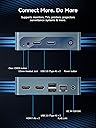
The Bmax B1 Mini PC combines an efficient Intel Gemini Lake N4000 processor with 8GB LPDDR4 RAM and 128GB eMMC storage, running Windows 11 Pro. Its ultra-compact design supports dual 4K UHD displays via HDMI 2.0, backed by smart cooling for quiet, reliable operation. Comprehensive connectivity includes Wi-Fi 5, Bluetooth 5.0, Gigabit Ethernet, and multiple USB ports. Ideal for professionals seeking a powerful, space-saving PC for work, study, or entertainment, with easy storage upgrades and 24/7 operation support.


| ASIN | B0GKZJ8GP7 |
| Aspect Ratio | 16:9 |
| Best Sellers Rank | #2,411 in Computers & Accessories ( See Top 100 in Computers & Accessories ) #78 in Mini Computers |
| Brand | Bmax |
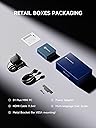
| Built-In Media | 1 x Bracket, 1 x DC 12V/2A Power Adapter, 1 x HDMI Cable, 1 x Mini PC, 1 x User Guide |
| CPU Model Number | J3355 |
| CPU Model Speed Maximum | 2.5 GHz |
| Cache Memory Installed Size | 6 GB |
| Color | B1 Plus-6GB+128GB-J3355 |
| Compatible Devices | Keyboard, Monitor, Mouse, Printer, Television |
| Connectivity Technology | Bluetooth, HDMI, USB, Wi-Fi |
| Cooling Method | Smart Fan |
| Customer Reviews | 4.2 4.2 out of 5 stars (134) |
| Display Resolution Maximum | 3840 Pixels |
| Graphics Card Interface | Integrated |
| Graphics Card Ram | 6 GB |
| Graphics Coprocessor | Intel HD Graphics 500 |
| Graphics Description | Integrated |
| Graphics Ram Type | DDR3 SDRAM |
| Hard Disk Description | SSD |
| Hard Disk Interface | Serial ATA |
| Hardware Interface | HDMI, USB 2.0, USB 3.0 |
| Human-Interface Input | Buttons |
| Item Dimensions | 4.25 x 4.13 x 1.42 inches |
| Language | English |
| Manufacturer | Bmax |
| Memory Clock Speed | 1600 MHz |
| Memory Speed | 1600 MHz |
| Memory Storage Capacity | 128 GB |
| Model Name | B1 Plus |
| Model Number | B1 Plus |
| Model Year | 2026 |
| Native Resolution | 3840 x 2160 |
| Number of Component Outputs | 2 |
| Operating System | OS 11 |
| Personal Computer Design Type | Mini PC |
| Power Consumption | 15 Watts |
| Power Plug Type | Type A - 2 pin (North American) |
| Processor Brand | Intel |
| Processor Count | 1 |
| Processor Series | Celeron J3355 |
| Processor Socket | BGA |
| Processor Speed | 2.5 GHz |
| RAM Memory Installed | 6 GB |
| RAM Memory Technology | LPDDR3 |
| RAM Type | DDR3 SDRAM |
| Ram Memory Maximum Size | 6 GB |
| Resolution | 4K |
| Specific Uses For Product | Business, Everyday Use, Study |
| Specification Met | CE, FCC |
| Style Name | Minimalist |
| Total Number of HDMI Ports | 2 |
| Total Usb Ports | 4 |
| Video Output | HDMI |
| Video Output Interface | HDMI |
| Video Processor | Intel |
| Warranty Description | 1 Year |
| Wireless Compability | 802.11a/b/g/n/ac, Bluetooth |
| Wireless Technology | Bluetooth, Wi-Fi |
M**B
Stream-ready and ultra-compact mini PC delivers more than expected
I’ve been using the BMAX B2 Power mini PC for a few days as a streaming/cord-cutting replacement for my older box, and it has exceeded my expectations. The Intel Celeron 5205U processor is modest on paper, but for streaming, browsing, and everyday tasks it’s more than sufficient. The operating system comes pre-installed, so setup was incredibly simple—just connect it to the TV, plug it in, wait a couple of minutes, and it’s ready to use. Display quality has been excellent, and the inclusion of both HDMI and DisplayPort outputs is a nice bonus. The 8 GB of DDR4 RAM and the 256 GB NVMe SSD offer plenty of room and responsiveness for typical home-use workloads. I also appreciate that both RAM and storage are upgradeable, which gives the mini PC a longer useful life if I ever decide to expand. Thermals and noise control have been very good. I only heard the fan briefly while installing software, and even then it was quiet. During normal streaming, it stays cool and unobtrusive. The compact form factor and clean design make it easy to fit into a living-room setup. For the price, this little computer offers outstanding value: strong everyday performance, quiet operation, and genuinely useful connectivity options in a very small footprint.
M**B
Really liking this compact setup 👍
Is a nice compact mini pc. So far it works great, haven’t used a lot but Atleast it is going. I bought a beelink couple years back and never got to use, Cause it wouldnt ever load windows. This seems to be even better than beelink Í only wish I had the money Í gave for beelink and I would have gotten a nicer BMax. I’m running 2 24” monitors . Still getting used to a more modern pc, îs way different than the old ones for sure 👍
C**S
Simple set up
Simple setup and license key is fine it's windows 11 pro it's not lightning fast but it's not slow it's a great emulator pc it plays upto gamecube games but there kinda slow ps1 was fine ps2 some games worked others were slow also plays movies well and YouTube is fine it does everything I want it to do I would definitely recommend
A**S
Don't buy it
The truth is I don't recommend it, it starts well but after 5 minutes it overheats and gets super slow that you can't use it, I only put one star but the truth is I give it 0
B**N
Good performance and great price
I recently purchased the new mini CP, I really didn’t know what to expect at finding a good new one at such a low price. This works just as good and fast as my other computer than I paid much more for!!! Of course, with the new PC you have to wait a longtime for all the upgrades, but after everything was done and update I am still blown away!!! My windows 11 pro download and set up done by few hours!!! I can play movies and shows with no lag!! The size keeps top of desk clear! It has been running so far! It is very quiet not a lot of noise!!! Cool mini CP
F**A
Good computer
A lil slow, but good for basic use.
N**E
Replaced my 10 year old laptop
I like it's compact design, durable build, sleek computer, and high performance components. This product is built with reliable two cores and two threads for energy efficiency, which consume less power, lower electricity bills, and quiet smooth operation. With Speedy NVMe Storage, the application loading will faster, quicker boot times, allows me to get my tasks without waiting at all. I also like Dual 4K display support, and 8 GB of DDR4 RAM as well. This versatile features help me to connect two monitors at the same time to increase productivity, and perform multitasking smoothly without any issue or lags while using it. This device also has flexible Dual slot storage with B2 power that expanding storage for large projects, or backup files, too. I love the compact and convenient of this mini PC so much. The high-quality wireless technology and full suite of essential ports helps me easy to relocate, storage, travel, and setup. This desktop computer is space saving, and beneficial for dorm rooms, home office, business, gaming, Audio and video as well. This is a tiny figure, but capable unit and biggie power. I am definitely satisfied.
J**G
Before throwing it away, read this!
The internet on this computer was extremely slow initially, to the point where almost nothing would load. Fortunately we live in a world of AI overlords that know far more than the average human and ChatGPT was able to walk me through the problem and it’s solution. For those who are also living in the endless purgatory of a loading screen, here is the solution to your problem: Option A (FASTEST fix – do this first) Force your computer to prefer 5 GHz On Windows: 1. Right-click Start → Device Manager 2. Expand Network adapters 3. Right-click your Wi-Fi adapter → Properties 4. Go to the Advanced tab Now look for one of these settings (names vary): • Preferred Band • Band Selection • Wireless Mode • 802.11a/b/g/n/ac/ax Set it to: • Prefer 5 GHz or • 802.11a/n/ac (or ac/ax) Click OK, then: • Disconnect from Wi-Fi • Reconnect 💡 This alone fixes ~80% of cases. ⸻ Option B (If Preferred Band isn’t listed) Some cheap adapters hide it 🙃 Do this instead: 1. Still in Advanced 2. Find Channel Width for 2.4GHz • Set to 20 MHz 3. Find Channel Width for 5GHz • Set to Auto or 80 MHz 4. Apply → Reconnect This makes 2.4 GHz unattractive so the PC jumps to 5 GHz. ⸻ Option C (Router-side, if needed) Only if A & B fail. • Log into your router • Split Wi-Fi into: • MyWiFi_2.4 • MyWiFi_5G • Connect the computer to MyWiFi_5G This is the nuclear option, but it always works. ⸻ Quick check after reconnecting Go back to: Wi-Fi → Properties You should now see: • Network band: 5 GHz Then run a speed test. You should see a massive jump. —————————- Now that the computer is working as it should, I give it 5 stars. It does what it’s supposed to, and I have no complaints.
M**5
بعد استخدام اسبوع كامل مشاهده وتنزيل المحتوى يصبح ابطئ غير مشكلة خطاء في المنتج طلبت ارجاعه
Trustpilot
2 weeks ago
1 week ago