Buy anything from 5,000+ international stores. One checkout price. No surprise fees. Join 2M+ shoppers on Desertcart.
Desertcart purchases this item on your behalf and handles shipping, customs, and support to Italy.
🔥 Dominate your MMO universe with precision, power, and style 🎮
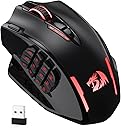
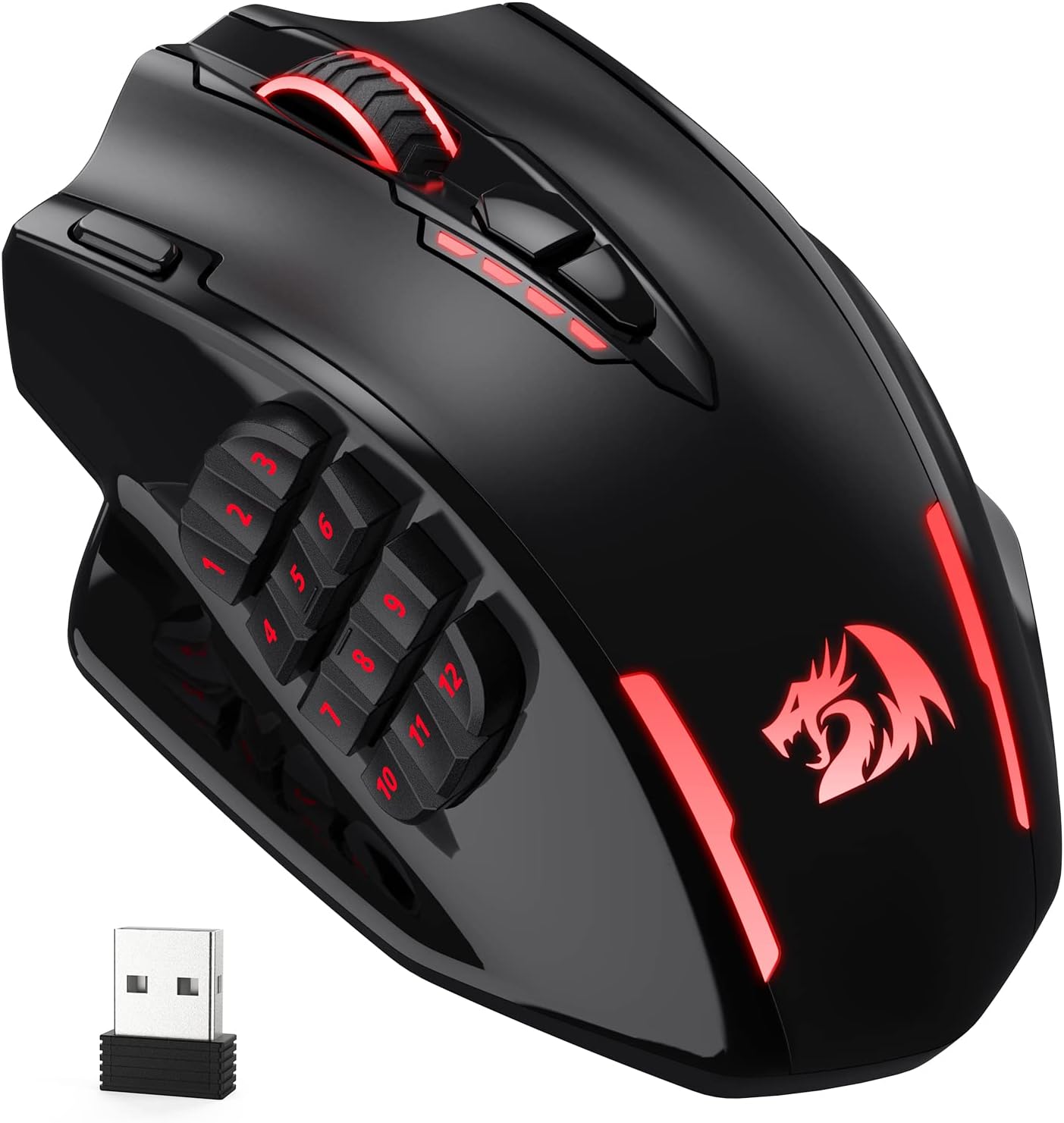
The Redragon M913 Impact Elite is a versatile wired/wireless gaming mouse designed for MMO enthusiasts, featuring a high-precision 16000 DPI optical sensor, 16 programmable buttons for complex commands, and a long-lasting 45-hour battery. Its ergonomic design and customizable RGB lighting make it a standout choice for professionals seeking both performance and flair.


| ASIN | B088B3ZM76 |
| Additional Features | Wireless |
| Amazon Bestseller | #2,989 in Computers ( See Top 100 in Computers ) #31 in PC Gaming Mice |
| Antenna Location | Gaming |
| Are Batteries Included | No |
| Are Batteries Required | Yes |
| Battery Average Life | 45 Hours |
| Brand | Redragon |
| Built-In Media | [USB Cable, Wireless Receiver, RGB Lighting] |
| Button Quantity | 16 |
| Color | Black |
| Compatible Devices | Personal Computer |
| Connectivity Technology | 2.4Ghz Wireless, USB-C |
| Country of Origin | China |
| Customer Reviews | 4.3 4.3 out of 5 stars (6,248) |
| Enclosure Material | ABS |
| Finish | Matte |
| Hand Orientation | Right |
| Hardware Platform | Laptop |
| Item Dimensions L x W | 17.5L x 11.5W cm |
| Item Weight | 132 Grams |
| Manufacturer | Redragon |
| Mfr Part Number | 507611201 |
| Model Name | Impact Elite |
| Model Number | M913 |
| Mouse Maximum Sensitivity | 16000 Dots per Inch |
| Movement Detection | Optical |
| Number of Batteries | 1 Lithium Polymer batteries required. |
| Operating System | PC/Mac/Linux/Unix |
| Power Source | Battery Powered |
| Range | 13.72 meters |
| Style Name | Wireless Mouse |
| Theme | Video Game |
| Unit Count | 1.0 Count |
| Warranty Description | 1 year manufacturer warranty |
さ**う
G604の後継機が無く定価1万のG600は在庫切れ。仕方なく値段的に手頃なこちらへ乗り換え。 使用一週間の感想です。 中華メーカーという事で警戒していたが思ったより使える。乾電池式だと思い込んでたが内蔵バッテリー充電式。意外と長く保つので一週間に一度とかで良いかも。G604と違ってボタン数が多く押しづらいが慣れれば問題ない。寧ろボタン数が増えて痒いところに手が届く印象。ホイールの左右チルトが無いがボタンの多さでカバーできる。ボタンは確かにG604より硬いもののこれも慣れる。 事務作業やMMO系に向いてると思う。私はアクションゲーやらなくなったので特段困っていないがそういう人には非推奨。あとマウス自体がお椀型というか横幅があるので持ち上げづらい。微妙な位置調整で持ち上げたい時やや不便。またマウスの電源ON・OFFが無いのでPCのスリープを解除してしまうのは難点か。ただしPC側の設定でこの問題は解決できる。 当たり前だがマウスがでかいので手が小さい方は非推奨。私は手首のラインから中指の先まで18cm程だがこの手で親指の中腹が1~3に当たる感じ。親指を伸ばしきって押す1~3は少々押しづらく、第1関節を曲げて押すことになる4~12は押しやすい(力が入りやすい)。恐らくボタンが硬くて押しづらさを感じてる人は手が少し小さいのかも。 あと日本語版の説明書は同梱の説明書のQRコードを読み取って飛ぶと存在する。私はスマホで飛んでChromeに履歴を残し同アカウントのPCでスマホの履歴を参照してPCで閲覧できた。
A**ー
少し大きめで滑りはよくはないですがサイドボタンが多くあって助かっています! やっているゲームがキーボードだとボタンが複雑なので右手ひとつである程度操作できるのが良かったです!
M**O
セールだったので買ってみたのですが、かなり便利。 当たり前ですが「指が操作を覚えるまで」と「設定」は大変ですが、毎日酷使していても問題なく使えています。 無線なのに遅延もなく、たまにの充電でかなり長く動きます。 ほんの少しよくないのは充電のタイミングがいつきれるかはソフト開かないとわかんない。もしくはきれてわかるのでそこがよくないかな。 2週間に一回ぐらいフル充電しています。
M**U
初めてボタンいっぱい付いてるやつ買ったけど使いやすいと思う
E**O
The best MMO budget gaming mouse
The quality of this MMO gaming mouse is excellent
赤**ま
2024年の10月に買って、先日(2025/3/3)にお亡くなりに。いくら充電しても充電できず電源オンオフすると一瞬チカッと着くだけで操作できず。 けっこうよい値段するのに壊れるの早すぎ、というかこの辺りの値段帯でもホイホイ壊れる中華クオリティに慣れすぎてるかもしれない。 マウスなくては困るので別のもの(LOGICOOL製)を購入して思い出した。 保証期間というものが存在することを・・・・・! もうこの商品に保証書があったかどうかすら覚えてねえ!少なくともlogiのようなちゃんとした2年保証書はなかったと思うが。 中華製こそ保証書は取っておくべきだなと思い返したので、自分の記憶に刻むためにも、他の人が同じ轍を踏まないようにもレビューを残しておこう、と。 たぶん保証書がなくても購入日は履歴でわかるし製品の保証期間さえ記録しておけば対応してくれるんじゃないかな、私のように本体を捨ててしまっていなければ。
H**U
購入から1ヶ月。ゲームではなく事務用途に使っていますが、カスタマイズ性、機能性とくに不満なく使えています。ボタンが押し辛いとのレビューもありましたが自分はそんなに気になりませんでした。
K**O
届いて開封してとりあえずメーカーのHPから設定ソフトウェアDLした、ここまではよかったが、ソフトウェア起動したらドライバーが見つからないとエラー。普通にHP上でデバイスドライバー探したんだけど見つからない。私と同様の案件がググったら多数でてきて、その中からようやくとデバイスドライバー置いてある場所教えてくれる解答が見つかって無事インストール終了。あまりにもメーカー不親切すぎ。 ちなみに、MMOゲームのマウス設定やったのですが、機能的には問題なさそう。 追記:マウスのバッテリーはすぐ切れます。有線じゃないと突然バッテリー切れになりゲームをやっていると積みます。
N**X
First impressions, comparing this to my old UtechSmart VENUS Pro (which I had for 2-3 years before the battery started dying) and the Razer Naga Pro. I had initially bought a much more expensive Razer Naga Pro, but found the buttons way too easy to push accidentally, and the mouse overall uncomfortable in the hand. I can safely say that for those with wide hands: this is the MMO mouse for you. The Redragon and the Utech are almost identical (probably from the same factory), however the Redragon is a bit bigger and wider, with a proper thumb rest, and a pinky rest as well. The buttons are a bit easier to push than the Utech, but still hard enough to push that you're not really gonna be accidentally pressing them too often. The software is very similar to the Utech with all the exact same features and the same lack of brightness control for the rainbow RGB mode (tho there is brightness control for all static modes). The main thing I don't like compared to the Utech software is that you can't see what all the buttons are assigned to at once, just one by one. When I was setting the buttons, occasionally one would bug out and disable itself or assign to the wrong button, so not being able to see them all at once meant I didn't realise this for a while sometimes. Overall tho, it gets the job done. Definitely not as nice as other software such as Razer, but you can't expect that at this price point, and you do get the advantage of it being less system heavy because it doesn't need to run in the background. The mouse feels nice in the hand, and while both it and the Naga Pro have a plasticy finish (compared to the Utech which is more texturised), the Redragon feels much nicer in the hand to me. And cooler too! The Naga's material always felt warm, which is just kinda bleh in hot climates such as Australia. Both the thumb/button side, and the finger rests have a glossy finish, which I would prefer not to be there at all, but it is comfortable. The Utech had a small glossy finish area under the palm and I never ran into too many issues with scratching, fingerprints, etc, so hoping for the same here. The Redragon, despite apparently being lighter than the Utech, tends not to glide as easily as far as I can tell depending on the surface. It glides easier on a desk surface or a more slippery mousepad, but a mousepad that's less slippery will lead to it moving more slowly, and strain your wrist a bit more. Increasing the DPI does help make up for this a bit. For Linux users (and Mac too? Don't think the software is on there), you can expect this to work perfectly across all your systems once configured in Windows, as everything is stored onboard in the mouse, just like the Utech. Including the mouse's second profile, which can be accessed by clicking the profile button on the bottom of the mouse. RGB will work, you just won't be able to change it. But there isn't a ton of RGB options anyway so I usually just leave it on rainbow. I had lots of success using my Utech with my Steam Deck, and given that this Redragon mouse is practically the same mouse with small differences, I fully expect to have the same experience here. Will update if that is not the case! It's really amazing the bang for buck you can get with these Chinese mice vs the big name brands. There just isn't any competition for wireless MMO mice atm in my eyes, which is such a shame because there's some awesome wired ones, and most MMOs that will benefit from this style of mouse don't really need the low latency of wires. Also, if there are any FFXIV players reading who're thinking about trying out an MMO mouse, just do it! It's so worth it!
A**I
One of the best things I've purchased. It has two customizable modes. I customized one for work and one for games, which means I use it all day. One full charge keeps it up for 3 days, which is more than what I expected. The only thing, which is not an issue, is that it doesn't have RGB zones. Still, the RGB is pretty good.
J**N
I like my G600 but hate its wire. Decided to try M913 many because it is cheap and really I did not expect it to work. But it does. This is crazy. I enjoy using mouses with multiple buttons while working and I am really into macros. Talking about macros, M913 is godlike. First of all, M913 stores all your macro "on-the-board". This means the mouse has its own memory and it literally remember the macros. In other words, if you just unplug it and plug into a different PC, macros will work. This is simply crazy. This is a premium feature and for those famous brand it is usually only available on the most expensive models. Consider the price doubled if it is wireless. The second craziness comes from the mouse's driver, which you can download from their website. According to its graphical interface, it seems like a super old framework is used (winform?). But its functionalities are perfect. Similar as other brand's driver, it allows you to record keystokes. The different thing is, it allows to change every single keystroke separately after you have record the macro. The stall time between each keystroke can be customerized as well. Drawbacks: 1. Side buttons' clicking feel is not as good as G600 2. Side button's angles are not as perfect as G600. Can be a problem for MMO mouse rookies (mis-click) 3. DPI buttons cannot be customized 4. RGB can hardly be customerized 5. Does not have shift functionalities like G600's G-shift 6. Wheel cannot be tilt. This make it 2 buttons less. And that two are actually the best kind of buttons: easy use & hardly misclick. 7. Driver's keystroke recording mechanism does not work with 'win' button well. Pretty sure this is a bug. But an easy workaround is to replace the 'win' button with something else (e.g. 'A') while recording, and change that specific key later manually. That is what happen when you actually spend time to build a robust driver, partial functionalities is sufficient to still make things work. Overall: As can be seen the drawbacks are basically tiny issues. This mouse has no critical problem and did what it advertised. I am really surprised by its driver, it does have problem but I feel it is more robust than Logitech G Hub. Ugly thing that work is always better than fancy stuff that does not work. Finally the price, it is simply too cheap. Reddragon built a 50 bucks product that stands the same level as other brands' 150 bucks mouse. I recommend this product. Update: It seems like not only the key stroke recording process has problem with "win", same issue applies to the default profile auto save. If you create a macro with "win" using my workaround and deploy to your mouse, it will work. However, if you restart your driver, the "win" key will disappear in your macro. I think there is something wrong with its save/load functionalities for the default profile (it cannot recognize "win" and decides to ignore it). Fortunately its customer export/import feature does recognize "win", and therefore you can keep your "win" key by creating backup manually.
S**X
Das Design der Maus ist nicht nur ansprechend, sondern auch äußerst funktional. Mit zahlreichen programmierbaren Tasten und einem ergonomischen Design bietet die Maus eine optimale Unterstützung für komplexe MMO-Spiele. In meinem Fall habe ich diese Maus für das Videoeditieren benötigt und habe Makros auf die einzelnen Tasten gesetzt die mir das Arbeiten erleichtern. Dies geschieht alles sehr intuitiv über die Software von Redragon. Die Präzision und Reaktionsgeschwindigkeit der Maus sind beeindruckend. Dank des hochwertigen Sensors und der individuell einstellbaren DPI-Einstellungen kann man die Maus perfekt an seine Bedürfnisse anpassen und von einer exakten Steuerung profitieren. Die Maus liegt dank ihrer ergonomischen Form angenehm in der Hand und sorgt auch bei langen Sessions für maximalen Komfort. Die hochwertige Verarbeitung und die langlebigen Materialien garantieren eine lange Lebensdauer, selbst bei intensiver Nutzung. Ein weiteres Highlight der Maus ist die individuell anpassbare RGB-Beleuchtung. Insgesamt bin ich von der MMO Gaming Maus von Redragon restlos begeistert und kann sie jedem ambitionierten PC-Nutzer nur wärmstens empfehlen.
G**O
Finora è l'unico mouse wireless che ho trovato che sia così tanto programmabile (12 tasti laterali + alcuni altri, che però si è meno inclini a modificare), e a cui sia anche possibile sostituire il cavo, funziona anche se ci si dimentica di caricarlo (se attaccato al cavo può essere usato anche mentre è in carica), a differenza di molti altri modelli in cui non è possibile, per via di dove si trova la porta di ricarica. Per quelli a cui piacciono i led ne ha più che a sufficienza (io però non li uso quasi mai, perché riducono di parecchio la durata della batteria). Ha svariate velocità di rilevamento del movimento (utile se giocate a giochi in cui questa latenza è rilevante). Considerato tutto, forse è addirittura overkill per la maggior parte degli utilizzi, anche per il gaming, però è molto comodo, una volta che ci si prende la mano. Il prezzo è un po' alto, per quello di cui in genere si ha bisogno di fare, ma sono soldi ben spesi. Per personalizzare il mouse bisogna scaricare il programma apposta dal sito del produttore
Trustpilot
1 month ago
2 months ago