We remain fully operational. Our teams are working around the clock to ensure your deliveries continue safely.

DOWNLOAD THE APP


Customer Services
Copyright © 2025 Desertcart Holdings Limited
DOWNLOAD THE APP
![【ワイヤレス・ピンク軸】Kinesis Advantage360 Professional【キネシス アドバンテージ360 プロ】[KB360-PRO-KLQ]](/_next/image?url=https%3A%2F%2Fm.media-amazon.com%2Fimages%2FI%2F61Rcv4tifEL.jpg&w=3840&q=75)
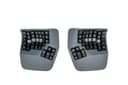

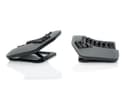
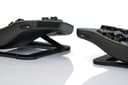

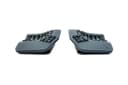
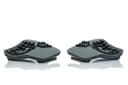
⌨️ Elevate your workflow with ergonomic elegance and silent power
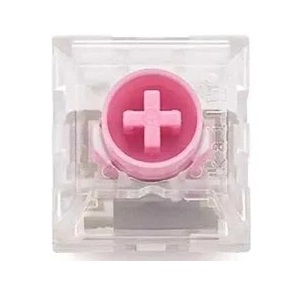
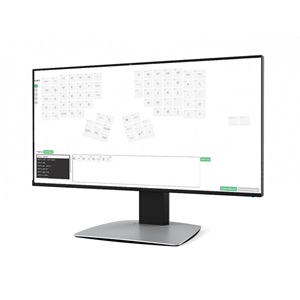
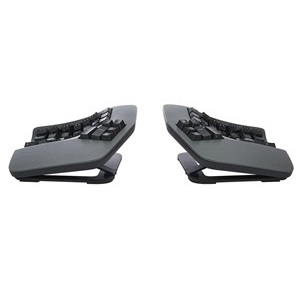
The Kinesis Advantage360 Professional Linear Quiet keyboard combines a split, bowl-shaped ergonomic design with quiet Kailh Box Silent Pink linear switches and wireless Bluetooth connectivity. Its adjustable tenting angles and spacing reduce shoulder and wrist strain, while advanced open-source firmware allows deep customization of key functions and macros. Designed for professionals seeking comfort and efficiency, it includes thumb clusters for frequent keys and a rechargeable battery, backed by a 1-year warranty with local Japanese support.





| ASIN | B0CT444BH6 |
| Additional Features | Ergonomic |
| Amazon Bestseller | #62,123 in Computers ( See Top 100 in Computers ) #982 in Computer Keyboards |
| Antenna Location | Business |
| Brand | KINESIS |
| Built-In Media | 2 x USB Charging Cable, Additional key cap, Bridge Connector, Keycap Puller |
| Button Quantity | 108 |
| Color | gray (dark gray) |
| Compatible Devices | Laptop, PC, Smartphone, Tablet |
| Connectivity Technology | Wireless |
| Customer Reviews | 4.3 4.3 out of 5 stars (323) |
| EU Spare Part Availability Duration | 3 Years |
| Enclosure Material | Plastic |
| Generation | 1 |
| Hand Orientation | Ambidextrous |
| Item Dimensions L x W x H | 38.1L x 20.3W x 7.6H cm |
| Item Weight | 1.45 kg |
| Keyboard Backlighting Color Support | Single Color |
| Keyboard Description | Mechanical |
| Keyboard Layout | QWERTY |
| Manufacturer | Kinesis |
| Mechanical Keyboard Switch Model | kailh_box_silent_pink |
| Model Name | Kinesis Advantage360 Professional |
| Model Number | KB360-PRO-KLQ |
| Number of Keys | 76 |
| Number of Sections | 5 |
| Power Source | Battery Powered |
| Series Number | 360 |
| Style Name | Professional (Bluetooth) | Quiet Switch |
| Switch Type | Linear |
| Theme | Ergonomic keyboard |
| UPC | 607998360408 |
| Warranty Description | 1 |
A**R
Advantageは15年以上使っているので(PS2->USB->赤軸)、キーボード自体が特殊かどうかはもう慣れてしまったのでわかりません。ただ、それ程慣れが必要という事もないかと思います。今回、かなり高くなっていますが。 数か月使ってみた感触としては以下でしょうか。 ・基本的な使いやすさは変わらず 問題ないですね。BT接続だったり、バックライトが必要か?というと疑問ですが ・パームパッドがマグネット式になった これまではテープで貼る形だったので、外しにくかったり汚れたりしていた。 ・ファンクションキーがないのが少し不便 たまに使う時に物理キーがないので、あれ?となります。キートップに印字してくれていたらよかったのですが(前面に印刷されているが傾斜のためほぼ見えない)。F4が3キーだったりするのも困りもの。リマップしてずらせばいいじゃないと指摘されそうですが、今度はF12があふれちゃうんですよね。 ・テンキーでフットペダルが使えない これまでテンキー入力時はフットペダルを踏んで入力していたのですが、Proの方はフットペダル非対応なので、それが使えない。これまでの癖でペダルを踏む動作をしようとしちゃいます。 ・日本語キーボードマッピングは可能 基本的には英語キーボードで全く問題ないのですが、在宅用の貸与PC(Windows)が日本語キーボードのため。設定が変えられないんですよね。これまではかえうち2で対処していたのですが、今回認識せず。 そのままだとキーのリマップができないので、configでCONFIG_ZMK_HID_REPORT_TYPE_HKRO=yにすると日本語キーのリマップが可能となります。リマップ自体は他のZMKキーボード(globe80とか)を参考にすればいいかと。
ま**る
分離型かつお椀のような立体構造のおかげで、胸を開いた自然な姿勢で軽く入力できます。身体への負担軽減を目的として購入したのでその点については大満足です。文字入力は意外とすぐ慣れましたが、記号は少し練習が必要でした。 またキー設定の自由度が高いのは嬉しいポイントでした。 オープンソースのZMKファームウェアを使用した細かなキーカスタム・マクロ作成が可能なので、色々なソフトのショートカットをワンタッチで打てるように設定し、ちょっとした左手キーボード代わりにも使っています。 複数のプロファイルを登録できるので、通常の入力用のほか、各ソフトごとに専用のプロファイルを作り使い分けています。 完全な素人ですが公式リファレンスとAIを活用すれば設定はできました。面倒ではあったので人は選ぶと思いますが、こちらを購入しようという方はプロフェッショナルが多い気がするので不要な心配かもしれません……。 キーカスタムについてのサポートは一切していないと公式から明言されていますので自分と同じ素人の購入者はご注意を。 個人的なマイナス点として、海外製のためサイズが大きく、手が小さめだと最上段のキーまで指が届きません。セットポジションを維持したまま打てるのは手の大きい人に限られると思います。 また左右それぞれの電源を入れる手間があり、Bluetooth接続が安定するまでに少し時間がかかることもあります。 そのためサッと入力したいだけの時には別の普通のキーボードを使っています。 総合して、身体への負担軽減を主目的とするなら満足できる製品ですが、最速入力や接続の快適さなどを重視するなら慎重な検討をおすすめします。なお、デスクに置いてあると気分が上がって作業のモチベは上がります。
試**み
キーボードとしては素晴らしい商品。キーボードをよく触る職業なら間違いなく買いだと思う。 ただし、充電まわりが非常に残念。 ・充電中に無線での使用ができない ・そのくせ、充電の減りが早い ・充電後Bluetooth再接続が上手く行かない(コツが要る)
A**R
自分のタイピングについてしまっていた、ミスタイプの原因になるくせに気が付かされます。 正しい指でタイプしないと打てない、、という配置なので、慣れるまでは時間がかかりますが、正しい共生なので、それはいいとして。 ただし、強制が終わったとしても、最速でタイプできるかというとちょっと微妙です。 特に小指でタイプするキーは、私だとかなり指を伸ばさないと届かないのできつい。 そこだけ手首を返して薬指で打つ、としてもいのですが、結構厄介。 しかも、指に若干のマヒが出ている人だと、さらにきつい。 エルゴノミックは、ユニバーサルデザインとは別の概念なんだな、、と気が付かされました。 また、それ以外のキーも、結構しっかりと打ち込まないといけないので、指に力がかかります。 1日作業していると、結構指が疲労していることに気が付きます。 高いだけあって品質はいいのですが、自分に合う最適解かというとちょっと微妙かもしれません。 小指が長い人ならいいのですが。
D**T
弧を描くキーボードはたいていそうですが、フレキシブルPCBなのでスイッチの交換はできません。もちろん自分でハンダを外してやれることはないと思いますが、保証が切れます。
V**M
It took me ~ a month to get used to the keyboard, but now I love it. Something that it pushed me to do is to use right fingers to type certain keys. Also I feel a bit more efficient after I started to use VIM motions with the keyboard almost everywhere - magic.
I**N
This keyboard is awesome! I've gone through a bunch of other keyboards over the years from cheap Dell ones, Keychron mechanical keyboards (great keyboards for normal layouts), Unicomp IBM Model M and was skeptical at first about this, primarily as I've never touch-typed.. can type fast with numerous fingers but mostly looked at the keyboard. This Kinesis has taught me to touch type too now, within a few weeks. I remapped a few of the keys due to programming needs, but it's so comfy and allows me to sit in a better position. It's not cheap, bit if you're looking for a split ergo keyboard, I'd highly recommend it!
J**S
Steep learning curve - I bought this during a flare up of tendonitis in my new job caused by having to use a latop for a week, so I can't speak yet for preventative qualities, but I also have shoulder issues from arthritis and immediately from day one I could feel my shoulders were far more relaxed. After a few weeks of use I am becoming more proficient, it starts to become easier to use as you train yourself to let more fingers share the load, and it definitely feels more natural. It is expensive, but so is being unable to work. It's that simple.
E**A
Saved my wrists. Once you get used to it, the strain on your wrists and forearms disappear. A bit pricy but worth it if you type a lot. Would be five stars but it bugs out sometimes, needing to be unplugged and replugged in (macros stop working)
D**Y
This keyboard is awful. Nearly 1000 dollars and you have to use a janky fork of a GitHub repository to change anything.
Trustpilot
2 days ago
2 weeks ago