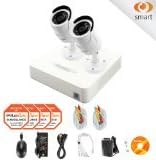

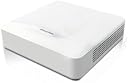
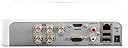

2 Camera 960H Security System, 4 Channel 960H Compact DVR w/500GB HDD and 2 1000TVL White Bullet Camera Surveillance Kit
Product ID: 7129169
🌙100ft Night Vision
💾500GB HDD
📷1.3MP Resolution
🔒 Secure Your Space, Anytime, Anywhere!
The 2 Camera 960H Security System features a compact DVR with a 500GB HDD and two high-resolution 1000TVL bullet cameras, offering superior 1.3 Megapixel video quality, night vision capabilities, and robust weatherproofing, making it an ideal choice for both home and small business security.
L**A
Do you want "UNRELIABLE" for your home security.
Don't trust this system with the security of your home. The installation for me was easy enough as the system and all four cameras were attached to my garage. The system will work fine at first but after a few months (estimations) you will log into the system to find it is no longer recording. Nothing will show up on the hard drive so you don't know how long it has been like this. A call to the company and they will tell you to open the system up and unplug the hard drive and then plug it back in. This will reset the system.and it. Upon doing this I was able to start recording again. A few months later and the same thing occurred. Called the company and they wanted me to reset the hard drive again. Since the system wasn't reliable, as it was a hit and miss weather the system was working, I returned the hard drive and it took about a month for the replacment to arrive. They said it was a new one but since I didn't write the serial number down for the one I returned,it could have been the same one. The system worked at first but after a few months the same issue occurred. It would stop recording without warning and no footage could be retrieved. Since installing the system there were two occasion where I needed to review footage for security reasons. Unfortunately the systems was down both times. System is out of warranty I'll need to find a hard drive system to work with the cameras. The cameras appear to be working okay but I would never do buisness with LaView again.. Recording system is unreliable
M**S
LaView 8 Channel ProX DVR
I have bought two of these 8 channel systems and one 16 channel system and am very impressed with them.While the 8 channel system does not have a fan and has a 100 Mb Ethernet Port, the 16 channel system does have a fan and a Gibabit Ethernet Port.In so far as I can tell, the DVR features appear to be the same on both 8 and 16 channel systems. For sure you can administer both 8 and 16 channel systems from a computer using Skyview Cam as I have all three of my DVRs programmed in and can view, playback and administer all three locations by selecting the DVR I want to look at. The Android/Apple Skyview Plus App can also view and playback all three locations by choosing which DVR I want to look at.The camera resolution is very good in my opinion, night vision is good in most cases, DVR is loaded with options and the Android and Apple apps are very good.You have to port forward three ports through your router. Android/Apple Skyview Plus app and SkyView Cam for PC need Device Port 8000 (can be changed to your choice), your browser will need HTTP Port 8080 (can be changed) and RTSP Port 8554 (as I recall and can be changed as well).I have had good luck with Maxthon, Safari and Chrome Browsers. Can't get Firefox to work fully and IE simply does not work for me at all. System configuration can be done for the most part from a browser or you can use the Skyview Cam program from Windows. The one thing I could not do from the browser was to change the RTSP port. Had to use Skyview Cam on my computer for that.Users can be added in addition to the default admin user. Each user can be restricted as to what can be viewed, played back or changed.There is also a PDF help file on the CD that comes with Skyview Cam for PC that really is helpful in programming the DVR. I can't remember but it may also be with the download from LaView's website. The written documentation is poor.Android and Apple Skyview Plus app can view live video and playback as well. You can view all 8 cameras by swiping left or right on the touch screen. Playback is easy as well.One nice feature of the DVR is camera files can be automatically deleted after a set number of days. We needed this at one location to avoid keeping files longer than absolutely necessary.Don't be discouraged by poor video quality during live view. You must use Main Stream and not Sub Stream to get good quality. There are options for each camera to set the video quality as well.
A**R
Affordable Video Security System- WITH DRAWBACKS
UPDATE 2:1)I've given up on the motion detection software. I am contemplating setting up Blue Iris software on a dedicated PC/Media Server, which will fix motion detection false alarms. If LaView reads this, PLEASE update your software to be able to better fine tune the motion detection. I have tried absolutely everything to negate any false alarms, but nothing has worked. At night, the IR attracts bugs and the motion alarm goes crazy, even on lowest sensitivity. LaView customer service recommended I get a bug light/zapper nearby at attract them away from the cameras. I'm not in the swamp (I'm in Seattle) and installing bug lights around my house is a)overkill and b)rediculous. Blue Iris allows for motion detection to be fine tuned to the size of moving objects, for example, which will completely solve the LaView motion detection issue I have. Shadows even set off the alarm as to tree branches, etc. And again, that is on lowest settings with selected alarm zones turn on/off best I could.2)The image needs to be better compressed and have better color range. I wish this had a dynamic light feature. As it is now, images get horribly washed out when the sun hit them or car lights drive by at night.As it stands now, I'm keeping the system up and running, since I'm past the return window. I have set up the motion detection to not email me when it goes off and have taken time every day to go back through the recorded motion events video clips (see UPDATE comments below on navigating through the recorded video...)to see what's been "caught." 99% of the time so far it's been absolutely nothing. But I got this system for that 1% incident, so it's passable if you really take the time to hold its hand.UPDATE:The video recording playback is a nightmare to navigate. There's no immediate way to jump to the time of the motion detection. I get an email with 3 pictures attached, but it takes far too long to try and get to the time in question in the video menus. Also, no way to change video playback time from 24 hour to 12 hour in the playback timeline. Just another layer of confusion to add to the mix...I'll get to the points. Also will offer some help to those who might run into the same things I did.1) First off...NOT "HD-like," video quality. 1000TVL lines looks a whole lot like 600/700 TVL from other manufacturers. I think they're a bit gimmicky saying things like 1.3MP and 1000TVL cameras. Look at other popular brands and see how many TVL they're top of the line analog cameras are... Analog can only handle up to a certain resolution, much lower than HD. I currently have bitrate at 2048, highest quality and main and sub stream so I know I've maxed out the quality best I can. This is a 960H resolution system and outputs 960x480. Looks great on mobile devices, not so great full screen. Very fuzzy and pixelated (compressed). Doubt you'll be identifying faces, license plates, etc from very far away.2) DVR operating system seems good. Lots of options to dig through if inclined. It's pretty intuitive. Recording modes are customizable for motion/24/7, alarm, etc. Can be remotely configured from a PC in the home network to setup once you find out what IP address is.3) Remote viewing: You have to open up 3 different ports on your router to get it to view remotely. You will be able to see which port #'s are "RSTP, HTTP and Server" via a direct connection to the DVR using an attached monitor and the included mouse to navigate the OS. If you're not familiar with port forwarding, you'll be horribly lost on your own. Hopefully tech support can help you out via phone. I found them quickly helpful via email. I got a response in the morning after leaving them an email before bed.TIP: Android users- You have to use their "LaView Plus" app to view the camera remotely. Their other apps on the google play store "LaView Live" and "LaView HD" didn't work for me. I haven't been able to get any other IP camera apps to work with these cameras yet. I prefer other apps over theirs, so that's a shame.4) Camera's offer a very wide view. Slightly fish eye, but I prefer that for the wider view.5) (REMOVED MOTION DETECTION COMMENT- SEE UPDATE)6) Night vision is good. A little washed out but still reaches far enough for my needs.I got the 8 channel system so I might add other cameras in the future. I found the included 4 to be just enough.
Trustpilot
3 weeks ago
1 month ago