Desertcart purchases this item on your behalf and handles shipping, customs, and support to Italy.
โ๏ธ Power your productivity with a pen that never quits!
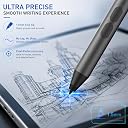
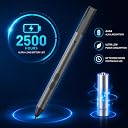
The iafer Active Pen is a high-performance stylus designed for Surface Pro and multiple MPP-compatible devices, boasting an industry-leading 2500-hour battery life, 1024 levels of pressure sensitivity, and advanced palm rejection technology. Its instant-on feature eliminates pairing hassles, while a sturdy metal clip ensures portability without signal interference. Ideal for professionals, students, and creatives seeking reliable precision and long-lasting use.


| ASIN | B0792Y9K3P |
| Battery Average Life Standby | 521 days |
| Battery Description | Alkaline |
| Best Sellers Rank | #13,551 in Cell Phones & Accessories ( See Top 100 in Cell Phones & Accessories ) #298 in Styluses |
| Brand | iafer |
| Color | Black |
| Compatible Devices | Surface Pro 10, 9, 8, 7+, 7, 6, 5, Laptop, Studio, Book, Go, Duo |
| Compatible Tablet Computer Models | Asus Transformer Book T300, HP Omni 10, Kobo Libra Colour, Microsoft Surface Pro 11 |
| Customer Reviews | 4.3 out of 5 stars 3,957 Reviews |
| EU Spare Part Availability Duration | 1 years |
| Enclosure Material | Aluminum |
| Item Diameter | 0.35 inches |
| Item Dimensions | 5.4 x 0.37 x 0.37 inches |
| Item Weight | 9.07 g |
| Manufacturer | iafer |
| Material | Aluminum |
| Mfr Part Number | Surface Pen-Platinum |
| Minimum Required Operating System Version | Windows 10 |
| Model Number | SPEN surface pen |
| Number of Batteries | 1 AAAA batteries required. (included) |
| Number of Packs | 1 |
| Pressure Sensitivity | 1024 levels |
| UPC | 747180989441 |
| Unit Count | 1 Count |
| Warranty Description | 1 year warranty |
E**C
Works with the Kobo Libra Colour
This works awesome for a Kobo Libra Colour.
S**9
Worked great...at first (UPDATED)
I ordered this pen for a Surface Pro 4. I noticed right off that the buttons were not the same as a Microsoft pen, but it worked great so I didn't care. It had good accuracy, good response, everything. Then, not a week after my Amazon warranty ended, the thing just quits. I tried new battery, I tried opening something specifically on a draw function, everything I could think of. So I came to the product page to find the warranty/support info, which told me to contact the seller. Ok... I went to the seller page No contact info. I went to find the seller site. No website results. No Facebook. Nothing. There is no way to contact them that I can find. Update! We delved through the packaging and found the battery replacement instructions. On the bottom was driac.com! They directed me to a set of instructions involving drivers, and I have my pen back!
A**L
Works, but no Bluetooth
I use my pen everyday to teach my math classes. I project my computer screen and fill out the notes with the pen. When my old Microsoft brand pen stopped working, I decided to try out a cheaper version. Here is my honest review. This product works well. For some reason it did not work the first time I tried to use it. After I removed the battery and put it back in, it worked great. I will be keeping an eye on that and update the review if I have any more issues. Note that it does not have Bluetooth, so you will not be able to pair it to your computer. However, it does not seem to need Bluetooth. This is probably because it does not have a shortcut button, which I never used anyway. There is no power button, it simply works when you put the battery in it. The side buttons do work well. I actually like the eraser being a side button better than it being on the back like my old pen from Microsoft. It is faster to click the button than to flip the pen upside down. The palm blocking does seem to work well, which is probably the most important feature of a pen. With out palm blocking, you may as well use an old school stylus which is just a piece of rubber on a stick. The pen itself seems rather light and cheaply made, so I am not sure how long it will last. The tip is just plastic. It does come with a second tip, but it is exactly the same. I was unable to remove the tip because it was so tight, but as the second one is the same, I am not too concerned about it.
S**S
Great low-cost stylus for the Microsoft Surface tablet
Lightweight and responsive, very natural and easy to use. It ignores palm presses on the screen and delivers accurate cursor placement. Have not had it long enough to evaluate the battery longevity, but so far it's been working perfectly! Recommended!
R**T
Good replacement
It's a good replacement for the Surface pen. It doesn't use Bluetooth, but for writing and drawing it is great. It has a precise point, making it easy to use. The buttons make it easy to erase. It's all i need. It didn't cling to the magnet on the surface very well as only the pocket clip seems to stick to the magnet.
R**O
Great product for price!
I bought this to use on my touchscreen computer and it worked so well for the price!! It automatically connected to my laptop and worked flawlessly. It moves accords the screen well without scratching. It also has a button to press to erase. I will say that sometimes itโs easy to hit the erase button and mess up your work but usually you can undo it.
N**N
Good if you just want to use it as a mouse.
So first, it's battery operated. It uses a AAAA battery, so when it dies you have to replace it. Drawing: 1/5 It is really bad for drawing. The tip has some wobble to it, so the beginning of your line will never be smooth. Standard mouse: 5/5 If you just want to use it as a mouse to right and left click, it is really good for that. Other: 3/5 I was using it to support 3d print files in Chitubox with decent success. Again, the movement in the tip prevented the precision I required for desired support placement, but I was able to make it work. Verdict: Unless you just want this as a basic clicker, buy the more expensive (brand) pen for your tablet. You'll spend the difference on batteries over a year anyway.
L**S
Surface Pro laptop
I was very upset when I finally got this stylus, for a Surface Pro laptop, Christmas Eve. It was not compatible with my laptop, even though the add listed mine. Never could get it to work. I had to rush out on Christmas Eve to find one that worked and was compatible. Do Not RECCOMEND this product.
M**E
Gran calidad
Esta pluma tiene una sensaciรณn hermosa al tomarla. Es un poquito pesada por el material que me parece resistente, metรกlico. Viene con su pila AAAA incluida y puntillas de repuesto. El emparejamiento es instantรกneo una vez colocando su baterรญa. Encantada. Excelente producto.
J**N
Great pen
I've been using this with the Surface Pro X for months and it works really well. The battery has lasted without a thought and it is a good and responsive pen. I don't know if there are cheaper pens, but this is definitely a good option. Thank you!
T**Q
Pen is amazing
The pen is really good; it is pressure sensitive, has palm rejection, and is really responsive. The seller was also really good, the day after i ordered they texted me informing me that they were processing my order and asked me to confirm my model of my Surface to make sure it was compatible. Not many sellers do this, so it was really nice to see them care for the customer like this. Overall, an amazing product and an amazing seller.
B**A
Top
Me flipa lo bueno que es no necesita de concetarse con el Bluetooth, va super rapido y suave. Mejor lapiz y mas barato imposible
K**T
great device
great device
Trustpilot
2 weeks ago
4 days ago