


Desertcart purchases this item on your behalf and handles shipping, customs, and support to Italy.
🔌 Upgrade your setup—because your legacy gear deserves premium clarity!
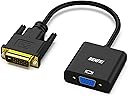
The BENFEI Active DVI-D to VGA Adapter converts DVI-D 24+1 signals to VGA, supporting HDTV resolutions up to 1080p at 60Hz and PC resolutions up to 1920x1200 at 60Hz. Featuring a quad-shielded PVC jacket cable, it ensures reliable, interference-free video transmission. Designed for plug-and-play ease with no driver installation required, it’s compatible with major brands like Lenovo, Dell, HP, and ASUS. Backed by an 18-month warranty, this adapter is ideal for professionals bridging modern devices with legacy VGA displays.


| ASIN | B07D3XZ9SD |
| Best Sellers Rank | #43 in DVI-HDMI Adapters #398 in Audio & Video Connectors & Adapters |
| Brand | BENFEI |
| Brand Name | BENFEI |
| Cable Type | DVI, VGA |
| Color | 1 Pack |
| Compatible Devices | Laptop, Monitor, PC |
| Compatible Phone Models | No compatible phone model |
| Connector Gender | Male-to-Female |
| Connector Type | DVI, VGA |
| Customer Package Type | Standard Packaging |
| Customer Reviews | 4.6 out of 5 stars 6,237 Reviews |
| Data Transfer Rate | 1.65 gigabits_per_second |
| Frequency | 60 hertz |
| Indoor Outdoor Usage | Indoor, Outdoor |
| Item Length | 19 centimeters |
| Item Shape | Round |
| Item Weight | 1 ounces |
| Manufacturer | Benfei |
| Model | 000185black |
| Model Name | BENFEI Adaptateur actif DVI-D vers VGA |
| Number of Items | 1 |
| Number of Pins | 39 |
| Other Special Features of the Product | Data Transfer |
| Outer Material | Polyvinyl Chloride (PVC) |
| Part Number | 000185black |
| Recommended Uses For Product | connecting DVI-D systems to VGA displays, office work, home entertainment, conference room presentations |
| Special Feature | Data Transfer |
| UPC | 606682479006 |
| Unit Count | 1 Count |
S**4
Works well
Arrived intact and delivered at front door..not a neighbor's house. Works as it should.
B**E
Trouble free and cost effective adapter for VGA monitor
We are in the unusual position that the technology of our PC has outpaced the technology of our monitors. We use two VGA monitors on a PC with one HDMI and one DVI-D connector. This DVI-D to VGA adapter works perfectly for our application. The monitors may be old technology but they have sufficient resolution for our purpose. It is a real plus to be able to use them for another few years - thanks to this DVI-D adaptor. Further we have another PC connected to the monitor with a KVM switch. So our video system is VGA from the monitors through the KVM switch right up to the back of the PC - where the DVI-D adaptor takes over. KVM switches for VGA monitors are more readily available and far less expensive than HDMI or DVI KVM switches. This DVI-D adaptor has allowed us to reduce our costs for two pieces of equipment, the VGA monitor and the VGA KVM switch - much appreciated and highly recommended.
F**Y
Worked as advertised
Worked
T**N
Works Great, Exactly What I Needed
This adapter was exactly the one I needed and it works great. It does exactly what it is supposed to do. I have an older desktop that I wanted to add a second monitor to (that I got for free!). The problem was the only available output port is DVI and the only input to the monitor is VGA. I first bought a DVI VGA adapter from Best Buy but it turns out the only ones they have are VGA OUT to DVI IN, so are useless to me. I found this one and it arrived within two days and was exactly what I needed. Before you buy ANY adapter, makes sure it goes in the direction you need.
A**E
Bought to use 1920x1200_60 mode, but highest res EDID is 1920x1080
I might be doing something wrong. Got this converter to connect a new nVidia gt 1030 GPU to an existing Dell VGA monitor. The monitor has been working at 1920x1200 for over 5 yrs. I'm a Linux desktop user. No Windows. After connecting this adapter, only 1920x1080 is allowed by the nvidia driver. This is because the adapter EDID highest resolution is 1920x1080. In debug mode, the nvidia driver outputs all the EDID information that this adapter provides. Basically, it has resolutions from 1920x1080 down. Nothing higher, so nVidia GPUs won't use any resolution that isn't provided by the EDID information. I was stuck for a few weeks at 1080. I used another computer connected to the monitor over VGA which was working at 1200p resolution to pull the EDID data directly from the monitor. I took that data and put it into the computer in a binary/raw file and found the nvidia driver option to use it. That didn't work. Seems nvidia trusts what the hardware says over anything provided in the CustomEDID setting of the xorg.conf file. I kept searching for a solution. In the end, I had to tell the nvidia card to ignore the HW-provided EDID data, use the customEDID settings, and setup the highly specific "modelines" for each resolution I wanted to support. Basically, the monitor, this adpapter and my computer are extremely tightly coupled together now. For anyone else going though this, the xorg options you should customize are: Horizsync, VertRefresh, Modeline (I have 10 entries for these), CustomEDID, and Option "ModeValidation" "NoExtendedGpuCapabilitiesCheck" After forcing all these overrides, the EDID for my monitor was used and 1920x1200p resolution is working. I'm afraid to post too many details, because it is highly unlikely that anyone else would have the same card, same monitor, with the same timings. Using the wrong timings can harm a monitor. I haven't tried all the valid modes, but 1920x1200 is working nicely. [ 22.082] (II) NVIDIA(GPU-0): Mode "1920x1200_60" is valid. [ 22.082] (II) NVIDIA(GPU-0): Mode "1280x960_60" is valid. [ 22.083] (II) NVIDIA(GPU-0): Mode "1280x1024_60" is valid. [ 22.083] (II) NVIDIA(GPU-0): Mode "1600x1200_60" is valid. [ 22.083] (II) NVIDIA(GPU-0): Mode "1680x1050_60" is valid. [ 22.083] (II) NVIDIA(GPU-0): Mode "1920x1080_60" is valid. [ 22.083] (II) NVIDIA(GPU-0): Mode "640x480_60" is valid. [ 22.083] (II) NVIDIA(GPU-0): Mode "800x600_60" is valid. [ 22.083] (II) NVIDIA(GPU-0): Mode "1024x768_60" is valid. many more modes/resolution are listed as invalid now: [ 22.083] (WW) NVIDIA(GPU-0): Mode "800x600_56" is invalid. [ 22.083] (WW) NVIDIA(GPU-0): Mode "800x600_60" is invalid. [ 22.083] (WW) NVIDIA(GPU-0): Mode "800x600_72" is invalid. [ 22.084] (WW) NVIDIA(GPU-0): Mode "800x600_75" is invalid. [ 22.084] (WW) NVIDIA(GPU-0): Mode "800x600_85" is invalid. [ 22.084] (WW) NVIDIA(GPU-0): Mode "1024x768_87i" is invalid. [ 22.084] (WW) NVIDIA(GPU-0): Mode "1024x768_60" is invalid. [ 22.084] (WW) NVIDIA(GPU-0): Mode "1024x768_70" is invalid. [ 22.084] (WW) NVIDIA(GPU-0): Mode "1024x768_75" is invalid. [ 22.084] (WW) NVIDIA(GPU-0): Mode "1024x768_85" is invalid. [ 22.084] (WW) NVIDIA(GPU-0): Mode "1152x864_75" is invalid. [ 22.084] (WW) NVIDIA(GPU-0): Mode "1280x960_60" is invalid. [ 22.084] (WW) NVIDIA(GPU-0): Mode "1280x960_85" is invalid. [ 22.084] (WW) NVIDIA(GPU-0): Mode "1280x1024_60" is invalid. [ 22.084] (WW) NVIDIA(GPU-0): Mode "1280x1024_75" is invalid. [ 22.084] (WW) NVIDIA(GPU-0): Mode "1280x1024_85" is invalid. [ 22.084] (WW) NVIDIA(GPU-0): Mode "1600x1200_60" is invalid. [ 22.084] (WW) NVIDIA(GPU-0): Mode "1600x1200_65" is invalid. [ 22.084] (WW) NVIDIA(GPU-0): Mode "1600x1200_70" is invalid. But I bet all the 60hz modes could be forced with my Dell monitor. Summary: I wish the correct EDID was passed through from the VGA monitor so that none of the extra steps required had to be taken. OTOH, once again, the flexibility of Linux allowed a determined end-user to accomplish something unexpected.
K**Y
Exactly as described.
Exactly what was described. Well packaged. Timely.
S**H
I was surprised
I had purchased this to place on an old Dell with a discrete graphics card, but no HDMI output (before HD's time). However, this card DID have a DVI output (old style - 24+5 pin, whereas this is 24+1 pin, and yet still works with that older connector) - and it was after using Benfei's cable that I learned how very underrated DVI output has actually been. This system went from outputting an 'ok' washed-out VGA signal, to outputting something RICH that really enhanced the viewing experiencing. Stronger contrast, greater detail, and more vivid colors. And this was still going from a DVI output from the PC to a VGA input on the monitor! It didn't seem to produce a degradation in quality. I didn't even know that was possible. So good job!
E**E
This adapter worked for my needs, it might work for you too...
Well, first off I don't normally write reviews but since we got so many adapters to choose from it was a must especially if you're struggling to find out what will work for you. I was upgrading my dad's monitor setup from two to three which was the max his EVGA GT710 card would support. We realized our third monitor a DELL 24" only had VGA/DP port available. The GPU only had the DVI-D available unless we reconfigured everything...NOT happening. I searched far and wide for a legit adapter that had DVI-D output from the GPU to VGA since we were trying to minimize costs only using what we had on hand. I gotta say at first I was skeptical about the quality and if it would work considering I noticed a lot of other adapters had fallen apart rather quickly or simply stopped functioning. This one feels like it's built to last and pretty durable too. The most important thing is it WORKED with absolutely zero problems. If you are looking for a DVI-D adapter to VGA this one will get the job done proper, look no further order this one. TLDR GPU output DVI-D to a VGA monitor. It works!
K**R
It is a connector....
Nothing much to say - it arrived next day, good and solid quality, works perfectly. Was worth the money so happy
P**R
Adapter
Adapter Handig in gebruik . Werkt alleen niet als de video - kaart van de pc actief is ..
D**H
Älteren PC an noch älteren Monitor anschließen
Wir betreiben eine Reihe von identischen, älteren Desktop PCs mit DP, HDMI und DVI-D Anschluss, die normalerweise ausschließlich remote bedient werden. Nur gelegentlich muss ein (noch älterer) Service-Monitor angeschlossen werden, um ab und an den Bootvorgang umzukonfigurieren. Das leistet dieser Adapter vorbildlich: Anstecken und funktioniert!
P**H
allt fungerar bra
den fungerar bra
L**L
Adaptateur actif
Parfait. L'image sur mon écran VGA est très bonne. A recommander !
Trustpilot
3 weeks ago
1 month ago