We remain fully operational. Our teams are working around the clock to ensure your deliveries continue safely.

DOWNLOAD THE APP


Copyright © 2025 Desertcart Holdings Limited
DOWNLOAD THE APP
Buy anything from 5,000+ international stores. One checkout price. No surprise fees. Join 2M+ shoppers on Desertcart.
Desertcart purchases this item on your behalf and handles shipping, customs, and support to Italy.
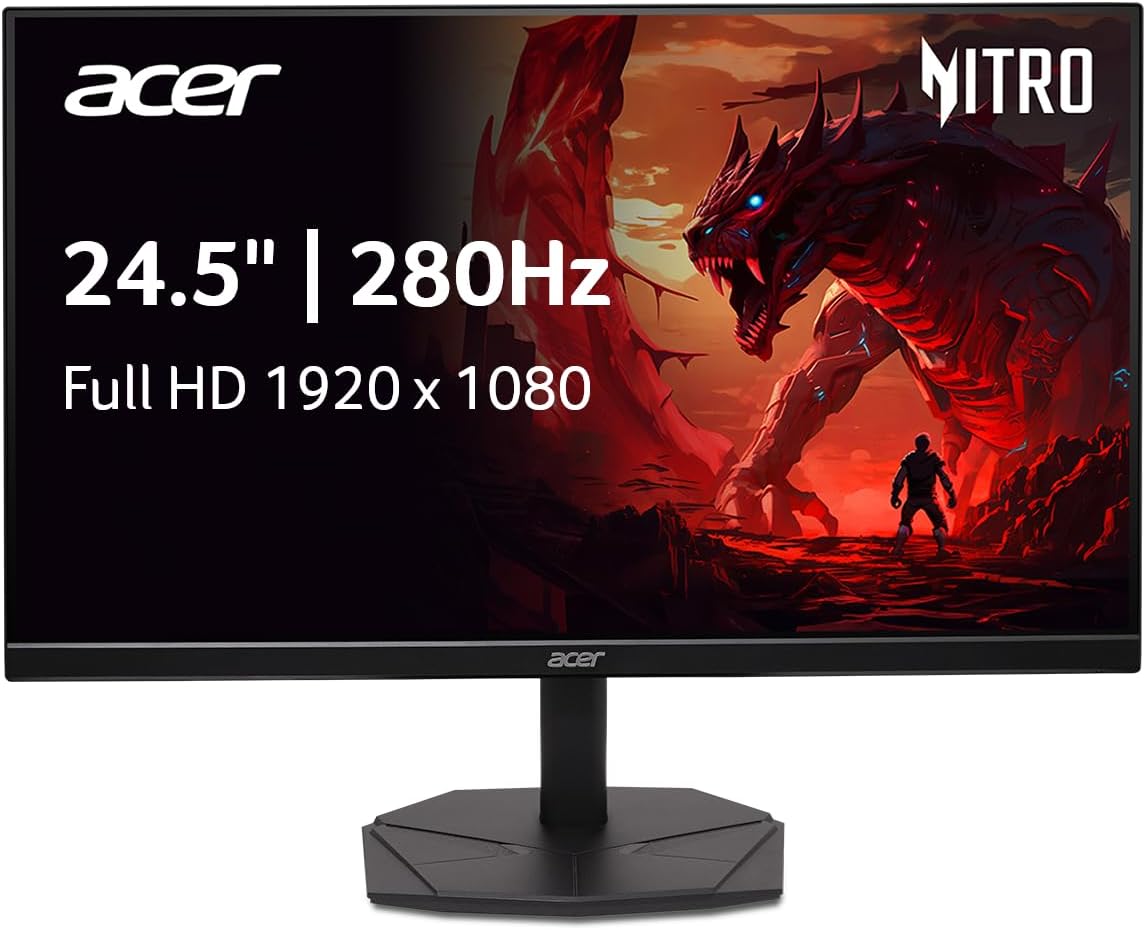
🎮 Dominate Every Frame with Acer Nitro’s Lightning-Fast Precision
The Acer Nitro KG251Q is a 24.5-inch Full HD gaming monitor featuring a blazing 280Hz refresh rate and 1ms VRB response time for ultra-smooth, blur-free visuals. Its AMD FreeSync Premium technology synchronizes frames to eliminate tearing, while the zero-frame design enables seamless multi-monitor setups. Equipped with DisplayPort 1.4 and dual HDMI 2.0 ports, it offers versatile connectivity tailored for competitive gamers seeking high performance without breaking the bank.


| ASIN | B0DJTTB6V9 |
| Adaptive Sync | FreeSync Premium |
| Additional Features | Free Sync, High Dynamic Range |
| Aspect Ratio | 16:9 |
| Best Sellers Rank | #1,956 in Electronics ( See Top 100 in Electronics ) #65 in Computer Monitors |
| Brand | acer |
| Brightness | 250 Candela per Square Meter |
| Built-In Media | Display, HDMI Cable, Power Cord, Stand |
| Color | Black |
| Connectivity Technology | DisplayPort, HDMI |
| Contrast Ratio | 3000:1+ |
| Customer Reviews | 4.6 4.6 out of 5 stars (316) |
| Display Resolution Maximum | 1920 x 1080 |
| Display Technology | LCD |
| Display Type | LCD |
| Hardware Connectivity | DisplayPort, HDMI |
| Has Color Screen | Yes |
| Item Dimensions D x W x H | 8.67"D x 21.93"W x 16.9"H |
| Item Weight | 4.52 Kilograms |
| Manufacturer | Acer |
| Model Name | Acer Nitro KG251Q Z1biip |
| Model Number | UM.KX1AA.101 |
| Native Resolution | 1920x1080 |
| Number of Component Outputs | 3 |
| Picture Quality Enhancement Technology | HDR10 |
| Power Consumption | 19 Watts |
| Refresh Rate | 280 Hz |
| Resolution | FHD 1080p |
| Response Time | 1 Milliseconds |
| Screen Finish | Matte |
| Screen Size | 24.5 Inches |
| Specific Uses For Product | Desktop, Gaming, Personal |
| Total Number of HDMI Ports | 2 |
| UPC | 195133261456 |
| Viewing Angle | 178 Degrees |
| Warranty Description | 3 year parts and labor |
Z**S
Excellent Budget Monitor – Clean Design, High Refresh Rate, and Great for Multi-Screen Setups
UPDATED REVIEW.. Console Gamers or anyone on HDMI do not buy.. Monitor only has HDMI 2.0, this means 120HZ will struggle on HDMI. If you use Display Port this will not affect. I recently changed to using PS5 for BF6 Game, and it goes black screen randomly at 120hz when using capture card... its bare minimum direct to monitor... But occasionaly screen might go black.. turn off HDCP in console for sure to help. If you are on display port, the monitor is a beast If you're looking for a solid monitor without the hefty price tag, this is the one. It’s a no-frills, performance-focused display that delivers where it counts. ✅ Value: For the price, you’re getting excellent bang for your buck. No gimmicks—just strong fundamentals. ✅ Visuals: The color output is impressive for this range, and the borderless design makes it perfect for dual or triple monitor setups. (Check out my photo—stacking these is nearly seamless.) ✅ Specs: 1080p resolution – crisp and clear Up to 280Hz refresh rate – buttery smooth for gaming 1ms VRB (Virtual Response Boost) – helps reduce motion blur during fast-paced scenes FreeSync support, and yes, it works with NVIDIA G-Sync too HDR10 – enhances contrast, brightness, and color depth, making lighting effects and visuals pop in dynamic game environments 💡 Tip: I highly recommend pairing this with a VESA-compatible monitor arm (100x100mm). It saves desk space and makes cable management way easier. What this monitor doesn’t have (and that’s okay if you know it upfront): ❌ No USB ports – You’ll need an external USB hub if you rely on monitor-based USB expansion. ❌ No built-in speakers – Audio will need to come from your PC or external setup. ❌ Not 4K – This is a 1080p monitor, not ultra-HD. Be sure that’s what you’re after. Bottom line: If you want a clean, high-refresh monitor that looks great in a multi-display rig and doesn’t break the bank, this is a top pick. Just be mindful of the feature set and plan around it.
B**N
Good starter monitor 😄
This monitor is pretty good for the price it’s set at. I love the 280 hz I can get and while the color quality may not be the best on its own, I modified it with my AMD software for pc to have really good colors to make it pop more. The size is also not too big or too small, making it pretty compact. Overall a great monitor to start with in my opinion 🙌
Y**T
Worth The Money.
Everything is perfect and Easy to set up and the Quality is good and so is the picture and color is amazing on that and for the Price it’s Amazing it's Worth it.
F**Z
Monitor
Monitor works are described, it has many different settings and options to optimize your game. The quality of the monitor is perfect, there were no issues with it when I received it. It runs 120hz consistently and is very smooth.
A**S
Flimsy stand, OK monitor
a very decent monitor, not good without a better stand the stand it comes with is very flimsy, it adjusts tilt front to back but it is not height adjustable. overall a good monitor for the price but a better option would be the onn 144hz because it has better mobility and stability very easy to set up
K**M
Has amazing FPS and latency.. HDR is absolutely astonishingly beautiful :)
These are great monitors, we baught 3 of them.. Running them at 280hz and lock the FPS at 277 to prevent clipping.. very low Latency.. and the HDR is absolutely the best thing since Realtime raytracing! We run ours on RTX 4060 8GB and are able to maintain 277FPS without issues. Gaming performance is amazing in most games.. Eventually we want to upgrade to 500hz monitors but would need 5080 16gb of higher cards to put out enough FPS to make those monitors useful. Plus 500hz is cost prohibitive due to the RTX 5080 or higher 16gb requirements.
R**O
Incredible speed and smooth
This monitor is a beast for the price. The 280Hz refresh rate makes everything feel incredibly fluid.
K**Y
Good monitor
As described and great quality! Like the larger base for stability and the design on it gives it some cool points. The top/screen don't really collect dust or anything but the base can get dusty fairly easy. Video quality is good and the hook up to your tower is easy. Dual/multiple screens easy too.
D**.
Chulada de monitor, y más si lo compras en promoción. Trae cable hdmi y displayport, lo cual se agradece bastante. Llegó el día prometido, y de momento estoy muy feliz con mi compra. Si buscas reviews de este monitor no las vas a encontrar. Ojalá algún techtuber le haga una porque es un gran monitor de 280hz.
N**F
هل الالوان tn ولا ips ولا va لانها مهي مكتوبه
M**O
Llego en tiempo y forma, calidad impresionante y precio mas que accesible, pase de un monitor de 60hz a este de 280hz y es abismal la mejora y fluidez, 10/10
E**D
Buena calidad de imagen
L**O
Funciona todo correcto, su alta taza de refresco lo hace muy buen monitor calidad precio y hasta el momento no tengo fallas con el, los colores son buenos.
Trustpilot
1 day ago
3 weeks ago