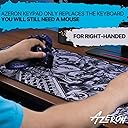
🎯 Dominate your game with the Azeron Cyborg II — where precision meets personalized power.
The AZERON Cyborg II is a right-handed, one-handed gaming keypad featuring 30 programmable tactile keys and a Hall Effect analog thumbstick for precise 360° movement. Its fully adjustable, 3D printed ergonomic design fits medium hand sizes (6.3-7.5 inches) and offers customizable dead zones, sensitivity, and analog smoothing. With onboard storage for six profiles, USB-C connectivity, and modular hardware ready for future upgrades, it’s engineered for FPS, MOBA, and RPG gamers seeking a tailored, high-performance input device.


| ASIN | B0DFMN3CFN |
| Additional Features | Ergonomic, Programmable Keys |
| Antenna Location | 3d, 3d modelling, Photo Editing, Programming, Video Editing |
| Best Sellers Rank | #148 in Computer Keyboards |
| Brand | AZERON |
| Built-In Media | Quick Guide, Restrictor ring, Screwdriver, Thumbstick caps, USB Cable |
| Button Quantity | 30 |
| Color | Galaxy Purple |
| Compatible Devices | PC |
| Connectivity Technology | USB-C |
| Customer Reviews | 4.5 out of 5 stars 233 Reviews |
| Enclosure Material | PLA, PETG |
| Generation | 2nd Generation |
| Hand Orientation | Right |
| Keyboard Description | Gaming |
| Keyboard Layout | QWERTY |
| Manufacturer | Azeron |
| Model Number | Cyborg II |
| Number of Keys | 30 |
| Number of Sections | 1 |
| Power Source | USB Powered |
| Recommended Uses For Product | 3d, 3d modelling, Photo Editing, Programming, Video Editing |
| Special Feature | Ergonomic, Programmable Keys |
| Switch Type | Tactile |
| Unit Count | 1.0 Count |
| Warranty Description | 1 Year Manufacturer |
A**R
Quality Product. Very adaptable.
Quality Product. Very adaptable. I've had this Cyborg II for about a month. I've used it for Foxhole, Battlefield, Helldivers II, and Killing Floor. Once adjusted to my hand all the buttons are easy to reach and require very little movement to activate. The travel required to make a button click is just as I want it to be. The adjustments lock in well and don't seem to drift. By that I mean that the towers that hold the buttons don't move once properly adjusted and tightened down. I have a medium, maybe large, wide hand. I was able to get it to fit me well. The pinky tower could maybe be a little better aligned with my pinky finger, but it is still very usable. All buttons are easily reachable without shifting my palm. All the parts seem to be as sturdy as they should be. As a whole, it has a nice solid weight to it. The printed plastic has a professional, quality, and rugged look. Mine is all black. The button pads have a slight texture to them that feels good and provides feedback as to how hard your finger is pressing. But, it does not irritate my fingertips even after hours of gaming. The software is easy to learn and provides many great functions. The macros are very flexible. Take your time adjusting it to your hand. To better fit a wide hand, the towers can be slid as far apart as the rails will allow and then each tower from pointer to pinky pivoted progressively more clockwise. This helps compensate for the distance between your knuckles. I think your goal will be to make each tower as parallel with each finger as possible: parallel as you look at it from above. Adjust as little at one time as you have patience for. If you leave too many things loose at once you will accidentally mess up adjustments. But be sure not to force any adjustments! Expect to revisit earlier adjustments to tweak them. I haven't changed its current (final?) physical adjustment for about 2 weeks. The key mapping is so incredibly flexible I'm still fine tuning on a couple games. I recommend!
J**L
Pure Fire!!
I was on the fence about ordering this. I primarily wanted it to use for modifier keys for MMOs, literally. I have used the Razer Naga since its inception circa 2008, but remapping a keyboard to make easier finger positions for Alt, Ctrl, and Shift has become just stupid. I finaly just said "screw it" and ordered this. I am glad I did! I've already mapped about 16 keys to this on top of the modifier keys. I have read some reviews about using the spacebar as jump for all these years, and that was another concern of mine, but that was EASILY overcome (I bound spacebar to the index finger right most button and I have not looked back). This thing is simply amazing. I have huge hands, they measure 2 inches over the "medium" size, or 2 inches into their "large" size, if you will, and that was another concern I had ordering it here, where the only option is medium. Not even an issue. This package included the curved palm rest, and my big ole hands and fingers fit with everything basically maxed out, but they fit, and very comfortably as well, which is huge. It's built like a brick shih house to boot, honestly, very weighty, quality construction, very much unlike the aforementioned company whose mice I have been using near 20 years. The Cyborg 2 is very hefty, the screws don't take oer forcing of any kind in order to set the positions and keep them there. The buttons are very light weight, which is taking a little getting used to with my heavy sausage links, but it's not to the point where it is annoying or impossible, it's all about taking the time (and I mean TAKING YOUR TIME) to set this up using EVERY screw available for positioning. Every screw on the exterior of this has a purposeful function. Once you take the appropriate amount of time to adjust everything, and I mean everything, this truly not only fits like a glove, but becomes a cyborg hand, it's pure fire, seriously, this thing is insane. Having used the Naga and other custom accessories over the last 20 years, I am not having a problem adjusting to the keybinds I have created for it. I also have 4 monitors, so if I really needed to, I could keep the app open on another monitor with said keybinds listed to navigate my way. I don't type up reviews very often, it takes one heck of a flop, or in this case, one heck of a zinger for me to want to put a product where it belongs. This one gets huge praise! Azeron has outdone themselves, and for that, I thank them!
C**T
Take your time it’s worth it.
I was a little worried I wouldn't like this thing. I find it really comfortable with the grip tape applied. The software is really good and intuitive. I’m still making small adjustments to the button placement and I’m loving it. I use this in Halo infinite and Cyberpunk(more games to follow). I’m a controller user primarily so this did take me a couple days to get used to. Once I set the buttons up in the software I take a picture so I can refer to it quickly. I try to keep the button positions and actions the same with different games to make it less confusing (I keep the run, jump, reload the same button position with different games and profiles). You can title your buttons once you assign them (run,jump,reload,crouch), it helps me to keep buttons straight. Yeah it takes some getting used to but now it’s my favorite game input device/keyboard. Make sure you are gentle with the adjustment screws, I did strip one. I was able to get it out and replace it luckily. Yeah, for a hand built controller the price makes sense, I’m glad I bought it. I’m not sure how easy a transition it is coming from mouse and keyboard, but from controller it wasn’t horrible at all. I’ll probably order another one as a gift. Update: gift was given and they love it. I highly recommend the grip stickers for the fingers and palm rest. It just makes it feel extra comfortable. I love this weird thing.
J**.
Absolutely game changer!
I was a die hard ps5 controller user 3 weeks ago I made the switch to M&K I started liking it and learning it. Surprised to say in 2 weeks I was doing better on competitive shooters than i did with a modded ps5 controller with 4 paddles that I have been using for 2 years. For a year I have been interested in azeron and turned away by reviews. I got my azeron cyborg ii in yesterday put 2-3 hours on it and was carrying the team. Felt natural and comfortable. I didn’t over think such a simple process and kept it simple and just set it up using the standardized keys for every game we all play. I was able to pick up on how to use it with ease and comfort in the matter of an hour. It is more intimidating looking than it really is. The azeron is an absolute game changer making mobility 10 times better than a keyboard. There is absolutely no con to the joystick. The quality is amazing. Based on what I had seen for reviews on bad print quality I can say they improved the quality and listened to the feedback from community. If you’re interested in this I hope my review sealed the deal for you and you dont get turned away like I did for a year! If you were a controller user and have switched to M&K but just want something better than a keyboard. Look no further this is the item for you don’t let the price discourage you because I assure you get what you pay for. You will not be disappointed! I only wish I didn’t listen to biased reviews steering me away this whole time!
B**B
Lots of buttons!!! Better than trying to use keyboard keys.
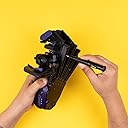
Reviewing the Azeron Cyborg 2: So to start with I must say that I prefer to sit back and play games with a hand held controller. PS or X-box type at this time. But my issue with all hand held controllers that I have tried is aiming is harder than with a mouse. Some games handle it better than others. The game I wanted to play more now (Arc Raiders) does not handle the controller aiming well and two many buttons needed for current hand held controllers available. I tried to find a better hand held controller with better curve configurations with stop limits on the curves.....not really having any luck and also no controller is taking advantage of all those fingers I have on the back of the controller!!!! Boo to hand held controller designers. So a friend recommended the Azeron and mouse combo. First thing I will say is that shipping cost a lot even with prime ($40). And the shipping time was reported as weeks from overseas. Low and behold it came in two days!!!! Overnight from overseas! Now that shipping cost did not seem so bad. But I would have choose slower with no shipping cost if I had the option. This desktop controller comes with the torx driver you need to adjust the position of all the joints (lots of joints). You can slide each finger pod in and out, side to side, and angle them up and down. Same with thumb joystick. So far the only extra joint I would have liked is angling the outside thumb bump switch pod. Oh, I should mention that I use this on both the PC and Mac as I game through G-Force Now mostly. You have to have a Windows PC to configure the On Board Memory settings of this controller. It works fine on Mac after that. Only issue I ran into is switching profiles while connected to Mac would sometimes lock up the switching. I have to unplug and plug into PC to clear it. I think plugging into a power brick would have cleared it also, but have not tried (I don't really normally switch profiles while plugged into Mac). The only thing I am missing is Macros when not on Windows PC. Darn, I do wish the macros were stored in On Board Memory also like they are for my gaming mouse. This is one reason for partial star removal also (please provide either Mac version software or macros in OBM. Now the biggest issue I am having with moving to this and mouse in this game is that I can not use the joystick on the Azeron as x-box type while using the mouse and this is a game issue to be sure. Very disappointing (game programmers please sort this out!!!). The joystick ASDW simulation is way better than using keyboard, but not near as good as x-box analog stick mode. This is a game issue...so no partial star off for that. The controller can do it...the game can not (I did not mention that the issue is the game jumping back and forth between keyboard and controller mode while moving = all sorts of issues). The next biggest issue using desktop controllers is just comfort. I dislike being tied to the desk!!!! My arms and body get so sore. With this Azeron controller my fingers have no place to rest without pushing buttons by accident. I had to disable some buttons just to have a place to rest my fingers. That is OK as there are so many buttons. I do not find myself using those overhead knkle buttons much....but I still like that they are an option. I set two of them to be the same thing (like melee weapon) as I have trouble just hitting one at a time. Maybe I should switch the flashlight up there as that is something I do not use much. Anyway, I love companies trying to solve the mouse/keyboard issues that take away from gaming fun. I still would prefer the ultimate hand held controller where I do not have to sit at the desk!!! I will use this until I can find that perfect hand held controller that I do not believe is made yet.
K**A
Good but a slight learning curve
This thing is sick with a crazy amount of inputs available at any moment. A lot of setup and getting use to. Easy to accidentally press stuff when getting use to it. Keyzen seems like less of a learning curve. Very limited amount of support for dual input in games but the thumb stick limiter comes in handy for games that see it as a keyboard but could limit more for faster strafing.
S**R
great support
great quality and overall a great product. Fits a hand perfect. alot of time went into this and if it is the right product for you, you wil love it
C**T
Not very comfortable for my hand. Many misclicks and fatigue.
I've been working on this for an hour. I can not get it to be comfortable. I have approx 8.5in from wrist to middle finger tip. Nothing I do will make this work well for me. I feel like I've wasted my money. I really wanted to love this but I feel like it's lacking some adjustment features that would benefit more hands. If I could maybe raise the wrist/palm pad in the front I believe it would improve misclicks. I practiced in various positions but if i use the thumb pad I tend to accidently press other buttons. I've very disappointed, because with some way to adjust it better I believe this would be an amazing device. It wasn't until later that I found out there was 2 sizes. Its not in the main description.
Trustpilot
1 month ago
1 week ago