🖱️ Elevate your workspace comfort with precision and effortless multi-device flow!
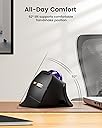
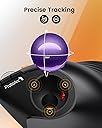
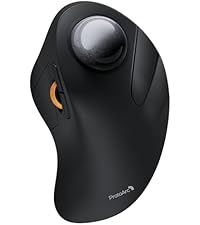
The ProtoArc EM05 NL is a rechargeable, ergonomic vertical trackball mouse designed for professionals who demand comfort and efficiency. Featuring a 62° tilted natural grip, triple wireless connectivity (Bluetooth 5.1, 3.0, and 2.4G), and a thumb-controlled trackball, it reduces wrist strain while enabling seamless switching between up to three devices. Compatible with Windows, Mac, iPad, and Android, it offers adjustable DPI settings up to 1600 for precise cursor control, all wrapped in a sleek purple matte finish.


| ASIN | B0D7PZZY87 |
| Additional Features | Ergonomic Design, Quiet, Rechargeable, Wireless |
| Antenna Location | Business, Office |
| Are Batteries Included | Yes |
| Are Batteries Required | Yes |
| Best Sellers Rank | #274 in Computer Mice |
| Brand | ProtoArc |
| Built-In Media | Type C Charging Cable, USB Receiver, User Manual, Vertical Trackball Mouse |
| Button Quantity | 7 |
| Color | Purple |
| Compatible Devices | Desktop, Laptop, Personal Computer, Smartphone, Tablet |
| Connectivity Technology | 2.4G Wireless, Bluetooth |
| Customer Reviews | 4.3 4.3 out of 5 stars (614) |
| Enclosure Material | Plastic |
| Finish | Matte |
| Hand Orientation | Right |
| Item Weight | 0.17 Kilograms |
| Manufacturer | ProtoArc |
| Model Name | EM05 NL |
| Model Number | EM05 NL |
| Mouse Maximum Sensitivity | 1600 Dots per Inch |
| Movement Detection | Trackball |
| Number of Batteries | 1 Lithium Ion batteries required. (included) |
| Operating System | iOS, macOS, Windows |
| Power Source | Battery Powered |
| Range | 10 meters |
| Style Name | Modern |
| Warranty Description | 2 Year Warranty |
R**K
Fantastic choice for ergonomic trackball; I bought one for office & home
Basic description: essentially the trackball equivalent of the "vertical mouse." What do I think about it: Excellent. Ergonomic design is fantastic for me. Helps my shoulder vs. other trackballs because the angle of the arm impacts which muscles in the shoulder get used. It's just a comfortable, natural angle that allows my arm to be more relaxed while having good control of the cursor. This is also a much better value than the extra ergonomic Logi[tech] equivalent, which is nearly 2x the cost as I type this. And by the way, you'd have to use the cushion thing the Logi unit comes with to achieve a similar angle. Maybe it's great/fine, but if you want the steeper angle then why have a 2-piece design? Other aspects: Buttons somehow feel crisp while also being quiet. Effort feels just right to me. Weighting of the ball feels just right and it moves very smoothly. Scroll wheel could feel a tad tighter for my liking but this is being very picky; it behaves as I expect/want. Subjectively, the ProtoArc feels higher quality than the Logi M575 I'm coming from. The M575 doesn't feel cheap to me, but this feels nicer/higher end. If you like switching between DPI levels on the fly, there's a button on the mouse for this. I don't use this but the button is not in the way. My only open questions about this unit is how the Li-ion battery and buttons will hold up. The Logi units use plain old AA batteries, which makes them a non-issue to replace (though less convenient than Li-ion in some ways). The buttons fail on Logi units faster than I think they should. Time will tell here but I'm hopeful given that ProtoArc put the time and effort into creating a very thoughtful product.
B**N
Great for ergonomics and functionality.
I've never used a trackball at all before but took a chance on this because I was sick of the little mouse I had. I'm so glad I did. Using the thumb doesn't take that long to get used to, and now I wish I'd switched sooner. It's a great fit for my hand, and I like the speed switching button on top to quickly go from lower to high precision in mouse movement. The build quality is pretty decent, not exceptional. My only complaint would be that there's no dynamic way to adjust the scroll speed of the scroll wheel. Have to do that in windows settings.
M**H
Good Trackball, Just a Bit Too Cramped
I really want to love this trackball. I got it to help reduce wrist pain and shoulder pain and was hoping it would be a good ergonomic fit since I am used to vertical mice. Unfortunately the shape of the trackball is a bit too cramped for the size of my hands. I often find myself resting my index finger over the forward and back buttons because keeping it on the left click cramps my pinky finger and causes it to start falling asleep. It is also awkward to hold the device while the thumb is in motion. The trackball itself is smooth and has little stiction and the buttons themselves feel nice to press. Connectivity is great being able to switch between three devices although the device switch button is on the bottom of the device which isn’t as nice as on many regular thumballs where you can do it without lifting it off Overall this is a good concept for a trackball but could benefit from some refinement to it’s button placement and shape
R**D
Awesome mouse!
This is the greatest trackball mouse I have used so far. I have been using track balls my entire life and this is the final form I have been looking for. I have large hands and it's perfect but I would say if you have extra large hands this mouse might not work. I retired my Logitech MX ergo yesterday ($90) mouse. After using the protoarch for 5 minutes the MX ergo feels wrong.
C**Z
Great mouse with a few minor issues
**UPDATE** It's been just over 6 months since I bought this, and for the last week the scroll wheel has been "squeaking." It's not constant, at least not yet, but it happens "frequently." When you use the scroll wheel (not the ball), it frequently makes a light squeaking noise. The only other mice that I've ever had do this were cheap HP mice that are included with enterprise hardware. As of now, it's not overly bothersome and performance has not been impacted, but I'm removing a star because of it, as this should not be a problem on a $50+ mouse. We'll see if it gets worse. Overall, I really enjoy using this mouse. The design took a full day or two of work to get use to, but it is so much more comfortable than a traditional design. It keeps my wrist at a much more natural angle, which has eliminated the end-of-the-day fatigue and soreness that I had started to experience. I have used trackballs before, but they were always the more traditional index finger design...I really like using the trackball with my thumb. DPI is adjustable on the fly, which is nice because I can raise it to move between multiple screens or windows quickly and slow it down when precision is needed. It has been reliable, durable, and consistent. I've been using it 40+ hours a week for about a month, and aside from the initial charge I did before even using it, I haven't needed to charge it. You can use it either Bluetooth or with a 2.4GHz dongle (included), and you can have it paired to 2 devices. The wireless dongle stores in the bottom of the mouse when not needed, so if you're primarily a Bluetooth user or just want to keep your dongle safe when in transport, it's a very convenient way to keep track of it. I do have three minor complaints, or things I'd change: 1) The trackball could be smoother. It's not bad; far from gritty, but it's definitely not the smoothest trackball I've used. This doesn't cause any issues under normal use, but when I really need to make precise micro-movements in CAD, I find myself relying on my traditional laser mouse. Fortunately, that's only a few times a month, so it's not unbearably inconvenient. 2) There is no software or driver available for this mouse, so you cannot customize the buttons. Being this is not a gaming mouse, and the default functions are suitable for what it's designed for, I don't find this problematic, but if you like to change default functions, be aware. 3) There is only one DPI switch, so if you want to drop down one level in DPI, you have to hit the button several times. There also is no LED indicator for the DPI setting, nor any sort of driver or software that creates an on-screen indicator, so you have to go off of memory. This is the worst part of this mouse in my opinion and leads to having to "search" for the correct setting depending on the task you're performing. I understand that the thought process is "once you find your preferred setting, you won't need to change it," but in a modern office setting where we have multiple screens and work within many different applications performing many tasks, I think it's a relevant problem. A simple LED "ladder" indicating which of the 5 settings you're on along the top of the mouse where the "Protoarc" logo is would be perfect.
G**L
- This mouse is quite different as it uses a trackball to mouse the mouse cursor, something I have not used for over 2 decades. It brings back some memories when using the trackball. - To move the mouse, you would use your thumb to move the trackball. It may take time to get used to. The advantage of this mouse is that the mouse is stationary, and it’s perfect for places where you have very limited space with your mouse to move around. Also you could literally put this mouse on any surface and still be able to use the mouse as it moves with the trackball and not the optical/laser on the bottom like regular mouse design. - ERGONOMIC: This new mouse from ProtoArc is even better than the original ones that I am currently using. Now the hand feels even more natural when you're using it. If you're a first time user, it may take sometime to get use to, but once you're used to it, it's quite comfortable compare to using regular mouse, especially when you're on the computer for hours each session. - CONNECTION: There are 3 modes on this mouse you can select from. 2 Bluetooth connections and 1 with a usb dongle. The dongle is tugged nicely under the mouse and so if not in use you won’t lose it. Good design. With 2 bluetooth connections, you could connect this mouse to 2 devices that use bluetooth, and just press the Mode button on the bottom to switch to the connection you like. Very convenient and simple to operate. - Overall a very nice built trackball mouse. Holding it is very comfortable and it contours to your right hand. However, if you’re using the mouse a lot in your work like autocad, photoshop, etc, then I would suggest getting an ergonomic mouse with optical or laser on the bottom because you would have to move your thumb a lot and in the long run it’s not beneficial to your thumb at all. But for regular office work, or normal use I’d recommend giving this a try.
L**S
Mouse muy recomendable, especialmente si tienes muy poco espacio para moverlo. La bola responde muy bien y hay que tomar tiempo y práctica para usarlo. El ajuste del dpi te ayuda bastante para moverlo con más control.
A**A
I had never used a trackball mouse before, so I wasn't sure what to expect. But from the first use, it was incredibly comfortable with no need for adaptation. The minimal wrist and hand movement makes a big difference. My thumb controls the cursor, while two fingers easily manage the silent, premium buttons. The mouse fits perfectly in a handshake position, and I love the texture. With ProtoArc’s 2-year warranty and outstanding customer service, my trust in their products has only grown. Great experience, thank you ProtoArc!
G**S
After dealing with wrist strain from regular mice, I decided to switch to a vertical mouse and found this ProtoArc vertical trackball mouse. I work long hours on my computer, so an ergonomic option seemed like the right move. Right out of the box, the vertical design felt almost natural in my hand. The trackball was smooth with easy navigation as I didn't need to move my arm much. I was also impressed with the ability to connect it to three different devices by changing the channel which you can do by pressing a button on the bottom of the mouse. I didn't need to however, as I just used the dongle in my KVM switch to use the mouse across 2 devices without switching channels. I also really like the fact that it doesn't need batteries and it can be recharged through a regular USB-C cable which came included, and I can tell you, the cable appears to be of very high quality. One recommendation, if you feel that the mouse moves too fast, you can just go to mouse settings on Windows and adjust the mouse pointer speed, I found a speed of 2 or 3 produces better navigation. On the downside, I found the thumb placement for the trackball a bit awkward at first (it's quite large compared to a regular mouse), and it took me some time to get used to it. It’s not a dealbreaker, but there’s definitely a learning curve. I just wish it was slightly towards the left so that my arm doesn't need to be completely vertical, but I'm not a guru in ergonomics, so I'm not sure if this would impact the benefits of a vertical mouse. Overall, the ProtoArc mouse could potentially be more comfortable, but I still need to use it for a few more days to get used to it and adjust to the trackball position.
M**N
To preface, this is not my first Protoarc product. I've also used their EM03 trackball, but that one is a finger ball (the trackball is located up front instead of on the side) and not angled, which doesn't help with my wrist pronation and carpal tunnel issues. Enter the EM05. Very solidly built mouse but doesn't have a lot of weight to it, so some people might not like that it doesn't have that "grounded" sort of feeling. Otherwise it punches above its weight I find - easy to connect to any device via usb-c, 2.4ghz usb dongle or bluetooth wirelessly. The trackball rolls smoothly and is very easy to pop out and clean, but the ball won't just drop out of its slot. The metal scroll wheel feels okay but still lacking compared to the industry standard in the Logitech infinite scroll wheel in terms of smoothness and tactility. I also like that it has this sort of extended "lip" at the bottom to cradle the edge of your hand as you cradle it around the mouse. The angle on the EM05 is very comfortable compared to other vertical trackballs I've tried prior like the MX Ergo. I personally prefer the steeper angle so I can get my wrist as vertical as possible to avoid the overpronation but obviously not everyone will like this. For any left-handers wondering, this mouse is unfortunately not going to be for you with the buttons all located specifically for right-handers. Hopefully Protoarc produces a left-handed version of this in the future for the lefties out there.
Trustpilot
1 month ago
2 days ago