Buy anything from 5,000+ international stores. One checkout price. No surprise fees. Join 2M+ shoppers on Desertcart.
Desertcart purchases this item on your behalf and handles shipping, customs, and support to Italy.
⚡ Unlock your laptop’s full potential with the ultimate 6-in-1 USB-C hub — because your workflow deserves the best.
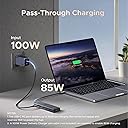
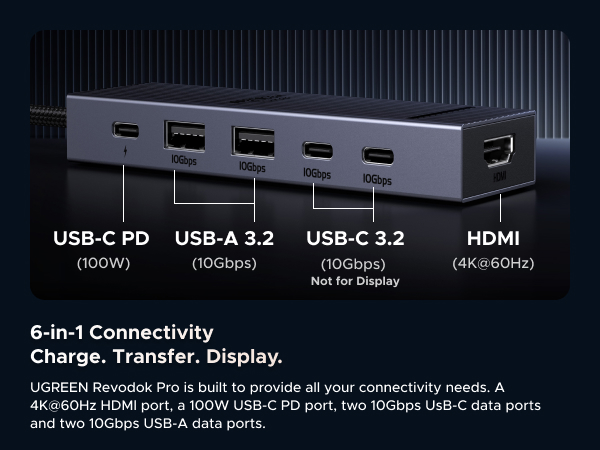
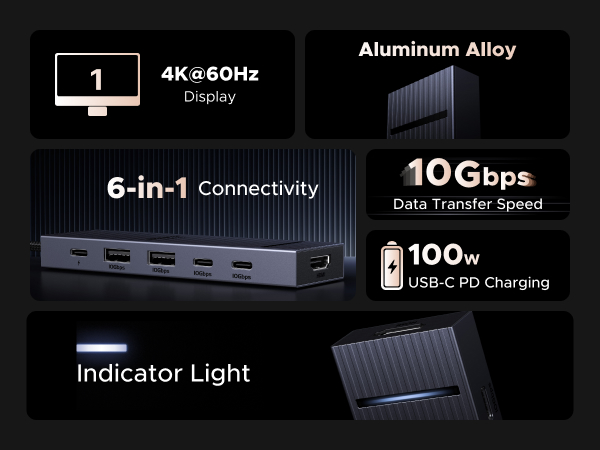
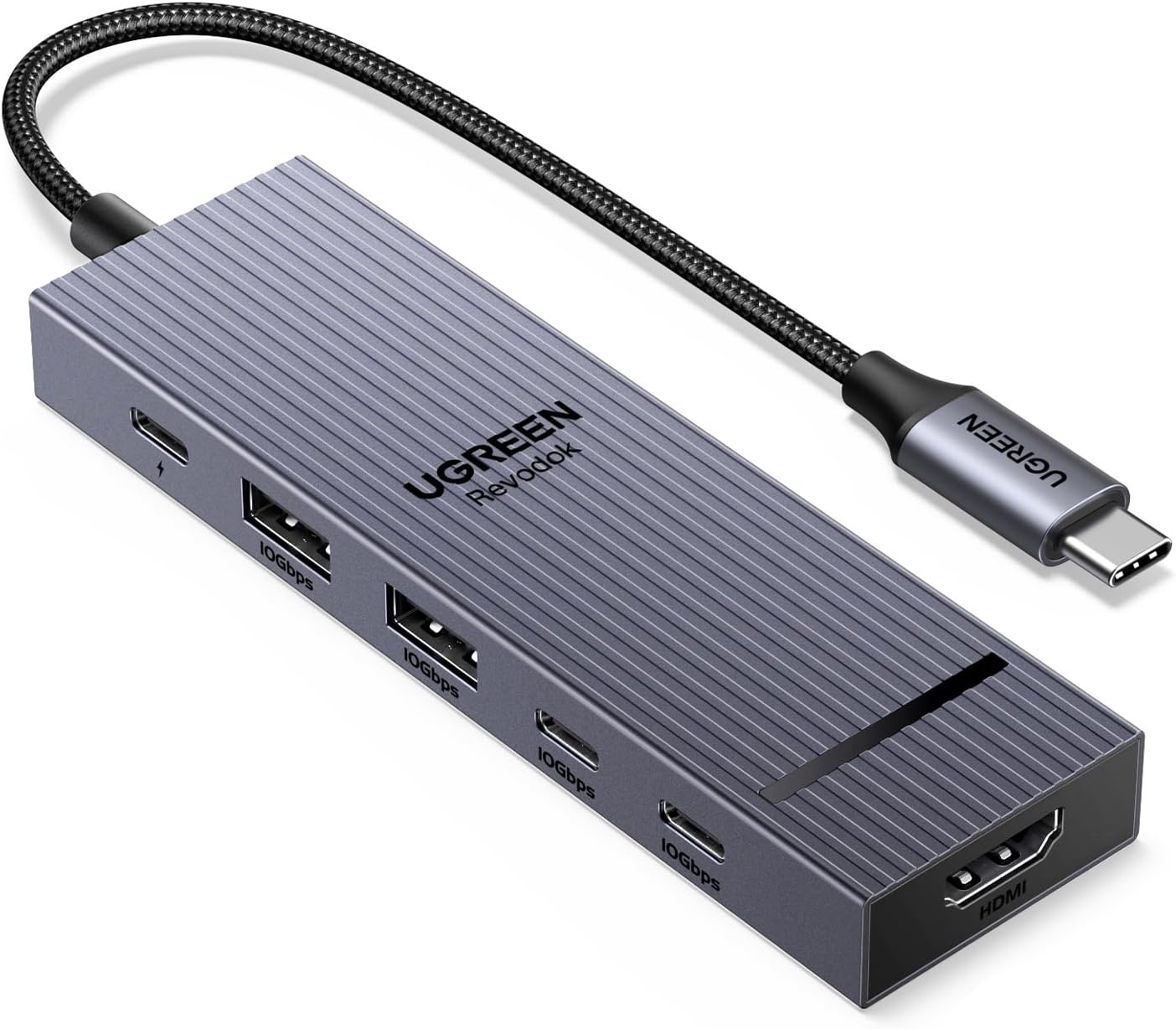
The UGREEN Revodok Pro is a versatile 6-in-1 USB-C hub featuring dual 10Gbps USB-C and USB-A ports, a 4K 60Hz HDMI output, and 100W power delivery. Compatible with a wide range of devices including MacBook Pro/Air, iPad Pro, and gaming laptops, it offers fast data transfer, seamless multi-device connectivity, and reliable pass-through charging in a sleek, compact aluminum design.


| ASIN | B0D1XLNWP2 |
| Additional Features | Fast Data Transfer, Lightweight, Plug and Play, Portable |
| Best Sellers Rank | #12 in USB Hubs |
| Brand | UGREEN |
| Color | silver |
| Compatible Devices | MacBook Neo,MacBook Pro, MacBook Air, MacBook M1, M2,M3,M4,M5, iMac, iPad Pro, iPhone, Chromebook, Surface, Steam deck, Rog Ally Compatible Devices MacBook Neo,MacBook Pro, MacBook Air, MacBook M1, M2,M3,M4,M5, iMac, iPad Pro, iPhone, Chromebook, Surface, Steam deck, Rog Ally See more |
| Customer Reviews | 4.5 out of 5 stars 6,096 Reviews |
| Data Transfer Rate | 10 Gigabits Per Second |
| Enclosure Material | Aluminum, Plastic |
| Global Trade Identification Number | 06941876243631 |
| Hardware Interface | HDMI , USB, USB Type C |
| Item Weight | 180 Grams |
| Manufacturer | Ugreen Group Limited |
| Mfr Part Number | AMUH12H |
| Minimum Required Operating System Version | Windows 7 |
| Model Number | AMUH12H |
| Number of Ports | 6 |
| Operating System | Mac OS 9, Windows 10, Windows 7 |
| Special Feature | Fast Data Transfer, Lightweight, Plug and Play, Portable |
| Total USB Ports | 4 |
| Total Usb Ports | 4 |
| Unit Count | 1.0 Count |
| Warranty Description | 2 Year Manufacturer |
S**.
Best Value! UGREEN Revodok Pro USB-C Hub 6 in 1 10Gbps 4K 60Hz HDMI, 100W Power Delivery for MacBoo
This little thing does exactly what I needed. I plug it into my MacBook and instantly have all my ports back — HDMI to my monitor at 4K 60Hz with zero lag or flickering, USB ports that actually transfer files fast, and passthrough charging that keeps my laptop juiced up while everything's connected. The 10Gbps speed is noticeably faster than my old hub when moving large files. Build quality feels solid and premium, the aluminum body matches my MacBook nicely and it doesn't feel cheap at all. It stays cool too even after hours of use which was something I was worried about since my last hub used to get hot. Super compact and easy to throw in my bag. If you work with an external monitor and need a reliable hub that just works every time you plug it in, this is it. No drivers, no fuss, just plug and go.
A**G
Multipurpose, reliable, great price, amazing for my Macbook Air M1
Works perfectly for my Macbook Air M1! It's a great machine, but the lack of ports is the worst, and this hub is great and the connection itself is thin enough where I can also use the second usb-c port on the macbook as well! I can connect everything seamlessly, flash-drives, monitors, my mouse, my ac adapter, my phone charger, etc and all simultaneously! It was at a great price too! So far no issues, it's portable, light, and I love it!
J**L
Perfect Port Expander for M1 MacBook Air & M4 Mac Mini – Frees Up Ports Without the Hassle
I own a 2020 MacBook Air M1 (16GB RAM, 256GB storage) for mobile work and a 2024 Mac mini M4 (16GB RAM, 256GB storage) for my home office, and port limitations were driving me nuts, especially on the Air with just two USB-C ports. The UGREEN Revodok 105 5-in-1 hub, snagged for around $25, has been a lifesaver for expanding connectivity while keeping things simple and affordable. It’s plug-and-play on macOS Sequoia for both machines, and it perfectly hits my needs: charging, external displays, and legacy USB-A devices without dongle chaos. Here’s my experience after a week of heavy use. Pros: On the MacBook Air, this hub is a port-freeing champ. It uses one USB-C port and lets me charge via its 100W power delivery port with my 30W Apple adapter, leaving the second USB-C free for a Thunderbolt drive. I connected a 4K Dell monitor via HDMI (3840x2160 at 30Hz, sharp and stable), a USB-A keyboard, and an external HDD to the USB-A 3.0 port, which transferred a 50GB video project in under 5 minutes. No lag or disconnects. On the Mac mini, with its three USB-C and two USB-A ports, the hub adds flexibility. I plugged it into a front USB-C for a second 4K monitor via HDMI, using the native HDMI for my main display, and it handles dual displays like a dream. The USB-A ports ran my old USB stick and printer without issues. The aluminum build feels sturdy, stays cool even with all ports active, and is compact enough to toss in my bag with the Air. Battery life on the Air stays strong at 15+ hours. For the price, it’s a steal compared to Apple’s pricey adapters. Cons: The HDMI is 4K at 30Hz, great for work or editing but not ideal for gaming needing 60Hz—look at Thunderbolt hubs if that’s you. The two USB-A 2.0 ports are slow (480Mbps), so use the 3.0 port for fast drives. No SD card or Ethernet, but I didn’t need those. It warms up slightly under heavy load (charging, HDMI, data), but never hot. Tip: For the Air, connect hub, PD charger, then HDMI for a clean setup; pair a Bluetooth mouse to avoid USB-A clutter. On the Mini, use System Settings to extend displays for dual-monitor productivity. This hub is a must for Apple Silicon users needing more ports on a budget. It’s reliable, sleek, and does exactly what I need. Highly recommend!
E**E
better than expected
I originally bought this usb ports hub because i needed to plug in additional ssds into my laptop, but the side of my laptop was getting too crammed, so i had to opt in for a ports hub, and after about a month of using this thing, I can say that its really good, although I wish the ports were a bit spaced out a bit. For 13USD, the pricing on this is not bad, although the 10Gbps transfer speed really shows when multiple flash drives and external SSDs are connected and running at the same time. The PD port is also reliable, as I have not experienced any charging problems with this ports hub. The light on the top of the dock is a little less visible in daylight, but nonetheless, it still helps to see an indicator showing that the ports hub is on. The hub works on my Windows laptop, my MacBook Pro, my iPad, and even my phone without any problems. It's safe to say that I have not run into any compatibility issues while using the ports hub. The cord length is a bit short for my liking, although the cord itself seems extremely high quality and durable, although it does get a bit hot after long periods of use, but nothing too out of the ordinary. Another problem is that while using the HDMI port connected to an external display, the transfer speeds dip really low, although it's not that big of a surprise, seeing that the max speed of this thing is only 10Gbps anyways, but it would have been even better if it used all 40Gbps of my thunderbolt 4 speeds. Overall, if you really need a new ports hub, I would go for this one, because it's extremely compatible, and it seems to be able to go for years without a replacement.
D**S
Easy Port Expansion
I replaced a USB expansion hub that simply expanded one A port to four ports but found a connected external drive would disconnect while accessing it. Even with no other port in use, the drive disappeared in Windows Explorer and device management. This hub is stable and performs as expected. I'm using it with a mimnicomputer running Windows 11 Pro and have noted no performance issues. It was an easy plug and play setup. The device is well constructed and offers more features than I need - I don't use the HDMI port or the PD connection as its function isn't clear. Instructions or a schematic / connection diagram would be helpful. Besides documentation, the connecting cable is a bit too short and brittle for mounting at any distance from the computer but that's a minor inconvenience. I am pleased with performance and enjoy the diversity of connector types.
K**E
Great for the ROG Ally, does 1440p 144hz, HDR, and 30 watt turbo mode (with 100 watt charger)
This dock will fully power the ROG Ally in 30 watt turbo mode if you use a 100 watt USB C power supply. Unfortunately the changer that comes with he Ally is not enough when going through the dock for some reason. A 65 watt Amazon basics charger that I have was also not enough. So if you want your Ally to run at max power you will need a 100 watt USB C power supply. I got a cheap $10 EIZLXQ 100W GaN Charger here on Amazon and it has been powering the Ally just fine in 30 watt mode through this dock. Overall the dock works really well, it can handle 1440p 144hz HDR through HDMI while also transferring files over USB at 100+MBs, a mouse with a 1000hz polling rate, and power delivery in 30 watt turbo mode on the ROG Ally all at the same time with no lag. Also no lag while playing games on the external display. In the week that I have been using the new dock I have not encountered a single issue with the display or connectivity. So I am very pleased with the dock for $14 and would highly recommenced it. Really the only minor complaints that I have is that variable refresh rate does not seem to be working through the dock. My display supports freesync and it works on my main computer, but the ROG Ally does not detect it as freesync compatible through this dock. It is possible that is something to do with the Ally or my specific monitor instead of the hub, I can't be sure. Also there are not enough USB A ports, I just do not use USB C data ports very much, but I just got some USB C to A adapters. The $6 BENFEI hub that I was using before this would have occasional lags just with the display running at 60hz (that is all it could do at 1440p) along with a mouse and keyboard. And it had horrible lag to the point of becoming basically unusable when a USB 3 drive was plugged in and pretty much just froze up when transferring data, so this is a massive upgrade over that.
H**R
Works great
i was thinking to buy long time, and I’m glad I finally did it. This UGREEN Revodok Pro USB-C Hub is exactly what I needed for my devices. I use it with my laptop and tablet, and it works very well and very stable. The 6-in-1 design is really useful. I can connect HDMI, USB devices, and still charge my laptop with the same hub. The HDMI output works great. I have 34 inch monitor, it it looks clear and sharp. There is no flickering or random disconnects. The USB ports are fast too, copying files to my external drive is much quicker than with my old hub. I like that it supports 100W Power Delivery. I just plug my charger into the hub and my MacBook. laptop still charges without any problem while everything else is connected. This keeps my desk cleaner and I don’t have to plug and unplug many cables all the time. The build quality feels solid and premium. The hub is small, light, and easy to carry in a bag, but it does not feel cheap. The cable is flexible but strong, and the metal body helps it stay cool even when I use several ports at once. I have tried it with different devices (MacBook, iPad Pro, and a Windows laptop and linux), and it was plug-and-play every time. No drivers, no extra setup. Everything just works.
M**S
Great USB C hub, can also serve as a dock
I bought this to use with a Minisforum mini PC I have to expand one of the rear type C USB 4 ports, not only for more connectivity, but to prevent regular plugging and unplugging from the computer itself. It's a great little hub with all of the IO I need, including an HDMI port which, honestly, I don't really need since the PC itself has both an HDMI and a DisplayPort connection. It provides 2 USB type A ports, two 10 Gbps type C ports and a third type C port that is capable of 100 watt power delivery. That combined with the HDMI output means this hub could also feasibly be used as a dock for something like a Steam Deck, ROG Ally, a laptop PC, etc. I tested it with my Steam Deck OLED and it worked just fine and was able to output an HDR signal to my LG television while charging the Deck at full speed since the Deck's charger puts out way less than 100 watts. It feels reasonably sturdy, has a braided cable and even a faint little LED to let you know when it's actually plugged in. The cable could have been a little longer, though it's serviceable since it spends its time just sitting on a desk right beside the PC. When I tested it with my Steam Deck though, to test whether it could serve as a dock for that, it was short enough that the hub couldn't lay flat on the desk behind the Deck and was sort of suspended in the air by the tension in the cable, which would probably damage it over time, so if you want to use this as a dock for another device I would consider mounting it to the back of the device's stand or to the wall or something to keep it from just hanging from its own cable. I also think more companies should consider opting for the more open Displayport instead of the more proprietary HDMI. Not having to pay licensing fees to use HDMI could have brought the cost down a little bit. Overall though it's easy to use, turns my otherwise hard to reach rear facing USB 4 port into something more accessible and can even charge attached devices at up to 100 watts. I'm pretty happy with the purchase and will definitely consider UGreen for my needs in the future.
T**L
Great hub
It’s a well built usb hub with a decent amount of ports. The braided cable for the usb c connector is very nice to have and I hope more companies start making this a standard. Specs wise it’s an absolute value for money but since I’ve only been using it for one day, I’ll update this review with time. One thing I will say you should keep in mind especially if you’re using it for MacBook to connect to an external display via the hdmi cable is that the ugreen hub and Mac don’t communicate well when using an external monitor so the colours may look very pinkish out of the box (check pics for reference). To fix this, you’ll need to go to your monitor settings and change the colour space from RGB to YUV or auto. It’ll display colours the way you expected it to. Note that this does not happen when connected to windows so it’s mostly a Mac and hub issue but not a manufacturing defect. It’s just how the hub communicates with the Mac. It’s perfectly fine for majority of the people. Also note that in order to keep your display on and MacBook’s lid closed, select your monitor as an external monitor and connect the charging cable to either your Mac directly or via the usb hub’s power delivery port. Another very good thing I noticed was that it doesn’t get hot at all when connected to an external display, charging cable and mouse and keyboard (both wired in my case). It may not seem as a big deal but in the longer run, it pays for sure. So overall it’s a great hub for the price and I do recommend it so far.
Y**D
Extraordinario
Excelente producto cumple su función a la perfección en todos sus puestos y no presenta fallas ampliamente relacionado
M**O
Ótimo produto
Funciona muito bem com Macbook. Também funciona com linux (ubuntu) mesmo sem ser mencionado.
L**S
Un hub fiable et durable : indispensable dans mon setup !
J'utilise ce hub UGREEN Revodok Pro 106 depuis environ un an et je n'ai jamais eu le moindre souci. C'est un accessoire devenu indispensable pour mon setup. Compatibilité testée : MacBook Pro M1 : Fonctionne parfaitement, reconnu instantanément. Samsung Galaxy S25 : Testé également avec mon téléphone, tout fonctionne sans problème, ce qui est super pratique pour transférer des fichiers ou brancher un écran. Points forts : HDMI et USB : Aucun souci de connexion, le signal est stable. Température : Même après une longue journée de travail, il ne chauffe pas du tout. Fiabilité : Après un an d'utilisation quotidienne, il est toujours comme neuf. Je recommande vivement si vous cherchez un hub durable et polyvalent !
F**N
Easy recommendation
Good built quality, you won't run out of ports anymore...
Trustpilot
2 months ago
3 weeks ago