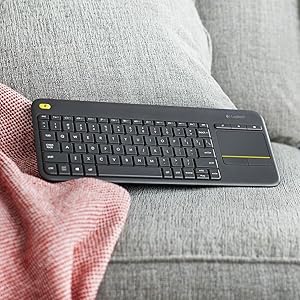
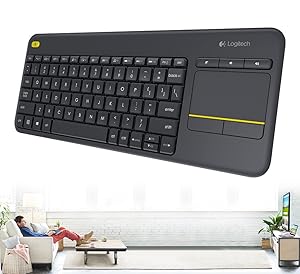
🛋️ Couch command center: Control your entertainment kingdom with ease!
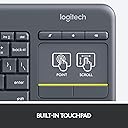
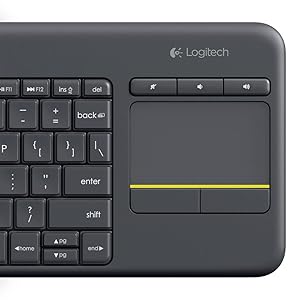
The Logitech K400 Plus is a compact, wireless keyboard with an integrated 3.5-inch touchpad designed for effortless PC-to-TV control. Featuring a robust 33-foot wireless range, up to 18 months of battery life, and plug-and-play setup via a Unifying USB receiver, it supports Windows, Android, and Chrome OS devices. Its media-friendly layout with dedicated hotkeys and spill-resistant design makes it the perfect minimalist solution for living room entertainment and casual productivity.


| ASIN | B014EUQOGK |
| Antenna Location | Office |
| Best Sellers Rank | #39,378 in Electronics ( See Top 100 in Electronics ) #140 in Keyboards |
| Box Contents | Wireless Touch Keyboard,,,,,,, |
| Brand | Logitech |
| Brand Name | Logitech |
| Button Quantity | 84 |
| Colour | Black |
| Compatible Devices | Laptop, PC, Tablet, Smartphone, Smart TV |
| Connectivity Technology | wireless |
| Customer Reviews | 4.2 out of 5 stars 38,807 Reviews |
| Global Trade Identification Number | 00097855115300 |
| Hand Orientation | Ambidextrous |
| Importer Contact Information | Importer AddressSavex Technologies Private Limited, S1, Gala No:1-2, 101-102, Perana Industrial Complex, Anjur Phata- Mankholi Rd Village, Bhiwandi District, Thane, 421302, Maharashtra, Registered Add: Savex technologies Private Limited, 124, Maker Chambers - III, Nariman Point, Mumbai 400021, Maharashtra India. |
| Is Electric | No |
| Item Dimensions L x W x H | 35.4L x 14W x 2.4H Centimeters |
| Item Type Name | K400 Plus |
| Item Weight Unit of Measure | 0.86 Pounds |
| Keyboard Backlighting Color Support | Single Color |
| Keyboard Description | Media/ Wireless |
| Keyboard Layout | QWERTY |
| Manufacturer | Logitech, Logitech Asia Pacific Ltd, Unit no. 1003, Tower 1, Cheung Sha Wan Plaza, Cheung Sha Wan Road, Kowloon, Hong Kong. |
| Manufacturer Contact Information | Logitech Asia Pacific Ltd, Unit no. 1003, Tower 1, Cheung Sha Wan Plaza, Cheung Sha Wan Road, Kowloon, Hong Kong. |
| Model Name | logitech k400 |
| Model Number | 920-007119 |
| Number of Keys | 84 |
| Packer Contact Information | Logitech Asia Pacific Ltd, Unit no. 1003, Tower 1, Cheung Sha Wan Plaza, Cheung Sha Wan Road, Kowloon, Hong Kong. |
| Power Source | Battery Powered |
| Processor Count | 1 |
| Product Features | Compact, Hotkeys and Media Keys, Trackpad, Spill Proof, |
| Recommended Uses For Product | Office |
| Series Number | 7119 |
| Special Feature | Compact, Hotkeys and Media Keys , Trackpad, Spill Proof |
| Style Name | Classic |
| UPC | 097855115300 |
| Unit Count | 1 Ounce |
| Warranty Description | 2 |
R**E
Excellent product. Lightweight and small, without compromising too much on key size.
Just had it delivered a few hours ago. Tried it with my mobile (had to get a small OTG adaptor to get started). I also own the K480, and got this one because it has a touchpad. Comparing the two, both have unique features that I would not call positive or negative, because how one views a feature, or the lack thereof, depends on one's requirements. The plus-point of the K480 is that it connects through bluetooth, leaving the port free to charge the mobile (if you want to use it with your mobile/tab) or connect a pendrive to it. The keys are larger and better spaced out (important if typing comfort is a major priority). The K400 plus, on the other hand, requires the OTG adaptor, plus, the unifying receiver used to connect the keyboard to devices like the mobile, tab, or the LCD TV. The plus point of this feature is that connection is immediate. The minus point is that one must be careful not to lose the 'unifying receiver'. Also, if you forget the OTG connector, there is no way you can connect the keyboard to anything. The 'K400 Plus' is also lighter and slightly tinier: But comfortable enough for normal to large sized fingers to type without any obstacles. Unlike the K480, this piece has the touch pad. One main advantage of going for these keyboards ( be it the K480 and K400) is the amount of money saved...in my case, I saved 28K approx., the amount I would have to invest for getting a new laptop. And just didn't have the money to invest in one. Now, with this, I can complete most college assigments. And a couple of years later when my phone conks off, I can simply get a new smartphone for about 8-10K. If one calculates the interest accumulated, one has way more in one's hand than one thinks.
A**.
Decent for what it is but not decent for its price
So I would probably assume most people would be using it for their smart TVs but for those who are looking to buy this because of its compact design and touchpad integration to carry with a laptop or use it on a general-purpose PC. Here are some important things to note before buying - The reason being why I bought this keyboard is to use it with my laptop since 1. it is compact as what I would wanna look for, 2. it has the mousepad integration so I wouldn't have to use my hand all the time reaching a mouse or the trackpad on my laptop itself. (My laptop keyboard broke, so I'm using this one) Now getting it in hands reveals that some things: 1. The build quality feels very cheap not certainly not of this price range 2. It doesn't have any LEDs as a sort of indicator of battery, capslock ect. Which you make like or hate, I hate. 3. The trackpad is small which is okay since it is meant to be compact but the touch is significantly worse than my laptop, especially the swipe sensitivity. 4. The swipe gesture direction is opposite to what the default one is for the windows precision enabled trackpads. 5. Last but not least, you will need some time getting used to using the backspace and other keys on the right column keys because of being it shorter than usual. I mentioned all the bad stuff about this before the good ones because that's what I think is more important for an average consumer like you. I'm not being sponsored by them so it's okay. Now, let's go on to some good stuff about this keyboard. 1. Typing on this keyboard feels better than the default laptop experience 2. Runs off of AAs, and it lasts pretty long. 3. The shortcut keys are just awesome for just about any device.
D**Y
Good one and useful
Used for 4 months. Happy feeling
M**N
Compact for TV and PC
I'm using it with my home music studio. Compact and very good. Connects immediately, no driver required. Works with my Bravia 43 inch too. Wish it had a trackpoint or maybe the touchpad was in the middle so that the keyboard would be split (with keys like B, H, etc occuring on both sides).
S**E
Stopped working in 4 months
the keyboard and touch pad are good quality. However, it has stopped working within 4 months of purchase. I contacted customer support - now fingers crossed that I'll get it back in working condition after claiming the warranty. Did not expect this after spending 3500 Rs. for this keyboard.
J**L
Working fine
Good
M**R
Good for media center use
Good little keyboard from Logitech. The size of keyboard is very compact, infect maybe too compact for some. Touch pad is great and works well with PC running Windows 10 as well as Apple Mac OSX. Which was a surprise because Mac compatibility wasn't mentioned on the box. However support for android device is mentioned on the box but I haven't tested that yet. Touch pad supports single tap to click and double tap to right click as well as gestures like two finger scroll and pinch to zoom. Plus volume keys on the top of touch pad is a great edition. Three gaming keys are awkwardly placed so not very ideal for gaming. The range is good and keyboard and mouse doesn't lag like other cheap wireless products. Only issue here is the build quality. Keys feel bit flimsy and overall plastic feels like it could easily break. There are keyboards out there that cost much less but have lot better build quality. Overall a good product for home media center use. I am using this keyboard to control my PC connected with my HDTV, from comfort of a couch. Keyboard comes with two batteries right out of package so you don't have to rush and buy new ones immediately. Delivery was quick and packaging was excellent.
H**I
The best of both worlds...
Logitech K400 Plus Wireless Keyboard is one of the best wireless keyboards in its class. I've been using it for the past couple of weeks and it's been an amazing experience. So, as usual, let me start with the pros and cons of the product Pros - ==> Plug and Play. ==> It's wireless so you can keep your laptop at one end and operate it from another corner. (You gonna get lazier than you already are) ==> Unifying the keyboard and touchpad make it more convenient than having a combo of wireless keyboard and mouse. ==> Keystrokes are not very noisy ==> Gesture are really very convenient and better than my laptop touchpad(they have used/copied some of the Mac's features in the keyboard) ==> Compact and slim design gives it a premium feel ==> Light weight make it easier to carry around ==> Ability to change the function keys. You can use it as the standard F1-F12 keys or change it. Though you will have to install Logitech options from [...] it will also help you tweak the setting like: - Keyboard - Point and Scroll - Gestures ==> Placement of the Volume keys ==> If you own multiple Logitech wireless Bluetooth devices, you can easily connect it to the Universal receiver that comes with the keyboard Cons - ==> Using the keyboard at night without lights is a big issue ==> Keys like Num Lock, Print Screen are missing Initially, it may take some time getting used to it but once you do surely it would be an amazing feeling to use it. Truth be told I was very skeptical about buying a Logitech product which carries a price tag of 2K+, but it was worth the try. Note: Till now I've used the product only on Laptop and Desktop so I'm not quite aware of its performance on other devices. Also, it's been only a couple of weeks to talk about the battery life so I skipped that part. Once I do I'll update the review.
Trustpilot
2 months ago
1 week ago