🚀 Elevate your WiFi game — because buffering is so last decade!
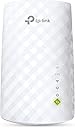
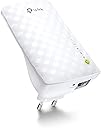
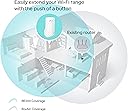
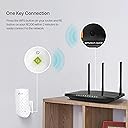
The TP-Link AC750 WiFi Range Extender (RE200) delivers reliable dual-band speeds up to 750Mbps, extending your wireless network to hard-to-reach areas. Its compact, wall-mounted design includes an Ethernet port for wired device connectivity and supports easy plug-and-play setup. Ideal for enhancing smart home and Alexa device coverage, it’s a budget-friendly solution trusted by thousands for seamless internet expansion.


| ASIN | B00KXULGJQ |
| Are Batteries Included | No |
| Batteries | 1 AAAA batteries required. |
| Best Sellers Rank | #70 in Computers & Accessories ( See Top 100 in Computers & Accessories ) #2 in Repeaters & Extenders |
| Brand | TP-Link |
| Colour | White |
| Computer Memory Type | DDR3 SDRAM |
| Country of Origin | India |
| Customer Reviews | 4.2 4.2 out of 5 stars (85,070) |
| Date First Available | 19 January 2026 |
| Generic Name | Range Extender |
| Importer | Pacific cyber Technology Private Limited,Survey No .57/3/55,57/2/56,57/1/57,Silver Industrial Estate,Village Bhimpore,Nani Daman,Daman Dadra and Nagar Haveli and Daman and Diu,India - 396210, Contact: Toll Free 18002094168, Email- [email protected] |
| Included Components | AC750 Wi-Fi Range Extender RE200, Resource CD, Quick Installation Guide |
| Item Dimensions LxWxH | 6.6 x 7.5 x 11 Centimeters |
| Item Height | 11 Centimeters |
| Item Weight | 110 g |
| Item Width | 7.5 Centimeters |
| Item model number | RE200 |
| Lithium Battery Energy Content | 2.6 Watt Hours |
| Lithium Battery Weight | 5 Grams |
| Manufacturer | TP-LINK CORPORATION LIMITED |
| Net Quantity | 1 Count |
| Number of Lithium Ion Cells | 4 |
| Number of Lithium Metal Cells | 1 |
| Packer | Pacific cyber Technology Private Limited,Survey No .57/3/55,57/2/56,57/1/57,Silver Industrial Estate,Village Bhimpore,Nani Daman,Daman Dadra and Nagar Haveli and Daman and Diu,India - 396210, Contact: Toll Free 18002094168, Email- [email protected] |
| Processor Count | 1 |
| Product Dimensions | 6.6 x 7.5 x 11 cm; 110 g |
| Series | RE200 |
| Voltage | 220 Volts |
| Wattage | 3.5 Watts |
| Wireless Type | 802.11ac, 802.11b, 802.11g, 802.11n |
A**R
Good product
Works ectermely well, i have been using it for more than a year now and no complaints, Zero latency. Plug and Play mode so no complex configuration required. Easy to install. You can carry anywhere in the home and just plug in, it will start working. Sturdy and durable product. Worth for money.
V**H
A Decent signal extender but not a booster
I got this extender to extend my 300mbps connection to a new room, which is around 5-7ft away from the actual router. When I purchased, I observed this router extends the signal to upto 10000ft, our house being only around 2500sqft I thought this should suffice to give us good signal across the house with decent speed. After I received the product following are the issues I noticed: 1. Since I use act broadband, and the router band selection is set in auto, this extender doesn't always pick up any other bands/channels other than 36&48. I think it's a general issue across all TP Link products. Tip: please buy the extender from the same company has router. 2. I changed my router configuration to only broadcast in 48 channel. After that the router consistently picked up the signal. 3. Wi-Fi boosting is almost negligible: When I did a speed test by connecting directly to base wifi network and extended wifi network. I saw a negligible gain off speed of around 5-10%, surprisingly sometimes the speed on extended network was lesser than the speed on base network. But when we connect via it's lan port, the speed was around 50-60% of the available speed. So that's in the range off 140-180 MBPS, my actual speed 300 mbps. PS: This speeds are only in the 5G network. In 2.4G it's very abysmal, it's like 10-20% of the available bandwidth, around 20-30 mbps if you are lucky. 4. Signal strength: The signal is generally available across my house, but once we go to a different room the maximum speed you'll get is around 50 mbps. Anything farther than 50-80ft you'll have signal but not enough data speed. In conclusion, Buy this only if: 1. You have a TP Link router already, from here you can easily extend. 2. Don't fall to the marketing gimmicks off 10000 sqft, it's usually a max of 500sqft of useable bandwidth. 3. It's not technically a wifi booster, it gives a gain off max 20%. 4. Please remember this doesn't support one mesh. Limited configuration options. Remember this: Using an extender will always increase ping and latency. Also the upload speeds are not usually same as download speeds. The extender takes around 30sec to fully boot and be ready. If 5G is available then there will be no internet on 2G network.
B**A
Good
It is easy to set up and it does amplify the network strength for you. Good quality. Value for money.
P**.
Great Performance and Easy Setup
I am very satisfied with this Wi-Fi extender. Installation was simple and took only a few minutes. After setting it up, the signal strength improved significantly, especially in rooms where the Wi-Fi was previously weak or unavailable. Internet speed is stable, and there are no frequent disconnections. It works well for browsing, video calls, and streaming. Overall, it is a good value for money and does exactly what it promises. Highly recommended for homes and offices with weak Wi-Fi coverage.
A**R
Good product
Good product extends wifi well but not much speed
R**L
A Dual-Band Router with Performance Quirks & Heating Issue
I recently installed TP-Link AC750 in my home network to improve Wi-Fi connectivity , and while it has some strengths, there are a few drawbacks that need to be considered. Download Speed: ⚡⚡ (2/5) On the 2.5GHz band, the TP-Link AC750 showed a modest 22% increase(59mbps-->72mbps) in download speed compared to my previous router, which is a noticeable but not game-changing improvement. However, the 5GHz band didn't perform as well, experiencing a significant 63%(365mbps-->136mbps) decrease in download speed, which can be noticeable when streaming high-definition content or downloading large files. Upload Speed: ⚡ (1/5) Both the 2.5GHz and 5GHz bands exhibited a disappointing decrease in upload speed. On the 2.5GHz band, there was a 32% reduction(From 62mbps->42mbps) in upload speed, and on the 5GHz band, the decrease was a substantial 55%(336mbps->150mbps). This reduction in upload speed can be problematic for tasks like uploading photos or documents, making it less than ideal for users who require fast uploads. Ping and Latency: ⚡⚡⚡⚡⚡ (5/5) On a positive note, the router performed exceptionally well in terms of ping and latency on both bands, with an average ping of just 5ms and low latency. This makes online gaming and video conferencing a seamless experience. Heat Management: 🔥🔥 (2/5) One noticeable drawback of the TP-Link AC750 is that it tends to get quite hot during operation. While it doesn't seem to affect its performance directly, the heat buildup may raise concerns about long-term reliability and potential overheating issues. It's advisable to ensure the router has proper ventilation to mitigate this. In conclusion, the TP-Link AC750 is a reliable router with some notable strengths in terms of low latency and a modest 2.5GHz download speed improvement of 22%. However, the significant decrease in 5GHz download speed by 63%, and the issues with upload speeds, may be concerns for users who require high-speed uploads and downloads. If these factors are critical for you, it might be worth exploring other router options that better suit your needs.
A**R
Works good so far! Need to ensure it is in decent range. Good speed connection.
E**N
So it’s useless. And I have to pay for a return. I genuinely feel like I’ve been scammed.
W**R
Added this to my home because my other extender was way outdated . It works - don't have some of the issues(buffering for one) as previous. Easy install.
I**O
Después de un mes de prueba he de decir que este repetidor wifi me ha sorprendido gratamente, aunque los primeros días estuve a punto de devolverlo y ahora os explico el por que. Siguiendo con el análisis del producto, y siendo el primer repetidor wifi que uso en la vida, la verdad es que no puedo estar mas contento con la compra. Cobertura wifi tanto 2,4/5G impecables (después de colocar el repetidor en el punto óptimo de la casa), interfaz web muy intuitiva y fácil de entender, fácil instalación y configuración en un par de pasos... Básicamente lo compre para poder tener wifi en una TV que colgué en la habitación, a la cual le llegaba apenas una raya de cobertura y ahora, le llegan todas. Probada la señal wifi con Netflix y ni un solo corte o pixelación. Antes, ni me conectaba la TV a la wifi sin el repetidor. Enfín, no puedo ponerle pega alguna al producto, al menos de momento. En cuanto a lo de que estuve a punto de devolverlo, os explico el porque y la solución por si le sirve a alguien que tenga uno y esté padeciendo los mismos problemas. Resulta que los dos primeros días, funcionaba de lujo, hasta que al día siguiente, pruebo a ver la TV en la habitación y resulta que me dice que no hay internet. Ya me huelo movida, ya que el repetidor no se había tocado desde que lo instalé y no había motivos para que fallara. El caso es que la extensión de cobertura había desaparecido y los leds del repetidor seguían encendidos y fijos como debía de funcionar. Intento acceder por web para buscar el posible problema, y me encuentro con que no puedo acceder. El repetidor colgado del todo. Toca desenchufarlo de la red y volverlo a enchufar, y a funcionar. No le dí mucha importancia hasta que al día siguiente y sucesivos, volvía a pasar. Como digo era constante, me plantee devolverlo, hasta que empecé a buscar información por internet en foros por si el problema no fuera del repetidor... Efectivamente di con la solución y no era el repetidor el que fallaba. Resulta que el router de Movistar que tengo en casa, en opciones avanzadas de la banda 5Ghz tenía una opción marcada llamada... SCS (Smart Selection of Best Wireless Channel). A mi prácticamente todos los días, la banda 5G se me cambiaba de canal, incluso teniendo puesto yo el canal manualmente y era por tener esa opción activada. Por ejemplo, aunque el canal en el router lo tenía manualmente puesto en el 36, viendo yo en las opciones que me indicaba ese canal, realmente mirabas la red con un analizador de redes, y mi red 5G aparecía en el 108. Fué desmarcar la opción SCS en las propiedades avanzadas de la red 5G del router, y desaparecer de raíz los cuelgues del repetidor, ya que el canal ya no se cambiaba por su cuenta. Espero que os haya servido a alguien que tuviera los mismos problemas que yo. Un saludo.
R**A
Polecam
Trustpilot
2 months ago
3 weeks ago