Buy anything from 5,000+ international stores. One checkout price. No surprise fees. Join 2M+ shoppers on Desertcart.
Desertcart purchases this item on your behalf and handles shipping, customs, and support to Italy.
🚀 Elevate Your Data Game!
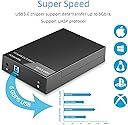
The RSHTECH Hard Drive Enclosure is a versatile external caddy that supports both 2.5 and 3.5 inch SATA I/II/III hard drives and SSDs, accommodating up to 16TB. With USB 3.0 technology, it offers rapid data transfer rates of up to 6Gbps, ensuring efficient performance. The enclosure features a reliable 12V/2A power supply and a user-friendly plug-and-play design, making it easy to set up. Its innovative hollow design promotes superior heat dissipation, keeping your drives cool during extended use.


| ASIN | B07CNZLFGZ |
| Best Sellers Rank | 10,417 in Computers & Accessories ( See Top 100 in Computers & Accessories ) 44 in Enclosures |
| Box Contents | 1 x 12V/2A Power Adapter, 1 x RSHTECH 3.5" SATA Hard Drive Enclosure, 1 x USB 3.0 Cable 100cm/3.3ft, 1 x User Manual, 18 Months Warranty |
| Brand | RSHTECH |
| Brand Name | RSHTECH |
| Colour | Black |
| Compatible Devices | Personal Computer |
| Country of Origin | China |
| Customer Reviews | 4.5 out of 5 stars 1,628 Reviews |
| Data Transfer Rate | 6 Gigabits Per Second |
| Enclosure Material | Acrylonitrile Butadiene Styrene (ABS) |
| Hardware Interface | USB 3.0 |
| Hardware Platform | Universal |
| Hardware interface | USB 3.0 |
| Hardware platform | Universal |
| Item Dimensions L x W x H | 18L x 11.6W x 3.3H centimetres |
| Item Type Name | USB 3.0 to SATA |
| Item Weight | 0.52 Kilograms |
| Manufacturer | RSHTECH |
| Manufacturer Part Number | RSH-319 |
| Material | Acrylonitrile Butadiene Styrene (ABS) |
| Memory Storage Capacity | 16 TB |
| Model Number | RSH-319 |
| Network Connectivity Technology | USB 3.0 to SATA |
| Product Warranty | 18 Months |
| Product dimensions | 18L x 11.6W x 3.3H centimetres |
| Supported Devices Quantity | 1 |
| The Standard Size of the Hard Drive or the Bay the Hard Drive Is Compatible With (in inches) | 3.5 Inches |
B**N
A good way to reuse old HDDs.
This device simply did the job. It yuned my old 1Tb HDD into a very useful backup drive eith no other set up required other than to repartition the HDD and format it to NFTS. I have seen criticism of this case as being fragile plastic. It is plastic alough I would not say fragile. Buyers are likely to do nothing more than keep it sitting on a desk by their computer and it is easily strong enough to withstand everyday knocks and bumps. It has supplied screws to secure the drive. It is fast in a usb 3 socket. There are cheaper devices but I consider the price of £18 I paid very reasonable. The cables aren't that long but I doubt whether that will present a problem to most users. I'm happy with it as a back up for my 1 Tb laptop info using Grsync for convenience. Cables are about 1m long. It takes 2.5 & 3.5 inch drives up to SATA III. It is supplied with a PSU for 3.5 inch drives. It is supplied with screws to secure 3.5 inch drives that are heavy beasts. It is fast when used on usb 3 host sockets. Ideal for desktop backup.
M**T
Brilliant
Super, works perfectly and comes with mounting screws and even a little screwdriver.
W**R
Cheap, easy to use, fast data transfer speeds, average build quality.
I'm using this to connect a 3.5 inch Western Digital Green 1.5 TB hard drive to my new Beelink Mini-PC. It’s my main storage drive as it was removed from my old desktop so I needed decent data transfer speeds. Good points: Fitting the drive is very easy. Slide the top cover off. Insert the hard drive and secure it to the unit using the supplied screws. Replace the top cover. Power up the unit using the supplied power adapter. Connect it to your PC or laptop using the included USB cable. That’s it. It uses USB 3.0 so ideally you should connect it to a USB 3.0 or higher port for best data transfer speeds. In real world data transfer tests I’m getting 60-70 MB per second read speeds (95 MB/s peak) and 45-55 MB per second write speeds. It powers down when not used for a while which preserves your hard drive a bit. It then takes a few seconds to spin back up when you subsequently go to access data on the drive but for me that’s acceptable. It’s a very cheap and easy way to connect an old 3.5 inch desktop hard drive to a PC or laptop to expand your storage or to backup your data. Not so good points: Build quality is not great. The top cover slides off almost too easily and the plastic case and connectors feel a little brittle. It’s not pretty either. Thankfully, in my use case these are not important as I have no need to access the case on a regular basis and it stays permanently connected to my Mini-PC. As it’s hidden on my desktop under a shelf unit, I don’t even see it! However, if I was looking for a case to use on the move or one to use with lots of different drives or with lots of different devices, I’d be concerned about its robustness. Recommended with caveats.
J**P
Great enclosure - well worth the price.
Absolutely great enclosure. I put a Western Digital 4TB drive in that was in an old PC that had died on me so it was full of data. Plugged it into the enclosure - attached to new PC, powered on and it worked straight away. I have read some other reviews saying it is a bit flimsy - I don't agree. Yes it is clearly plastic - but unless you are going to move it a lot then no problem (If I wanted to use this as a mobile device I might just put a bit of tape where the cover meets the body so it dosent come open). I also read a review that said that it got very hot - mine has been plugged in and switched on permanently for over a week and it is still cool to the touch. If I ever need it I will buy another one.
B**G
Perfect
Needed a way of accessing files on a couple of old hard drives and this worked perfectly. I was able to remove all the old files I wanted and then did a full format so they can to recycled without worry of my data being accessed. It was didn't straight away and had good transfer speeds for my old HDD. No sound apart from the normal hard drive sounds. Comes well packaged with all the cables you need including a UK power supply. Has screws to secure the HDD in place if using for a long time but no tools needed if only using for a short time. Good quality with excellent features (power button, sliding top and lights for power and HDD accessing. Great product 👌.
J**G
Works Linux Mint, Quick to assemble, usb 3.
Got this for a friend as he just uses a laptop now. He had a 2TB hard drive from his previous PC with loads of music he's collected over the years. So a gentle push on the top of the case and the top slid off. The circuitry that sorts the power and SATA connector plus on off switch are all separately enclosed unlike some which can get knocked about causing problems. Just the SATA port to slide the Hard Drive into. That's it, just plug the power lead in and the USB 3 lead into this case then USB 3 port in pc or laptop ( USB 2 and 3 compatible) . Press the on button and 2 led's show, one for power and other data use. Also there are screws and a mini screwdriver for those who want to screw the hard-drive to the base, which I did. Tested connecting it to my Linux Mint computer, it was recognised straight away and worked without any fuss with nothing else to do. Even using it now as I am listening to music on it as another test. Sure my friend will be pleased.
A**D
Good value, works well
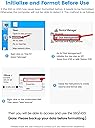
I bought this product to convert a 3.5“ 1TB hard disc into an external USB drive. The disc was spare after exchanging it for a SSD, and I want to use it for backups. The case arrived well packaged, complete with UK power supply, USB cable, screws and a small screwdriver. It is simple to install the disc and it worked straight away. The connectors seem to be of good quality and it all has a solid feel. To install, you remove the lid (slides back and then lifts off), insert the drive and screw it into place from the bottom with the four screws. The supplied screwdriver is small but adequate, though I preferred to use my ‘proper’ screwdriver. I had to hold the disc in place with a finger when I turned the case upside down, so the lid had to remain open until the screws were in place, but it was not as fiddly as it sounds – once one screw is in, the rest just follow. The lid only clicks shut. There is no catch and it can come open rather easily, so remember that when holding it or it could slip and you might drop the case. It’s only plastic and probably wouldn’t survive a drop, but then, the disc probably wouldn’t either… The power connector goes to a compact ‘wall wart’ power supply, but the lead is only 113cm long – OK to use with a skirting board-height mains socket if the table is right next to it but that is all. The supplied USB cable is 96cm long, which is barely enough to reach from a desk to a PC on the floor beneath it. At one end is a standard USB-A plug; at the other a USB 3.0 type B plug. Both have blue tongues to indicate that they are USB 3.0 standard. Once it is all plugged in, you press the On switch and it all comes to life. Hint: In Windows, if you are using a brand new disc, you need to visit Disk Management to initialise the disc and create a partition on it. As I was repurposing an old disc, I wanted to delete all the partitions and create a new, large one so I could use the whole capacity.
S**A
Simple to setup and reuse an old SATA hard drive
I had a 3TB drive that I wanted to reuse as a backup, this caddy seemed like a good option from the reviews so I went ahead with it. For me it was easy enough using the instructions to slide the cover off, insert the drive, screw the drive into place so it is secure and slide the cover back on. I agree with others that the sliding of the case could be improved with some indentations for grip but I still managed to slide it on and off as is. Once plugged into the USB on the PC and powered up the PC found the drive and was usable straight away (as I had already formatted the drive.) The caddy does have a small power button on the front, this is used to power on the drive but weirdly does not seem to be used to power the device off, this is not an issue for me as I just eject the drive via Windows to allow me to disconnect and then I unplug it. I should say I am using this essentially as an offline backup so it is only plugged in when I want to take a backup or want to restore so it is not running all the time. For me this has enabled a reuse of a drive without too much fuss.
G**E
Good quality
Good value for money and quality. No complaints other than slow transfer speed, but comes with connection type. Good, affordable option to house an old hdd to use as an external.
E**E
Works but no ventilation
Product is easy to open and install the hard drive without requiring tools. Looks like it is transferring data at the advertised USB 3.0 speeds. Power and USB cables are somewhat short and not very practical. Enclosure has no ventilation holes which almost caused a brand new 16TB Hard Drive to overheat. Could not touch it for a while and it actually melted the sponge strip that acts as a vibration dampener on the inside of the enclosure.
Trustpilot
1 month ago
3 days ago