Buy anything from 5,000+ international stores. One checkout price. No surprise fees. Join 2M+ shoppers on Desertcart.
Desertcart purchases this item on your behalf and handles shipping, customs, and support to Italy.
🚀 Elevate your home network to WiFi 7 speed—because buffering is so last decade!
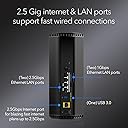
The NETGEAR Nighthawk RS300 WiFi 7 Tri-Band Router delivers cutting-edge wireless speeds up to 9.3 Gbps, covering up to 2,500 sq. ft. and supporting 100 devices simultaneously. Featuring tri-band technology including a 6 GHz band, multi-gig wired ports, and universal ISP compatibility, it’s designed for high-performance gaming, 4K/8K streaming, and smart home integration with robust security protocols and automatic updates.


| ASIN | B0D4JBGPH4 |
| Antenna Location | Business, Gaming, Home |
| Antenna Type | Fixed |
| Best Sellers Rank | #30 in Computers & Accessories ( See Top 100 in Computers & Accessories ) #3 in Computer Routers |
| Brand | NETGEAR |
| Built-In Media | One (1) 12V/3.5A power adapter, One (1) 2m Ethernet cable, One (1) WiFi 7 Tri-Band Router (RS300), Quick start guide |
| Color | black or white |
| Compatible Devices | Gaming Console, Personal Computer, Security Camera, Smart Television, Smartphone |
| Connectivity Protocol | Wi-Fi |
| Connectivity Range | 2500 Square Feet |
| Connectivity Technology | Ethernet, Wi-Fi |
| Control Method | App |
| Coverage | up to 2,500 sq. ft. |
| Customer Reviews | 4.4 out of 5 stars 704 Reviews |
| Data Transfer Rate | 9.3 Gigabits Per Second |
| Frequency | 6 GHz |
| Frequency Band Class | Tri-Band |
| Global Trade Identification Number | 00606449169591 |
| Has Internet Connectivity | Yes |
| Has Security Updates | Yes |
| Is Modem Compatible | Yes |
| Item Weight | 4.05 Pounds |
| LAN Port Bandwidth | 2500, 1000 Mbps |
| Manufacturer | Netgear |
| Maximum Upstream Data Transfer Rate | 2500 Megabits Per Second |
| Mfr Part Number | RS300-100NAS |
| Model Name | RS300-100NAS |
| Model Number | RS300-100NAS |
| Number of Antennas | 3 |
| Number of Ports | 4 |
| Operating System | NETGEAR Proprietary OS |
| Other Special Features of the Product | Guest Network, MU-MIMO, OFDMA, VPN, WPA3 |
| Router Firewall Security Level | Advanced |
| Router Network Type | Tri-Band |
| Security Protocol | WPA3 |
| Special Feature | Guest Network, MU-MIMO, OFDMA, VPN , WPA3 |
| UPC | 606449169591 |
| Unit Count | 1.0 Count |
| Voltage | 12 Volts |
| Warranty Description | 1 Year Limited |
| Wi-Fi Generation | Wi-Fi 7 |
| Wireless Communication Standard | 802.11.be |
| Wireless Compability | 802.11.be |
J**T
Best Netgear Router I Have Ever Owned!
Netgear Nighthawk (RS300) WiFi 7 Router Review I recently got the Netgear Nighthawk (RS300) WiFi 7 Router, and I have to say, it's absolutely amazing! From the moment I unboxed it, I knew I was in for a treat. The design is really sleek and modern, and it looks great in my living room. Fast and Reliable The performance of this router is just out of this world. With WiFi 7, it offers lightning-fast speeds. Whether I'm streaming 4K movies, playing online games, or just browsing the web, everything is super smooth and fast. No more annoying buffering or lag – it’s a total game-changer! Easy to Set Up One of the best things about the Nighthawk RS300 is how easy it is to set up. The Netgear Nighthawk app guides you through the whole process, and it’s really straightforward, even if you’re not tech-savvy. I had everything up and running in no time. Great Features This router comes packed with awesome features. It has multiple bands, so it can handle a ton of devices without slowing down. The security features are top-notch too, with the latest encryption to keep everything safe. Plus, the app lets you control everything easily, like setting up guest networks and managing connected devices. Future-Proof What’s really cool is that this router is future-proof. With WiFi 7, it’s ready for all the new devices and faster internet speeds that will come out in the future. It feels good to know that I won’t need to upgrade my router for a long time. Overall All in all, I couldn’t be happier with the Netgear Nighthawk (RS300) WiFi 7 Router. It’s fast, reliable, easy to use, and packed with great features. If you’re looking for a new router that can handle everything you throw at it and more, this is definitely the one to get. Highly recommended!
J**S
Reliable and Worth the Money
Title: Netgear Nighthawk RS300 Description: Bought this product and it was delivered quickly next day. Arrived in perfect condition no issues. Set up was easy and straight forward, I highly recommend giving the Netgear Nighthawk RS300 a chance in your home. Best feature is no antennas sticking out, looks really nice on my shelving. It has powerful range for my two floor house, and it can handle many electronics. I have personally over 9 electronics being used so far and the Netgear Nighthawk RS300 is running it all very smooth, it has the potential to run 100 items on wifi if needed, that includes home security. Highly recommend the Nighthawk RS300 give it a try.
L**Z
Best Router I’ve Ever Owned – Nighthawk BE9300 is a Game Changer
I rarely write reviews, but I had to share how impressed I am with the NETGEAR Nighthawk BE9300 Wi-Fi 7 Router. From the moment I opened the box, the setup was incredibly simple and user-friendly. The app (mobile) walks you through everything, and I had my entire network up and running in minutes—no tech background needed. Now let’s talk performance: this thing is a beast. I live in a 2000 sq ft condo and I get full bars in every single room—no dead spots anywhere. What's even more impressive is the coverage outside on my balcony, with the door closed, and even when I’m over at my neighbor’s unit (other side of building). The signal strength and range are hands-down the best I’ve ever experienced in a high-rise building. It seriously blankets the entire space with fast, reliable Wi-Fi. As for speed—wow. These are the fastest Wi-Fi speeds I’ve ever had. Streaming 4K content, video calls, and multiple smart devices all running at once? No problem. Everything is buttery smooth and lightning quick. One last thing I really appreciate is the built-in security. The advanced protection features give me true peace of mind, knowing my data and devices are safe without needing to install extra software or worry about constant monitoring. If you’re looking for the ultimate router that delivers speed, range, and simplicity, this is it. The NETGEAR Nighthawk BE9300 exceeded every expectation.
M**W
Fast, Reliable, and Great for Gaming—But Netgear Armor Disappoints
I live in a household that heavily relies on streaming and gaming, so a stable, high-quality internet connection is a must. After a disappointing experience with a Nighthawk router about 5-6 years ago, I was hesitant to try another one. However, when my previous router died, this new Netgear Nighthawk model checked all the right boxes in terms of specifications and affordability for a WiFi 7 router—so I decided to give it a shot. Two months in, I’m happy to report that it has exceeded my expectations. The connection has been fast, reliable, and completely stable with no drops or issues. For the price, you’re getting a high-performance router that delivers excellent speeds, making it a great choice for gamers and streamers alike. That said, I’m knocking off one star due to Netgear Armor. Network security should be included—at least a limited version—without requiring a paid subscription. Competing brands like ASUS offer comparable security for free, and in today’s economy, an extra monthly cost just isn’t justifiable. A $300+ router is already a significant investment for many people, and Netgear could do better in this regard. Aside from that, this router is an excellent piece of hardware, and I think most gamers and streamers will be very pleased with its performance.
T**X
Rs300 Router Review!
The Nighthawk RS300 has been a huge upgrade from my previous router. Setup was quick and straightforward, and performance has been excellent. I run multiple high-bitrate streams across several devices daily, and this router handles the load without buffering or slowdowns. WiFi coverage is noticeably stronger, and everything feels more stable overall. If you have a busy network or stream a lot of large files, this router is absolutely worth it. It was also very simple to set up with an app that allows you to control your router settings.
W**R
Top Notch Router
The NETGEAR Nighthawk® BE9300 WiFi 7 Router (RS300) is a standout device in the world of high-performance networking, setting a new benchmark for home and small office WiFi solutions. **Performance and Speed:** Equipped with the latest WiFi 7 technology, the BE9300 delivers unparalleled speed and efficiency. It supports tri-band connectivity and boasts a 12-stream configuration, ensuring that even the most bandwidth-intensive tasks are handled with ease. Whether you’re streaming 4K content, gaming, or working from home, this router provides lightning-fast and stable connections, minimizing lag and buffering. **Coverage and Range:** The BE9300 excels in covering large areas, thanks to its advanced antenna design and powerful signal amplification. It effectively eliminates dead zones and ensures robust connectivity throughout your home or office, making it ideal for multi-story buildings or expansive spaces. **Setup and Management:** Setting up the BE9300 is a breeze with the NETGEAR Nighthawk app. The app offers a user-friendly interface for easy installation, network management, and performance monitoring. Features like guest network setup and parental controls are straightforward to configure, providing both convenience and security. **Design and Build Quality:** The router’s sleek, modern design is both aesthetically pleasing and functional. Its efficient cooling system ensures consistent performance without overheating, and the overall build quality reflects NETGEAR’s commitment to durability and reliability. **Security:** The BE9300 prioritizes security with the latest protocols and features, including automatic firmware updates, advanced encryption, and robust parental controls. These features work together to protect your network from potential threats and give you peace of mind. **Conclusion:** The NETGEAR Nighthawk BE9300 WiFi 7 Router (RS300) is a top-of-the-line choice for anyone seeking exceptional wireless performance and future-proof technology. Its impressive speed, extensive coverage, and advanced features make it an excellent investment for both high-demand users and tech enthusiasts. If you’re looking to upgrade your network to the latest standard and enjoy reliable, high-speed internet throughout your home, the BE9300 is a stellar option.
A**R
Great purchase
Title: Awesome Router Description: Speed of this router is just as good as a wired connection. Very happy. Only issue I had is signal strength in one room. This was due to location and physical construction of the home. I did purchase the Netgear WiFi 7 extender and the problem is resolved. Very easy setup and I love to amount of customization and control I now have over my wireless. Highly recommend this product.
D**U
Good router. Annoying limitations of NightHawk mobile app. Older Wifi appliances may have Issues.
So far so good, but not without compatibility issues and annoyances. 1. Basic setup was very easy, but you have to have an active cable modem or other digital service internet connection to setup the router. 2.5 Gb Ethernet RJ-45 interface is there. There are also 2 additional 2.5 Gb RJ-45 internet interfaces plus 2 1 Gb RJ-45 internet interfaces. Annoyance: The Nighthawk phone/ipad app only supports basic setup. If you want to do something like disable SSID broadcast, you need to manually login directly to the router via laptop from a browser. Other routers can be setup without the connection, and then plugged into a live internet connection like a cable router. 2. Some older networked appliance type devices may have WiFi compatibility issues. Example: Older Apple TV boxes like the Generation 2 Apple TV A1469 will hang on initial connection request to the network. You will get to the screen where you can select a network SSID for AppleTV to choose, but it will bomb out with a message: "There was a problem connecting to the internet. The WIFI password entered is not correct. Try Again. (-3900)" - or - "There was a problem connecting to the internet. The WIFI password entered is not correct. Try Again. (-100)" Often this happens before the system has even prompted you to enter in a password. You have only selected the network. This is a modem chip type communications issue which is actually somewhat common with older WiFi devices built to older WiFi specs and newer WiFi6/WiFi6E/WiFi7 routers, not just Apple and not just NETGEAR. One workaround in my case was to DISABLE Access Control on the router and retry setup of the old Apple TV device. This did not work. Another workaround of changing authentication to downgrade WPA2/WPA3 back to WPA2 on the router and retry setup. WPA2 is apparently not always reliably detected by the NETGEAR Router. This did not work, either. Annoyance: The Nighthawk app also is too basic to handle this as well, and info on the WPA settings is not under the SECURITY tab, but under the INFO on the wireless network - but not changeable there. Again, you have to login. Another workaround of disabling all router security also did not work. With some routers it will work, but the older Apple TV boxes will return to an error state of (-100) or (-3900) once security is turned back on. Before you return your router, consider replacing the older devices unless you have no option. In my instance, the Gen 2 Apple TV 1469 box is the only device I have that had connection issues. The device is very old and getting a new one is not that expensive. You may run into similar problems with older Home WiFi appliances adhering to older WiFi specs, even if you replace the router with a different brand. Search their knowledge bases before deciding to return the router and getting something else. Do your research on the device and the specific routers you are looking at, and don’t blindly trust what the router vendor tells you.. Keep in mind that WiFi7 is also still an interim draft specification at this time (January 2025), but it has backwards compatibility. WiFi7 is faster than WiFi6 or 6E, but not much can take advantage of the speed yet. WiFi6 is a released spec. WiFi6E is somewhat proprietary and has no backwards compatibility or limited backwards compatibility, but it is faster than 6. I did, however, still notice a definite improvement in my Internet TV devices on the new NETGEAR RS300 Router.
Trustpilot
2 weeks ago
1 month ago