🚀 Tiny Titan: Power, Performance & Portability in One Sleek Package
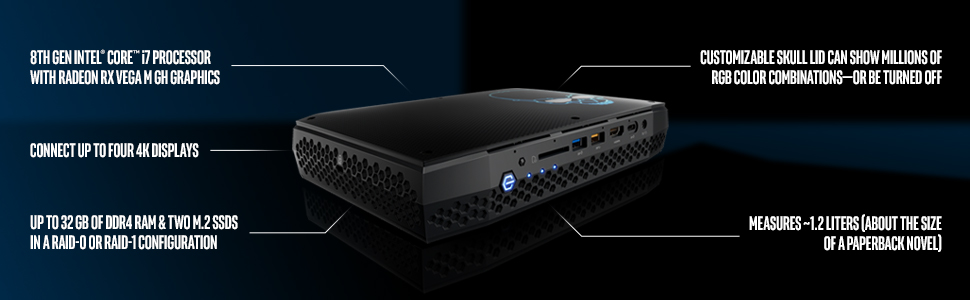
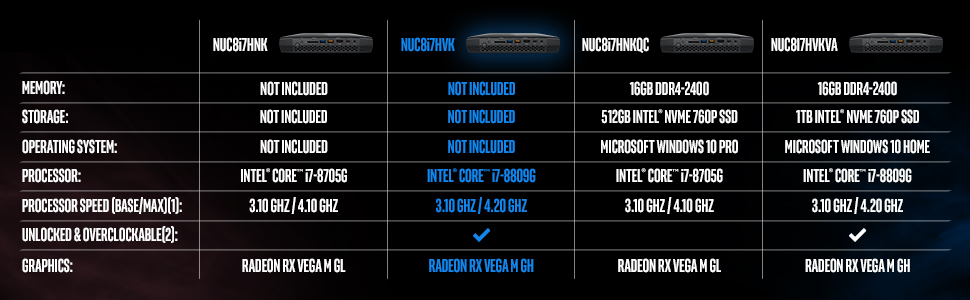
The Intel NUC 8 Performance-G Kit (NUC8i7HVK) is a compact barebone mini PC featuring an 8th Gen Intel Core i7-8809G processor paired with Radeon RX Vega M GH graphics. Designed for VR and high-performance gaming, it supports up to six displays and offers extensive connectivity including Thunderbolt 3 and multiple USB ports. With a 100W thermal design power, dual M.2 NVMe slots, and upgradeable wireless, it balances power, expandability, and portability in a whisper-quiet chassis ideal for professionals and enthusiasts seeking a versatile, space-saving powerhouse.


| ASIN | B07BR5GK1V |
| Additional Features | Microphone |
| Aspect Ratio | 1.77:1 |
| Best Sellers Rank | #38,013 in Computers & Accessories ( See Top 100 in Computers & Accessories ) #1,139 in Mini Computers |
| Brand | Intel |
| Built-In Media | 19V Power Adapter, Manual, NUC, VESA Mounting Plate |
| CPU Model | Core i7 |
| CPU Model Number | BOXNUC8i7HVK1 |
| CPU Model Speed Maximum | 4.2 GHz |
| CPU Speed | 3.1 GHz |
| Cache Memory Installed Size | 32 |
| Cache Size | 32 |
| Color | Black |
| Connectivity Technology | Bluetooth, HDMI, Thunderbolt, USB |
| Cooling Method | Air |
| Customer Reviews | 4.5 out of 5 stars 304 Reviews |
| Display Resolution Maximum | 3840x2160 |
| Display Type | LCD |
| Global Trade Identification Number | 00735858351423 |
| Graphics Card Description | Integrated |
| Graphics Card Interface | Integrated |
| Graphics Card Ram | 32 GB |
| Graphics Coprocessor | Radeon™ RX Vega M GH Graphics |
| Graphics Description | Integrated |
| Graphics Ram Type | DDR4 SDRAM |
| Hard Disk Description | SSD |
| Hard Disk Interface | eSATA |
| Hardware Interface | Bluetooth |
| Human-Interface Input | TrackPoint pointing device |
| Item Dimensions | 10.8 x 7.8 x 4.8 inches |
| Item Type Name | Intel NUC 8 Enthusiast VR Capable mini PC Kit NUC8i7HVK with Radeon RX Vega M Graphics |
| Item Weight | 6.4 Pounds |
| Keyboard Description | compact laptop-like keyboard |
| Keyboard Layout | QWERTY |
| Manufacturer | Intel |
| Memory Clock Speed | 1090 MHz |
| Memory Speed | 1090 MHz |
| Memory Storage Capacity | 4 GB |
| Model Name | BOXNUC8I7HVK1 |
| Model Number | BOXNUC8I7HVK1 |
| Model Year | 2018 |
| Native Resolution | 3840 x 2160 |
| Number of Component Outputs | 2 |
| Operating System | Windows 10 Home |
| Personal Computer Design Type | Mini PC |
| Power Consumption | 100 Watts |
| Processor Brand | Intel |
| Processor Count | 4 |
| Processor Series | Core i7 |
| Processor Speed | 3.1 GHz |
| RAM Memory Installed | 32 GB |
| RAM Memory Technology | DDR4 |
| RAM Type | DDR4 SDRAM |
| Ram Memory Maximum Size | 32 GB |
| Resolution | 3840 x 2160 |
| Screen Size | 1 |
| Specific Uses For Product | personal, gaming, business |
| Style Name | Core i7 100W |
| Total Number of HDMI Ports | 2 |
| Total Thunderbolt Ports | 2 |
| Total Usb Ports | 6 |
| UPC | 735858351423 |
| Video Output | HDMI |
| Video Output Interface | HDMI and DisplayPort |
| Video Processor | Intel |
| Warranty Description | 3-year limited warranty |
| Wireless Compability | 802.11b, 802.11g, 802.11n |
| Wireless Network Technology | Wi-Fi |
| Wireless Technology | Bluetooth |
T**S
Surprising performance from a small device
I've been on the fence deciding to buy this kit since it was introduced earlier this year. More rightly so due to the added cost of memory and the NVMe drive (neither of which I had on hand). At that neighborhood, one might consider a laptop with the same processor, right? Yup, I decided to buy the 2018 Dell 15 2-in-1 first because everything is already integrated. I still kept thinking about the Intel NUC even after I got the laptop. Don't get me wrong...It's a great laptop. So, what do I think of this NUC? I absolutely LOVE it! It's small. It's quiet. The BIOS options are insane! Excellent multi-system/console emulation performance. Hackintosh works - kinda. It's well built - it's deceiving heavy because of that. It's energy efficient - Wemo Insight tells me it draws 30W at idle (take it for what it is worth). It has a slew of ports. It blows away all the other computers/laptops I own. Yes surprisingly that includes the Dell 15 2-in-1 with the same processor. Unless you're coming from a top of the line gaming PC, I think you'll be pleasantly surprised what this unit has to offer. I highly recommend it! UPDATE: 8/16/2018 I’ve been using the NUC as my primary workstation for the last few weeks. I still have absolutely no regrets buying it. I did upgrade the wireless card with a Intel 9260-AC with Bluetooth 5 since the unit came with an older one. New card cost about $25 or so (no biggie). It was plug and play. Windows 10 detected it without any issues. Love it (FYI you can’t upgrade the wireless on the Dell 2 in 1). Fan noise? Don’t let it deter you from buying it. My desktop with an Nvidia GTX was much louder than this one. The only difference was that the desktop was under my desk which muffled some of the fan noise. I have the Intel nuc sitting between my two monitors now. It’s not as bad as most people/reviewers make it seem. If you want to play AAA game titles and want the NUC to be whisper quiet, you best look into a water-cooled desktop. Expect a little fan noise under load and you’ll be fine. UPGRADABILITY Other than the NVMe, memory, and wireless card, there’s not much you can upgrade. I personally don’t think that is a negative. Just buy the max memory from the get-go and upgrade the wireless/NVMe when prices come down. I looked back on all the years (20+ years and being in the IT career)...I’ve rarely had to upgrade much of anything in my devices. When the machine was too slow, I just bought a new one. That leads me to my next point. When you’re ready to upgrade to the next big thing, I can foresee so many uses for this unit. You can reconfigure it as a mini set top box, NAS, firewall, dev box, emulation station, etc. the possibilities are limitless. Other cool features: - you can reassign the LEDs in the front for other functions instead of power, hdd, network. You can set each independently as CPU load, power load, and a few others. Or you turn them all off. - the unit already has a slew of ports on the front and rear. To my surprise, there are more internal connectors in case you want to expand it with a custom DYI case mod. If you have access to a 3D printer, that is certainly a possibility. You’ll need to supply your own cables but they look standard. - having 2 m2 slots for your NVMe drives is super convenient. I have one configured for Linux/OSX and and the other for Windows 10. Switching between the 2 OS is way better than using bootcamp via OSX. I haven’t tried testing vSphere on it. If there’s enough interest, I’ll do it. There’s nothing like this on the market in this form factor. I’m seriously considering buying another just so I can play games in my living room. It’s that good!
K**4
This NUC is absolutely BEAST!
Seeing that I've had the NUC8i7HVK (8809G) for 2 months now I decided I should probably write a review on it. Note that I had previously been using an AMD R2400g system I had built for my wife. Unfortunately, no matter what I tried with the 2400g I just could not get it to be stable while gaming. I spent two months troubleshooting every possible piece of hardware/software and finally just gave up and got the Hades Canyon NUC. Immediately I had a better experience with the NUC. The box that the NUC comes in is all fancy! Granted aesthetics doesn't affect your PCs performance but bonus points to intel anyway. I already had a copy of Windows 10 as well as an NVME and SATA SSD drive so all I had to do was install the memory I had purchased with the NUC. It only took about 5 minutes to unscrew the NUC case, install the memory and SSD drives then screw the case back on. Windows 10 installed stupid fast and I was at the Windows desktop in about 15 minutes. From there it did take about 20 minutes to download the remaining Windows updates but then I was good to go. One of the awesome things that Intel includes is the Driver & Support assistant software. It's a one-stop shop that takes you to a webpage that automatically scans all the drivers for your NUC hardware. If anything is out of date it shows you and gives you a link to download the newest version and install it. This is super useful as you only need to run it once a month or so. The only thing it is missing is BIOS updates which you have to go to a separate webpage to get but hopefully they will integrate BIOS updates on the same webpage in the future. Edit 6_1_2019: I wanted to update this just in case anyone wants to know to confirm that Intel now has BIOS updates through their Intel updater website AND it's done while you are in windows. Just restart the NUC and it will update to the newest BIOS and your good to go. I still think this is one of the best features of this NUC - literally any and all updates to your NUC are in one place. Super convenient and time saving. I originally purchased this for my wife to use as her PC. To be honest it is complete overkill for her needs. However, I also wanted a PC that could do some decent gaming as a backup to my main gaming system. I was a bit nervous about the AMD graphics drivers performance given all the problems that I had experienced with the AMD 2400g APU but it turns out I had nothing to worry about. The drivers in the NUC have been completely flawless from day one. I have read some other people leaving reviews on Amazon stating that they are experiencing thermal throttling on these NUCs. All I can say is that maybe they had defective units and that I have had zero issues with this. Keep in mind I have tested gaming for 3-4 hours straight and still no issues. I do have the BIOS settings set to COOL instead of QUIET. Every few minutes I will hear the fan kick up for about a minute then ramp back down to normal where I can't even hear it running. Note that even at it's highest RPM the fan is not that loud, certainly not in comparison to most 'GAMING' notebooks out there that sound like a hair dryer on full blast. Almost every game I've tested has run at 60fps solid at 1080p at maxed settings. This includes, but is not limited to StarCraft 2, Heroes of the Storm, Diablo 3, Doom (2016), Demigod, Left 4 Dead 2, Killing Floor 2, Titan Quest, Divinity: Original Sin 2, Borderlands and Borderlands 2. The only game I've played recently that I CAN'T max out are The Division and Far Cry 5. Note that I can get VERY close to maxing out all settings on these two games, just a couple of settings have to be set to medium. I suspect that I could probably play several of these games on my ultrawide monitor (3440x1440 res) that I currently use on my gaming PC and STILL play at 60fps solid with maybe some graphics settings turned down a bit. Still, this is exactly what I wanted performance wise. Basically you are getting performance that is close to, but not equal to a GTX 1060. It blows my mind that Intel was able to cram that much performance in to something of this size. Yes, it is significantly larger than all previous NUCs but it also CRUSHES all previous NUCs in gaming performance, period. If you are looking for something that has excellent gaming performance, relatively quiet fan noise in a small footprint then this is definitely for you. If anyone has any questions on this please feel free to ask me and I'll be glad to answer questions you have on this.
B**I
PROBLEM WITH INTEL DRIVER AND SUPPORT ASSISTANT
It is a great machine for the money, with latest technology. I had problem downloading and installing Intel Driver and Support Assistant. It keep giving me message "Oops, something went wrong while trying to scan." And I could only use one (out of 4) monitor(s). After a couple of hours of fumbling around for answer on Google search and various trials, it started scanning my Hades Canyon and I was able to download and install 7 of the 10 drivers. I could not install the other three including HD audio (which is not important to me). Also, download Windows 10 using media creation tool took over 5 hours. It took so long I though it was not working. Why does it take so long. My Hades Canyon has popular devices like Samsung 970 Evo Plus 500 GB, HyperX Kingston Technology Impact 32 GB RAM and broadband download speed over 400 Mbps. I have been thinking of buying a couple of more Hades Canyon with similar setup for my family, but a little shy how to download and install Intel Driver and Support Assistant. I think I will have the same trouble since I never found out what the problem was. Otherwise Hades Canyon is a superb powerful little machine with good graphics and fast loading. I wish Intel would make it Driver and Support Assistant less problematic and more user-friendly. July 8, 2019 Update This little computer works flawlessly on Windows 10. I installed 6 27" 1080p monitors for stock trading using 2 HDMI's, 2 mini displayports and 2 Thunderbolt 3 outputs. They work very well StreetSmart Edge, and fast loading. I output many graphs and stock sticker and options tablets (ALL IN ONE), and live Bloomberg, with no problem whatsoever. The CPU, memory and broadband usages are small fractions. Intel has integrated two graphics cards and the performance far exceeds stock trading platform requirements. The computer temperature was not an issue. I raised the computer box a couple of inches with an improvised stool for better air flow. I had been thinking of building a desktop with i9 processor and Nvidia Quadro P2000 for sometime, a much more expensive proposition. Now I know I do not need to and I am very happy with NUC Hades Canyon NUC8i7HVK. It has all the latest technology and multiple ports: M.2 NVME, Thunderbolt 3, C1 USB Generation 2. I notice that the price of NUC8i7HVK has gone up since I bought it about two weeks ago!
T**G
VERY IMPORTANT!!! A serious error in support at INTEL re this product!!
Sadly, I returned my NUC because I was led to believe it was defective by an Intel tech support person. The reality is: My "returned" NUC was the very same box as the one that replaced it!! What I feel Amazon and Intel BOTH need to learn from my HOURS of wasted time is that any NUC8i7HVK unit with BIOS level 0029 (part of the NUC BIOS ID string on a Home Page of the GUI BIOS utility) is the CULPRIT. At that level, the BIO utility seizes anywhere from very quick to up to 2-3 minutes in. VERY BAD!!! I now believe my unit was NOT defective! THE BIOS needs to be updated immediately because it has lots of errors and leads "someone new to NUC technology" to believe the unit is defective. I feel badly about the over all experience and how it initially made me feel about Amazon, in this case; but I did get a better price from Newegg, when my dissatisfaction led me to investigate other options. Nonetheless, I unfairly judged Amazon based on BAD information from Intel. But everyone at Amazon Customer Service did as I asked without any hesitation. I should also note that the process of updating the BIOS, has some real pitfalls if you do not know the correct sequence to follow, and "will not net a perfectly configured device." The GUI BIOS utility has a variety of shortcomings - primarily in the DROP DOWN created when entering anything in the "search(?) area, a white bar at the top of the page. :-( Wishing this had gone differently doesn't change the price benefit; but it was unfair to Amazon and me as an unaware person, initially. Now I know a great deal about the NUC and anyone purchasing THIS PARTICULAR box better know the pitfalls or they too will suffer my fate!
C**F
Impressive little computer for almost any task
I was skeptical, since the Vega GPU are not exactly blazing fasts, but this little thing packs a punch. CPU wise, it has a quite powerful one; I was able to run 3d software, music production software, Photoshop, Premiere and other software that was quite demanding for the CPU and it did work just fine; faster than my desktop with a 7th gen i7. The GPU is also good; if you plan to play in 1080p, at medium detail, most of the modern games I tried, did work great. Very few did slow down; and beside Battlefield one and Assassin's Creed Odissey; everything I threw at this machine was handled very well, including Forza Horizon 3 and Witcher 3. The machine is overclockable; that may give you some improvements but keep in mind that the thermals on this unit are already at the max. I tried to push the CPU to 4.3 GHz and the GPU by 10% from the standard values and the machine would just crash; so either you overclock the CPU, or the GPU. This is due to the design of the machine: both CPU and GPU (and VRAM) are on one die, which means that there is only one solid copper vapor chamber, shared among them, and that in short means that if the CPU gets hotter, the GPU get that heat too, so you can't disperse the heat from both chips at the same time in the same amount. The increase in framerate on GPU overclock is quite noticeable, same for CPU benchmark score if you overclock the CPU, so unless you are planning to convert this NUC in a water cooled device, you have to choose if you care more about FPS increase in gaming, or CPU intensive apps. At standard values, non-overclocked, the device works just fine; the fan rarely goes on, so it is very quiet. You can tweak the fan speed to make it go faster and push with overclock; although if you increase too much the speed, it sound like a small jet turbine; really umpleasant to hear, especially if you don't wear headphones. One thing that did surprise me was that it runs VR perfectly. I tried it with the Oculus rift and it works like a charm with all the games I tried. If you plan to buy a small device for VR and gaming; you can't go wrong with this one. As far as downside: the price is clearly one. For the performances you get, you can build your own micro pc, and pay 30% less than the price of this unit; but even the smallest ATX build can't be as small as this. Also the PSU is external, so you get a brick that is bigger than the computer itself, but that's OK, considering that you can hide the brick behind a desk. This device is the perfect unit for traveling; for dorms, for any place that has very little space available; it does almost anything you want to do; and while not a beast for gaming, it is running almost everything at 1080p 30fps; which equal to a console quality level in the end, but with the advantage of being as small as a VHS tape, and be a full computer running windows (or linux, your pick). Keep in mind that the base unit does not have RAM or storage, so you have to factor that in the final price (about 1200 USD once completed). Again, this is not for everyone; this is an expensive toy for specific subset of PC users. I am looking forward to the next variant of the NUC, with better graphics hopefully, and a better handling of thermals, to allow for more extreme overclock.
J**S
I am simply Blown away
Yes it is pricey, yes it is tiny, yes the tech is ridiculous. I was on the fence regarding building a gaming box since the last one I had I gave to my stepson as I felt too old to game at 54 (yeah right). At that time I got the previous Skull Canyon and it was an amazing machine for what it was, what it wasn't was gaming capable. Even at low settings on 1080p it struggled. Enter Hades Canyon, this is a completely different machine. The power on this thing is nothing short of spectacular, especially when you think about how it is all crammed in a insanely small enclosure. Did you say IO? This thing has so many ports it aint funny. 6 USB 3 1 USB 3.1 Type C 2 Thunderbolt 3 2 HDMI 2 Display ports and ... Two Intel Gigabit Ethernet ports. Oh, Oh I almost forgot there is a full sized SD Card reader as well. The aesthetics are pleasing, love the honeycomb texture and the skull is full on addressable RGB LED (of course). It can be turned off as well, oh and if you choose to turn the LED's off, there is no trace of the skull! Love it. I popped in 32GB of RAM (yeah I know, I know), a 512gb Sammy Pro 970 and in about 35 minutes I was booting up to windows 10 for the first time. The majority of the drivers were loaded during the install, specially cool since wifi was one of them and I was able to complete the install and then get all of the other drivers with the Intel Utility. I ran 3DMark on it and came out in the the top 20% with the reference GPU being a 1080ti, not too shabby. I also ram PCMark and again very high scores for this tiny little thing. Is it the most powerful? NO! But is it insane for what it is? You bet your sweet hybrid chip! I have played Battle Field 4, Titanfall 2 and Mass Effect Andromeda at 3440x1440 at normal setting with excellent frame rates on the 50's. In 1080p, I used max out setting on all and still got about 60-90 FPS on these games. I know it has only been a few days, and time will tell regarding longevity, but if it is anything like my two other NUC's well it should be kicking for a while. Once I get it dialed down completely, I will start top play with over clocking it since you can modify CPU and GPU clock speed and you can also OC the RAM. So far there is absolutely NOTHING I can say about it as a con, except that it cost a ton of loot. But luckily that wasn't a factor when deciding whether to build or buy. The cool factor is in effect and it is hard to fault the performance when all is taken into consideration especially the minute size. I get it that this is not for everyone, but it is PERFECT for me.
A**1
Only for very niche consumers. Excellent if you're in that niche.
I could go on and on about this but I'll keep it simple. What I Need: Working in a cloud, servicing as a cloud device, photoshop, 1080 and 4K gaming and video, multimedia station for remote content, running as a VM, server support device. I often travel between work, my home, and work abroad. I have some games I like to play that require a decently powered machine. But at the same time I require some level of portability, and I need heavy processing power for my work related tasks. I typically hook this up to my office monitor, or my home TV (75inch 4k) to run as a all-in-one type of game and media box. I then use this in hotel rooms with an HDMI cable and wireless mouse/keyboard to do work on the go. While I'm at my own house, this services as an in-between interface for my home IoT and other stuff when not on travel. This box does it all. Performance, I can run 5-6 desktops with 3-4 instances of games at 1080 per desktop and heavy photoshop work (granted you are using some high end SSDs) and it eats it up. I can run 4K games as well with mild to full settings depending on what game it is. I was never much into laptops, and this proved to be the more cost effective solution that offers a desktop experience. This product will not be for everyone. If you need this level of portability minus the graphics, just get the NUC 8i5BEK which has an i5 processor that produces almost identical benchmark results. If you're a working professional that travels a lot but likes to get in a game or two at the end of the day, this might be up your alley. All in all, this this is a powerhouse, with excellent stability, portability, and power. I just know it will not be the right product for many people out there. Also I have heavily modded for Bluetooth controlled RGB LED, internally routing power from aux connectors on the motherboard. For those that like modding stuff, I would say take caution as the profile is EXTREMELY low. You will need to really think out your wiring and strip lengths, as well as study the inside of the case thoroughly before buying anything. Unless you're good with soldering and making your own Bluetooth receivers and wiring, I would avoid at all costs. Do watch a few disassembly videos first before attempting. I have also replaced the stock heatsink thermal compound with my own choice for slightly better cooling results (Expect about 3-5 C less).
A**R
Awesome Tiny Powerhouse
This little machine is awesome. I bought the 100w TDP version together with 32GB RAM, 1TB Samsung 970 NVMe boot drive and 2TB Samsung 860 SSD for Steam and other apps. This box has more ports than most desktop motherboards. I have installed steam, origin, epic games, visual studio 2017 Pro and this machine handles pretty much everything. The fans will spin up to an audible level as low as 20% CPU utilization, otherwise the machine is silent. The LED control program is pretty cool. Be sure to load the radeon GPU drivers from the intel website since they are not loaded on a fresh windows 10 pro install. The machine boots really fast. I really wanted to order a pair of the new Samsung 32G DIMMS for a total of 64G RAM but didn't find a reputable seller. RAM and SSD installation was a breeze. Remove 7 screws and that's it. The power brick is about the same size as the machine but that is due to intel cpu's poor efficiencies compared to ARM. This machine will be used for compiling c++/development, gaming, as well as email, web browsing...... I am really happy with the machine. Yes it was expensive. Yes I could have bought a full desktop system for similar cost. I knew that going in. The free software offer expired in Jan 2019, but it was just a couple VR games I think which I am not really interested in so no big loss. Excellent little machine which will let you "power through it".
C**R
Perfect for my needs
Runs the games I play (mainly Rocket League and WoW) at a smooth frame rate (100+ fps). Small and light weight. Quiet. Portable. Would buy it again if I had to.
A**R
Excelente equipo
Le cambié dos veces el WiFi 6 y ahora 7. Le puse un T500 también y jala perfecto. Último Windows 11 y es Gen 8. Vamos en la 16. Hasta gaming con Assasin Creed Valhalla. Lo bello de que no seatid integrado en un chip. Como en la Mac o equipos Snapdragon. Las PC duran más si k viertes desde un inicio en una buena configuración actualizable.
C**Y
Absolute beast
Just so fast, so quite, so amazing
M**E
Excelente desempeño!
Llevo casi 2 años con este equipo, anteriormente era usario mac de casi 11 años y siempre me acostumbre a cambiar el disco y memoria de mis mac, y puesto que las ultimas fueron un fiasco para mi, carisimas con muchas broncas de manufactura, esta NUC fue una oda a todo geek. Tienes un excelente procesador y tarjeta para el dia a dia, en un inicio si llegue a correr juegos como batman arkham night, etc. pero realmente la uso como servidor de PLEX y Squeezebox. Tienes todas las ventajas de poder ir incrementando la ram y disco y sobre todo escoger el nivel de performance que querras. asi que le puse discos samsung y ram kingston. Se convirtio en un pequeño centro multimedia para el ocio y a veces trabajo. Le eh cambiado la ram de 8, 16 y ahora 32GB, con discos en RAID 0 y ahora 2 discos de diferente capacidad y rendimiento para poder tener un disco con toda mi biblioteca de audio y video, mas el disco de arranque. Super versatil y recomendada si eres una persona que le gusta meterle mano a sus equipos
R**D
Hades rock
Awesome power
Trustpilot
1 day ago
1 week ago