


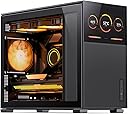
🖥️ Mesh meets modern: Show off your build with style and airflow that breathes innovation.
The JONSBO D31 MESH SC is a MicroATX PC case featuring a unique removable front display, extensive mesh panels for superior airflow, and support for high-end GPUs up to 400mm including RTX 4090. It offers versatile cooling options with multiple fan mounts and radiator support, all housed in a compact, lightweight chassis designed for professional and enthusiast builders seeking both style and performance.


| ASIN | B0BQJ7SW4Q |
| Antenna Location | Business |
| Brand | Jonsbo |
| Brand Name | Jonsbo |
| Case Type | Mid Tower |
| Case type | Mid Tower |
| Colour | Black |
| Compatible Devices | M-ATX/ITX motherboards, up to 400mm GPUs, ATX/SFX power supplies up to 220mm, 120mm fans and AIO 360/280/240 (top) 360/240 cooling systems (bottom) |
| Cooling Method | Air |
| Customer Reviews | 4.6 out of 5 stars 109 Reviews |
| Enclosure Material | Metal |
| Fan Size | 120 Millimetres |
| Hard Disk Form Factor | 3.5 Inches |
| Internal Bays Quantity | 3 |
| Item Dimensions D x W x H | 43.9D x 20.3W x 20.3H centimetres |
| Manufacturer | Dongguan Sibo Sitong Industrial Co., LTD |
| Material | Metal |
| Model Name | D31 MESH Black |
| Model Number | D31 |
| Motherboard compatibility | Micro ATX |
| Number of Fans | 10 |
| Other Special Features of the Product | Built-In Type-C USB 3.2 Gen 2, Screen (with potential compatibility issues) |
| Power Supply Maximum Output | 350 Watts |
| Power Supply Mounting Type | Bottom Mount |
| Recommended uses for product | Business |
| Supported Motherboard | Micro ATX |
| Total Expansion Slots Quantity | 5 |
| Total USB 3.0 Ports | 1 |
| Total USB Ports | 3 |
N**N
Cinema
The case is an absolute cinema, i took the screen and replaced the metal piece covering the power supply with the screen, it now looks perfect inside
T**Y
One of the best and fun cases to work in.
First off, I normally don’t purchase cases that I have not heard of. But, Jonsbo has been on my radar for a long while. I have seen them on Newegg before when I’m browsing. Just wasn’t the right time. Until I saw this. There is an ATX and mATX version. I had to go with the mATX version since like semi-small builds. Out of the box I was impressed. Has such a clean appearance. None of that nonsense edgy corners or angles. Let’s talk about it being tool less. The front mesh and screen pop off as well as the side panels. Love it! The top have two thumb screws and the top slides off and is easy to place back on and secure. PSU mounting does require a tool to undo some screws, two in the front. But you need to undo four more from the side where the tempered glass panel is. By removing this long narrow plate you can now remove the PSU cage. One thing nice is that psu cage’s height can be adjusted from top to bottom. So not entirely tool less lol but only 6 screws to deal with. Cable management was challenging in this case. However, the back has a decent channel that allows your cables to fit snug and zip tie down. My process was kinda backwards. Since I had 7 case fans, I wanted to map out the cables. WARNING: Fan hubs that are thick will not fit in the back. The case fans I got came with a fan hub that was more that 1/2in thick. I countered this by using a raised pump mount that attaches to the fan. This is mount in front with the case fan just below the PSU. I barely had room but I made it fit! So with fans on the bottom and 3 fans on top and one in front, everything fitted. One thing that should be done first is too cable the HDMI and USB for the front screen. Just leave it hanging out a bit. Typically, this would be the last step prior to finishing up the build. Overall, very nice case and fun to build in. I need to buy the ATX version as well. So thank you Jonsbo! You’ve done very nice on this one!
@**H
Great quality and exceptional value
I purchased this for my daughter's PC to alleviate high temp problems and for the front LCD screen. The case arrived very quickly and packaged very well to ensure safe transport. Setup of the components was very straightforward and a pleasant process. I did not need to modify anything in order to get everything working from first boot. My daughter's PC is a 14700k with a MATX mobo, a 3080ti, and a 240mm AIO. This case can fit a 360mm AIO if you wanted. The screen is connected to your GPU via HDMI (it comes with the case) that has a cutout to come out of the back of the case and is plugged into your GPU. The display is powered by a USB port which also comes out of the port and plugs into the back of your motherboard. If you do not have an extra HDMI port available on your GPU you will need a HDMI to displayport adapter (found on Amazon). The screen amazingly has GSYNC/FreeSync compatibility (60hz). If you don't want to use the screen on the front of the case, it also comes with an aluminum front cover that looks nice. Coming from a SFF case with poor airflow this case lowered the CPU temps by 15 degrees which is significant. The case allows 3 fans on the bottom for intake, 3 fans on the top for exhaust, 1 fan on the back for exhaust, and 1 fan on the front for intake. Because there are so many fans you can run them on low and still achieve excellent cooling performance while keeping the PC near silent. I like the simple design, easy setup/installation, cool temps, and great looking screen. I would definitely recommend this case to others for the exceptional value.
M**N
High quality and thoughtful features, and the screen is super neat.
I took a chance on this case and was very happy with it! All of the exterior panels, including the front and top, can be easily removed with no tools. The screen will refuse to work unless you send it 800x1280 - so video sources like cheaper USB to HDMI dongles may not support the needed mode. The screen has controls on the side, as well as a power button to turn it off as desired. I used an adapter to get USB 3.0 from the motherboard header to power the screen and run the USB->HDMI converter. Rainmeter provides some fun free options to use the screen as shown in my pics. Build quality: The build quality is surprisingly good. Everything pops on and off in a crisp, satisfying way. Nothing about it feels cheap or flimsy. The panels are very easy to remove and assemble in an intuitive way. Cable management: There are holes located throughout to pass cables from the main compartment to the "basement" behind the motherboard. In this area there are a bunch of eyelets to thread cable ties through to keep everything tidy. There's also a nice internal trim panel to hide the nest of cables that comes out of the power supply. The case also includes a cable from the back of the PC to the power supply, which is convenient.
B**N
Beautiful case, lots of air flow, limited space
This case is a very good looking design with a lot of features. The monitor is more of a novelty that I would say I don't personally use a lot but it's a cool feature to have. The mesh panels on the front and top allow a lot of air to keep parts cool and there is plenty of room for most gpus. I currently have a 3 fan RTX 3080 in this case and a 280mm AIO. The power supply is an 850W and I ran into a space issue with the front fan (120mm) mounting just because the size of the power supply. The psu cage is adjustable with about 4 different spots but if you want a fan in the front then the highest psu spot just barely fits to allow a fan. Also for spacing, there is very little room for any cable management on the back side on the case so I wouldn't recommend running an rgb hub. Ultimately, this is a great case. Definitely pleased with Jonsbo and the product they have so far!
Trustpilot
2 weeks ago
3 weeks ago