Buy anything from 5,000+ international stores. One checkout price. No surprise fees. Join 2M+ shoppers on Desertcart.
Desertcart purchases this item on your behalf and handles shipping, customs, and support to Italy.
🔥 Dominate your game with precision, power, and style!
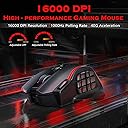
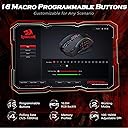
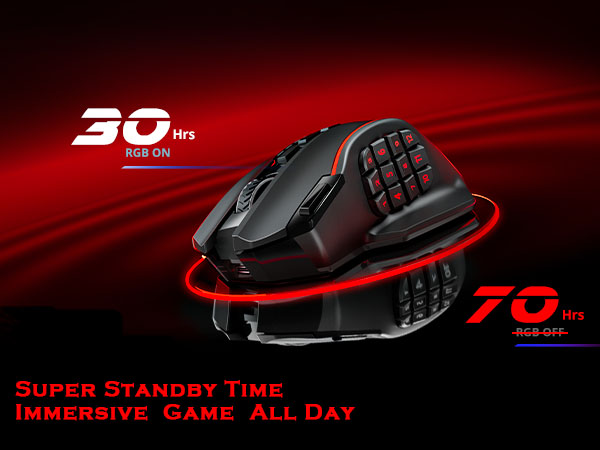
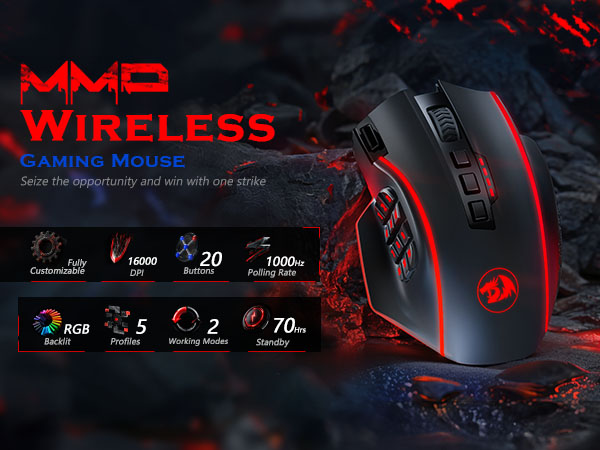
The Redragon Wireless Gaming Mouse M901P-KS delivers professional-grade performance with up to 16,000 DPI sensitivity, 16 programmable macro buttons, and a robust 70-hour wireless battery life. Designed ergonomically for extended gaming sessions, it features customizable RGB lighting and multi-profile memory, making it the ultimate MMO and FPS gaming companion for PC and laptop users.


| ASIN | B0CKN2NSYL |
| Additional Features | 16 Programmable Buttons, Ergonomic Design, MMO 12 Side Buttons, RGB Lights, Rechargeable, Wireless |
| Antenna Location | Gaming |
| Are Batteries Included | Yes |
| Are Batteries Required | Yes |
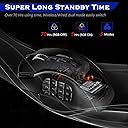
| Battery Average Life | 70 Hours |
| Best Sellers Rank | #230 in Video Games ( See Top 100 in Video Games ) #20 in PC Gaming Mice |
| Brand | Redragon |
| Built-In Media | USB Cable |
| Button Quantity | 20 |
| Color | black |
| Compatible Devices | Personal Computer |
| Connectivity Technology | Wired / Wireless |
| Customer Reviews | 4.4 out of 5 stars 9,853 Reviews |
| Embellishment Feature | LED |
| Enclosure Material | Plastic |
| Hand Orientation | Right |
| Hardware Platform | PC |
| Item Weight | 0.29 Kilograms |
| Manufacturer | Redragon |
| Minimum Required Operating System Version | Windows 10 |
| Model Name | Redragon Wireless Gaming Mouse |
| Mouse Maximum Sensitivity | 16000 Dots per Inch |
| Movement Detection | Optical |
| Movement Detection Technology | Optical |
| Number of Batteries | 1 Lithium Polymer batteries required. (included) |
| Number of Buttons | 20 |
| Operating System | Windows 10, Windows 7, Windows 8, Windows Vista, Windows XP |
| Power Source | Battery Powered |
| Range | 10.0 meters |
| Special Feature | 16 Programmable Buttons, Ergonomic Design, MMO 12 Side Buttons, RGB Lights, Rechargeable, Wireless |
| Style Name | Wireless |
| Theme | Video Game |
| Unit Count | 1.0 Count |
| Warranty Description | 1 year |
W**I
Excellent Mouse. Worth every penny.
Got this to replace my aging Razer Naga Molten, which had several buttons failing to work consistently after around 15/16 months of use. I have small hands for a guy, which was one of the reasons I went for the Naga, since its one of the smaller MMO style mice out there, but I had to hold my hand a certain way to access all the thumb buttons. The Perdition, although slightly larger, its abit more ergonomic and sweeps in just enough to were I can easily access all of its thumb buttons. At first I did have some trouble getting use to it, mainly cause of the extra weight it has over the Naga Molten, but after taking out all but one of the included weights, it was a little lighter than the Naga and felt more natural to move around after using the lighter Naga for over a year. The thumb buttons and mouse wheel are very clicky, which I love, the way they are tilted makes them much more easy to hit the right button without any conscious effort. The software was the only concern I had about this mouse, because Razer Synapse is lets you do ALOT, but the Redragon software, while not quite as good as Synapse, its much better than I expected. Some people complained that you couldnt rebind the red power button, but I guess they fixed that cause I easily rebound it. The DPI lights on the mousewheel are one of the 2 shortcomings of the mouse/software, you only have a few colors to access, luckily I had the other lights set as red, which is the 5th dpi color setting on the wheel, so I adjusted the DPI for that color to my most used DPI. The second shortcoming is the software doesnt let you bind "other" mouse buttons, eg, Mouse 4 and Mouse 5 buttons, since the mouse itself doesnt have those buttons. I still think they should of put it in the software cause I literally had to change my hotkeys in over 20 games since I used M4 and M5 buttons on my naga in mose of my games. All in all, its a very solid mouse, which is shocking considering its half the price of the competition and is just as good, if not better physically. This is one of those expenditures that is completely worth every dollar you spent on it. --- EDIT: I forgot to add that I ordered this and a HausBell wireless mini keyboard/touchpad. Ive never had a problem with amazon packaging something until now. A 5 year old could of boxed it up better. Both ends of the box were open and had someone decide to take my items. they could of easily done it. When I got the package, I literally shook it up and down once without much force and my items fell out. This wasnt the product makers fault, just amazons as they fulfilled and shipped the order. After ordering hundreds of things from amazon, this hiccup is forgivable since the items werent stolen/damaged miraculously.
N**E
A Cheaper Competitive MMO Mouse with Macro's & RGB's ( Redragon Perdition Pro )
Very clean mouse. The only downfall, which honestly doesn't totally matter is the lack of DPI @ only 16,000 when many of the average and above average holds 25,000 and up. But I compete in games like Battlefield and CS2 and Fortnite and Call of Duty, and I haven't noticed anything abnormal. All works as good as my $25.00 logitech mouse. The programable RGB's are a cool feature and the software to control it has a nice interface, that is easy to manage and modify. The macro option is cool, but is difficult to understand, they don't seem to offer customer service on that area and places like reddit and google search don't render any results. So, that part is cool but a stalemate. Don't forget to remove the plastic covers over the easy glide or your mouse will not be as smooth as you hoped. LOL This model is very nice for semi or non-semi Large hands. Great for adults. Manageable for Teens. @ the price value & operations of a gaming mouse, I am saticefied. I recommend it for anyone who wants a cheaper and doable MMO mouse. *KinGaming Approved !!
M**A
Best MMO mouse - Updated two years after original review
This mouse is another one of those incredibly awesome for the price type things. This type of mouse obviously has a small overall market being targeted at basically only the MMO crowd, It really is a nice feeling mouse. The tracking of this mouse is slightly above your average mouse in this $25 - $40 price range, However it does a kind of odd feel to the tracking. I can say honestly that this wouldn't be my first pick for something such as sniping on a precision first person shooter, But it's still better than a lot of mice *for* it. The mouse supposedly has an 18 month warranty which is great, Inside the box you get replacement feet (or pads) for the bottom of the mouse in case they peel off. Or at least I think that's what they're supposed to be. You get a MINI DISC for the drivers, However you can download these on their website (Redragonzone.com) The usual instruction manual, and a warranty registration card from ChallengerUSA. The software that comes with the mouse is relatively simply to use, You can make five different profiles, This includes being able to individually set different DPI settings, side buttons, and front(top) buttons, Which can be mapped to most button combinations that I've tried. My favorite combinations involve using Shift + a number key or F key. This makes hotkeys in a lot of MMOs very easy to reach for those who struggle to do so. You have 12 side buttons, And though I've seen complaints for them being hard to press, I actually find them extremely easy to remember and hit. Ever since the first time I've used the mouse I've had no issue. Due to how they're positioned, It's easiest to describe it as thinking of it as two sets of six keys, Row one and two of the buttons slant towards each other like this \ /, With the five key having a raised bump to it so you know exactly where you're thumb is, And the same goes for the third and forth row. Only instead of the raised bump being on the five, It's the key closest to the five, the 8 key. The finish on this mouse is probably one of the best I've personally seen (At least on the black version), It feels "grippy" to me, Which is something I personally like, The build quality seems very nice, However due to the short period of time I've owned this mouse, I can't say anything for the durability of the side buttons. On one of my previous mice(Different manufacturer, Different mouse), The side buttons wore out prematurely, So this can of course be a concern. Should something happen where a button stops responding as it should, I'll come back and revise this to reflect on that. Overall, This is one of the best mice you can use for MMO's, Due to it's shape it fits snuggly in the hand and I never seem to suffer from my hand cramping up on the mouse, The buttons are more than easy enough to hit even out of the box, And the software is easy enough to maneuver. Having five different profiles is a must, And being able to have five different levels of DPI on each profile is also nice, Despite being somewhat unneeded. All the buttons to my knowledge seem to be able to be mapped, And it seems extremely solid. You always have to be careful buying offbrands, But this one is well worth it for those playing MMOs. Another update, Two years later! This mouse has still been an amazing product to me, I've had no issues at all in the two years I've owned this. All of the side buttons are still functioning normally, and the grip/texturing of the mouse is still perfectly fine without any obvious wear into it. I consider it such a comfortable mouse to hold that I've just instinctively been using it for everything as long as I'm not planning to play a shooter like Overwatch. This is by far the most amazing MMO mouse out there, even two years later. Disclaimer: I'd also like to note, It appears as though there's another similar looking product by Redragon and I'm unsure if the reviews are combined. This review is solely for the Redragon M901 Perdition, NOT the M990 Legend. Again, This review does NOT address the M990 Legend. Edit almost a year a later(Old update), I feel it was time to come back and update this review, This mouse still functions, looks, and feels just as good as it did on day one. I've noticed no changes on the "grippy" feel that I mentioned previously which was at one point a big concern for me which has now been put to rest. The Omron switches on the side of the mouse have given me zero issues so far. I'd like to say that this mouse somehow ended up becoming my daily driver except for when I play FPS games. This mouse is just too comfortable for something as casual as an MMO or RTS. I've noticed no hand fatigue while using the mouse (Palm), And I'd say the buttons are still just as easy for me to accurately hit as I stated before. I use every single button this mouse has almost every day. If this mouse were to somehow take I dive (I doubt this will happen as it seems like it's a tank at this point) I would fully and whole-heartedly buy this mouse again, Nothing will replace it for me. The only new con I can add to this mouse has to do with mouse acceleration, Something many of you will dislike. When you start pushing past the 8,000 DPI mark, You'll notice obvious mouse acceleration. I'm uncertain if others will notice it before that point, I'm just your slightly above average Joe who just wants to properly review this mouse. I have now tried the Logitech G600 MMO mouse, I personally feel the shape of it is terrible, And the side buttons just aren't intuitive in comparison. I've also tried a Utech Venus, It seems to be exactly the same as this Redragon Perdition besides a small lip at the bottom, I strongly dislike the lip Utech has as my thumb gets stuck on it, And the grip isn't near as nice. And lastly the Razer Naga, It honestly deserves my second favorite MMO mouse award, But I still have to give credit where it's due, To me this Redragon Perdition stomps it. I again have an issue with the buttons having no real indication where your thumb will be, The grip is fairly similar and honestly it seems to track just a tad better. Why this is I wouldn't know, But I believe they use the same or similar sensor (I could be very wrong about this, Do your homework) however I did end up experiencing the double click issue on it, And it costs $20 more. There's no incentive to buy the Naga over the Perdition, If you're looking at a mouse with this many buttons for an MMO or RTS, I think you'd want the easiest design to learn and get used to so I take huge points off the Naga for this one thing. In my opinion, The ONLY MMO mouse worth buying is this beautifully built Perdition. Save yourself the money, Get this over the Naga and be happy. I'd also like to note, It appears as though there's another similar looking product by Redragon and I'm unsure if the reviews are combined. This review is solely for the Redragon M901 Perdition, NOT the M990 Legend. Again, This review does NOT address the M990 Legend.
C**S
Great mouse for gamers and professionals
Perfect gaming mouse or for professional use. Macros, multi button able to set individual controls. Wasn't sure I would like all of the buttons but after getting used to their feel, I don't know what I did without them. The one star is for the scroll wheel. Why the engineers put such a crappy detent on the scroll wheel is unexplainable. I will probably disassemble the mouse and make my own. The right and left clicks are accurate, software is easy to use, rgb is nice. Cable is soft and doesn't cause any resistence.
J**Z
TL;DR Buy it great mouse, for any type of gamer. Lots of Customizing. Very nice.
Alright, I had this mouse for a while now. Like 6 months now. Figured it'd be best to test drive it and all before I praised, or condemned this item. So here we go. The Redragon M901 Perdition edition is fantastic in many ways, with minor downfalls. I've never owned any top tier mice before, mostly just for the cheap 20$ mice from your local Walmart or BestBuy. And I didn't expect to big of a difference between mice, but was I wrong. But before I get to ahead of myself I'll just split this into more detailed subsections. The Design: The design feels great, for those who are right handed and have medium to large hands that is. I have had a few others hold it and they also agreed it feels great, although those with smaller hands had to adjust there positioning to make it work right and even than couldn't get the bottom row buttons, so if you're a small handed person beware. Nonetheless, it felt great holding, with the nice groove over making your thumb rest on the top 2 rows of the side buttons, while you can easily slide or use your thumbs joint like I do, to press the lower section. The buttons themselves are relatively easy to push, but not so easy that you will press them when you don't mean to. It has a nice grip feel to it, that's also relaxing and has yes to cause cramping in my hands after 4 hours of gameplay. The texture of the material is also nice, I was expecting a glossy like finish from how the picture looks with the glare, but instead I was met with a light sand paper like feel, imagine like 400 grit sand paper. It wasn't over intrusive as in to make you notice it, but it wasn't faded that it would be completely missed. It give's it a nice gripping for when things get heavy in the game, but is soft to the touch for the light internet browsing. So far this texture has yet to fade or show wear which is great. Than there's the all important right and left clickers, they are one with the shell of the rest of the mouse, excluding the scroll wheel, and click lightly but nicely. My only concern is that I may one day end up clicking on it to hard and repeatedly that they might break, the Steam Summer Sale Game gave me this concern so much I downloaded an auto clicker just to be safe. Perhaps I'm just to overly cautious. Carrying on. There's the scroll wheel and the DPI + and - buttons. The scroll wheel is ripped and feels nice, made of rubber, and is quick to scroll with, it lacks the left/right clicking most gaming mouses have these days but that doesn't really bother me. The DPI button's are nice and out of the way, in a concave like wall around them so you don't end up clicking them when you don't need too. Which brings me to another point, the extra red button you see on the left is used to switch profiles, i'll get to more on those in a bit, which I find myself sometimes to end up sliding over it and clicking it switching through. Maybe it's just me though, the designers did try and elevate it up some as to keep you aware of where it is. There's also a nice groove on the right side of the mouse to relax you ring finger on, which adds to the comfortably of it all. Lastly the lights are pretty, there's a nice breathing effect, with varrying speeds, and completely always on, or just an off selection if you're not a fan. The Software The mouse comes with a disc with all the software and drivers. If you don't have a disc drive like me fear not! Just head over to there website and download it all from there, plugging in the mouse will get you the drivers, or just use of the basic drivers so you can accomplish such a step. The Software is easy to install with no hassle, and once it's done you can add it to your desktop or not whatever. I did because I like to customize the settings every so often and want to keep it right at the tip of my finger. The Software use is pretty straight forward, the mouse comes with 5 profiles, each of which can be set to a different playstyle, for example I have profile set for CoD and other FPS games, while I have another set up for The Old Republic and other MMO's, and even one set up for internet browsing because why not? Starting from the main screen you can adjust the button assignments, and by that I mean everything that's clickable can be changed. You want your right click to be linked to Shift? Sure you can do that. You can add shortcuts, hot keys, single keys, make it lock your PC or disable a button completely, to any of the buttons. It's very nice to have all this control, and it makes having all these options pretty neat. Can change the acceleration and poll rate here also which is nice, maybe on profile one you want to be able to turn quickly in an FPS so you increase it all to the max, but profile 2 you got a MMO that you don't want to turn so fast when you move just an inch. Second screen allows you to adjust the DPI of all 5 different levels for each individual profile. But wait, you can unlink the XY axis so that you can increase your Y and not your X, why would you do that? Well now you can look up and down at crazy speeds, while looking left and right at average speeds, at least that's what I did for FPS games. You can also disable the levels if you want to which is considerate of them. Than you got the light settings, you can choose a color from a select assertion of colors provided, or find the right shade of color you want via a color slider. You can make the lights super bright, or dim. Can also add in a breathing effect, solid effect or turn them off. Only one problem I found, rather inconvenient, is that the scroll wheel light is not customizable, nor can it be turned off either. You are stuck with the 5 preset colors of yellow, green, blue, magenta, and red. So if you want say, white as your color of choice, than you can have it as the logo and side buttons, but your scroll wheel will be one of the aforementioned colors depending on what level you are set at. This bothers me to a degree, but I looked past it because, well besides me, who else is going to see the mouse anyways and see what whacky color system I have going on? Verdict I love this mouse, it's comfy, cheaper than other gaming mice, and is easy to use. There's a lot of custumization to it that feels great and makes it feels like it's MY mouse. On a scaled of 1-10 I'd give it a 9.8 just due to that last gripe I have. Would I buy this again? Most definetly. Maybe I'd try for a newer version from Reddragon, see if they improve anything, but this mouse is pretty great and I don't see a need to get a different one.
C**S
Epic Mouse from newcomer, you can now program all buttons, including the red "power" button some reviews say cannot be programed
High quality mouse. Surprisingly so. I have a Razer Naga Molten Edition mouse. The scroll click works roughly 30% of the time now after almost three years of use, so it needed replacing. Still runs well despite that, and given the number of buttons it wasn't sorely missed. I also broke the right click, but that was all on me and a bit of superglue fixed it. The little plastic piece that pushes the button down inside the mouse broke off and I just had to glue it back on. I've loved that mouse from the moment I bought it, but if I didn't replace it I'd worry about it giving out on me and leaving me stuck with a standard mouse. I could deal with it, but I'd rather not as I've been spoiled by the Naga for so long. I also considered the Logitech G600 mouse. I have a friend who has one and tried it, but I disliked the fact that it didn't have a button next to the left mouse button like the Naga Molten and this mouse do. The naga molten actually has two of these buttons but lacks the two over the scroll wheel leaving it with one button less than this mouse. The regular Naga does not have these extra buttons next to the left click so I'd have to buy another Molten edition and that's a lot of money for a mouse. More than I really wanted to spend despite my love for the one I have. I got it on sale drastically reduced when I bought it and didn't find any sales close to the price I got on it before. The G600 does have a large button next to the right click, but I found it awkward. I came very close to buying it anyway as I know it wouldn't be that hard to retrain myself to use it, but then I noticed the Redragon Perdition. I really like having that extra button next to my index as I bind it to the 'use' or 'open' function in almost every game I play. I really didn't want to go without it so I took a shot. This mouse exceeded my expectations. I'm glad I took a shot with this company as I actually like this mouse more than my considerably more expensive Razer Naga Molten edition. The Naga side buttons are smooth and the rear buttons are no more or less awkward to reach than this mouse's, but the wave placement makes it easy to position where your thumb is. The two center buttons are a fine replacement for the extra left click button the Molten Ed. Naga has next to my index. I also really like the scroll wheel, it's larger than either of the other two mice I was looking at and has a rubberized grip. The illumination is also better on this mouse, the G600 only lights up on the side and the Naga's wheel does not illuminate. The color options on the Perdition are also very nice. Illumination isn't a huge deal, but it is something else this mouse does better than either of it's similar competitors. The Naga was great, don't get me wrong. It's the reason I was looking for a 12 button pad on the side of the mouse. I used it with little difficulty and 99% of the time I hit the right key when using the thumb pad. However, there was the rare occasion where my thumb would get lost and I'd end up using the wrong key because they all feel pretty much the same. This mouse has completely eliminated that issue. This mouse is slightly larger than the Naga and the rest for the ring finger fits my hand better. It's also got a textured surface. As much as I liked the Naga, after a while my hand would unconsciously slide back due to the smooth plastic and from adjusting to reach some of the number pad buttons. It wasn't a huge deal and not even an annoyance as all I had to do was shift my grip and I usually barely noticed, but it's an issue that I've not had with this mouse. My hand stays in position even when I'm using the rear buttons on the num pad. Also, it's worth noting that several reviews have said that the red "Power" button could not be reprogrammed. This has been addressed and the newest version of the keybinding software allows you to program all the buttons on the mouse, including the scroll click and red Power button. You can get it from here: [ht tp://www .redragonzone.co m/en/download.aspx] You can also bind macros to this, which is very nice. Also, by binding a key to 'Shift' you can double the amount of use for the keypad functions in a lot of games. One of the two top buttons, scroll click, or the red Power button would work best for this. The Logitech mouse does this better as it allows for a single key be bound to switch the function of the other keys on the mouse natively in it's own software, but most games that use a large amount of key bindings allow for multiple key bindings. I found this mouse to be perfect for my needs. It works well for any game with hotkeys really and not just MMOs. It's an all around great gaming mouse. Between this and my Razer Hydra [I use half like a Wii nunchuck for movement], I've got a pretty epic gaming setup and only ever need to use my keyboard to chat in MP games without voice support. Highly recommended. This is a high quality product, especially for the money. I like it more than either of the similar products from Logitech and Razer and I've had hands on with all three. Also, super high DPI isn't all that great. Not sure why it's touted as such a feature. I doubt the vast majority of people will ever use the highest settings of Polling and DPI. A lot of gaming mice promote this, so that's not a ding against this one in particular. Just saying that it's not a big deal feature and you really shouldn't pay much attention to it when looking to buy a mouse for the vast majority of users.
J**.
Budget mouse destined for Greatness
Budget mouse destined for Greatness I have used literally hundreds of computer mice in my career and personal life. I’ve used mice made for everything from ergonomics to $150+ USD gaming mice. Along the way I like to think I picked up some idea of what a good mouse should have and should be. The Red Dragon Perdition has almost all of these aspects. I decided on the Perdition after cruising Amazon when my faithful G500 had a terrible accident in a move, took a tear in the cable, and lost the ability to middle click. I tried to make it work for a number of days, but it was just failing miserably. Sometimes the left click would middle click, closing important tabs in Chrome, and other times the left click would just hold down until I jiggled the cable the right way. It was not a fun time. Let’s start on the only real bad note about this mouse: when it came in and I first pulled it out of the package I noticed that it was LIGHT, and that was with all of the removable weights it came with. I like a heavy mouse, I had every 3.5 gram weight my G500 had in it, and this is very light. I can not begin to image what it would be like without the weights. The mouse has multiple modes to it, each can be separately programmed (Windows users only, but I have confirmed that the mouse will work on Mac and Linux with the proper keypresses on the on-board mouse profiles). There are 5, each designated by a color on the mouse that can be switched using the profile button on the bottom of the mouse. There are also, in each mode, 5 different (and customizable) DPI settings. These can be told by the color of the scroll wheel, and adjusted by the buttons immediately under the same. The 12 thumb-buttons are each mappable and fairly easy to access. I have heard, and read, others having problems with having to move their hand to get to buttons 7-12, but I do not have this problem. There is a slight shift, but I would hardly call it completely adjusting hand placement. It also helps that the rows buttons are slanted facing each other so it is very easy to determine where your thumb is at any given point. All told, especially given that you can pick this baby up on Amazon for less than 50 USD (I got mine for 35), I would say this is among the best gaming mice I have ever used. What it lacks in cross-platform functionality and heft, it more than makes up for in performance and utility. I strongly suggest picking one of these up and giving it a try. At 35 bucks, what do you really have to lose?
M**I
Works, but quality control is obviously lacking.
I've had RedDragon brand mouse before so I knew what to expect. Working, but budget feeling. However, it's budget with software so it still offers a similar level of customization. RedDragons software is infamously bare. But that wouldn't be a problem if it didn't arbitrarily decide which key is worthy of a rebind and which are not. Mouse 1 and 2 can be changed to media keys but the DPI up, down, and RGB changer are hard coded to only ever work as those specific buttons. In what world will someone want to willingly rebind 'm1' but leave three buttons forever unused once the best long term settings are applied. Aside from that I find the the buttons on the side, although perfectly functional, are very mushy and unsatisfying if you're goal is to play a game where your spamming these keys in rapid succession. This was honestly expected on my part, so I don't even hold it that much against the brand. Cheaper you go, the more tactile keycaps tend to suffer. What's harder to dismiss is the constant rattling when I pick up the mouse off of the desk because at some point in the assembly process, some plastic tag. Albeit most likely just some important piece of excess molding. Broke off and rattles inside the thing. Truly a sign of good quality control. All while the right click has an extra pop where I assume the mold is slightly misaligned with the key cap underneath that functions as m2. This mouse is entirely functional, and I'll probably use it regardless of my issues because i'm broke and this is what I can afford and this is what was delivered to me. But this isn't something I can recommend past "Something that works, is cheap, and has a reprogrammable keypad on the side". If that's all you need, then this product is exactly that. If you want to do this with a bit of quality and comfort, then this product is likely not the one you want. Not bad. Not good. 5/10. Spend 10-30 extra bucks and you'll probably feel the difference.
S**L
Best mouse I have used thus far.
This is probably the best mouse I have ever used. It is the only one that has adjustable weights that can be added/removed as per your preference. This allows a lot of inertial flexibility. However, you will have to spend some time and tweak the settings to get it to perform to your liking. The mouse is highly configurable with all it's sensitivity settings, and can take some getting used to. All of the keys (18 in total) are programmable. The firmware also allows 5 profiles, each of which can be programmed differently. This is probably the greatest asset of the mouse. I use one dedicated profile with high sensitivity for gaming, one for 3D graphics modeling and one for everyday work. Each of my profiles has a different key mappings for all of the 18 keys. My 3D modeling work flow has sped up considerably since I started using this mouse. I can just hit assigned shortcut keys off the mouse! Ergonomically the mouse feels pretty big, but fits into your hand pretty well. However, I have to say I don't have small hands so your mileage may vary. The mouse is also pretty lightweight. When it came in, I thought it would be heavy and initially it did feel heavy. Then I read about the weights in it's rear. After I removed the 8 weights (yeah 8) it became too light, so I had to add in 3 to get it to a comfortable weight. Now the mouse feels secure and firm, not too light and not too heavy. I get pretty tight control even when doing 3D modeling and gaming. If you are a gaming enthusiast or a 3d graphics modeler who requires a high precision mouse, I would definitely recommend this one. Take your time with the settings and read through the documentation. You won't be disappointed.
D**S
Feels good in your hand
I usually get the Razer Naga but they have an issue with double clicking. This mouse was significantly less expensive and after a short period of adjustment to its shape and button placement I can't see a difference in performance. Also the box it came in was really cool. I upcycled it.
H**O
Don't expect good precision
Purchased this mouse as a replacement MMO mouse and it's fit for purpose. It just feels cheap and for some reason even with the sensitivity dialed in, I found it's precision to be off.
L**O
Atenção: mouse muito grande
Gostei em tudo nesse mouse, exceto duas coisas: o tamanho que ele fica na mão, e o software. O DPI é maravilhoso. Os botões são todos programáveis e, FUNCIONA! Por que eu disse que “funciona” com entusiasmo? Tenho um Logitech 604. Em ergonomia ele é muito melhor, vem com 8 botões laterais, mas alguns simplesmente não recebem programação, é horrível! Voltando ao assunto: Além de vir com 12 botões, todos eles são de fato, programáveis. Não uso apenas em jogos RPG, uso em FPS, uso em ferramentas de trabalho como Photoshop. Sim, ele permite através do software mudar a programação para seu uso. Falando no software, o sisteminha problematico. Toda vez ele fica surgindo do nada na minha tela, as vezes eu to jogando, e ele surge lá. Meu mouse tem mau contato no laptop, ai as vezes desconecta, mas é muito rápido que é quase imperceptível. Porém o programa surge pra alertar que tá sem mouse as vezes nos momentos mais críticos.
Y**O
É diferente do anúncio, não tem ajuste de peso
O produto é excelente pra quem joga tíbia poketibia, PXG ou qualquer jogo de RPG com muitas skill, porém fiquei triste somente pelo fato de ser um mouse no anúncio e entregaram outro, noa tem ajuste de peso e etc....
Trustpilot
2 months ago
3 weeks ago