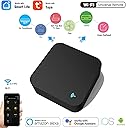
๐ฑ Control Everything, Anywhere โ Your Smart Homeโs Command Center
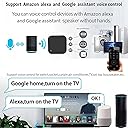
The WiFi IR Universal Remote is a versatile smart home hub compatible with over 50,000 infrared devices. It connects via 2.4GHz WiFi and integrates with the Smart Life/Tuya app for remote control and device sharing. Alexa voice compatibility enables hands-free operation, while intelligent automation lets you create custom smart scenes. The device supports DIY learning for unmatched flexibility and plugs in via USB for easy placement.
| ASIN | B0D31CQLXF |
| Additional Features | Universal |
| Battery Type | USB Powered, No Batteries Required |
| Best Sellers Rank | #1,091,949 in Tools & Home Improvement ( See Top 100 in Tools & Home Improvement ) #872 in Home Automation Hubs & Controllers |
| Brand | SENCKIT |
| Built-In Media | 1* Smart IR RF Remote Controller +1* User Manual + 1* USB Power cable |
| Button Quantity | 50 |
| Color | Black |
| Compatible Devices | Television |
| Connectivity Technology | Wi-Fi |
| Controller Type | Amazon Alexa, Voice Control |
| Customer Reviews | 3.2 3.2 out of 5 stars (27) |
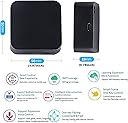
| Item Dimensions L x W x H | 2.68"L x 2.68"W x 1.06"H |
| Item Type Name | Smart Remote Control |
| Manufacturer | SENCKIT |
| Maximum Number of Supported Devices | 50000 |
| Maximum Range | 15 Meters |
| Model Name | wifi IR Remote-2 |
| Model Number | S10 |
| Smart Home Compatibility | Smart Home Compatible |
M**T
Easy setup
The setup was really easy. The box works well, I have been using this for a few months with no troubles at all.
K**R
False Advertising
False advertising! This product is not what is advertised. It works for IR devices but not for RF as it states. Do not waste your money buying this if you want to control both IR and RF devices.
E**N
No RF learning.
RF doesn't work. IR works well. False advertisement.
T**L
Learned manually from IR & RF remotes. Only RF worked w/ Google Home for voice control.
Using this to control my ceiling fan, desk/room lamps, window AC. It learned all my remotes manually by pressing each button. It worked pretty well though IR devices didn't show up in Google Home so I couldn't control them via voice. Setup was a little clunky. Hub is made from IR-transparent plastic and has array of LEDs pointing in all directions (see photo). Connected with Tuya Smart app smoothly. IR and RF (433MHz) learning worked pretty reliably. App requires brand name even if not listed, so you have to choose a random one then program buttons. RF devices showed up individually in Google Home for easy voice control, but I couldn't get IR devices to appear. Learned remotes show up as normal top-level devices in Tuya app, and can be fully controlled with smart actions, e.g. light on when there's motion, fan on/off at particular times.
S**P
I only bought this to operate the garage door and although the set up wasn't too clear I was done in. It took much time. Very happy with it. In time I may get it hooked up with other things but for now I'm very happy.
D**H
Kind of worked, didn't have all my devices pre loaded so had to add them manually. Was a bit flaky so I deleted them, reset the device to re program it and now I can't even get it to connect to my 2.4G network!!! Spend a bit more money and get a decent one
G**B
Mostly ok, but goes offline erratically. Can't customise the button layouts. When it goes offline then suddenly reappears it can send bursts of commands. If adjusting volume on an amplifier this is REALLY bad, necessitating whole system immediate manual shutdown. Kinda defets the purpose! Firmware could be improved for better power management options, or simply disabling it. It's a bit half-baked.
A**K
This is not the same as shown of the advert, it does not have humidity and temp sensor nor does it have rf control. You can only use it for air con IR frequencies of 38khz
M**S
I was surprised how small this was, which is great for positioning/installing out of site. It is very lite, and is pulled by the lead, so the pads to hold it in place are a good idea. The cable is rather short, however, you can easily and cheaply get the right length cable for your setup. You also need a usb power adapter as is usual. I was not over impressed with the manual, it seemed a little confusing and very small to read. Even magnified the screen shots were difficult to read. Having not been impressed with the manual, the setup could not have been easier. Possibly made a little easier as I already had the tuya smart life app installed & configured for other devices. I powered up the remote, clicked the add button, and it was immediately found and set up. Adding devices can take a little trial and error. The process is straightforward, but with so many devices finding yours can be tricky. You select by category, then manufactorer, This wasnโt ideal as I found sky under set-top-box & tv-box. The tv-box version worked better. Not all buttons from the original remote seem to be present for all devices though, maybe a bit more trial & error. I then tried to setup the remote for my lighting scene controller, which was not listed. The process to learn from the original remote was straight forward, however, after reporting it had learnt the keys, I could not get it to work. I then tried a key from my LG TV (which had previously been setup) this worked fine. So not sure if itโs an issue with learning, or maybe just that particular light controller. (Another similar product does work, so don't think its a rolloing code type issue) A useful facility is to set up scenes, which can send several commands and can be triggered by various events. Overall, this works quite well, but needs a bit of thought & work to do what youโre trying to do. There is no list of compatible devices you can check, which is unfortunate.
Trustpilot
1 month ago
3 weeks ago