We remain fully operational. Our teams are working around the clock to ensure your deliveries continue safely.

DOWNLOAD THE APP


Customer Services
Copyright © 2025 Desertcart Holdings Limited
DOWNLOAD THE APP
💼 Secure your data, speed your hustle, and never miss a byte!
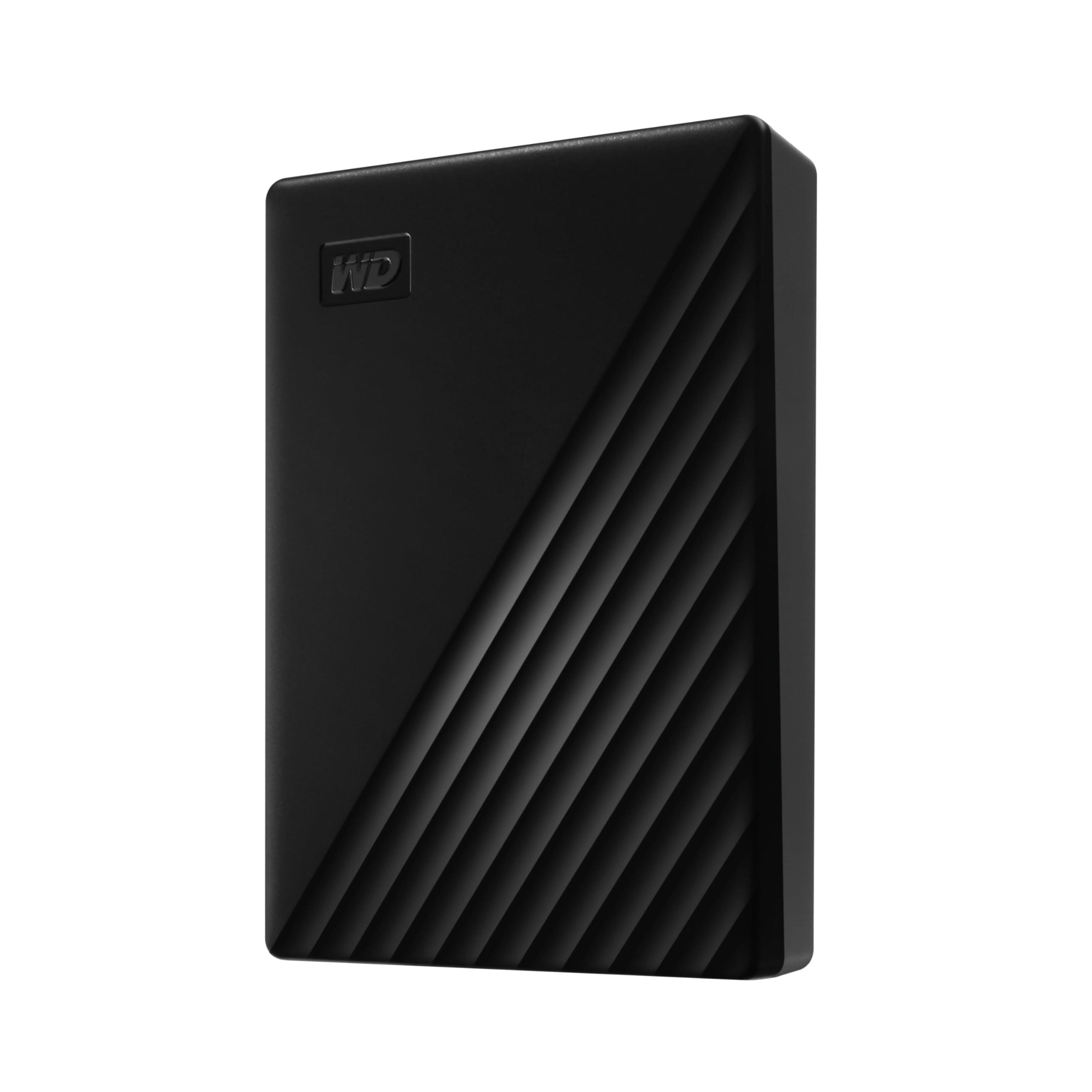
The WD 6TB My Passport is a cutting-edge portable external hard drive featuring massive 6TB storage in a compact 2.5-inch form factor. It supports USB 3.1 for fast 5Gbps data transfers and comes equipped with advanced ransomware defense, password protection, and hardware encryption. Designed for professionals on the move, it includes smart backup software and a durable, stylish matte black aluminum case, backed by a 3-year warranty.


| ASIN | B0D1YHC4KW |
| Additional Features | Hardware Encryption, Portable |
| Best Sellers Rank | #4 in External Hard Drives |
| Brand | WD |
| Built-In Media | My Passport portable hard drive, Quick Start Guide, Software[2] for device management and backup with password protection, SuperSpeed USB-A cable (5Gbps) |
| Cache Memory Installed Size | 6 |
| Color | Black |
| Compatible Devices | Desktop, Laptop, Tablet |
| Connectivity Technology | USB |
| Customer Package Type | Standard Packaging |
| Customer Reviews | 4.5 4.5 out of 5 stars (101,552) |
| Data Transfer Rate | 5 Gigabits Per Second |
| Digital Storage Capacity | 6 TB |
| Enclosure Material | Aluminum |
| Form Factor | 2.5-inch |
| Global Trade Identification Number | 00718037903873 |
| Hard Disk Description | Mechanical Hard Disk |
| Hard Disk Form Factor | 2.5 Inches |
| Hard Disk Interface | USB 2.0/3.0 |
| Hard Disk Rotational Speed | 1 |
| Hard-Drive Size | 6 TB |
| Hardware Connectivity | USB 2.0, USB 3.0, USB 3.2 Gen 2 |
| Installation Type | External Hard Drive |
| Item Weight | 0.46 Pounds |
| Manufacturer | Western Digital Technologies, Inc. |
| Media Speed | 80-160 MB/s |
| Model Name | My Passport External Hard Drive |
| Model Number | WDBR9S0060BBK-WESN |
| Number of Items | 1 |
| Read Speed | 1050 Megabytes Per Second |
| Specific Uses For Product | Business, Multimedia, Personal |
| UPC | 718037903873 |
| Unit Count | 1.0 Count |
| Warranty Description | 3-year manufacturer's limited warranty |
S**N
Random/Sequential Writes Faster Than 2016 Model, Reliable, Improved Smaller Design
This model is the latest generation of the many My Passport drives I've owned or purchased for clients. They have proven reliable and good performers. They have incrementally improved with each new generation. This model features a new case design which I feel is much better looking and is slightly smaller than the last version. BOTTOM LINE (for the impatient): This model is a little bit faster than the last (2016) model I bought. I got the black 2TB model and this generation offers up to a 5TB model as well as the usual smaller capacities. This model is just noticeably faster than the last generation on sequential reads and writes when I tested using CrystalDiskMark. This My Passport has a new design that returns to rounded corners and soft-look matte case. I like this much better than the older one with its cheap-looking (to me) styling. The drive is slightly less thick, wide and long than the 2016 model. In my laptop bag that’s welcome even if not a lot smaller. I’m very pleased with this My Passport drive as with ones purchased over the last decade plus. It’s reliable, fast for a USB mechanical HD and gives a lot of space for a low price. If you want more details, read on... SUMMARY: The My Passport USB 3.0 drives are simple to use and come with reasonable software tools and backup/sync software. These are now in a single installer on the drive. I have my own backup solution and do not want encryption on this drive, so have not explored this software. If these are of interest, be sure to check for newer versions on the WD web site. Pluses: + This drive works fine with Windows, Linux or Mac out of the box. With Linux or Mac (where it is read-only with NTFS). They generally performs best when reformatted with a native file system to the respective operating system. Mine came formatted with NTFS for Windows. + This generation has 5TB, 4TB, 2TB, and 1TB models. The 500GB models were dropped a couple of generations ago and more recently the 3TB models. + This drive is faster than the last generation, but just a little. Up to about 3% faster in benchmarks, but barely noticeable in practical use. + The form factor of the new drive is lighter and slightly smaller before with a much nicer case without pointy corners and scratch/fingerprint prone glossy finish. + The warranty has been returned to 3 years from 2 years on the 2016 generation. Minuses: - It comes with the same very short USB 3.0 cable as previous versions. I like a longer 3ft (or more) USB 3.0 cable : a very good upgrade purchase for the My Passport drives. IN THE BOX: The My Passport comes in a easy to open retail package containing the drive and a annoyingly short USB 3.0 cable. There are a couple small pieces of paper for warranty and quick-start. That's it. The cable in this model is the same as previous versions. This may be just fine for a lot of folks but I keep some 3ft (or more) USB 3.0 cables handy for longer runs to my desktop or even on top of a tall computer. FORM FACTOR vs. PREVIOUS GENERATION: I'll compare the new generation of My Passport with my 2016 My Passport Ultra This Model My Passport's dimensions: 1TB-2TB: 0.27lb, 4.22in X 0.44in X 2.95in 4TB-5TB: 0.46lb, 4.22in X 0.46in X 2.95in 2016 My Passport's dimensions: 1TB: 0.37lb, 4.33in X 0.64in X 3.21in 2TB-4TB: 0.54lb, 4.33in X 0.85in X 3.21in TESTING: I tested both my older 2016 My Passport 4TB drive and my new My Passport 4TB model using CrystalDiskMark benchmark software and by copying 11GB folder of updates and files to the drive. This was to compare the benchmark with real-world copying. The 11GB folder has a broad mix of file sizes and types including files an over 2GB iso DVD image. Using CrystalDiskMark I found sequential reads were about 3% faster and writes about 8% faster with the new model. Random reads were just a tiny bit slower and writes were about 8X (!!!) faster. While the benchmarks showed significant differences using them in my real-world copy test the difference was most noticeable with lots of smallish files, but not so much with large sequential reads/writes. If you need to write smallish files this drive is noticeably better than the 2016 model and about the same for large files. For my testing the My Passport drive was connected to built-in USB 3.0 controller on my Dell 7710 Precision Mobile Workstation. I also tried it on a older add-in card with the Renasas USB 3.0 chip set on my Dell Precision T7500 tower. I have the latest Renasas drivers installed. Both are running build 1903 of Windows 10 Pro and both have SATA SSD boot drives. I used CrystalDiskMark V7 64bit version. CRYSTALDISKMARK Results: The New Generation My Passport: Sequential Read (Q8T1): 129.18 MB/s Sequential Write (Q8T1): 119.75 MB/s Sequential Read (Q1T1): 120.37 MB/s Sequential Write (Q1T1): 118.08MB/s Random Read (Q32T16): 4KiB 0.6 MB/s Random Write (Q32T16): 4KiB 10.8 MB/s Random Read (Q1T1): 4KiB 0.49 MB/s Random Write (Q1T1): 4KiB 7.8 MB/s The 2016 My Passport: The New Generation My Passport: Sequential Read (Q8T1): 125.5 MB/s Sequential Write (Q8T1): 113.7 MB/s Sequential Read (Q1T1): 119.1 MB/s Sequential Write (Q1T1): 113.7 MB/s Random Read (Q32T16): 4KiB 0.573 MB/s Random Write (Q32T16): 4KiB 1.290 MB/s Random Read (Q1T1): 4KiB 0.505 MB/s Random Write (Q1T1): 4KiB 1.305 MB/s REAL WORLD COPY: In my real world copy test the new My Passport drive was just noticeably faster than the older My Passport Ultra. More on the writing than reading side and more noticeably with smaller files than larger files. It peaked out at about 70MB/s with large files. I never dropped below 35MB/s even with large amounts of small files being copied to the drive. The 2016 My Passport Ultra peaked out at about 68MB/s and dropped several times to 30MB/s. I'm thinking the newer drive may have a larger on-drive write cache or maybe it's just a bit faster drive. Maybe both. On big copies the new My Passport may save you a few seconds here or there but if copying a lot of small files to it the difference was much more noticeable. CONCLUSIONS: The My Passport line of drives from Western Digital has been very good to me and to my clients. This reliable and good to excellent performing line has a long positive history with me. This WD My Passport model is an evolution over the 2016 My Passport. I'm picking it for new purchases over the older model, but won't rush out to replace older drives. I like this 2019 My Passport’s rounded corner case better than the 2016 sharp edged and glossy one, but it's very minor point for me. Overall it's an excellent evolution to a 5 star predecessor and continues to be a very good external storage choice. For making improvements in small file write performance and correcting the 2016 bad case design issue this new 2019 generation of My Passport drives is worth 5 stars in my opinion. Hope this helps someone!
L**E
Dependable and easy to use
Great, dependable, back-up drive. I own several WD passport drives and find them easy to use and reliable.
J**F
Great WD Hard drive - Free Software Sucks
You can't go wrong with Western Digital. Very small package for huge storage. Plug and Play - connected the USB cable, (included) and my computer immediately recognized it. The portable drive is larger than the drive on my laptop, so I partitioned it into 2 virtual drives. One partition for an Image/Backup and a second partition for file backup & storage. The partitioning process was flawless and now my computer recognizes two separate drives. I am super happy with the WD SSD portable drive. I would highly recommend to anyone wanting a portable drive. I'm even thinking about buying another larger drive and partitioning into more virtual drives for backup of other computers. My only complaint and major disappointment with WD, is that the free "WD Backup" software is no longer supported by WD and hasn't been for a few years. They offer a free version of Acronis, which doesn't work. Installed the Acronis software, created a bootable disk on a USB Flash (thumb) drive, then rebooted the computer from the thumb drive and created a full backup/ disk image to the new WD drive. The software seemed to run perfectly, and said the backup was successfully created. I felt really good that I had a full backup of my 2015 laptop, in case I ever need to replace the mechanical HDD. But it was a false peace of mind. Only 2 weeks after using the Acronis backup software, my computer was crashing shortly after bootup, which it had never done before. So I thought I would test the new drive and backup. After rebooting with the Acronis USB Boot drive, it asked for the location of the image file. The computer recognized the WD drive with all of the Acronis backup folders. But then the Acronis software said all of the folders were empty and there was No Image found. WTF?! Acronis said it successfully made a full disk copy. But then the software could not find its own image. DO NOT USE the ACRONIS software. I was fortunately able to fix the boot/crash problem using other software. But if my hard drive had completely failed, I would not have a usable backup copy to restore to a new drive. I would have been screwed. It would have been better if I never attempting to create a backup. At least I would known that I didn't have a backup copy to rely on, rather than falsely thinking I was protected. In addition, the "free" software isn't really free. It's only a 30 day free Trial version. So if you make a full backup within 30 days, and later have a critical problem, you will be forced to purchase the full version to perform the restore. The backup file versions are propitiatory, so you can't use another brand of software to do the restore. They've got you! You can make a free backup/copy (if you can even get the software to work properly). But then you have to pay for the software to actually use the Backup in order to Restore. This is akin Ransomware. I have since purchased other backup/imaging software and made a full (working) backup to my new WD drive. I'm very happy about that.
J**S
Great storage at a great price!!
Bought this on a recommendation from a tech friend to move and save thousands of pics from my phone. Simple and easy to connect and move photos. 6 TB gives me HUGE storage at a one time price that made sense!! Thx Bill Z!!
I**T
Reliable so far, easy to use
I’ve been using the WD 4TB My Passport portable external hard drive for about a month now and so far it’s been working exactly as advertised. Setup was quick and simple. I like the compact size and that it’s powered through USB, so it’s easy to toss in my bag and use with my laptop on the go. I haven’t had any reliability issues yet, though it’s still early days, so I’m cautiously optimistic this will be a dependable long-term backup solution.
R**S
Very nice for the price and WD too. I will hardly fil it.
Awesome DEAL ! Holds all my backups and rebuild a C: drive with all my favorite apps folder of installers and my collection of cooking recipe PDFs and My AD&D PDFs Just for safe keeping.
T**E
Highly recommend. Fast data transfer rates. Works great. Working 6 mos so far.
Highly recommend. Works great. No issues. Fast 3.0/3.1 data transfer rates. The cord is proprietary?/atypical/nonstandard end where it plugs into the hard drive. Heat level is medium - it gets a little hot but not bad. Seems sturdy. Keeps data safe. Still works after 6 months. Will update if any issues of data loss or if it acts up, but so far it's great! I like the compact size - fits easily in handbag or cosmetic-size pouch, but would be too thick/deep for a typical shirt or pants pocket. Typical USB compatible on the computer/tablet. Pretty color blue.
A**K
Needed something reliable to back up years of photos, videos, and random chaos—this 5TB WD My Passport totally delivered! Super compact and lightweight! The transfer speeds have been solid (nothing to complain about unless you're expecting SSD speeds
U**G
Aynı ürünün 4tb olanını yedeklemek için 6tb olanı aldım. Güvenilir ürün 👍
A**D
Le meilleur disc externe, fonctionne très bien j'en suis à mon 4ieme . Je recommande cette article.
M**Y
Rápido y con mucha capacidad a precio razonable
E**E
It works well
Trustpilot
2 days ago
1 month ago