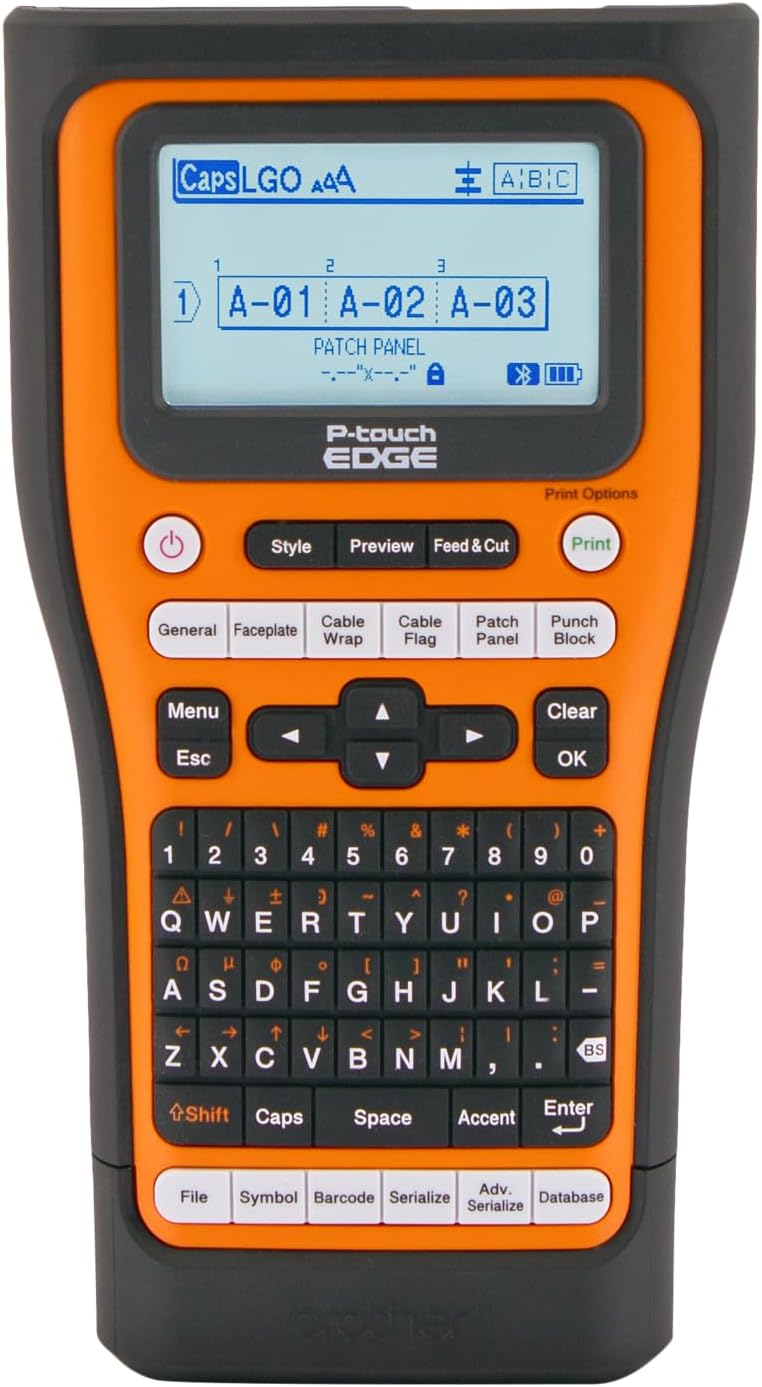
✂️ Label like a pro, print like a boss.
The Brother PT-E560BTVP P-Touch Edge is a professional handheld industrial label printer designed for contractors and techs. It prints durable laminated and heat-shrink labels up to 24mm wide, supports Bluetooth wireless printing via the Pro Label Tool app, and connects via USB-C for PC-based design. Featuring dual auto-cutters for easy peel-and-apply labels, quick application keys, and on-device template storage, it streamlines large project labeling with rugged portability and precision.


| ASIN | B0D2Z2Q1T1 |
| Additional Printer Functions | Print Only |
| B&W Pages per Minute | 1.2 ppm |
| Best Sellers Rank | #14,142 in Industrial & Scientific ( See Top 100 in Industrial & Scientific ) #3 in Safety Label Makers #73 in Other Office Equipment |
| Brand | Brother |
| Built-In Media | Carry Case, Hand Strap, Patch Panel Ruler, TZeFX251 black on white Flexible ID tape 0.94in x 26.2ft (24mm x 8m), USB-C Cable (1m) |
| Color | Orange |
| Compatible Cartridge | P-touch TZe, HGe, Hse, Sle, STe |
| Compatible Devices | Laptops, PC, Smartphones, Tablets |
| Control Method | App |
| Controller Type | Android |
| Customer Reviews | 4.6 out of 5 stars 419 Reviews |
| Display Type | LCD |
| Dual-sided printing | No |
| Hardware Interface | USB Type C |
| Ink Color | black |
| Item Dimensions D x W x H | 3.15"D x 9.3"W x 5.2"H |
| Item Height | 5.2 inches |
| Item Type Name | Handheld industrial label printer |
| Item Weight | 2.43 Pounds |
| Manufacturer | Brother |
| Maximum Copy Speed Black and White | 1.2 ppm |
| Maximum Sheet Capacity | 26 |
| Maximum print Resolution Color | 180 dpi |
| Media Size Maximum | 24mm |
| Model Name | P-touch EDGE 560BTVP |
| Model Number | PTE560BTVP |
| Model Series | P-touch EDGE |
| Other Special Features of the Product | Internal Memory, Portable |
| Output sheet capacity | 26 |
| Paper Size | 24mm, 18mm, 12mm, 9mm, 6mm, 3.5mm |
| Print media | Labels |
| Printer Connectivity Type | Bluetooth, USB |
| Printer Output Type | Monochrome |
| Printer Type | Thermal |
| Specific Uses For Product | Electrical Labeling, Low Voltage Labeling, MRO Labeling |
| Total Usb Ports | 1 |
| UPC | 012502674146 |
| Warranty Description | 2-Year Limited Exchange Warranty |
| Warranty Type | 2-Year Limited Exchange Warranty |
| Wattage | 14 watts |
E**N
Professional-Grade Label Maker – Tons of Tape Options & Bluetooth Control
This is hands down the best label maker I’ve used. The PT-E560BTVP prints crisp, durable labels and has a huge variety of compatible tapes—including heat shrink tubing, which is a game changer for electrical work. It’s built like a tank and feels professional-grade. What really sets it apart is the Bluetooth connectivity and P-touch app—you can design and print custom labels right from your phone. It’s fast, easy, and way more flexible than typing on the built-in keyboard (though that works great too). I've used it for organizing toolboxes, electrical panels, bins, and more. The laminated TZe tapes hold up to heat, water, and abrasion without fading or peeling. If you want a label maker that does it all and then some, this is the one to get. Totally worth the investment.
C**J
Professional tool
Fantastic little label printer on its own but together with the android app and pc software it makes a professional labeling system, to avoid tape waste just print labels as a set instead of one by one. You can open the case, leave the printer in it and print with the app and Bluetooth, the case does not block the label shoot. The shrink fit tapes work very well and goes all the way to 23.6mm HSE tape for 13.5mm diameter cable, cables thick enough to not fit 23.6mm tape probably needs a cable tag anyway but you can make TZe tape label in any diameter if needed. This is a pro level device in every way with a lot of attention to detail, ease of use and producing professional resuls.
V**E
Saves time, lots of functionality. Great replacement for Dymo Rhino.
I was hoping to have a great labeler to replace my Dymo Rhino and I think this is it. I have a lot of serialization needs along with custom layouts. The software, so far, has given me what I need. Hardest part was getting the drivers installed for Windows 11, and the Bluetooth connection going. I've not yet been able to get it to work with my Mac M4...another day. Once connected to my Windows machine and P-Touch editor installed, I was able to serialize over 700 circuit boards in a few hours. You will love the cutter on this machine. The fact that it will do what they call a "Half cut" will safe you hours of tedious peeling that you'd get with the Dymo Rhino. P-Touch editor gives you some control over that. I've had very little waste of tape, compared to the Dymo, thanks to the options they give you on how to print. I use the "back-to-back" option in conjuction with the half-cut option and get a lot of labels for the tape. Really glad I got this.
O**L
Have bought several of them
I have used Brother label makers for over 25 years. In fact I have the original one I purchased and it still works fine today. I recently bought the E550W and liked it so well I bought one for all my employees. I used to hate working behind the TV. We had so many cables and it was a pain tracing where everything went to. The cable wrap and cable flag button quickly allows you to mark each cable. I now have all the power adapters and cables labeled to what they belong to and what they are connected to. The kids PS4 HDMI cable clearly shows that it plugs into HDMI 4 port of the TV. The HDMI 4 port of the TV clearly labels it is plugged into the PS4. When I need to power cycle the internet DSL modem, the power cable is labeled at the power strip and I don't have to trace it back. I am able to velcro strap the cables up neat and do not have to undo them to trace back to the correct cable. The serializer and database are an amazing feature as well. When running network cables I print several copies in numbered sequence. It spits out a long continuous strip and you just have to peel off the one that you need. I no longer have to print several individual labels in a pile and go through them all to find the label I need. The template feature is awesome as well. You can program a device id label with IP Address, Device Name, Router, etc. and then upload the template to the E550w. I then select the template and can modify the name and ip address on the label maker itself. When I take the label maker inside to a customers location they are all very impressed with the device. It makes labeling everything easy and makes everything look very professional. The cons are just a few. The device is pretty large. I do wish it was a little smaller. The rechargeable battery falls out a lot which shuts the device off and you have to power cycle it back on when changing tape colors and sizes. I wish either the battery had a separate door or would stay in the device better. I wish you could charge the device using a standard USB charging adapter. I wish the device could be configured to print in high resolution mode directly from the hand held. They only way to print Hi-Res is to manually select the setting each time from the computer software. Standard resolution is okay with simple labeling, but when printing out logos and pictures there is a pretty big difference in quality. I had one employee complain about the large size of the device, but a week later he admitted it was his goto device now and that documentation was much easier now and most customers have commented how nice of a job it has done.
I**W
Great Product
Very good product. Would recommend to others. I really like the many ways to make labels and different sizes.
N**.
Don’t know why I waited so long to buy it.
Overall: Kicking myself for waiting so long to buy it. Quality piece of equipment! Carry case is very handy. Will check back in in February 2026 to update on how the outdoor labels are holding up. The Good: So far I’ve only used a couple label types for panels and wire flags. Auto scales text and label lengths easily. App allows you to preview and save labels. Discovered it scores the labels so you can pull off the extra at the start (no need to cut with scissors). Also discovered if you push a little the backing where you tell it to score, and it opens up so it’s easy to pull off. The “Bad”: Sometimes if the device turns off while the app is running, you have to kill the app and start it after the device has powered back up. (Even with latest app and firmware.) it’s only happened a couple times and the work around quick and painless.
J**B
This is a real pro tool
This is a very solid labeler, if you do a lot of IT labeling it's amazing with a zillion patch panel features and cabling options. It's also pretty straightforward to make labels using a spreadsheet and the computer software. The nice part of this is this acts like a totally wireless printer that roams around with you. It prints over wifi after you get it connected as a printer. When you boot it up you can see it connect to your wireless. Then you can do some nice chain printing and the labels just come out by where you're working. There is a beefy long lasting battery that frankly has never really gone done for me yet. It seems to last forever. You can also put in regular batteries if you ever get in a pinch. I've been using non-brother labels which have been working fine. Though off-brand doesn't do the "half-cut" feature as well but that is no fault of the labeler. Tip: Make sure to setup the printer drivers on your computer before trying to setup wifi. That's the only way I found to configure the IP address to work on my network. I plugged it into the usb port temporarily to set the right ID and give it a static IP. It took awhile to figure that out. They have software (BRAdmin Light) that helped. One slight downside is that the 36mm tape (very wide) doesn't fit in it. Other than that, it's a real pro tool.
A**H
You will want to label everything.
After nearly a year of heavy usage in electrical work, I have very few complaints. It prints superbly. It’s easy to use. Panel boards, patch panels, faceplates - it does them all and it does them well. Tape is easy to find, relatively inexpensive, and easy to use. Whatever type you insert, the little elves do their thing and the machine adjusts settings like magic. No filing your thumbnails either; I especially like the extra tag that aids in separating label from backing, even if it does use a bit more tape. I did have a few issues with the laminate separating, but only when I folded the tape around a wire and stuck it to itself, and only with 18mm, which runs slightly beefier. No real issues with 9mm and 12mm. Still, it wasn’t a huge problem and was probably an issue with the tape manufacturer. The lack of an apostrophe function on the keypad seems like an omission of sorts, but I’ve rarely needed it - and you can find it easily via the Symbol key. I’ve also experimented with heat shrink labels and now want to redo every panel I’ve ever done. I love that you can get two lines of clearly legible font on an 8.8mm label, which shrinks snugly around a #12 gauge wire. This allows for much more circuit clarification and is super handy where you have one circuit serving several functions. Overall, it’s a pleasure to use, and even, dare I say - fun. No regerts.
Trustpilot
1 month ago
3 weeks ago